


 f7ac7ee109
* feat: rename a chat from the menu next to its title (#33177)

* feat: slider control for number valves with input type range (#33179)

* i18n: add pt-BR translations for newly added UI items and consistency pass (#33173)

New **pt-BR** translations for items introduced in the latest releases, plus a consistency/quality pass across existing strings (grammar, tone, capitalization, pluralization). Placeholders and hotkeys preserved. No logic changes.

* fix: the search dialog understands and suggests its tag:, folder:, pinned:, shared: and archived: filters again (#33181)

* feat: unassign a keyboard shortcut from Settings > Keyboard (#33185)

* fix: scrolling on the Keyboard settings tab no longer moves the whole Settings window (#33187)

* refac

* refac

* refac

* fix(channels): keep large pastes as text when Shift is held (#33190)

* i18n: Update Catalan translations.json file (#33215)

* i18n: Update catalan translation.json

* Update translation.json

* i18n: Update catalan translation.json

* fix: Read Aloud uses Kokoro.js when it is picked under Settings > Audio (#33211)

* fix: a folder's item count leaves out hidden files while they are hidden (#33213)

* fix: a model's Chats tab in Analytics follows the User group filter (#33207)

* fix: the Local source filter on Workspace > Knowledge lists knowledge bases made with Create (#33199)

* fix: a refused sharing change is undone in the Access dialog (#33209)

* fix: a refused sharing change is undone in the Access dialog

* fix: a refused sharing change in the model editor shows the server's message

* refac

* fix: adding another tool server connection starts with empty Headers (#33201)

* refac

* i18n: fill empty it-IT strings (#33216)

* fix: tool calls make chats compact too early and inflate prompt token counts (#33218)

Since a recent refactor on dev, the prompt and completion token counts of a reply that used tools added up every model call in the loop, even though each later call already re-sends the whole conversation. A reply whose context was 50k tokens showed 90k, the context gauge read over 100% and the next message triggered compaction long before the chat reached the threshold. Prompt and completion tokens show the latest call again, while total tokens and cost still add up across all calls.

* fix: typing in a note does nothing after switching Formatting on or off (#33222)

After flipping the Formatting switch in a note's menu, the editor stopped taking any input: typed text never appeared and nothing was saved, until the page was reloaded. The editor that comes back after the switch was still handed the one it replaced, and with the current editor library that old one now fails as soon as it is touched, so the new editor never connected to the note. Typing works right away after the switch now, and the text is saved and survives a reload.

* fix: replies without reported token usage show an empty Info button (#33220)

A recent dev change marks a reply as having incomplete usage when the provider reports no token counts, so the session analytics can tell measured replies apart. The chat then treated that marker as usage and showed the Info button under every such reply, with a tooltip that only said "incomplete: true". The Info button now only appears when the reply carries actual usage data, while the stored marker stays as it is for analytics.

* fix: saving Admin Settings > Interface updates the generation switches shown in Settings > Interface (#33197)

* fix: the search window only offers locations that fit the chosen content type (#33183)

* refac

* refac

* fix: Backspace while typing with a Japanese or other IME commits or duplicates the composing text (#33245)

Pressing Backspace inside an unconfirmed IME composition in the chat input ended the composition, so the next keystrokes started a new one and the text appeared twice. This started in 0.12.4, when the editor library picked up a release that treats every deletion as a Backspace key press, including deletions the IME makes inside a composition, and the editor's Backspace handling then disturbs the composition. Pinning that library to the last release without this behaviour restores normal IME editing.

Fixes #33223

* i18n: fill missing translations in 48 languages (#33252)

* fix(a11y): name the action column in the users and feedback tables (#33257)

* fix: a failed ComfyUI run is reported as a successful image generation with no images (#33237)

* fix: sub-agents cannot be given a photo attached in the chat (#33244)

When the model handed a photo from the chat to a sub-agent, the call failed with "file_ids not attached or unavailable" and no sub-agent started. Text files and documents worked, only photos were refused. Photos attached in the chat are now accepted and reach the sub-agent as an image, the same way they reach the model in a normal chat. Files that were never attached to the chat are still refused.

Fixes #33241

* fix: Kokoro.js falls back to WASM when the browser has WebGPU but no GPU adapter (#33233)

* fix(a11y): name the usage heatmap cells for screen readers (#33255)

* refac

* fix(a11y): keep chat messages in a list and make each message's name a heading (#33261)

Co-authored-by: ThreadWeaver <valandkayla@gmail.com>

* refac

* fix: foreground sub-agent loses its partial output at the tool-call limit (#33269)

When a foreground sub-agent stopped at the tool-call limit, the parent model got only the error, so everything the sub-agent had written before the limit was lost, while a background sub-agent in the same state reported it as partial output. A foreground sub-agent now returns the error followed by its partial output, the same way the background report does. The error in both modes is now the plain message, such as "Tool-call limit reached (30 iterations).", instead of raw internal data around it.

Fixes #33267

* refac: refuse a compressed body when fetching a remote URL (#33271)

Remote fetches now ask for an uncompressed response: web pages, documents, remote images, profile pictures from a login provider and webhook deliveries. A response that comes back compressed anyway is refused, except for a webhook reply, which is only logged and is left unread instead.

A page or file whose host echoes a stored `Content-Encoding` regardless of what the client asks for (an S3 or MinIO object uploaded with that metadata) is no longer read, and a profile picture that arrives that way falls back to the default avatar.

* refac

* refac

* refac

* fix: message ignores the Web Search toggle after switching models (#33275)

After changing the model or adding a second one to compare, the Web Search toggle showed the new default but the next message still went out with the previous model's setting. A model without Web Search as a default feature could search, and one with it did not. The message now follows what the toggle shows.

Fixes #33265

* fix: chat stops with no answer when an MCP server request fails mid-chat (#33272)

When an MCP tool server could not be reached for a tool call (server restarted, connection reset by a proxy or load balancer, a request timing out), the whole chat was cancelled as if the user had pressed stop, and the log only said "Task was cancelled!". Now only that tool call fails, the model gets the connection error as the tool result and the reply finishes, and the underlying connection error is logged. The MCP SDK cancels whatever task opened the session when a single request fails, so each MCP session now runs in its own task instead of the chat's.

Fixes #33268

* refac

* i18n: make Indonesian terminology consistent and translate a missed string (#33303)

Use "berkas" instead of "File" (108 existing uses vs 14), "Tambah" instead of
"Menambahkan" for the Add Files / Add Memory buttons (matching the other
"Add ..." actions), and "Pengaturan" instead of "Setelan". Also translate
"Enter certificate path", which was still in English.

Co-authored-by: Claude Sonnet 5.5 <noreply@anthropic.com>

* fix: a removed webhook carried over from before v0.11 stays removed (#33295)

* fix: a calendar event that ends after midnight keeps its end time (#33290)

* fix: Playground Controls reach the model (#33286)

* fix: labels in workspace search, Skills and the terminal file browser stay English (#33308)

The workspace search showed its result labels such as "Personal chat" and "Personal note" in English for every interface language, and some of its own labels never reached the translation files. Several labels, prompts and banners in the Skills list, the skill editor and the terminal file browser were also hard-coded in English. They now follow the interface language. Folder and channel names in search results stay as the user typed them, except a folder named exactly like one of the five fixed labels, which shows translated as well, since the search results do not tell the two apart.

Fixes #33304
Fixes #33305

* fix: a new notification target becomes the default after the last one was removed (#33284)

* feat: notify automation owners when a run fails (#33331)

When a scheduled automation failed (for example because its model was deleted), the owner could only see it as an error in the run history, so they found out much later when the results stopped showing up. Automation run failed is now one of the automatic events users can pick for their notification targets under Settings > Notifications, and every failed run, scheduled or started by hand, sends the automation name and the error to those targets. In Admin Settings > General > Events, webhooks set to Specific users or groups now receive these failures when the owner is among those users or groups, and webhooks set to System events only stop receiving them.

Closes #33228

* feat: allow negative values for the Relevance Threshold setting (#33330)

The Relevance Threshold field in the Documents settings refused negative values, so admins whose reranker returns raw scores (which can go below zero) could not set a useful threshold, and a negative RAG_RELEVANCE_THRESHOLD made the whole Documents settings page impossible to save while hybrid search was on. The server already stores and applies negative thresholds; only the field blocked them. The field now takes negative values in the same 0.01 steps as before, its help text says they are valid for rerankers that return raw scores outside the 0 to 1 range, and the hover hint asking for a value between 0 and 1 is gone. Nothing changes for 0 and above, and 0 still means no threshold.

Closes #29888

* feat: let admins exclude routes like health checks from OpenTelemetry metrics (#33329)

With OpenTelemetry metrics on, every request is counted in the HTTP request and duration metrics, so Kubernetes liveness and readiness probes on `/health` and `/health/db` fill the time series database and dashboards with noise. These metrics now skip any request whose URL matches `OTEL_PYTHON_FASTAPI_EXCLUDED_URLS` (or `OTEL_PYTHON_EXCLUDED_URLS` as a fallback), the standard OpenTelemetry variable that traces already honour. It takes a comma-separated list of regular expressions such as `/health,/_app/immutable/.*`, each matched anywhere in the URL, so `/health` also covers `/health/db`. One pattern now drops the same requests from traces and metrics alike. Nothing changes when the variable is unset.

Closes #31609

* feat: moving a chat into or out of a folder keeps its last activity date (#33327)

Filing an old chat into a folder made it look recently active: it jumped to the top of the sidebar under Today, and a batch of old chats sorted into folders ended up ordered by when each was moved. Moving a chat into or out of a folder now keeps its last activity date, so it is sorted and grouped by when it was really last active. Moving your own chat still clears its unread dot as before, and when the owner of a shared folder reorganizes your chat within it, the chat no longer turns unread for you.

Closes #30362

* feat: show ComfyUI images saved by the Save Animated WEBP and Save Animated PNG nodes (#33325)

A ComfyUI workflow that ends in the core Save Animated WEBP or Save Animated PNG node finished on the ComfyUI side, but nothing showed up in the chat, because Open WebUI only picked up images from the Save Image, Save Image (Advanced) and Preview Image nodes. Images from both animated nodes now show up in the chat too, as the original animated file, for image generation and image editing.

Closes #33013

* feat: choose the Mistral OCR model and pass extra OCR request options (#33333)

Mistral OCR always sent the mistral-ocr-latest model with no other request options, so admins could not stay on an older OCR model or send the model name a Mistral-compatible endpoint such as Azure AI Foundry expects. A new Parameters field under Admin Panel > Settings > Documents, shown when Mistral OCR is the extraction engine and also available as the MISTRAL_OCR_PARAMS environment variable, takes a JSON object that is merged into every OCR request: {"model": "mistral-ocr-2512"} replaces the default model, and any other field is sent to the OCR endpoint as given. It works the same with and without the Use Base64 switch, and when it is left empty the request is unchanged.

Closes #19707

* perf: kb_exec reads the full text of the whole knowledge base on every call (#33332)

Every kb_exec command (ls, cat, grep and the rest) and the knowledge base sync check listed the knowledge base by loading each file's full extracted text, even though only names, folders, sizes and hashes were used. On large knowledge bases every call took seconds, held hundreds of MB of memory and blocked the server for other users while it ran. The listing now reads only those fields, and file text is still loaded per file when a command needs it, as before. Output is byte-identical.

5,005 files (5,000 of 50 KB in 50 folders plus 5 of 10 MB, 292 MB of text), median of 3 calls, Postgres 17:

| kb_exec command | before | after | peak memory before | after |
|---|---|---|---|---|
| `ls` | 2.34 s | 0.20 s | 874 MB | 243 MB |
| `ls folder_000/` | 2.15 s | 0.20 s | 873 MB | 243 MB |
| `cat folder_000/doc_000_001.md` | 1.07 s | 0.17 s | 855 MB | 243 MB |
| `grep -n needle folder_000/` | 1.24 s | 0.31 s | 871 MB | 243 MB |
| `grep -c needle large_0.md` | 1.19 s | 0.22 s | 874 MB | 306 MB |

On SQLite the same calls drop from 0.50-1.03 s to 0.16-0.29 s.

Fixes #33322

* refac

* refac

* fix: readers see a remove button on a shared note's files (#33281)

Since a recent dev change, a reader opening a shared note sees the remove button on every file in the note, although clicking it does nothing. The editor was created editable and only switched to read-only afterwards, so the files were drawn as if the reader could edit. It now starts read-only for readers, and their files show without the button.

Fixes #33279

* refac

* refac

* fix: folder owners can rename a chat from the menu next to its title (#33339)

* refac

* refac

* refac

* fix: member's chat loses its pin when the shared folder owner moves it (#33342)

When the owner of a shared folder moved a chat a member created to another folder inside the shared folder, the chat lost the member's pin and dropped out of their Pinned list. The owner's move now keeps the member's pin, just as it already keeps the chat's unread status for them. Moving your own chat into a folder still unpins it, as before, so it shows up in that folder.

Fixes #33341

* refac

* fix: a cleared Embedding Batch Size no longer breaks file processing (#33288)

* refac

* fix(a11y): focus outlines on the tab rows are no longer cut off at the corners (#33363)

* fix(a11y): menu items, submenu items included, move with the arrow keys, Home and End (#33359)

* fix(a11y): Tab from a note's title reaches the Generate title button (#33354)

* fix(a11y): every field in the calendar event window has a name (#33361)

* refac

* fix(a11y): the model picker's highlighted row follows Tab, so only one row is outlined (#33367)

* fix(a11y): opening a filter list with the mouse also moves focus to its options (#33352)

* fix(a11y): Escape then Tab leaves the Compare revision editors instead of closing the window (#33357)

* refac

* fix(a11y): a model picker opened in a window takes keyboard focus, and focus stays in the window after it closes (#33365)

* refac

* feat: keep tool images away from models with Vision turned off (#33345)

When a tool returned an image, for example Open Terminal reading a PNG, a native tool or an MCP screenshot tool, the image was sent to the model even when the model has Vision turned off. A provider serving a text-only model rejects that request, so the reply failed with an error like "At most 0 image(s) may be provided in one prompt", and every later message in the chat failed the same way. With Vision off the model now gets a short "[image]" note in place of each tool image, including images already saved in the chat, so stuck chats work again. The images stay saved, so they reach the model again once Vision is turned on.

Fixes #32720

* refac

* refac

* fix: a calendar event that ends at midnight shows on one day in Month view (#33292)

* refac

* fix: deleting, renaming or adding a file keeps expanded folders listed in the Files tab (#33195)

* perf: knowledge base changes slow down as the knowledge base grows (#33335)

Adding, updating or removing knowledge base files through the API sent back the metadata of every file in the knowledge base, and so did renaming a knowledge base or changing its access. These calls got slower as the knowledge base grew, so bulk ingestion through the API lost speed with every batch. Adding or updating files now returns only those files, while removing a file, renaming or changing access returns an empty files list. API clients that read the files list from these responses now get only the affected files; the full list stays available, paginated, from `GET /api/v1/knowledge/{id}/files`. Timings with a local mock embedding server that answers instantly, median of 5 runs (at 1,000 files the per-file work of a batch still hides the difference):

| Files already in the knowledge base | Call | Before | After | Response size before | Response size after |
|---|---|---|---|---|---|
| 1,000 | batch add of 100 files | 519 ms | 528 ms | 437 KB | 39 KB |
| 10,000 | batch add of 100 files | 679 ms | 476 ms | 4.0 MB | 39 KB |
| 10,000 | single file add | 184 ms | 36 ms | 4.0 MB | 0.6 KB |

Closes #31397

* fix: the Available Tools window lists an OpenAPI tool server's tools (#33205)

* refac

* refac

* refac

* chore: i18n

* docs: start 0.12.5 changelog (#33188)

* docs: start 0.12.5 changelog

* docs: add session explorer and token count fix to 0.12.5 changelog

* docs: add provider details and latest fixes to 0.12.5 changelog

* docs: add embedding prefixes and new fixes to 0.12.5 changelog

* docs: update 0.12.5 changelog date

* docs: add generated images in terminals to 0.12.5 changelog

* docs: add latest fixes, accessibility and translations to 0.12.5 changelog

* docs: add model selection changes to 0.12.5 changelog

* docs: extend 0.12.5 accessibility entry

* docs: update model switch entry in 0.12.5 changelog

* docs: add sub-agent fix and security notice to 0.12.5 changelog

* docs: add terminal start timeout to 0.12.5 changelog

* docs: add note pages, presence and MCP fix to 0.12.5 changelog

* docs: add calendar and webhook fixes to 0.12.5 changelog

* docs: add Playground, notification and translation fixes to 0.12.5 changelog

* docs: link rename request in 0.12.5 changelog

* docs: add latest features and fixes to 0.12.5 changelog

* docs: add API key management and reconnect fix to 0.12.5 changelog

* docs: add shared folder pin fix to 0.12.5 changelog

* docs: add visibility controls and batch size fix to 0.12.5 changelog

* docs: extend 0.12.5 accessibility entry

* docs: add tool image, Stop button and thread fixes to 0.12.5 changelog

* docs: add display_file, chat loading and other fixes to 0.12.5 changelog

* docs: add faster chat search to 0.12.5 changelog

* chore: bump

* refac

* fix: arrow keys skip menu entries that appear after the menu opens (#33375)

Menus only let the arrow keys, Home and End reach the entries that were there the moment they opened. Entries that show up afterwards, such as the file, note, knowledge and chat lists in the message box's More menu or the tags in the chat actions menu, could only be reached with Tab or the mouse. These entries can now be reached with the arrow keys as soon as they appear, and screen readers announce them as menu items like the rest.

Fixes #33374

---------

Co-authored-by: G30 <50341825+silentoplayz@users.noreply.github.com>
Co-authored-by: joaoback <156559121+joaoback@users.noreply.github.com>
Co-authored-by: Aleix Dorca <aleixdorca@mac.com>
Co-authored-by: Loris Batacchi <DANIELE.GIOVANARDI@GMAIL.COM>
Co-authored-by: Classic298 <27028174+Classic298@users.noreply.github.com>
Co-authored-by: ThreadWeaver <valandkayla@gmail.com>
Co-authored-by: Mad-jr <120295540+Madleyym@users.noreply.github.com>
Co-authored-by: Claude Sonnet 5.5 <noreply@anthropic.com>
Open WebUI 👋





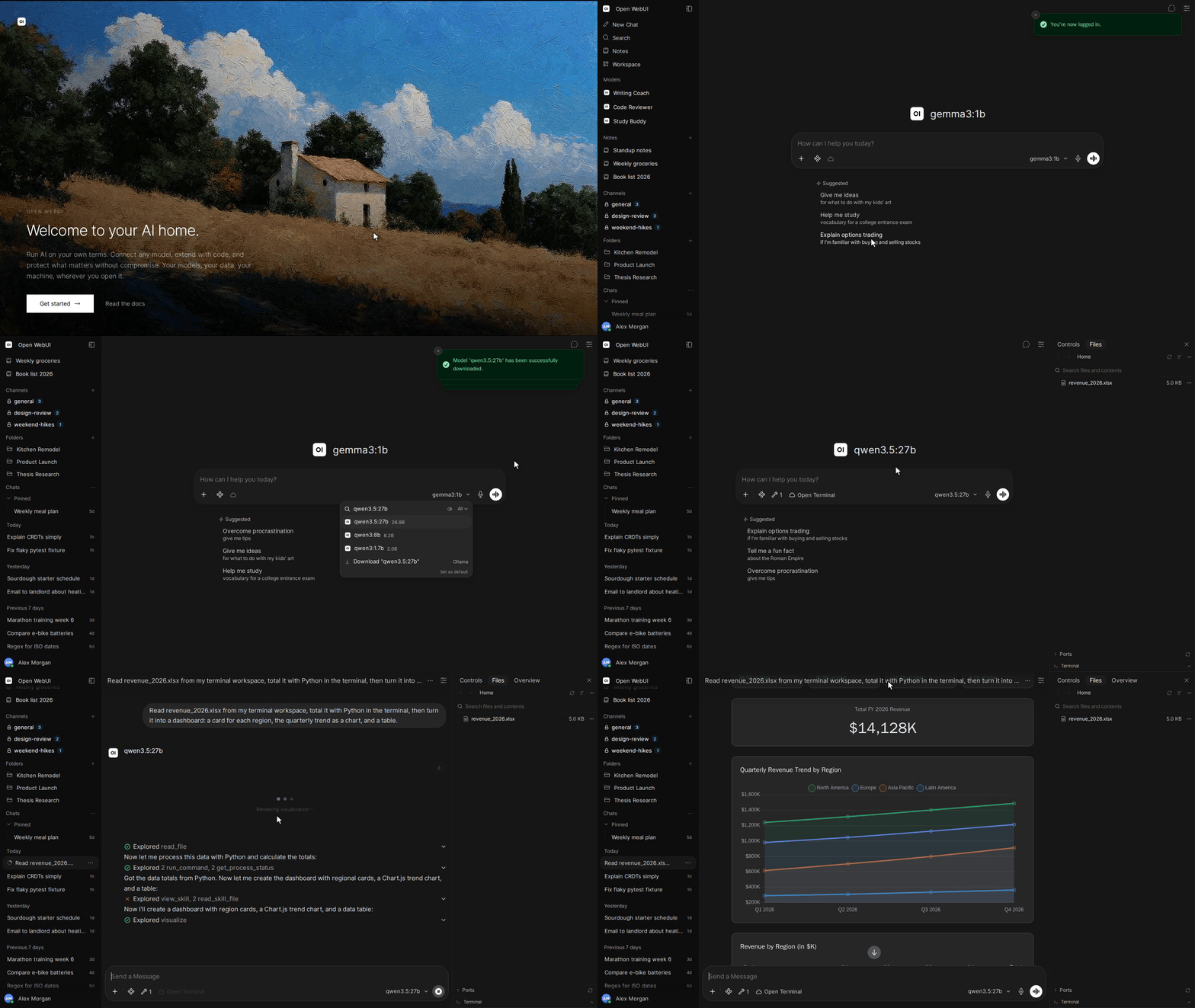
Open WebUI is a home for AI, a self-hosted AI platform that's extensible, feature-rich, user-friendly, and built to run entirely offline. With support for Ollama and OpenAI-compatible APIs, it gives you a powerful, provider-agnostic interface for both local and cloud-based models.
Passionate about open-source AI? Join our team →
Tip
Looking for an Enterprise Plan? – Speak with Our Sales Team Today!
For more information, be sure to check out our Open WebUI Documentation.
Key Features of Open WebUI ⭐
-
🚀 Effortless Setup: Install seamlessly via pip, uv, Docker, or Kubernetes (kubectl, kustomize, or helm), with
:ollamaand:cudatagged images available for container deployments. -
🤝 Broad Model & API Integration: Connect any OpenAI-compatible API alongside local Ollama models. Point the API URL at LMStudio, GroqCloud, Mistral, OpenRouter, vLLM, and more to mix and match providers freely.
-
🔐 Granular RBAC & User Groups: Administrators define detailed roles, groups, and permissions, giving each user exactly the access they need. Secure by default, with tailored experiences per group.
-
🧩 Plugin Support: Extend Open WebUI with Filters, Actions, Pipes, Tools, and Skills. Connect external services through MCP, MCPO, and OpenAPI tool servers. Build custom integrations, rate limits, approval flows, data connections, and more.
-
🤖 Models & Agents: Wrap any base model with custom instructions, tools, and knowledge to build specialized agents. Supports dynamic variables, per-user/group access control, and community preset imports via Open WebUI Community.
-
⚡ Agentic Execution with Open Terminal: Give your agents a terminal and filesystem to carry out multi-step tasks. Let them analyze data, run scripts, fix errors, and produce files directly in chat. Scale to teams with Terminals (Enterprise) for per-user isolated environments, resource limits, and automatic lifecycle management.
-
📝 Notes: A dedicated workspace for content outside conversations. Draft with a rich editor, use AI to rewrite selected text, and attach notes to any chat for full-context injection.
-
📢 Channels: Real-time shared spaces where your team and AI models collaborate in one timeline. Tag models to draft or critique, with threads, reactions, pins, and access control.
-
🧠 Persistent Memory: The AI remembers facts about you across conversations, carrying context from one chat to the next.
-
✅ Live Workflow & Message Flow: Watch the AI build and work through checklists in real time. Queue messages while the AI is still responding; they send automatically when it's ready.
-
📅 Calendar & AI Scheduling: Built-in personal and shared calendars with month/week/day views, recurring events, color coding, attendees, and reminders. Models manage your schedule conversationally through native function calling.
-
⏱️ Automations: Schedule prompts to run on recurring schedules, with runs surfaced on your calendar and each completed run linking back to the chat it produced.
-
📱 Responsive Design & PWA: Seamless experience across desktop, laptop, and mobile, with a Progressive Web App for native app-like feel and offline access on localhost.
-
✒️🔢 Full Markdown and LaTeX Support: Comprehensive Markdown and LaTeX capabilities for enriched interaction.
-
🎤📹 Hands-Free Voice/Video Call: Integrated voice and video calls with multiple Speech-to-Text providers (Local Whisper, OpenAI, Deepgram, Azure) and Text-to-Speech engines (Azure, ElevenLabs, OpenAI, Transformers, WebAPI).
-
💾 Persistent Artifact Storage: Built-in key-value storage API for artifacts, enabling journals, trackers, leaderboards, and collaborative tools with personal and shared data scopes.
-
📚 Local RAG Integration: Retrieval Augmented Generation backed by 9 vector databases and multiple content-extraction engines (Tika, Docling, Document Intelligence, Mistral OCR, PaddleOCR-vl, external loaders). Supports hybrid search (BM25 + vector) with reranking and full-context mode. Load documents into chat or pull them from your library with the
#command. -
🔍 Web Search for RAG: Search the web through dozens of providers including
SearXNG,Google PSE,Brave Search,Kagi,Mojeek,Tavily,Perplexity,Firecrawl,serpstack,serper,Serply,DuckDuckGo,SearchApi,SerpApi,Bing,Jina,Exa,Sougou,Azure AI Search, andOllama Cloud, injecting results directly into the conversation. -
🌐 Web Browsing Capability: Pull websites into chat with the
#command followed by a URL, or let the model fetch them on its own when needed. -
🎨 Image Generation & Editing: Create and edit images with multiple engines including OpenAI DALL·E, Gemini, ComfyUI (local), and AUTOMATIC1111 (local), supporting both generation and prompt-based editing.
-
⚙️ Multi-Model Conversations: Engage several models at once, harnessing their individual strengths in parallel for the best possible responses.
-
📊 Usage Analytics & Model Evaluation: Admin dashboards track message volume, token consumption, and cost across users and models. Evaluate models with a built-in arena, A/B testing, and ELO-based leaderboards.
-
🗄️ Flexible Database & Storage: Choose SQLite (with optional encryption) or PostgreSQL, and store files locally or on S3, Google Cloud Storage, or Azure Blob Storage.
-
🧬 Advanced Vector Database Support: Pick from 9 vector databases: ChromaDB, PGVector, Qdrant, Milvus, Elasticsearch, OpenSearch, Pinecone, S3Vector, and Oracle 23ai.
-
🪪 Enterprise Authentication & Provisioning: Full LDAP/Active Directory integration, SSO via trusted headers and OAuth providers, and SCIM 2.0 automated provisioning for identity providers like Okta, Azure AD, and Google Workspace.
-
☁️ Cloud-Native File Integration: Native Google Drive and OneDrive/SharePoint file picking for seamless document import from enterprise cloud storage.
-
🔭 Production Observability: Built-in OpenTelemetry support for traces, metrics, and logs, plugging into your existing monitoring stack.
-
⚖️ Horizontal Scalability: Redis-backed session management and WebSocket support for multi-worker, multi-node deployments behind load balancers.
-
🌐🌍 Multilingual Support: Use Open WebUI in your preferred language with i18n support. We're actively seeking contributors to expand language coverage!
-
🌟 Continuous Updates: We're committed to improving Open WebUI with regular updates, fixes, and new features.
-
🛡️ Transparent Security Process: Security reports are triaged, fixed, and published as open advisories through a documented responsible-disclosure process. See our Security Policy.
Want to learn more about Open WebUI's features? Check out our Open WebUI documentation for a comprehensive overview!
The Open WebUI Ecosystem 🌐
Open WebUI is the core, surrounded by companion apps and infrastructure that extend what your AI can do, where it can reach, and how you run it:
-
💻 Open WebUI Computer (open-webui/computer): A standalone, mobile-first computer and coding agent that runs on the machine you own. Files, terminal, and git in a browser tab, reachable from your phone. Connect it into Open WebUI as a model, or reach it from Telegram, WhatsApp, and more.
-
⚡ Open Terminal and Terminals (Enterprise) (open-webui/open-terminal & open-webui/terminals): A self-hosted computing environment that plugs into Open WebUI, giving the AI a place to write code, run it, read output, fix errors, and iterate inside the chat. Terminals gives you per-user isolated containers with separate credentials, resource limits, and network rules. Automatic lifecycle management on Docker or Kubernetes.
-
🔄 oikb (open-webui/oikb): Feed your Knowledge Bases from 45+ sources (GitHub, Confluence, ServiceNow, Salesforce, Jira, Slack, SharePoint, Notion, and more), keeping the tools your team already uses continuously in sync.
-
🖥️ Native Desktop App (open-webui/desktop): Run Open WebUI as a native app on macOS, Windows, and Linux. System-wide Spotlight chat bar with screenshot capture, push-to-talk voice, and optional fully-local inference via a built-in llama.cpp engine.
Want to learn more? Check out our Open WebUI documentation for more details!
We are incredibly grateful for the generous support of our sponsors. Their contributions help us to maintain and improve our project, ensuring we can continue to deliver quality work to our community. Thank you!
How to Install 🚀
Installation via Python pip 🐍
Open WebUI can be installed using pip, the Python package installer. Before proceeding, ensure you're using Python 3.12 to avoid compatibility issues.
-
Install Open WebUI: Open your terminal and run the following command to install Open WebUI:
pip install open-webui -
Running Open WebUI: After installation, you can start Open WebUI by executing:
open-webui serve
This will start the Open WebUI server, which you can access at http://localhost:8080
Quick Start with Docker 🐳
Note
Please note that for certain Docker environments, additional configurations might be needed. If you encounter any connection issues, our detailed guide on Open WebUI Documentation is ready to assist you.
Warning
When using Docker to install Open WebUI, make sure to include the
-v open-webui:/app/backend/datain your Docker command. This step is crucial as it ensures your database is properly mounted and prevents any loss of data.
Tip
If you wish to utilize Open WebUI with Ollama included or CUDA acceleration, we recommend utilizing our official images tagged with either
:cudaor:ollama. To enable CUDA, you must install the Nvidia CUDA container toolkit on your Linux/WSL system.
Installation with Default Configuration
-
If Ollama is on your computer, use this command:
docker run -d -p 3000:8080 --add-host=host.docker.internal:host-gateway -v open-webui:/app/backend/data --name open-webui --restart always ghcr.io/open-webui/open-webui:main -
If Ollama is on a Different Server, use this command:
To connect to Ollama on another server, change the
OLLAMA_BASE_URLto the server's URL:docker run -d -p 3000:8080 -e OLLAMA_BASE_URL=https://example.com -v open-webui:/app/backend/data --name open-webui --restart always ghcr.io/open-webui/open-webui:main -
To run Open WebUI with Nvidia GPU support, use this command:
docker run -d -p 3000:8080 --gpus all --add-host=host.docker.internal:host-gateway -v open-webui:/app/backend/data --name open-webui --restart always ghcr.io/open-webui/open-webui:cuda
Installation for OpenAI API Usage Only
-
If you're only using OpenAI API, use this command:
docker run -d -p 3000:8080 -e OPENAI_API_KEY=your_secret_key -v open-webui:/app/backend/data --name open-webui --restart always ghcr.io/open-webui/open-webui:main
Installing Open WebUI with Bundled Ollama Support
This installation method uses a single container image that bundles Open WebUI with Ollama, allowing for a streamlined setup via a single command. Choose the appropriate command based on your hardware setup:
-
With GPU Support: Utilize GPU resources by running the following command:
docker run -d -p 3000:8080 --gpus=all -v ollama:/root/.ollama -v open-webui:/app/backend/data --name open-webui --restart always ghcr.io/open-webui/open-webui:ollama -
For CPU Only: If you're not using a GPU, use this command instead:
docker run -d -p 3000:8080 -v ollama:/root/.ollama -v open-webui:/app/backend/data --name open-webui --restart always ghcr.io/open-webui/open-webui:ollama
Both commands facilitate a built-in, hassle-free installation of both Open WebUI and Ollama, ensuring that you can get everything up and running swiftly.
After installation, you can access Open WebUI at http://localhost:3000. Enjoy! 😄
Other Installation Methods
We offer various installation alternatives, including non-Docker native installation methods, Docker Compose, Kustomize, and Helm. Visit our Open WebUI Documentation or join our Discord community for comprehensive guidance.
Troubleshooting
Encountering connection issues? Our Open WebUI Documentation has got you covered. For further assistance and to join our vibrant community, visit the Open WebUI Discord.
Open WebUI: Server Connection Error
If you're experiencing connection issues, it’s often due to the WebUI docker container not being able to reach the Ollama server at 127.0.0.1:11434 (host.docker.internal:11434) inside the container . Use the --network=host flag in your docker command to resolve this. Note that the port changes from 3000 to 8080, resulting in the link: http://localhost:8080.
Example Docker Command:
docker run -d --network=host -v open-webui:/app/backend/data -e OLLAMA_BASE_URL=http://127.0.0.1:11434 --name open-webui --restart always ghcr.io/open-webui/open-webui:main
Keeping Your Docker Installation Up-to-Date
Check our Updating Guide available in our Open WebUI Documentation.
Using the Dev Branch 🌙
Warning
The
:devbranch contains the latest unstable features and changes. Use it at your own risk as it may have bugs or incomplete features.
If you want to try out the latest bleeding-edge features and are okay with occasional instability, you can use the :dev tag like this:
docker run -d -p 3000:8080 -v open-webui:/app/backend/data --name open-webui --add-host=host.docker.internal:host-gateway --restart always ghcr.io/open-webui/open-webui:dev
Offline Mode
If you are running Open WebUI in an offline environment, you can set the HF_HUB_OFFLINE environment variable to 1 to prevent attempts to download models from the internet.
export HF_HUB_OFFLINE=1
What's Next? 🌟
Discover upcoming features on our roadmap in the Open WebUI Documentation.
License 📜
This project contains code under multiple licenses. The current codebase includes components licensed under the Open WebUI License with an additional requirement to preserve the "Open WebUI" branding, as well as prior contributions under their respective original licenses. For a detailed record of license changes and the applicable terms for each section of the code, please refer to LICENSE_HISTORY. For complete and updated licensing details, please see the LICENSE and LICENSE_HISTORY files.
Support 💬
If you have any questions, suggestions, or need assistance, please open an issue or join our Open WebUI Discord community to connect with us! 🤝
Security 🛡️
If you believe you've found a security vulnerability, or something that shouldn't be disclosed publicly, please reach out confidentially through our responsible disclosure program on GitHub. We accept reports only through GitHub, not through any other platform. Thank you for helping us keep Open WebUI secure!
Star History
Created by Timothy Jaeryang Baek - Let's make Open WebUI even more amazing together! 💪