 d8317c44b7
* [AI] Migrate desktop-client to subpath imports

Replace the `@desktop-client/*` path alias with Node.js subpath
imports (`#*`) across packages/desktop-client:

- Declare the full `imports` map in packages/desktop-client/package.json
  (bare index entries, root-level files, and per-subdirectory wildcards
  with explicit extension overrides where `.ts` and `.tsx` mix).
- Update all source files to import from `#...` specifiers.
- Drop the `@desktop-client` group from .oxfmtrc.json.
- Enable `actual/prefer-subpath-imports` for desktop-client in
  .oxlintrc.json so future code keeps using the subpath form.

Co-Authored-By: Claude Opus 4.6 (1M context) <noreply@anthropic.com>

* [AI] Drop legacy desktop-client aliases

Remove the `@desktop-client/*` and `loot-core/*` path aliases from
vite.config.ts and tsconfig.json now that every desktop-client source
file imports via subpath imports / `@actual-app/core`.

Co-Authored-By: Claude Opus 4.6 (1M context) <noreply@anthropic.com>

* Release notes

* [AI] Use electron-renderer condition for renderer-only exports

Desktop-client's Vite build used the `electron` resolve condition, which
overlapped with loot-core exports where `electron` means the Node/main
variant (e.g. `shared/platform.electron.ts` using `os`,
`platform/server/asyncStorage/index.electron.ts` using `fs`). Once the
`loot-core` Vite alias was removed, the renderer bundle started pulling
those Node variants and crashed at runtime with
`It.default.platform is not a function` inside `platform.electron.ts`.

Introduce a distinct `electron-renderer` condition used only by
desktop-client's Vite config, and rename the `electron` key to
`electron-renderer` on the sole loot-core export whose `electron` branch
is the Electron renderer variant (`#/./platform/client/connection`, the
IPC `global.Actual.ipcConnect` file). Every other `electron`-conditioned
export keeps its Node semantics and is still matched by loot-core's own
`vite.desktop.config.ts` (`conditions: ['electron']`).

Co-Authored-By: Claude Opus 4.6 (1M context) <noreply@anthropic.com>

* [AI] Drop .electron.* extensions from loot-core desktop resolver

Now that every Node/main variant is selected via the `electron` subpath
import condition in `packages/loot-core/package.json`, Vite's
`resolveExtensions` list no longer needs the `.electron.js`,
`.electron.ts`, `.electron.tsx` entries. Remove them to keep resolution
explicit and avoid implicit extension picking.

Co-Authored-By: Claude Opus 4.6 (1M context) <noreply@anthropic.com>

* [AI] Align desktop-client TS resolution with Vite

- Set `customConditions: ["electron-renderer"]` in
  `packages/desktop-client/tsconfig.json` so TypeScript resolves
  conditional imports (notably `@actual-app/core/platform/client/connection`)
  to the same file Vite picks at runtime. Today the surfaces happen to
  match because both variants import from a shared `index-types.ts`,
  but the alignment prevents a latent drift bug.
- Fix typo in the release note (`Standartise` -> `Standardise`).

Co-Authored-By: Claude Opus 4.6 (1M context) <noreply@anthropic.com>

---------

Co-authored-by: Claude Opus 4.6 (1M context) <noreply@anthropic.com>

Getting Started
Actual is a local-first personal finance tool. It is 100% free and open-source, written in NodeJS, it has a synchronization element so that all your changes can move between devices without any heavy lifting.
If you are interested in contributing, or want to know how development works, see our contributing document we would love to have you.
Want to say thanks? Click the ⭐ at the top of the page.
Key Links
- Actual discord community.
- Actual Community Documentation
- Frequently asked questions
Installation
There are four ways to deploy Actual:
- One-click deployment via PikaPods (~1.40 $/month) - recommended for non-technical users
- Managed hosting via Fly.io (~1.50 $/month)
- Self-hosted by using a Docker image
- Local-only apps - downloadable Windows, Mac and Linux apps you can run on your device
Learn more in the installation instructions docs.
Ready to Start Budgeting?
Read about Envelope budgeting to know more about the idea behind Actual Budget.
Are you new to budgeting or want to start fresh?
Check out the community's Starting Fresh guide so you can quickly get up and running!
Are you migrating from other budgeting apps?
Check out the community's Migration guide to start jumping on the Actual Budget train!
Documentation
We have a wide range of documentation on how to use Actual, this is all available in our Community Documentation, this includes topics on Budgeting, Account Management, Tips & Tricks and some documentation for developers.
Contributing
Actual is a community driven product. Learn more about contributing to Actual.
Code structure
The Actual app is split up into a few packages:
- loot-core - The core application that runs on any platform
- desktop-client - The desktop UI
- desktop-electron - The desktop app
More information on the project structure is available in our community documentation.
Feature Requests
Current feature requests can be seen here. Vote for your favorite requests by reacting 👍 to the top comment of the request.
To add new feature requests, open a new Issue of the "Feature Request" type.
Translation
Make Actual Budget accessible to more people by helping with the Internationalization of Actual. We are using a crowd sourcing tool to manage the translations, see our Weblate Project. Weblate proudly supports open-source software projects through their Libre plan.

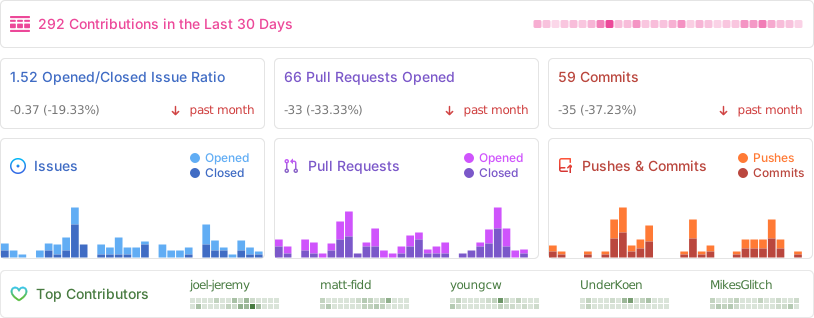
Repo Activity
Sponsors
Thanks to our wonderful sponsors who make Actual Budget possible!
