64f230833c
* [AI] Add Claude Code skills for docs, commits, and PR review

Add three project-scoped skills under .claude/skills/ so any contributor
using Claude Code in this repo gets the same conventions applied
automatically: writing-actual-docs (points Claude at writing-docs.md
before any docs work), committing-actual-changes (points Claude at
pr-and-commit-rules.md before any commit/PR so the [AI] prefix and
template-blank rule are followed), and review-actual-pr (end-to-end
offline PR review with browser testing via playwright-cli, never posts
to GitHub).

All skill paths and tool assumptions are repo-relative (resolved via
git rev-parse --show-toplevel) so they work on any contributor's
machine, not just the author's.

Co-Authored-By: Claude Opus 4.7 (1M context) <noreply@anthropic.com>

* [AI] Fix remaining hardcoded $HOME path in PR-review playbook

The Step 3 highlight-overlay example still referenced
$HOME/.claude/skills/review-actual-pr/... which only resolves on
the original author's machine. Switch to the same git rev-parse
--show-toplevel pattern used elsewhere in the skill so it works
for any contributor with a checkout of the repo.

Co-Authored-By: Claude Opus 4.7 (1M context) <noreply@anthropic.com>

* [AI] Add release note for #7967

Co-Authored-By: Claude Opus 4.7 (1M context) <noreply@anthropic.com>

* [AI] Drop "add AI generated label" instruction now that it auto-applies

The "AI generated" PR label is now applied automatically by GitHub
Actions to any PR whose title starts with [AI], so the manual "add
this label" instruction is stale. It was also misleading for outside
contributors, who cannot apply labels on PRs against this repo
regardless.

Updated the canonical rules file, the committing-actual-changes
skill, and the review-actual-pr code-review rubric to describe the
prefix as the single trigger and note that the label follows
automatically.

Co-Authored-By: Claude Opus 4.7 (1M context) <noreply@anthropic.com>

* Update Claude Code skills description

Simplified the description of Claude Code skills.

* [AI] Allow cat and mv in PR-review skill's tool allowlist

The workflow saves the final report via `cat > review.md <<'EOF'`
(step 6) and rotates a stale prior report via `mv` (step 2,
re-runs), but the allowed-tools line did not permit either, so
those commands would prompt or fail at runtime. Add Bash(cat:*) and
Bash(mv:*) — keeping the allowlist tight rather than broadening to
Bash(*), so unrelated shell commands still require explicit
authorization.

Co-Authored-By: Claude Opus 4.7 (1M context) <noreply@anthropic.com>

---------

Co-authored-by: Claude Opus 4.7 (1M context) <noreply@anthropic.com>

Getting Started
Actual is a local-first personal finance tool. It is 100% free and open-source, written in NodeJS, it has a synchronization element so that all your changes can move between devices without any heavy lifting.
If you are interested in contributing, or want to know how development works, see our contributing document we would love to have you.
Want to say thanks? Click the ⭐ at the top of the page.
Key Links
- Actual discord community.
- Actual Community Documentation
- Frequently asked questions
Installation
There are four ways to deploy Actual:
- One-click deployment via PikaPods (~1.40 $/month) - recommended for non-technical users
- Managed hosting via Fly.io (~1.50 $/month)
- Self-hosted by using a Docker image
- Local-only apps - downloadable Windows, Mac and Linux apps you can run on your device
Learn more in the installation instructions docs.
Ready to Start Budgeting?
Read about Envelope budgeting to know more about the idea behind Actual Budget.
Are you new to budgeting or want to start fresh?
Check out the community's Starting Fresh guide so you can quickly get up and running!
Are you migrating from other budgeting apps?
Check out the community's Migration guide to start jumping on the Actual Budget train!
Documentation
We have a wide range of documentation on how to use Actual, this is all available in our Community Documentation, this includes topics on Budgeting, Account Management, Tips & Tricks and some documentation for developers.
Contributing
Actual is a community driven product. Learn more about contributing to Actual.
Code structure
The Actual app is split up into a few packages:
- loot-core - The core application that runs on any platform
- desktop-client - The desktop UI
- desktop-electron - The desktop app
More information on the project structure is available in our community documentation.
Feature Requests
Current feature requests can be seen here. Vote for your favorite requests by reacting 👍 to the top comment of the request.
To add new feature requests, open a new Issue of the "Feature Request" type.
Translation
Make Actual Budget accessible to more people by helping with the Internationalization of Actual. We are using a crowd sourcing tool to manage the translations, see our Weblate Project. Weblate proudly supports open-source software projects through their Libre plan.

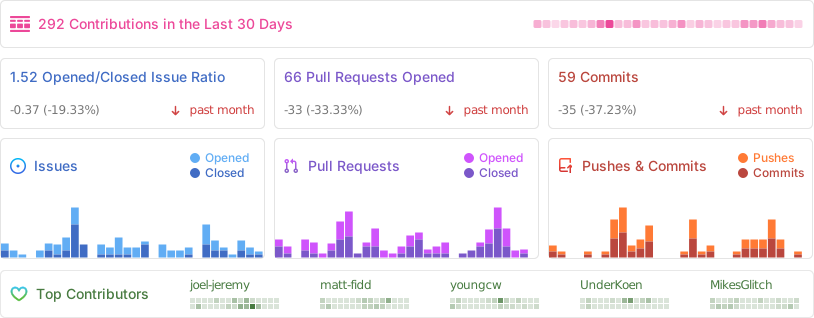
Repo Activity
Sponsors
Thanks to our wonderful sponsors who make Actual Budget possible!