mirror of
https://github.com/go-gitea/gitea.git
synced 2026-07-16 04:42:51 -05:00
Documentation for Customization is Lacking - Requesting Significant Update #1832
Closed
opened 2025-11-02 04:14:37 -06:00 by GiteaMirror
·
8 comments
No Branch/Tag Specified
main
release/v1.25
release/v1.24
release/v1.23
release/v1.22
release/v1.21
release/v1.20
release/v1.19
release/v1.18
release/v1.17
release/v1.16
release/v1.15
release/v1.14
release/v1.13
release/v1.12
release/v1.11
release/v1.10
release/v1.9
release/v1.8
v1.25.3
v1.25.2
v1.25.1
v1.25.0
v1.24.7
v1.25.0-rc0
v1.26.0-dev
v1.24.6
v1.24.5
v1.24.4
v1.24.3
v1.24.2
v1.24.1
v1.24.0
v1.23.8
v1.24.0-rc0
v1.25.0-dev
v1.23.7
v1.23.6
v1.23.5
v1.23.4
v1.23.3
v1.23.2
v1.23.1
v1.23.0
v1.23.0-rc0
v1.24.0-dev
v1.22.6
v1.22.5
v1.22.4
v1.22.3
v1.22.2
v1.22.1
v1.22.0
v1.23.0-dev
v1.22.0-rc1
v1.21.11
v1.22.0-rc0
v1.21.10
v1.21.9
v1.21.8
v1.21.7
v1.21.6
v1.21.5
v1.21.4
v1.21.3
v1.21.2
v1.20.6
v1.21.1
v1.21.0
v1.21.0-rc2
v1.21.0-rc1
v1.20.5
v1.22.0-dev
v1.21.0-rc0
v1.20.4
v1.20.3
v1.20.2
v1.20.1
v1.20.0
v1.19.4
v1.21.0-dev
v1.20.0-rc2
v1.20.0-rc1
v1.20.0-rc0
v1.19.3
v1.19.2
v1.19.1
v1.19.0
v1.19.0-rc1
v1.20.0-dev
v1.19.0-rc0
v1.18.5
v1.18.4
v1.18.3
v1.18.2
v1.18.1
v1.18.0
v1.17.4
v1.18.0-rc1
v1.19.0-dev
v1.18.0-rc0
v1.17.3
v1.17.2
v1.17.1
v1.17.0
v1.17.0-rc2
v1.16.9
v1.17.0-rc1
v1.18.0-dev
v1.16.8
v1.16.7
v1.16.6
v1.16.5
v1.16.4
v1.16.3
v1.16.2
v1.16.1
v1.16.0
v1.15.11
v1.17.0-dev
v1.16.0-rc1
v1.15.10
v1.15.9
v1.15.8
v1.15.7
v1.15.6
v1.15.5
v1.15.4
v1.15.3
v1.15.2
v1.15.1
v1.14.7
v1.15.0
v1.15.0-rc3
v1.14.6
v1.15.0-rc2
v1.14.5
v1.16.0-dev
v1.15.0-rc1
v1.14.4
v1.14.3
v1.14.2
v1.14.1
v1.14.0
v1.13.7
v1.14.0-rc2
v1.13.6
v1.13.5
v1.14.0-rc1
v1.15.0-dev
v1.13.4
v1.13.3
v1.13.2
v1.13.1
v1.13.0
v1.12.6
v1.13.0-rc2
v1.14.0-dev
v1.13.0-rc1
v1.12.5
v1.12.4
v1.12.3
v1.12.2
v1.12.1
v1.11.8
v1.12.0
v1.11.7
v1.12.0-rc2
v1.11.6
v1.12.0-rc1
v1.13.0-dev
v1.11.5
v1.11.4
v1.11.3
v1.10.6
v1.12.0-dev
v1.11.2
v1.10.5
v1.11.1
v1.10.4
v1.11.0
v1.11.0-rc2
v1.10.3
v1.11.0-rc1
v1.10.2
v1.10.1
v1.10.0
v1.9.6
v1.9.5
v1.10.0-rc2
v1.11.0-dev
v1.10.0-rc1
v1.9.4
v1.9.3
v1.9.2
v1.9.1
v1.9.0
v1.9.0-rc2
v1.10.0-dev
v1.9.0-rc1
v1.8.3
v1.8.2
v1.8.1
v1.8.0
v1.8.0-rc3
v1.7.6
v1.8.0-rc2
v1.7.5
v1.8.0-rc1
v1.9.0-dev
v1.7.4
v1.7.3
v1.7.2
v1.7.1
v1.7.0
v1.7.0-rc3
v1.6.4
v1.7.0-rc2
v1.6.3
v1.7.0-rc1
v1.7.0-dev
v1.6.2
v1.6.1
v1.6.0
v1.6.0-rc2
v1.5.3
v1.6.0-rc1
v1.6.0-dev
v1.5.2
v1.5.1
v1.5.0
v1.5.0-rc2
v1.5.0-rc1
v1.5.0-dev
v1.4.3
v1.4.2
v1.4.1
v1.4.0
v1.4.0-rc3
v1.4.0-rc2
v1.3.3
v1.4.0-rc1
v1.3.2
v1.3.1
v1.3.0
v1.3.0-rc2
v1.3.0-rc1
v1.2.3
v1.2.2
v1.2.1
v1.2.0
v1.2.0-rc3
v1.2.0-rc2
v1.1.4
v1.2.0-rc1
v1.1.3
v1.1.2
v1.1.1
v1.1.0
v1.0.2
v1.0.1
v1.0.0
v0.9.99
Labels
Clear labels
$20
$250
$50
$500
backport/done
💎 Bounty
docs-update-needed
good first issue
hacktoberfest
issue/bounty
issue/confirmed
issue/critical
issue/duplicate
issue/needs-feedback
issue/not-a-bug
issue/regression
issue/stale
issue/workaround
lgtm/need 2
modifies/api
modifies/translation
outdated/backport/v1.18
outdated/theme/markdown
outdated/theme/timetracker
performance/bigrepo
performance/cpu
performance/memory
performance/speed
pr/breaking
proposal/accepted
proposal/rejected
pr/wip
pull-request
reviewed/wontfix
💰 Rewarded
skip-changelog
status/blocked
topic/accessibility
topic/api
topic/authentication
topic/build
topic/code-linting
topic/commit-signing
topic/content-rendering
topic/deployment
topic/distribution
topic/federation
topic/gitea-actions
topic/issues
topic/lfs
topic/mobile
topic/moderation
topic/packages
topic/pr
topic/projects
topic/repo
topic/repo-migration
topic/security
topic/theme
topic/ui
topic/ui-interaction
topic/ux
topic/webhooks
topic/wiki
type/bug
type/deprecation
type/docs
type/enhancement
type/feature
type/miscellaneous
type/proposal
type/question
type/refactoring
type/summary
type/testing
type/upstream
Mirrored from GitHub Pull Request
No Label
Milestone
No items
No Milestone
Projects
Clear projects
No project

No Assignees

Notifications
Due Date
No due date set.
Dependencies
No dependencies set.
Reference: github-starred/gitea#1832
Reference in New Issue
Block a user
Blocking a user prevents them from interacting with repositories, such as opening or commenting on pull requests or issues. Learn more about blocking a user.
Delete Branch "%!s()"
Deleting a branch is permanent. Although the deleted branch may continue to exist for a short time before it actually gets removed, it CANNOT be undone in most cases. Continue?
Originally created by @methodbox on GitHub (May 28, 2018).
[x]):Description
##Feature Request and Suggestions
The documentation is pretty bad for customizing the UI. It's easy enough to get Gitea running but really we are all looking for a solution that we can integrate into something else, rather than running another copy of the Gitea home page.
The documentation actually makes no mention of this but the templates are built in Vue JS. It would seem some reference as to how to use this along with the binary and build should e included in the documentation.
Additionally, allowing for simply JS and CSS overrides via the /custom/... directories would make this a hell of a lot easier.
It's also very unclear if using custom templates allows/requires copying in the template you're overriding or if this can be done by sideloading the custom template.
Considering forking this so that I can make my own "non-proprietary" version of Gitea since it doesn't seem to be targeted toward personalization at all, which is odd for an open source app.
Screenshots
@lunny commented on GitHub (May 29, 2018):
Did you read https://docs.gitea.io/en-us/customizing-gitea/ ?
@methodbox commented on GitHub (May 29, 2018):
I did and the public files work fine. What doesn’t seem to work is anything to do with templates but the documentation is so vague about how to customize them I’m not sure if I’m even doing it correctly.
The documentation also mentions header and footer.tmpl and links to a source on GitHub for an example, yet doesn’t indicate how to completely override them, only append to them.
That doesn’t allow, for example, removing the Help link from the navigation.
It doesn’t allow me to apply global CSS, or if it does, it’s not documented as to how this would be done.
I can load a custom index page and then link to the rest of the app from there, but then I need to override the CSS on each of those templates.
Since Vue manages its CSS in both a global and local (by template) scope, it’s not clear how this is to be done.
The documentation doesn’t even mention this is Vue, I just know that from Wappalyer and familiarity with their template system.
Loading a file named header.tmpl in custom/templates, for example does not override the default header content as expected based on what I see in the source.
According to that documentation:
“Customizing Gitea pages
The custom/templates folder allows changing every single page of Gitea. Templates to override can be found in the templates directory of Gitea source. Override by making a copy of the file under custom/templates” ... but the templates/custom directory on your GitHub page is full of template files that are empty.
https://github.com/go-gitea/gitea/blob/master/templates/custom/header.tmpl
Copying another file into my custom/templates doesn’t override it.
Does it need to follow the same relative path as your GitHub layout?
I think the massive disconnect might be that your binary doesn’t layout the directories like your source so it’s very difficult to understand where to modify anything.
@techknowlogick commented on GitHub (May 29, 2018):
The specific file you linked to (https://github.com/go-gitea/gitea/blob/master/templates/custom/header.tmpl) has the purpose of injecting content into the header without having to keep the other templates up to date, as what the projects template system does is if a file exists on disk then the binary uses it instead of the one it has saved (assuming you are using a binary that has the original binary files embedded). You could actually use that file to inject global CSS.
The files in the folder linked were actually made to make what you are trying to do easier.
I personally use header.tmpl in templates/custom to apply a dark theme to my Gitea install.
I've attached a file tree of my Gitea install with the contents of the "custom" directory (In standard installs the directory is likely called custom, but I have a non-standard install), note the templates directory location, and how it is at the same level as the conf directory (where app.ini is located).
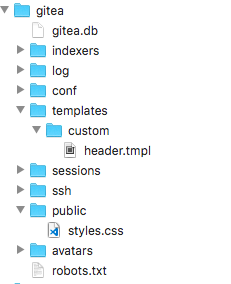
The files in the templates directory are mostly golang html template files which contain some Vuejs components.
An example of removing the help tab in the menu, to accomplish this:
templates/base/head.tmpl951309f76a/templates/base/head.tmpl (L234-L237)custom/templates/base/head.tmpl(in the screenshot above it would begitea/templates/base/head.tmpl)Rather than forking the project an alternative is perhaps contribute back to this project.
@methodbox commented on GitHub (May 29, 2018):
Thanks a lot! It would be great to see something like your explanation in the documentation, as well.
As far as contributing, I will definitely consider that but I don’t know Go beyond very entry level stuff.
I am quite solid with Vue and Javascript in general though.
What I was actually considering is maybe creating some kind of plugin using the API that would create a custom project directory and user templates as a boilerplate for customizations.
That’s just an stream of consciousness idea, so let me know what you think.
If there’s some way I could contribute that you’d suggest specifically I’d love to.
@techknowlogick commented on GitHub (May 29, 2018):
Everything I mentioned can be found in the link that @lunny commented above. If you'd like to add to the documentation or clarify any content the page you can submit a PR to is: https://github.com/go-gitea/gitea/blob/master/docs/content/doc/advanced/customizing-gitea.en-us.md
Here is the Contributors guide: https://github.com/go-gitea/gitea/blob/master/CONTRIBUTING.md
No knowledge of Golang is required to contribute to this project, there are many other ways, such as writing documentation, providing community support, etc..
I'm going to close this issue now, and direct you to the forum where you are able to ask more direct questions for support such as "How to remove the help tab from Navigation".
@methodbox commented on GitHub (May 30, 2018):
I know that link generally explains this but it does not specifically explain it, and as it is doing what you explained using the binary does not work.
I used exactly the same folder structure prior to opening this issue with header.tmpl, modified it (removed a link) and saw no change.
I even put a .tmpl file in there and tried putting giberish to see if I could even trigger an error and it didn’t work.
But I’m sorry, no the documentation does not include the level of detail of your post (like the folder tree, for example) and the binary does not build out that folder tree. It creates custom/conf/app.ini and that’s it.
If you don’t feel the documentation is lacking, fine. But I’m not sure it’s clear to you that people don’t necessarily know the structure of your app and this:
“The custom/templates folder allows changing every single page of Gitea”
Doesn’t seem to work as expected.
Also, your documentation says to use custom/templates.
In your tree, you clearly have templates/custom/header.
In your source it is the same as your example.
Which is it?
@lafriks commented on GitHub (May 30, 2018):
Did you restart gitea after adding custom template file?
@sapk commented on GitHub (May 30, 2018):
You are misled by the two
customterm.templates/custom/header.tmplis a empty file that can be overridden bycustom/templates/custom/header.tmpl. Those specifics files are there to be load/overridden without modifying the template and don't break across update/modification. For details, those files are imported here https://github.com/go-gitea/gitea/blob/master/templates/base/head.tmpl#L130But you can also completely rewrite the template like
templates/home.tmplundercustom/templates/home.tmpland be able to edit the home page.Please read carefully the documentation and full of help comments of nice contributors and user of gitea that take time to write them.
Please like allready said before go to "the forum where you are able to ask more direct questions for support"
And feel free to contribute to the project by any means like contributing to the docs if you feel it is not clear.