mirror of
https://github.com/bitwarden/android.git
synced 2026-08-24 14:28:58 -05:00
Android: Larger than "default" font sizes are too large #1211
Closed
opened 2025-11-26 22:42:02 -06:00 by GiteaMirror
·
15 comments
No Branch/Tag Specified
main
PM-42381-decouple-orgs
sdlc/sdk-update
PM-41929/manage-devices-push-update-screen
release/2026.8-rc61
PM-41293/identity-autofill-fill-assist-field-mapping
PM-41294/identity-autofill-multi-partition-pipeline
PM-41295/identity-autofill-multiple-address
PM-41296/identity-autofill-vault-selection-type
PM-41297/identity-autofill-fill-assit
PM-41291/identity-autofill-model-and-data-layer
PM-41292/identity-autofill-heuristic-field-detection
vfo-1-hardcoded-on
llm/plan-implement-review-command
auth/pm-41503-and-pm-41533/registration-add-open-org-invite-support
cxf/editable-fields
release/2026.8-rc60
test-stack-2
test-stack-1
release/2026.7-rc59
worktree-QA-2177-blockeduri-testtag
release/2026.7-rc58
PM-37256/merge-fill-assist-with-traverse
update-billing-api
agalles/create-deploy-workflow-trigger
allow-user-certs
vvolkgang/fdroid-update
release/2026.6-rc57
agalles/create-github-workflow-trigger
release/2026.6-rc56
release/2026.5-rc55
release/2026.5-rc53
release/2026.5-rc54
PM-37255/consume-fill-assist-rules-data
PM-26896-autofill-fix
release/hotfix-v2026.4.1-bwpm
target-sdk-37
agalles/fdroid-only
BWA-99/show-next-totp
BWA-99/add-preview-next-totp-code-setting
sync-min-sdk
release/2026.4-rc51
related-origin-passkey-creation
release/2026.4-rc50
platform/android-breaking-change-detection
innovation-sprint-2026-send-folder
release/2026.3-rc49
PM-34193-vault-lockout
android-collections
QA-1523/sanity-test-saucelabs
release/2026.3-rc48
release/2026.2-rc47
pr-6572
release/2026.2-rc46
release/2026.1-rc45
PM-30644/added-logs-for-debug
PM-30644/quicktile-nav-not-showing-migration
minor-gradle-updates
release/2026.1-rc42
release/2026.1-rc44
release/2026.1-rc43
PM-28834/set-landscape-on-horizonos-devices
PM-28468/validate-and-navigate-to-vault-migration
PM-20026/force-ltr-passwords-and-codes
release/2025.12-rc41
cmcg/testCoverage
PM-29014/talkback-support-for-passwords
release/2025.12-rc40
BRE-1305/publish_test
accept-user-certs
autofill-permissions
release/2025.11-rc39
PM-22479/check-all-certificates-validate-asset-links
release/2025.10-rc38
agalles/android-latest
retro-agent
PM-27001/skip-account-selection-only-one-exists-cxp
release/2025.10-rc37
agalles/test-1118
release/2025.10-rc36
PM-20593-token-refresh
QA-1126b/adding-native-sanity-test
release/2025.9-rc35
pm-25933/sdk-update-password
release/2025.9-rc34
release/2025.8-rc33
agalles/20250821-release
debug-release-issues
pm-24249-allow-automated-prs-for-sdk-updates
release/2025.8-rc32
release/WORKFLOW-TEST-2025.8-rc28
agalles/20250807release
release/2025.07-rc25
release/hotfix-v2025.7.0-bwa
pm-23311/export-vault-policy-bypass
release/2025.07-rc24
authenticator-pm-sync-flags-issue
release/hotfix-v2025.6.0-bwpm
release/2025.06-rc21
agalles/automate-android-fastlane-patch
release/2025.05-rc20
release/2025.04-rc19
languages/basque
release/2025.03-rc19
update-readme
qrcode/feature
innovation/archive/pm-19153-archive-items
qrcode/2-ui-fields
qrcode/1-page
hold-on-biometric-prompt-alternative
release-notes-process
release/2025.02-rc16
bwa-monorepo
PM-8223/new-device-verification-ux-improvements
pm-18451/exempt-from-policies
test-bwa
release/2025.01-rc15
release/2025.01-rc14
release/2024.12-rc13
pm-16670/sync-leave-notice
821
PM-16695/backport-lean-more-new-device-verification
release/hotfix-v2024.11.7
release/2024.11-rc1
pm-11304/collection-add-item-button
PM-14241/disabling-logs-app-crash
poc/offline-editing
new-version-calc
pm-11649/expired-link-services
pm-6702/add-feature-flag
pm-6702/email-verification-feature
pm-9933/marketing-copy-update
pm-6702/registration-flows
update-templates
pm-6701/email-verification-selfhost-registration
v2026.8.0-bwpm
v2026.8.0-bwa
v2026.7.1-bwpm
v2026.7.1-bwa
v2026.7.0-bwpm
v2026.7.0-bwa
v2026.6.1-bwa
v2026.6.1-bwpm
v2026.6.0-bwpm
v2026.6.0-bwa
v2026.5.1-bwpm
v2026.5.1-bwa
v2026.5.0-bwpm
v2026.5.0-bwa
v2026.4.2-bwpm
v2026.4.1-bwa
v2026.4.1-bwpm
v2026.4.0-bwa
v2026.4.0-bwpm
v2026.3.1-bwa
v2026.3.1-bwpm
v2026.3.0-bwpm
v2026.3.0-bwa
v2026.2.1-bwpm
v2026.2.1-bwa
v2026.2.0-bwpm
v2026.2.0-bwa
v2026.1.1-bwa
v2026.1.1-bwpm
temp-test
v2026.1.0-bwpm
v2026.1.0-bwa
v2025.12.1-bwa
v2025.12.1-bwpm
v2025.12.0-bwa
v2025.12.0-bwpm
v2025.11.1-bwpm
v2025.11.1-bwa
v2025.11.0-bwpm
v2025.11.0-bwa
v2025.10.1-bwa
v2025.10.1-bwpm
v2025.10.0-bwa
v2025.10.0-bwpm
v2025.9.1-bwa
v2025.9.1-bwpm
v2025.9.0-bwa
v2025.9.0-bwpm
v2025.8.1-bwa
v2025.8.1-bwpm
v2025.8.0-bwa
v2025.8.0-bwpm
v2025.7.2-bwa
v2025.7.2-bwpm
v2025.7.1-bwa
v2025.7.1-bwpm
v2025.7.0-bwa
v2025.7.0-bwpm
v2025.6.1-bwpm
v2025.6.0-bwa
v2025.6.0-bwpm
v2025.1.0-bwa
v2025.5.0-bwa
v2025.5.0-bwpm
v2025.5.999
2025.4.0
v2025.4.0
untagged-4731eaadac73f3dfbbb8
v2025.3.0
v2025.2.0
untagged-815a165c5d70ffe75bc7
v2025.1.2
v2025.1.1
v2025.1.0
v2024.12.0
untagged-5a76b6392a4c8998c63a
v2024.11.7
v2024.11.6
v2024.11.5
v2024.11.4
v2024.11.3
v2024.11.2
v2024.11.1
v2024.11.0
v2024.10.2
v2024.10.1
v2024.10.0
v2024.9.0
v2024.8.1
v2024.8.0
v2024.7.3
v2024.7.2
v2024.7.1
v2024.7.0
v2024.6.1
v2024.6.0
v2024.5.1
v2024.4.1
v2024.4.2
v2024.4.0
v2024.3.3
v2024.3.1
v2024.3.0
v2024.2.1
v2024.2.0
v2024.1.1
v2024.1.0
v2023.12.0
v2023.10.0
v2023.9.2
maui-single-project-android
v2023.9.1
v2023.9.0
v2023.8.0
v2023.7.0
v2023.5.0
v2023.4.0
v2023.3.2
v2023.3.1
v2023.3.0
v2023.2.0
v2023.1.0
v2022.11.0
v2022.10.0
v2022.9.1
v2022.9.0
v2022.8.0
v2022.6.2
v2022.6.1
v2022.6.0
v2022.05.0
v2.18.0
v2.17.0
v2.16.4
v2.16.3
v2.16.2
v2.16.1
v2.15.0
v2.14.2
v2.14.1
v2.14.0
v2.13.0
v2.12.0
v2.11.3
v2.11.2
v2.11.1
v2.11.0
v2.10.0
v2.9.1
v2.9.0
v2.8.2
v2.8.1
v2.8.0
v2.7.2
v2.7.0
v2.6.1
v2.6.0
v2.5.6
v.2.5.5
v2.5.5
v2.5.4
v2.5.3
v2.5.2
v2.5.1
v2.5.0
v2.4.3
v2.4.2
v2.4.1
v2.4.0
v2.3.1
v2.3.0
v2.2.8
v2.2.7
v2.2.6
v2.2.2
v2.2.1
v2.2.0
v2.1.2
v2.1.0
v2.0.6
v2.0.5
v2.0.4
v2.0.3
v2.0.2
v2.0.1
v2.0.0
v1.22.1
v1.22.0
v1.21.0
v1.20.0
v1.19.0
v1.18.1
v1.18.0
v1.17.0
v1.16.0
v1.15.2
v1.15.1
v1.15.0
v1.14.4
v1.14.1
v1.14.0
v1.13.0
v1.12.2
v1.12.1
v1.12.0
v1.11.1
v1.11.0
v1.10.0
v1.9.0
v1.8.1
v1.8.0
v1.7.0
v1.6.5
v1.6.1
v1.6.0
v1.5.1
v1.5.0
v1.4.4
v1.4.3
v1.4.0
v1.3.0
v1.2.1
v1.2.0
v1.1.0
v1.0.0
v0.0.6
v0.0.5
v0.0.4
v0.0.3
v0.0.2
v0.0.1
No labels
Milestone
No items
No Milestone
Projects
Clear projects
No projects

No Assignees

Notifications
Due Date
No due date set.
Dependencies
No dependencies set.
Reference: github-starred/android#1211
Reference in New Issue
Block a user
Blocking a user prevents them from interacting with repositories, such as opening or commenting on pull requests or issues. Learn more about blocking a user.
Originally created by @jgodfrey on GitHub (Feb 18, 2021).
Describe the Bug
On the below-mentioned device, setting the system font (Settings | Display | Advanced | Font size) to anything larger than Default (so, Large or Largest) causes the text used in Bitwarden to be far larger than expected.
Steps To Reproduce
Expected Result
I expect the text to be a reasonable size when using larger than default system font sizes.
Actual Result
The text in Bitwarden is much larger than expected and larger than other apps on the same device using the same font setting.
Screenshots or Videos
Environment
Additional Context
@kendratodd commented on GitHub (Mar 16, 2021):
From https://github.com/bitwarden/mobile/issues/1318, this also impacts the ability to login to the app:
@peterHoburg commented on GitHub (Mar 16, 2021):
One of my coworkers is also reporting this issue. It is preventing him from moving over from another password manager to BW. S21 with larger than default font is making the BW app unusable.
@SergeantConfused commented on GitHub (Apr 25, 2021):
Hi everyone,
Please note that this also happens in iOS. Increasing the font size to the max under Accessibility > Display and Text > Larger Text pushed the Login page buttons outside the view and you cannot scroll down to reach them, thus you cannot log in.
All the best,
@fchagas97 commented on GitHub (Apr 27, 2021):
Any ideas on how to solve this? I use Android and there is no large font option (the font size is standard), but the texts in the app are absurdly large, making it almost impossible to use the app.
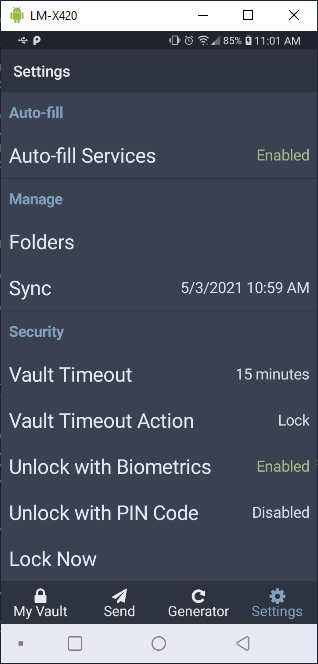
@djvfx commented on GitHub (Aug 17, 2021):
So this seems to still be an issue...right? I have a Samsung Note 8 and the FONTS ARE HUGE. many are truncated and very difficult to read. I do use larger text but many of my apps have settings to reduce and enlarge so I use accordingly.
Any update/input appreciated!
@fchagas97 commented on GitHub (Aug 17, 2021):
Yes, still an issue.
@binarydad commented on GitHub (Nov 16, 2021):
Still an issue. Any movement on this? Thanks.
@lbalogh commented on GitHub (Nov 16, 2021):
Yes this is still an issue. I've just switched from 1Password to Bitwarden on my girlfriend's Galaxy S21 and fonts are so big that the app is almost unusable
@binarydad commented on GitHub (Jan 31, 2022):
FYI, still having this annoying issue. Sometimes the fonts go back to normal, and then randomly it'll go back to large. No idea why it flips back and forth like this.
@gajda-b commented on GitHub (Apr 27, 2022):
14 month passed and the bug is still not solved!!
I am ne user of bitwarden and I am disgusted how they solve issues! So it is not worth paying!!
@dahamsta commented on GitHub (Jun 16, 2022):
I only just noticed this a few weeks ago, I can't believe how large the fonts are, and how I didn't notice it before! Please fix it.
@jstetten commented on GitHub (Jul 20, 2022):
Without simply saying "me too", could one of the maintainers be nice enough to verify that they can at least reproduce the giant font size problem throughout the app (as seen in various screenshots)?
Thank you in advance.
@dbosompem commented on GitHub (Jul 20, 2022):
Hi @jstetten, apologies for the inconveniences caused. This bug will be reproduced and will be added to our internal boards to be worked on while we keep you in the loop.
@ghost commented on GitHub (Jul 10, 2023):
Bitwarden font still looks extremely big when using a higher resolution despite the system font being 2 ticks above the smallest font.
I have to put the system font size to the smallest possible for Bitwarden to look normal, but then my system apps look too tiny.
@ghost commented on GitHub (Jan 22, 2024):
@aj-rosado This is still an issue...