Stephen Brown IIandGitHub
ffa72fbb9e
Stephen Brown IIandGitHub
ffa72fbb9e
* [AI] fix(loot-core): replace adm-zip with fflate for zip handling

Replaces the adm-zip dependency (which requires Node's `process`/`Buffer`
and can break in browser bundle contexts) with fflate, a zero-dependency,
isomorphic zip library that works identically in node and browser builds.

Adds a small `zip-utils.ts` wrapper (`safeZip`/`safeUnzip`) around fflate
to preserve the safety guarantees a hardened zip library provides by
default, since all three call sites parse zips that may cross a trust
boundary (cloud sync downloads, user-supplied budget/import files):

- Rejects zip-slip/path-traversal entry names (absolute paths, `..`
  segments, backslashes, drive letters, NUL bytes).
- Caps total archive size and per-entry uncompressed size, enforced via
  fflate's `filter` callback before it allocates the decompression buffer
  for each entry, to guard against decompression bombs.
- Rejects duplicate/case-variant entry names to avoid ambiguity attacks.

Updated call sites: budgetfiles/backups.ts (local backup zip write/read),
cloud-storage.ts (cloud sync export/import), importers/ynab4.ts (YNAB4
budget import).

* [AI] test(desktop-client): drop export/import perf e2e test

Removes packages/desktop-client/e2e/export-import-performance.test.ts,
added in an earlier commit to benchmark adm-zip vs fflate. Per review
feedback (matt-fidd): this zip-handling logic changes rarely, and a
future library swap would warrant its own fresh benchmarking rather
than maintaining a ~300 line permanent regression test for it.

The benchmark numbers already recorded in the PR description remain
accurate for this change.

* [AI] fix(loot-core): distinguish oversized-zip errors from generic parse failures

cloud-storage.ts's importBuffer (shared by both cloud-sync download and the
local "Import my budget -> Actual" file picker) caught every safeUnzip
failure the same way and threw FileDownloadError('not-zip-file'). Since
safeZip has no size limit but safeUnzip enforces one by default, a
self-generated export that grows past that cap (e.g. a large db.sqlite)
would fail to re-import with a misleading "this isn't a zip file" message,
even though the file is perfectly valid, just larger than the cap.

Catches UnsafeZipError separately and surfaces a new 'zip-too-large' reason,
with matching UI messages in both places that already handle
not-zip-file/invalid-zip-file/invalid-meta-file (loot-core's shared error
mapper and desktop-client's local import modal), reusing the same support-
link phrasing already used for invalid files.

* [AI] fix(loot-core): stop faking runtime config for zip upload size limit

Vite bakes process.env.ACTUAL_UPLOAD_FILE_SIZE_LIMIT_MB into the client
bundle at build time, so it was never actually runtime-configurable in
the browser build despite looking like sync-server's real env var.
Drop the env indirection and hardcode a fixed 20MB entry cap / 60MB
archive cap instead.

* [AI] fix(loot-core): tighten zip entry-name matching in importBuffer

* [AI] feat(loot-core): raise zip size limits to 500MB, warn on oversized/low-memory exports

Matt-fidd's review on #8393 argued 20MB was too tight for real budgets and
asked for (1) a more generous cap, (2) a warning when a backup is created
that won't be re-importable, and (3) test coverage for zip.ts's safety
checks (path traversal, size limits, duplicate entries, unsafe names,
round-trip). Later review passes asked to trim the verbose comments in
zip.ts and to use <Trans> instead of t() for the new warning strings.

- Collapse the three separate default caps into one MAX_ZIP_SIZE (500MB),
  since archive size, per-entry size, and total uncompressed size all
  shared the same value anyway. safeUnzip can run outside the browser
  (Electron, or Node via @actual-app/api) where the whole archive is held
  in memory at once, and some self-hosting providers (PikaPods) run
  containers with as little as 256MB RAM, so the cap stays flat rather
  than compounding into a multi-GB worst case.
- Add exceedsSafeUnzipLimits() to zip.ts so exportBuffer() can warn
  upfront, using the same cap import enforces, instead of drifting.
- Add #platform/server/memory (default/api/electron) exposing
  os.freemem() on node/electron and null in the browser, per the existing
  platform-conditional-export pattern. exportBuffer() warns if the
  uncompressed db.sqlite is bigger than currently-free memory; skipped
  entirely when the platform has no such API.
- Surface both warnings in the Export settings screen via <Trans>.
- Add zip.test.ts covering round trip, path traversal, unsafe names,
  duplicate entries, and all three size caps.
- Trim zip.ts's file-header comment per review feedback that it was too
  verbose to be useful.

* [AI] feat: surface descriptive, translatable errors for unsafe zip imports

UnsafeZipError now carries structured meta (zipReason + entryName/maxSize)
instead of only a free-text English message. The meta rides on
FileDownloadError('zip-too-large', ...) through the download and import-budget
paths, and the desktop-client maps it to detailed, translated messages
(which file, which limit) in getUnsafeZipError(); loot-core's shared
getDownloadError() gets a plain-English equivalent for the headless API.

Why structured meta rather than translating the message itself: i18n must not
live in loot-core (see platform/client/connection/index.ts) - the backend
worker has no i18next instance and doesn't know the user's locale, and a
message translated at throw time would bake a locale into a string that also
feeds the headless @actual-app/api and server logs, which want stable English.
i18next also needs a static key plus interpolation params to extract and look
up translations, so the error must cross the worker boundary as code + params
(zipReason + entryName/maxSize) and be rendered with t() at display time in
the client. The English Error.message is kept for logs and the API.

* Update release note to include safe wrappers

* [AI] fix(loot-core): require db.sqlite and metadata.json from the same archive directory

importBuffer previously located db.sqlite and metadata.json independently,
so an archive with a/db.sqlite and b/metadata.json would pair unrelated
files, and duplicate matches were resolved by archive order. Now prefer the
root-level pair; otherwise both files must come from exactly one shared
directory, and anything ambiguous is rejected as invalid-zip-file.

* [AI] fix(loot-core): restrict safeZip to flat entries so every name is validated

safeZip only ran assertSafeEntryName on top-level keys, but fflate's
Zippable type permits nested directory objects whose child names would
reach zipSync unvalidated. Both callers pass flat records, so narrow the
parameter to Record<string, Uint8Array> and let the compiler rule out
nested input.

Getting Started
Actual is a local-first personal finance tool. It is 100% free and open-source, written in NodeJS, it has a synchronization element so that all your changes can move between devices without any heavy lifting.
If you are interested in contributing, or want to know how development works, see our contributing document we would love to have you.
Want to say thanks? Click the ⭐ at the top of the page.
Key Links
- Actual discord community.
- Actual Community Documentation
- Frequently asked questions
Installation
There are four ways to deploy Actual:
- One-click deployment via PikaPods (~1.40 $/month) - recommended for non-technical users
- Managed hosting via Fly.io (~1.50 $/month)
- Self-hosted by using a Docker image
- Local-only apps - downloadable Windows, Mac and Linux apps you can run on your device
Learn more in the installation instructions docs.
Ready to Start Budgeting?
Read about Envelope budgeting to know more about the idea behind Actual Budget.
Are you new to budgeting or want to start fresh?
Check out the community's Starting Fresh guide so you can quickly get up and running!
Are you migrating from other budgeting apps?
Check out the community's Migration guide to start jumping on the Actual Budget train!
Documentation
We have a wide range of documentation on how to use Actual, this is all available in our Community Documentation, this includes topics on Budgeting, Account Management, Tips & Tricks and some documentation for developers.
Contributing
Actual is a community driven product. Learn more about contributing to Actual.
Code structure
The Actual app is split up into a few packages:
- loot-core - The core application that runs on any platform
- desktop-client - The desktop UI
- desktop-electron - The desktop app
More information on the project structure is available in our community documentation.
Feature Requests
Current feature requests can be seen here. Vote for your favorite requests by reacting 👍 to the top comment of the request.
To add new feature requests, open a new Issue of the "Feature Request" type.
Translation
Make Actual Budget accessible to more people by helping with the Internationalization of Actual. We are using a crowd sourcing tool to manage the translations, see our Weblate Project. Weblate proudly supports open-source software projects through their Libre plan.

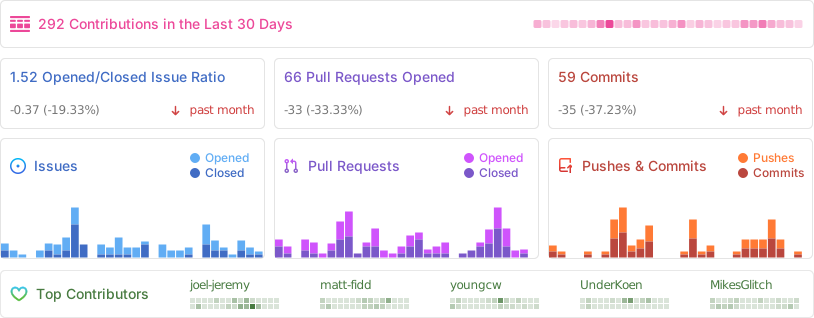
Repo Activity
Sponsors
Thanks to our wonderful sponsors who make Actual Budget possible!