[GH-ISSUE #810] [Feature] Number format, multiple accounts on the same CSV, currencies, others #26105

Closed
opened 2026-04-18 02:05:16 -05:00 by GiteaMirror · 5 comments
Owner

Originally created by @joaociocca on GitHub (Mar 24, 2023).
Original GitHub issue: https://github.com/actualbudget/actual/issues/810

Verified feature request does not already exist?

  • I have searched and found no existing issue

💻

  • Would you like to implement this feature?

Pitch: what problem are you trying to solve?

From what I'm seeing, I'm coming from two scenarios never before imagined for Actual:

  1. YNAB import with several accounts (I see Actual supports multiple accounts, but not CSV importing with this)
  2. Brazilian number format (Brazilians use , for decimals and . for thousands and up, along with our currency (Brazilian Real) being shown as R$)
  3. Multiple currencies (beyond my BRL account, I also have USD and EUR accounts)

From 1, I noticed a couple improvements for the CSV importer:

a. map an "Accounts" field to import each transaction on their respective account (since Actual already supports multiple accounts, it's all a matter of adding it's mapping to the importer, I'd guess)
b. allow using \t and other characters as the CSV separator (maybe automatically identify which character is being used to separate (single? double?) quotes, and suggest that to be used for importing the file)
c. (this is where 2 comes in) correctly read values from different currency formats (a field with a value of R$1652,29 will currently be read by Actual as 29 - which I find really curious, because I just noticed that I have already set Actual to use the decimal comma, so both my current budget and inputting a new transaction already use decimal comma)
d. add Group/Category import (I see Actual's budget already has groups + categories, so they'd just need to be supported on the importer itself)
e. support for UTF8 and emoji in all text fields (from what I'm seeing at the import preview screen, an emoji like 🔴 or will currently be ignored - I see they are already supported on Actual's transaction notes, but they don't seem to be read from the CSV)
f. allow outflow to be read from absolute values (YNAB, for instance, exports an outflow as R$1652,29 instead of -R$1652,29 or (R$1652,29))

For 3 I haven't had issues currently because I wasn't really tracking my foreign accounts on YNAB, but I did take a look at a competitor (Money Manager Ex) and that one allows it, and I really liked that option, along with showing exchange rates (which a button click will query somewhere on the internet and update - sounds like a nice addition too)

Describe your ideal solution to this problem

I think I already did problem + ideal solutions up there, np?

Teaching and learning

I think most of my suggestions affect the import CSV function, so it'd mainly be used by new users

Originally created by @joaociocca on GitHub (Mar 24, 2023). Original GitHub issue: https://github.com/actualbudget/actual/issues/810 ### Verified feature request does not already exist? - [X] I have searched and found no existing issue ### 💻 - [ ] Would you like to implement this feature? ### Pitch: what problem are you trying to solve? From what I'm seeing, I'm coming from two scenarios never before imagined for Actual: 1. YNAB import with several accounts (I see Actual supports multiple accounts, but not CSV importing with this) 2. Brazilian number format (Brazilians use `,` for decimals and `.` for thousands and up, along with our currency (Brazilian Real) being shown as R$) 3. Multiple currencies (beyond my BRL account, I also have USD and EUR accounts) From 1, I noticed a couple improvements for the CSV importer: a. map an "Accounts" field to import each transaction on their respective account (since Actual already supports multiple accounts, it's all a matter of adding it's mapping to the importer, I'd guess) b. allow using `\t` and other characters as the CSV separator (maybe automatically identify which character is being used to separate (single? double?) quotes, and suggest that to be used for importing the file) c. (this is where 2 comes in) correctly read values from different currency formats (a field with a value of `R$1652,29` will currently be read by Actual as `29` - which I find really curious, because I just noticed that I have already set Actual to use the decimal comma, so both my current budget and inputting a new transaction already use decimal comma) d. add Group/Category import (I see Actual's budget already has groups + categories, so they'd just need to be supported on the importer itself) e. support for UTF8 and emoji in all text fields (from what I'm seeing at the import preview screen, an emoji like 🔴 or ⚡will currently be ignored - I see they are already supported on Actual's transaction notes, but they don't seem to be read from the CSV) f. allow outflow to be read from absolute values (YNAB, for instance, exports an outflow as `R$1652,29` instead of `-R$1652,29` or `(R$1652,29)`) For 3 I haven't had issues currently because I wasn't really tracking my foreign accounts on YNAB, but I did take a look at a competitor (Money Manager Ex) and that one allows it, and I really liked that option, along with showing exchange rates (which a button click will query somewhere on the internet and update - sounds like a nice addition too) ### Describe your ideal solution to this problem I think I already did problem + ideal solutions up there, np? ### Teaching and learning I think most of my suggestions affect the import CSV function, so it'd mainly be used by new users
GiteaMirror added the needs votesfeature labels 2026-04-18 02:05:16 -05:00
Author
Owner

@j-f1 commented on GitHub (Mar 24, 2023):

Thanks for all the feedback! I think I’ve addressed all of your points below, but definitely let me know if I’m missing anything:

  • CSV importing for multiple accounts is being tracked by #525. If you want to import from an existing YNAB file, close your existing budget and choose “import” on the file screen to import from YNAB.
  • Adding a tab as a separator option is a good idea, we currently support , and ;. Do you have any other possible separators?
  • Importing values like R$1652,29 should already work correctly, the underlying code grabs everything after the last . or , along with everything before that separator, then remove everything besides digits, then parses the number. Can you share the exact value from the CSV that is failing to parse?
  • We’re tracking importing categories in #557
  • What encoding is your file using? It’s possible we’re not parsing the correct encoding, which would cause the emoji to be corrupted.
  • What do you mean by “allow outflow to be read from absolute values?”
  • We don’t have a tracking issue for multiple currency support at the moment but it is a request that we’re aware of. It would require significant changes to many core parts of Actual that would make developing and using it more complicated, so we’re unlikely to implement it in the near future.
<!-- gh-comment-id:1482183642 --> @j-f1 commented on GitHub (Mar 24, 2023): Thanks for all the feedback! I think I’ve addressed all of your points below, but definitely let me know if I’m missing anything: - CSV importing for multiple accounts is being tracked by #525. If you want to import from an existing YNAB file, close your existing budget and choose “import” on the file screen to import from YNAB. - Adding a tab as a separator option is a good idea, we currently support `,` and `;`. Do you have any other possible separators? - Importing values like `R$1652,29` should already work correctly, the [underlying code](https://github.com/actualbudget/actual/blob/ba778c9e9f102f301099b3e7e29de54e9fb6c190/packages/loot-core/src/shared/util.js#L375-L389) grabs everything after the last `.` or `,` along with everything before that separator, then remove everything besides digits, then parses the number. Can you share the exact value from the CSV that is failing to parse? - We’re tracking importing categories in #557 - What encoding is your file using? It’s possible we’re not parsing the correct encoding, which would cause the emoji to be corrupted. - What do you mean by “allow outflow to be read from absolute values?” - We don’t have a tracking issue for multiple currency support at the moment but it is a request that we’re aware of. It would require significant changes to many core parts of Actual that would make developing and using it more complicated, so we’re unlikely to implement it in the near future.
Author
Owner

@joaociocca commented on GitHub (Mar 24, 2023):

  • I always forget their community is as good as that tool, YNABers are amazing, I had completely forgotten about the json tool they've made.
  • top of my head, just tab really.
  • the example I've mentioned is in my budget file, but could be because I was doing the CSV import instead of the JSON one. My CSV has both inflow of R$1652,29 and outflow of R$1652,29 enclosed in double quotes. The only manual change I've made to the CSV was changing tabs into commas.
  • I had opened YNAB's Register CSV file, changed tabs to commas, and saved. VS Code shows the new file is UTF-8 with BOM, same it shows for the original Register TSV file.
  • Currently on my CSV file, both inflow and outflow are in absolute values, so there's no negative values for outflows. But the CSV importer doesn't seem to recognize any value from the Outflow column (like the R$1652,29 example above) - it'll show Outflow preview as 0 and... AH I KNOW WHAT HAPPENS NOW! It's probably an error because the importer must not be isolating the fields in quotes!

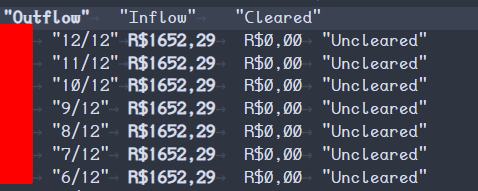
Original YNAB CSV, with tabs:
image

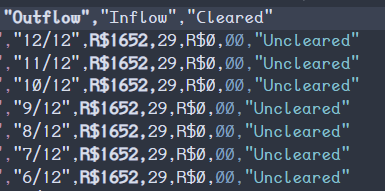
Adjusted file with commas:
image

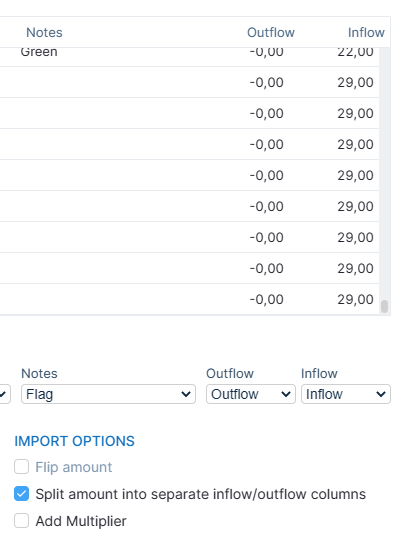
Actual CSV importer preview:
image

So it's spliting in commas... and because YNAB exports with tabs, and not commas, it won't use double quotes to delimit the values field - and that, for dealing with the original file, wouldn't be any trouble!

But when I replace tabs with commas, there are no quotes to isolate value fields' commas from the separating commas, and then Actual will read the ,29 from Outflow as the Inflow field... but this does not explain why Outflow isn't being read from the remaining R$1652 value?

  • I can totally see how that would be a radical core change. I had that chat with YNAB staff a couple years ago when I first started using foreign accounts 🤣

but yeah, I think that covers it all. Off to sleep, tomorrow I'll check the json transformer and attempt to import again, thanks for that tip! <3

<!-- gh-comment-id:1482200183 --> @joaociocca commented on GitHub (Mar 24, 2023): - I always forget their community is as good as that tool, YNABers are amazing, I had completely forgotten about the json tool they've made. - top of my head, just tab really. - the example I've mentioned is in my budget file, but could be because I was doing the CSV import instead of the JSON one. My CSV has both inflow of `R$1652,29` and outflow of `R$1652,29` enclosed in double quotes. The only manual change I've made to the CSV was changing tabs into commas. - I had opened YNAB's Register CSV file, changed tabs to commas, and saved. VS Code shows the new file is `UTF-8 with BOM`, same it shows for the original Register TSV file. - Currently on my CSV file, both inflow and outflow are in absolute values, so there's no negative values for outflows. But the CSV importer doesn't seem to recognize any value from the Outflow column (like the `R$1652,29` example above) - it'll show Outflow preview as 0 and... AH I KNOW WHAT HAPPENS NOW! It's probably an error because the importer must not be isolating the fields in quotes! Original YNAB CSV, with tabs: ![image](https://user-images.githubusercontent.com/6473725/227416612-41f1d983-23f2-48f8-96c8-7fe4cac0530c.png) Adjusted file with commas: ![image](https://user-images.githubusercontent.com/6473725/227416679-a0d161bd-17eb-494a-ab38-977996b99a0d.png) Actual CSV importer preview: ![image](https://user-images.githubusercontent.com/6473725/227416707-43b066ad-dd1e-48fa-950b-d47f1b02497f.png) So it's spliting in commas... and because YNAB exports with tabs, and not commas, it won't use double quotes to delimit the values field - and that, for dealing with the original file, wouldn't be any trouble! But when I replace tabs with commas, there are no quotes to isolate value fields' commas from the separating commas, and then Actual will read the `,29` from Outflow as the Inflow field... but this does not explain why Outflow isn't being read from the remaining `R$1652` value? - I can totally see how that would be a radical core change. I had that chat with YNAB staff a couple years ago when I first started using foreign accounts 🤣 but yeah, I think that covers it all. Off to sleep, tomorrow I'll check the json transformer and attempt to import again, thanks for that tip! <3
Author
Owner

@j-f1 commented on GitHub (Mar 24, 2023):

but this does not explain why Outflow isn't being read from the remaining R$1652 value?

It doesn’t apply any filtering if it can’t detect a comma or period in the currency amount, so it doesn’t know how to handle the R$ part. We should change that!

<!-- gh-comment-id:1482203295 --> @j-f1 commented on GitHub (Mar 24, 2023): > but this does not explain why Outflow isn't being read from the remaining R$1652 value? It doesn’t apply any filtering if it can’t detect a comma or period in the currency amount, so it doesn’t know how to handle the `R$` part. We should change that!
Author
Owner

@joaociocca commented on GitHub (Mar 24, 2023):

Considering there's the actual (tumdumts) nYNAB importer, I don't really see an issue there - specially considering that thinking about it now, well rested, after sleeping on it, feels to me like it's YNAB who did the CSV wrong - value fields should be value only, shouldn't contain strings, specially if the currency itself isn't used... and if the currency is used, it stops being a value and becomes a string, and so should be quoted.
But I guess that simply implementing the tab delimiter should be enough to clear this issue...

Moving on, I got to import my json and start using Actual... but it feels really weird for it to consider everything as executed, despite having scheduled transactions. The lack of a separator between past/today transactions and scheduled ones is also confusing. We have to really pay attention and look at the date to understand what is future scheduled transactions. And the accounts value already considers scheduled transactions as if they affected the balance today.

I think it's easier to show:

image

(edits)
Also, it seems ESC doesn't deselect when the date field is selected?

Oh! I just saw the schedule section and I love it! I do have a couple of suggestions for it, though. The option of "repeat until X" or "Repeat X times" (here in Brazil we have the... how do I put it? Cultural thing? of splitting a payment along several months, so it'd be really useful). And another would be to adequate dates when the scheduled date ends up being on weekends, moving them to the previous (Friday) or next (Monday) workday.

At least here, there's legal stuff about when a bill is due X date and X is a weekend or banking holiday, it automatically gets extended to the next workday.

OHHHHH this gave me another idea: add a calendar option where users can point, or import, banking holidays, to extend on that function!

Adding the notes field on the schedule would be nice too hehe or maybe allow the schedules to have a name, and then use that name as the note on the transaction!

When editing a schedule, I can tab via keyboard all the way to date. But when activating date to change when it starts, the next tab still goes to "Repeats" checkbox, instead of moving to the "Starts" date.

<!-- gh-comment-id:1482777547 --> @joaociocca commented on GitHub (Mar 24, 2023): Considering there's the actual (tumdumts) nYNAB importer, I don't really see an issue there - specially considering that thinking about it now, well rested, after sleeping on it, feels to me like it's YNAB who did the CSV wrong - value fields should be value only, shouldn't contain strings, specially if the currency itself isn't used... and if the currency is used, it stops being a value and becomes a string, and so should be quoted. But I guess that simply implementing the tab delimiter should be enough to clear this issue... Moving on, I got to import my json and start using Actual... but it feels really weird for it to consider everything as executed, despite having scheduled transactions. The lack of a separator between past/today transactions and scheduled ones is also confusing. We have to really pay attention and look at the date to understand what is future scheduled transactions. And the accounts value already considers scheduled transactions as if they affected the balance today. I think it's easier to show: ![image](https://user-images.githubusercontent.com/6473725/227529846-6301a89f-e637-4947-8aa2-2105343ea9b2.png) (edits) Also, it seems <kbd>ESC</kbd> doesn't deselect when the date field is selected? Oh! I just saw the schedule section and I love it! I do have a couple of suggestions for it, though. The option of "repeat until X" or "Repeat X times" (here in Brazil we have the... how do I put it? Cultural thing? of splitting a payment along several months, so it'd be really useful). And another would be to adequate dates when the scheduled date ends up being on weekends, moving them to the previous (Friday) or next (Monday) workday. At least here, there's legal stuff about when a bill is due X date and X is a weekend or banking holiday, it automatically gets extended to the next workday. OHHHHH this gave me another idea: add a calendar option where users can point, or import, banking holidays, to extend on that function! Adding the notes field on the schedule would be nice too hehe or maybe allow the schedules to have a name, and then use that name as the note on the transaction! When editing a schedule, I can tab via keyboard all the way to date. But when activating date to change when it starts, the next tab still goes to "Repeats" checkbox, instead of moving to the "Starts" date.
Author
Owner

@github-actions[bot] commented on GitHub (May 1, 2023):

Thanks for sharing your idea!

This repository is now using lodash style issue management for enhancements. This means enhancement issues will now be closed instead of leaving them open. This doesn’t mean we don’t accept feature requests, though! We will consider implementing ones that receive many upvotes, and we welcome contributions for any feature requests marked as needing votes (just post a comment first so we can help you make a successful contribution).

The enhancement backlog can be found here: https://github.com/actualbudget/actual/issues?q=is%3Aissue+label%3A%22needs+votes%22+sort%3Areactions-%2B1-desc

Don’t forget to upvote the top comment with 👍!

<!-- gh-comment-id:1530113645 --> @github-actions[bot] commented on GitHub (May 1, 2023): :sparkles: Thanks for sharing your idea! :sparkles: This repository is now using lodash style issue management for enhancements. This means enhancement issues will now be closed instead of leaving them open. This doesn’t mean we don’t accept feature requests, though! We will consider implementing ones that receive many upvotes, and we welcome contributions for any feature requests marked as needing votes (just post a comment first so we can help you make a successful contribution). The enhancement backlog can be found here: https://github.com/actualbudget/actual/issues?q=is%3Aissue+label%3A%22needs+votes%22+sort%3Areactions-%2B1-desc Don’t forget to upvote the top comment with 👍!
Sign in to join this conversation.
1 Participants
Notifications
Due Date
No due date set.
Dependencies

No dependencies set.

Reference: github-starred/actual#26105