 e4903ca6e3
* Add Budget Analysis report with full implementation

Co-authored-by: tabedzki <35670232+tabedzki@users.noreply.github.com>

* Add preset time ranges, intervals, bar chart, hide balance, and display controls

Co-authored-by: tabedzki <35670232+tabedzki@users.noreply.github.com>

* Fix duplicate function declaration syntax error in budget-analysis-spreadsheet.ts

Co-authored-by: tabedzki <35670232+tabedzki@users.noreply.github.com>

* Fix floating point precision error in daily/weekly intervals and replace interval button with dropdown

Co-authored-by: tabedzki <35670232+tabedzki@users.noreply.github.com>

* Make card always display monthly data and match report's chart type

Co-authored-by: tabedzki <35670232+tabedzki@users.noreply.github.com>

* fix: adjust widget placement and presentation

* fix: adjusted the dot presentation

* feat: added svg for line chart/barchart

* fix: added one month to the report

* added the upcoming release notes

* amended the upcoming release notes

* fix: removed unused variables

* formatted using prettier --write

* [autofix.ci] apply automated fixes

* feat: added new feature to the Reports Page in the test budget

* fix: amended the reports.test.ts file to expect Budget Analysis

* Update VRT screenshots

Auto-generated by VRT workflow

PR: #6137

* Update VRT screenshots

Auto-generated by VRT workflow

PR: #6137

* revert: removed the inclusion of the Budget Analysis tool from the test file

* Update VRT screenshots

Auto-generated by VRT workflow

PR: #6137

* fix: changed the display to always be monthly since budgets are monthly; removed the 1month view

* [autofix.ci] apply automated fixes

* [autofix.ci] apply automated fixes (attempt 2/3)

* fix: removed comment

* feat: added experimental feature flag for Budget Analysis tool

* feat: Switched option to use SVG Icons instead of words to shorten horizontal layout

* Removed interval possibilities and removed unnecessary compact variable as indicated by CodeRabbit

* Update packages/desktop-client/src/components/reports/reports/BudgetAnalysisCard.tsx

Co-authored-by: coderabbitai[bot] <136622811+coderabbitai[bot]@users.noreply.github.com>

* Added basic documentation for Budget Analysis Report

* Update VRT screenshots

Auto-generated by VRT workflow

PR: #6137

* Update VRT screenshots

Auto-generated by VRT workflow

PR: #6137

* fix: added budget-analysis doc to sidebar

* Update VRT screenshots

Auto-generated by VRT workflow

PR: #6137

* feat(reports): improve Budget Analysis report UI and behavior

- Update chart colors to match Cash Flow report style
  (Budgeted: blue, Balance: pageTextLight)
- Remove legend items from report view for cleaner UI
- Add 1 month quick select option to header
- Pass isConcise prop to BudgetAnalysisGraph for proper date formatting
- Add dynamic daily/monthly interval switching based on date range

* Update VRT screenshots

Auto-generated by VRT workflow

PR: #6137

* feat(reports): refactor BudgetAnalysisGraph and improve isConcise calculation according to Rabbit AI

* feat(reports): add translation support for Budget Analysis graph labels

* feat(reports): centralize translation for Budget Analysis graph labels

* feat: use the budget values directly from the budget spreadsheet/server

* feat: enhance budget analysis with overspending adjustments and detailed reporting

* style: format code for better readability in BudgetAnalysis and budget-analysis-spreadsheet components

* refactor: remove unused variables

* docs: added in the image to the docs

* fix: reimplement support for conditionsOp

* [autofix.ci] apply automated fixes

* style: simplify budget analysis labels for clarity

* fix: add the on copy function

* feat: tooltip improvements

* feat: enhance budget analysis to track overspending adjustments across months

* fix: removed the absolute value for spent

* feat: update the charts to look closer to the CashFlow report

* fix: correct financial formatting for totalSpent in BudgetAnalysis

* feat: add filterExclude prop to Header and BudgetAnalysis for improved filtering options

* feat: implement privacy mode for Y-axis values in BudgetAnalysisGraph

* feat: change default graph type to Bar in BudgetAnalysis

* feat: remove commented-out filter button code in Header component

* feat: remove commented-out code for filter exclusion in Header component

* fix: update the feedback link to the dedicated issue

* refactor: financial display components to use FinancialText for consistency in Budget Analysis reports

* fix: update the card to also start as bar graph

* docs: update Budget Analysis report to include category filtering information

* style: refactor imports and whitespace

* refactor: simplify inline content structure in BudgetAnalysis component

* [autofix.ci] apply automated fixes

* Update VRT screenshots

Auto-generated by VRT workflow

PR: #6137

* fix: removed color descriptors from the chart

* fix: update color themes for Budget Analysis to use custom theme definitions

* [autofix.ci] apply automated fixes

* feat: update Budget Analysis merge md file

* Update VRT screenshots

Auto-generated by VRT workflow

PR: #6137

* fix: update budget analysis report image

* fix: white space adjustment in descriptor

* [autofix.ci] apply automated fixes

---------

Co-authored-by: copilot-swe-agent[bot] <198982749+Copilot@users.noreply.github.com>
Co-authored-by: autofix-ci[bot] <114827586+autofix-ci[bot]@users.noreply.github.com>
Co-authored-by: github-actions[bot] <github-actions[bot]@users.noreply.github.com>
Co-authored-by: coderabbitai[bot] <136622811+coderabbitai[bot]@users.noreply.github.com>
Co-authored-by: youngcw <calebyoung94@gmail.com>

Getting Started
Actual is a local-first personal finance tool. It is 100% free and open-source, written in NodeJS, it has a synchronization element so that all your changes can move between devices without any heavy lifting.
If you are interested in contributing, or want to know how development works, see our contributing document we would love to have you.
Want to say thanks? Click the ⭐ at the top of the page.
Key Links
- Actual discord community.
- Actual Community Documentation
- Frequently asked questions
Installation
There are four ways to deploy Actual:
- One-click deployment via PikaPods (~1.40 $/month) - recommended for non-technical users
- Managed hosting via Fly.io (~1.50 $/month)
- Self-hosted by using a Docker image
- Local-only apps - downloadable Windows, Mac and Linux apps you can run on your device
Learn more in the installation instructions docs.
Ready to Start Budgeting?
Read about Envelope budgeting to know more about the idea behind Actual Budget.
Are you new to budgeting or want to start fresh?
Check out the community's Starting Fresh guide so you can quickly get up and running!
Are you migrating from other budgeting apps?
Check out the community's Migration guide to start jumping on the Actual Budget train!
Documentation
We have a wide range of documentation on how to use Actual, this is all available in our Community Documentation, this includes topics on Budgeting, Account Management, Tips & Tricks and some documentation for developers.
Contributing
Actual is a community driven product. Learn more about contributing to Actual.
Code structure
The Actual app is split up into a few packages:
- loot-core - The core application that runs on any platform
- desktop-client - The desktop UI
- desktop-electron - The desktop app
More information on the project structure is available in our community documentation.
Feature Requests
Current feature requests can be seen here. Vote for your favorite requests by reacting 👍 to the top comment of the request.
To add new feature requests, open a new Issue of the "Feature Request" type.
Translation
Make Actual Budget accessible to more people by helping with the Internationalization of Actual. We are using a crowd sourcing tool to manage the translations, see our Weblate Project. Weblate proudly supports open-source software projects through their Libre plan.

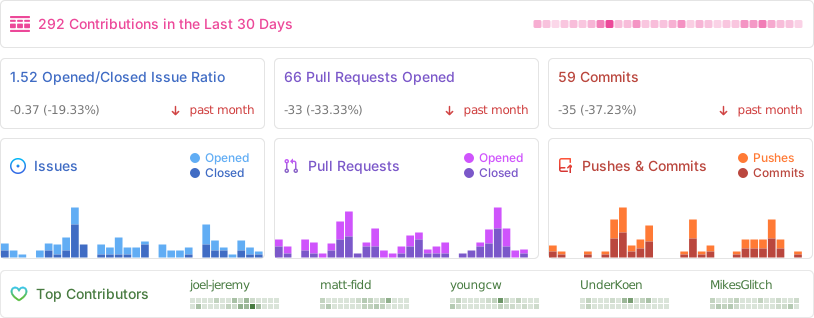
Repo Activity
Sponsors
Thanks to our wonderful sponsors who make Actual Budget possible!
