 554d0b6150
* Change color of budget table scrollbar.

* Update budget sidebar to use budget colors.

* Update fontWeight for 'Category' to match rest of table

* Update to use budget background

* Update ExpenseGroup to use budget color

* Update IncomeGroup to use budget color

* Update SidebarCategory colors

Change drag/drop to buttonPrimaryBackground so it will always be visible in any custom theme.

Background to budget color.

* Update SidebarGroup background to budget color

* Update EnvelopeBudgetComponents

Add 'budgetNumberNeutral' to cheveronDown in budgeted field instead of using default bare button text incases where bare button is set to normal button text and normal button is inverted. remove mobile color variable for shadow

* Update BudgetTotals.tsx

Use tableHeaderText for header.

* Update BudgetSummary.tsx

Use budget colors

* Update MonthPicker.tsx

change selected months at top from tableBorderHover color to buttonPrimaryBackground.

* [autofix.ci] apply automated fixes

* Update EnvelopeBudgetComponents.tsx

* Update BudgetTotals.tsx

revert

* Update SidebarCategory.tsx

* Update TrackingBudgetComponents to use budget colors

* [autofix.ci] apply automated fixes

* Update BudgetSummary to use budget colors

* Update BudgetTotal.tsx

* Update ExpenseProgress.tsx

* Update IncomeProgress.tsx

* Update Saved.tsx

* Use consistent color variables on budget pages.

* Update IncomeProgress.tsx

* Update ExpenseProgress.tsx

* Update VRT screenshots

Auto-generated by VRT workflow

PR: #6820

* Update EnvelopeBudgetComponents

Budget total header to follow current/other month style.

* Update EnvelopeBudgetComponents.tsx

* [autofix.ci] apply automated fixes

* Update EnvelopeBudgetComponents.tsx

* Update EnvelopeBudgetComponents.tsx

* [autofix.ci] apply automated fixes

* Update EnvelopeBudgetComponents.tsx

* Revert EnvelopeBudgetComponents.tsx

* [autofix.ci] apply automated fixes

* Update EnvelopeBudgetComponents.tsx

* Update EnvelopeBudgetComponents.tsx

* Update EnvelopeBudgetComponents.tsx

* Revert again :) EnvelopeBudgetComponents.tsx

---------

Co-authored-by: autofix-ci[bot] <114827586+autofix-ci[bot]@users.noreply.github.com>
Co-authored-by: github-actions[bot] <github-actions[bot]@users.noreply.github.com>

Getting Started
Actual is a local-first personal finance tool. It is 100% free and open-source, written in NodeJS, it has a synchronization element so that all your changes can move between devices without any heavy lifting.
If you are interested in contributing, or want to know how development works, see our contributing document we would love to have you.
Want to say thanks? Click the ⭐ at the top of the page.
Key Links
- Actual discord community.
- Actual Community Documentation
- Frequently asked questions
Installation
There are four ways to deploy Actual:
- One-click deployment via PikaPods (~1.40 $/month) - recommended for non-technical users
- Managed hosting via Fly.io (~1.50 $/month)
- Self-hosted by using a Docker image
- Local-only apps - downloadable Windows, Mac and Linux apps you can run on your device
Learn more in the installation instructions docs.
Ready to Start Budgeting?
Read about Envelope budgeting to know more about the idea behind Actual Budget.
Are you new to budgeting or want to start fresh?
Check out the community's Starting Fresh guide so you can quickly get up and running!
Are you migrating from other budgeting apps?
Check out the community's Migration guide to start jumping on the Actual Budget train!
Documentation
We have a wide range of documentation on how to use Actual, this is all available in our Community Documentation, this includes topics on Budgeting, Account Management, Tips & Tricks and some documentation for developers.
Contributing
Actual is a community driven product. Learn more about contributing to Actual.
Code structure
The Actual app is split up into a few packages:
- loot-core - The core application that runs on any platform
- desktop-client - The desktop UI
- desktop-electron - The desktop app
More information on the project structure is available in our community documentation.
Feature Requests
Current feature requests can be seen here. Vote for your favorite requests by reacting 👍 to the top comment of the request.
To add new feature requests, open a new Issue of the "Feature Request" type.
Translation
Make Actual Budget accessible to more people by helping with the Internationalization of Actual. We are using a crowd sourcing tool to manage the translations, see our Weblate Project. Weblate proudly supports open-source software projects through their Libre plan.

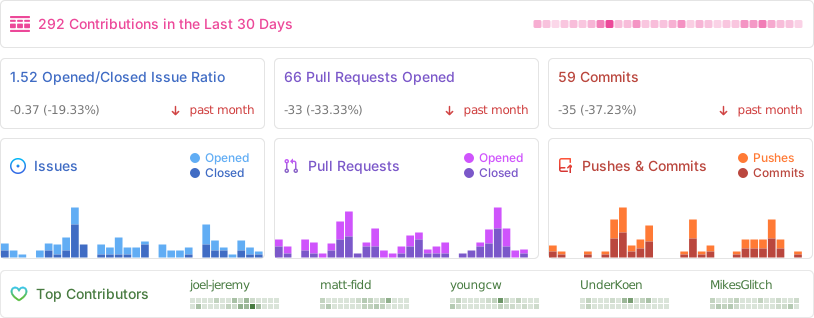
Repo Activity
Sponsors
Thanks to our wonderful sponsors who make Actual Budget possible!
