mirror of
https://github.com/go-vikunja/vikunja.git
synced 2026-08-30 09:07:40 -05:00
[Question] When I upload images to list's description, error happen #7
Closed
opened 2025-11-01 20:43:45 -05:00 by GiteaMirror
·
13 comments
No Branch/Tag Specified
main
labels-shared-visibility-cond
labels-query-rewrite
renovate/vue-router-5.x
renovate/major-dev-dependencies
pr-swarm-assets
fix-rootpath-relative-defaults
feat-mcp
task-detail-sidebar-redesign
screenshots/task-detail-sidebar
consolidate-data-folder
fix-multiline-add-task-order
gh-readonly-queue/main/pr-3363-654bb9493053299350c37d355cb426e045d72353
feat-project-templates
feat-soft-delete-projects
feat-run-as-user
claude/task-event-field-changes-ws73g2
feat-audit-sinks
claude/per-user-feature-toggles-vqlg8x
docs-v2-query-param
claude/veans-question-xBFkq
spike-huma-openapi3
claude/investigate-swagger3-support-nyyUa
feat-list-view-buckets
ci-mysql-8-test
codex/analyze-codebase-for-email-task-feature
csv-import-feature
claude/email-reply-comments-wpdcQ
fix-oidc-pkce-support
fix/overview-subtasks-expand
feat/bucket-select-task-detail
claude/review-bot-design-plan-cf5C3
claude/project-scoped-api-tokens-KTqR3
claude/explore-openclaw-integration-KQEzg
claude/project-scoped-api-tokens-yv5KS
fix-duplicate-close-button
feat-list-view-sorting
feat/official-vite-sentry-plugin
feat/highlight-overdue-tasks
feat/add-enter-key-form-submission-handling
feat/TipTap-nits
feat/update-caldavtimetotimestamp-parsing
feat-phosphor-icons
wip-plans
claude/investigate-issue-2173-llKme
fix-description-text-drag
feat-custom-keyboard-shortcuts
pr-1845-ci
codex/fix-drag-and-drop-behavior-inconsistency
copilot/add-clickable-labels-for-filtering
copilot/fix-issue-1786
playwright-migration
fix-kanban-repeating-wip
copilot/fix-1498
feature/replace-axios
codex/upgrade-to-tailwind-4.1.8-using-pnpm
codex/add-cypress-test-for-avatar-types
feature/biome
feature/oxc
codex/update-flexsearch-to-0.8.205
4r6ni9-codex/fix-deprecated-sass-@import-usage
codex/fix-deprecated-sass-@import-usage
codex/add-cypress-test-for-task-list-refresh-fix
codex/fix-quick-add-magic-not-adding-tasks
codex/fix-all-type-errors
codex/fix-mimetype-for-docs.json
feature/caldav-from-scratch
feature/gh-actions-hetzner
fix-ci
feat/new-logger
jyte-better-dev-config
feat/add-team-member-with-enter
fix/button-and-icon-types
fix/notifications-component-name-collision
feature/null-time
renovate/tailwindcss-4.x
feature/unplugin-vue-router
fix/deprecated-import
feature/zod-schema
renovate/golangci-golangci-lint-1.x
fix/tiptap-editor-reactive-destructuring
release/0.24
feat/improve-add-task
fix/saved-filter-search
feat/webp-and-avif-attachment-previews
feature/migrate-back-to-bulma
fix/sass-add-missing-list-import
feature/sticky-demo-bar
fix/gantt-view-switch
feature/typesense-position-join
feature/focus-visible
dependencies/golangci-lint
feature/better-filter-syntax
fix/tiptap-task-list
renovate/github.com-golang-jwt-jwt-v4-5.x
feature/hide-forbidden-related-tasks
renovate/golang-1.x
release/0.20
release/0.17
release/0.16
release/0.15
release/0.14
v2.5.0
v2.4.0
v2.3.0
v2.2.2
v2.2.1
v2.2.0
v2.1.0
v2.0.0
v1.1.0
v1.0.0
v1.0.0-rc4
v1.0.0-rc3
v1.0.0-rc2
v1.0.0-rc1
v1.0.0-rc0
v0.24.6
v0.24.5
v0.24.4
v0.24.3
v0.24.2
v0.24.1
v0.24.0
v0.23.0
v0.22.1
v0.22.0
0.21.0
v0.21.0
v0.20.4
v0.20.5
v0.20.3
v0.20.2
v0.20.1
v0.20.0
v0.19.2
v0.19.1
v0.19.0
vue3
v0.18.1
v0.18.0
v0.17.1
v0.17.0
v0.16.1
v0.16.0
v0.15.1
v0.15.0
v0.14.1
v0.14.0
v0.13.1
v0.13
v0.12
v0.11
v0.10
v0.9
v0.8
v0.7
v0.6
v0.5
v0.4
v0.3
v0.2
v0.1
Labels
Clear labels
area/api
area/attachments
area/auth
area/avatars
area/backup-restore
area/caldav
area/calendar-view
area/comments
area/config
area/database
area/desktop
area/docker
area/email
area/favorites
area/filters
area/frontend
area/gantt
area/i18n
area/import-export
area/internal-code
area/kanban
area/labels
area/list-view
area/mobile
area/notifications
area/permissions
area/projects
area/pwa
area/recurring-tasks
area/reminders
area/search
area/shortcuts
area/subtasks
area/sync
area/table-view
area/task-editor
area/task-metadata
area/task-relations
area/teams
area/theming
area/time-tracking
area/typesense
area/views
area/webhooks
bug
changes requested
concern/accessibility
concern/performance
concern/regression
concern/ux
confirmed
db/mysql
dependencies
enhancement
good first issue
help wanted
integration/inbound
integration/outbound
kind/bug
kind/feature
needs reproduction
pull-request
pull-request
pull-request
pull-request
question
security
support
upstream issue
waiting for reply
wontfix
Mirrored from GitHub Pull Request
Mirrored from GitHub Pull Request
Mirrored from GitHub Pull Request
Mirrored from GitHub Pull Request
No labels
Milestone
No items
No Milestone
Projects
Clear projects
No projects

No Assignees

Notifications
Due Date
No due date set.
Dependencies
No dependencies set.
Reference: github-starred/vikunja#7
Reference in New Issue
Block a user
Blocking a user prevents them from interacting with repositories, such as opening or commenting on pull requests or issues. Learn more about blocking a user.
Originally created by @rogerBridge on GitHub (Jun 9, 2021).
Hello Sir, your vikunja is really a fantastic app, recently, while using your app, I found a bug, when I upload image file to list's description, a bug will happen, in browser console:


In frontend:
my platform:
client: linux x86 64, firefox 89.0;
server: docker-compose, follow your website's example;
If you need more info about this situation, please tell me : )
could u help me deal with this question? Thank you Sir!
@rogerBridge commented on GitHub (Jun 9, 2021):
PS: this error msg is circulate print in browser console
@kolaente commented on GitHub (Jun 10, 2021):
Hi :)
What Vikunja version is that? (There should be a message in the browser console)
Can you reproduce this on try?
@rogerBridge commented on GitHub (Jun 10, 2021):
Hello Sir:
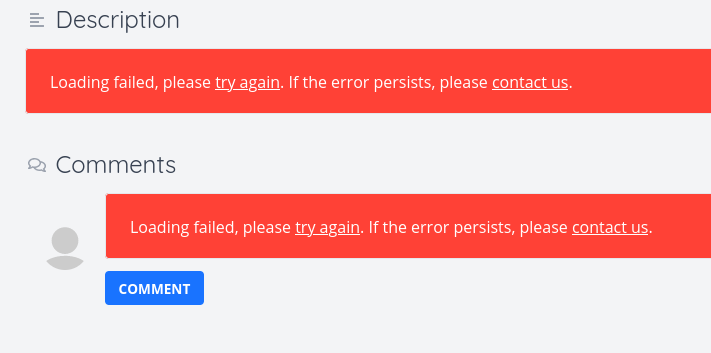
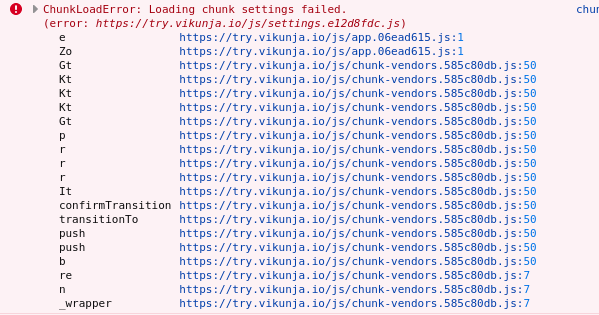
This is the frontend version: Vikunja frontend version 0.17.0+47-34ded051d1,
Sir, when I upload image file to "try", I found a error existed, show below:
Thanks for response : )
@kolaente commented on GitHub (Jun 10, 2021):
That's odd - works for me on try (at least for tasks).
Does the error also occur in a private tab with all caches cleared?
@rogerBridge commented on GitHub (Jun 11, 2021):
I just retest it on "try", it worked, I guess maybe some static asset load error yesterday, the same time, I found a small issue, I add a list called: "test_list", and add a item called: "test_image_upload", when I click the attachment, it looks like miss token in request header so the api call is rejected by api server
@rogerBridge commented on GitHub (Jun 11, 2021):
"e is not defined" error message still exist in my environment, I guess maybe I did something wrong, I follow majority of your instruct on vikunja website: "nginx -> (api + frontend)", but I add a layer, "caddy -> nginx -> (api + frontend)", I just use caddy point to nginx's port, just like: nginx associate local 127.0.0.1:8000, and caddy as a reverse proxy point to 127.0.0.1:8000(because caddy had very easy let's encrypt certificate apply and I had some app use caddy, I want make all of them in one place), I will visit nginx only as reverse proxy and try it later
@kolaente commented on GitHub (Jun 11, 2021):
Anything in the server logs? Is the file created correctly in the db and on disk?
If you're running with docker behind caddy, you might want to check out the caddy proxy examples.
@rogerBridge commented on GitHub (Jun 11, 2021):
Sir, I am sorry for my bad English and my bad expression, "try" is try, it is your website, so I could not know the server logs.
Thanks, Sir, I will follow your instruct to check out "the caddy proxy examples"
@rogerBridge commented on GitHub (Jun 11, 2021):
Sir, I followed your instruct, and I update all vikunja images(vikunja/api:latest + vikunja/frontend:latest) and the issue still exists;
my docker-compose yml:
my Caddyfile is:
While upload images failed, the vikunja/api log is:
because I enable the firefox's resist browser fingerprint option, so the request header is wrong.
I guess the issue is when file create, vikunja/api face a permission question, but why it happend? I don't know : (
almost everything works fine, except upload images, if you need more log, please tell me, thanks Sir : )
@kolaente commented on GitHub (Jun 11, 2021):
Nothing to worry about, I'm not a native english speaker myself so I know that very well 🙂
I've looked at the list and task you created on try and the attachment was uploaded just fine. I can access it when clicking on it in the list, embedding works as well when adding a
!in front of the generated markdown code when uploading through the editor (That's an upstream bug in the editor itself).The configuration looks fine to me. It looks like you're able to access the frontend and upload files even though uploading itself fails. That means the caddy configuration is working fine.
About the permission error: The files folder you mounted to store the attachments (and other things) needs to be accessible to the user and group with the id 1000 for Vikunja to have access to it. Try running
chown 1000:1000 ./files -Rin the directory where the compose file is stored. After that, restart the container and try uploading an attachment again.You can could change the uid and gid to match the value of some other user on your host system: https://vikunja.io/docs/install-backend/#files-volume
@rogerBridge commented on GitHub (Jun 11, 2021):
Wow, it worked, Thanks, Sir, and I have a question, I had add docker to sudo group, so if its permisson group is: root:root, it should has permission to store file in my home directory, why it can't? did it say: docker usergroup is just docker usergroup, it is not root:root, it is just docker:docker and equal to user:user, not equal to root:root, so it has not permission to store file in user:user's folder, is it right? if so, why vikunja/db can store file in my home directory? I can't understand it 😂
ps: just a irrelavant question
@kolaente commented on GitHub (Jun 11, 2021):
While the docker daemon runs as root, Vikunja itself does not. Vikunja runs as
1000:1000so if it wants to store files somewhere they have to be accessible to that user. I think you got the gist of it 🙂There's a bit more info about docker's permission model here: https://docs.docker.com/engine/install/linux-postinstall/#manage-docker-as-a-non-root-user
I'm going to close this issue as your problem got resolved. Feel free to open a new one if you have other issues or check out the forum.
@rogerBridge commented on GitHub (Jun 11, 2021):
I found something in vikunja/api Dockerfile:
I guess it is the answer, I am wrong before, it associate docker usergroup and host usergroup;
thank you, Sir : )