mirror of
https://github.com/go-vikunja/vikunja.git
synced 2026-07-24 08:48:48 -05:00
Access denied inside the DB container #21
Closed
opened 2025-11-01 20:44:33 -05:00 by GiteaMirror
·
12 comments
No Branch/Tag Specified
main
renovate/dev-dependencies
renovate/github.com-prometheus-client_golang-1.x
renovate/github.com-gabriel-vasile-mimetype-1.x
renovate/postcss-8.x
renovate/undici6-8.x
renovate/major-dev-dependencies
renovate/sentry-javascript-monorepo
renovate/marked-18.x
renovate/crowdin-github-action-2.x
fix-migration-index-wipe
fix-sr-findings
pr-swarm-assets
claude/task-event-field-changes-ws73g2
feat-mcp
feat-audit-sinks
claude/per-user-feature-toggles-vqlg8x
docs-v2-query-param
feat-project-templates
claude/veans-question-xBFkq
spike-huma-openapi3
claude/investigate-swagger3-support-nyyUa
feat-list-view-buckets
ci-mysql-8-test
codex/analyze-codebase-for-email-task-feature
csv-import-feature
claude/email-reply-comments-wpdcQ
fix-oidc-pkce-support
fix/overview-subtasks-expand
feat/bucket-select-task-detail
feat-soft-delete-projects
claude/review-bot-design-plan-cf5C3
claude/project-scoped-api-tokens-KTqR3
claude/explore-openclaw-integration-KQEzg
claude/project-scoped-api-tokens-yv5KS
fix-duplicate-close-button
feat-list-view-sorting
feat/official-vite-sentry-plugin
feat/highlight-overdue-tasks
feat/add-enter-key-form-submission-handling
feat/TipTap-nits
feat/update-caldavtimetotimestamp-parsing
feat-phosphor-icons
wip-plans
claude/investigate-issue-2173-llKme
fix-description-text-drag
feat-custom-keyboard-shortcuts
pr-1845-ci
codex/fix-drag-and-drop-behavior-inconsistency
copilot/add-clickable-labels-for-filtering
copilot/fix-issue-1786
playwright-migration
fix-kanban-repeating-wip
copilot/fix-1498
feature/replace-axios
codex/upgrade-to-tailwind-4.1.8-using-pnpm
codex/add-cypress-test-for-avatar-types
feature/biome
feature/oxc
codex/update-flexsearch-to-0.8.205
4r6ni9-codex/fix-deprecated-sass-@import-usage
codex/fix-deprecated-sass-@import-usage
codex/add-cypress-test-for-task-list-refresh-fix
codex/fix-quick-add-magic-not-adding-tasks
codex/fix-all-type-errors
codex/fix-mimetype-for-docs.json
feature/caldav-from-scratch
feature/gh-actions-hetzner
fix-ci
feat/new-logger
jyte-better-dev-config
feat/add-team-member-with-enter
fix/button-and-icon-types
fix/notifications-component-name-collision
feature/null-time
renovate/tailwindcss-4.x
feature/unplugin-vue-router
fix/deprecated-import
feature/zod-schema
renovate/golangci-golangci-lint-1.x
fix/tiptap-editor-reactive-destructuring
release/0.24
feat/improve-add-task
fix/saved-filter-search
feat/webp-and-avif-attachment-previews
feature/migrate-back-to-bulma
fix/sass-add-missing-list-import
feature/sticky-demo-bar
fix/gantt-view-switch
feature/typesense-position-join
feature/focus-visible
dependencies/golangci-lint
feature/better-filter-syntax
fix/tiptap-task-list
renovate/github.com-golang-jwt-jwt-v4-5.x
feature/hide-forbidden-related-tasks
renovate/golang-1.x
release/0.20
release/0.17
release/0.16
release/0.15
release/0.14
v2.4.0
v2.3.0
v2.2.2
v2.2.1
v2.2.0
v2.1.0
v2.0.0
v1.1.0
v1.0.0
v1.0.0-rc4
v1.0.0-rc3
v1.0.0-rc2
v1.0.0-rc1
v1.0.0-rc0
v0.24.6
v0.24.5
v0.24.4
v0.24.3
v0.24.2
v0.24.1
v0.24.0
v0.23.0
v0.22.1
v0.22.0
0.21.0
v0.21.0
v0.20.4
v0.20.5
v0.20.3
v0.20.2
v0.20.1
v0.20.0
v0.19.2
v0.19.1
v0.19.0
vue3
v0.18.1
v0.18.0
v0.17.1
v0.17.0
v0.16.1
v0.16.0
v0.15.1
v0.15.0
v0.14.1
v0.14.0
v0.13.1
v0.13
v0.12
v0.11
v0.10
v0.9
v0.8
v0.7
v0.6
v0.5
v0.4
v0.3
v0.2
v0.1
Labels
Clear labels
area/api
area/attachments
area/auth
area/avatars
area/backup-restore
area/caldav
area/calendar-view
area/comments
area/config
area/database
area/desktop
area/docker
area/email
area/favorites
area/filters
area/frontend
area/gantt
area/i18n
area/import-export
area/internal-code
area/kanban
area/labels
area/list-view
area/mobile
area/notifications
area/permissions
area/projects
area/pwa
area/recurring-tasks
area/reminders
area/search
area/shortcuts
area/subtasks
area/sync
area/table-view
area/task-editor
area/task-metadata
area/task-relations
area/teams
area/theming
area/time-tracking
area/typesense
area/views
area/webhooks
bug
changes requested
concern/accessibility
concern/performance
concern/regression
concern/ux
confirmed
db/mysql
dependencies
enhancement
good first issue
help wanted
integration/inbound
integration/outbound
kind/bug
kind/feature
needs reproduction
pull-request
question
security
support
upstream issue
waiting for reply
wontfix
Mirrored from GitHub Pull Request
No labels
Milestone
No items
No Milestone
Projects
Clear projects
No projects

No Assignees

Notifications
Due Date
No due date set.
Dependencies
No dependencies set.
Reference: github-starred/vikunja#21
Reference in New Issue
Block a user
Blocking a user prevents them from interacting with repositories, such as opening or commenting on pull requests or issues. Learn more about blocking a user.
Originally created by @rheaalleen on GitHub (Nov 16, 2021).
Tried to give this a spin under docker, I saw a similar problem over on kolaente.dev but this one is even working less.
Using the docker-compose.yml from the docs, only replacing the IP of my host, the two containers come up.
The frontend has the same problems as described on other issues site:
Also the Register Button is missing, the entire layout is misaligned. I can browse there with the subpath but otherwise it wouldn't be accessible.
The problem is that with the provided docker-compose.yml from the docs the db user vikunja cant access the database, docker logs of the container show the error "Access denied for user 'vikunja'@'docker-ip' (Using password: yes)". If I exec into the container and log myself in (mysql -u vikunja -p) I get in just fine. The user vikunja isn't restricted from which host ('vikunja'@'%').
So far I have no idea why the provided standard docker-compose would do that. Any ideas?
@kolaente commented on GitHub (Nov 16, 2021):
Did you configure the api URL as described in the docs you linked?
There's a few cases of the issue you're describing in the forum:
https://community.vikunja.io/t/new-install-no-register-button
https://community.vikunja.io/t/after-fresh-install-only-access-to-the-login-page-with-red-empty-box-under-the-form-buttons
I think there's more but those were the first two I found.
@rheaalleen commented on GitHub (Nov 17, 2021):
As I mentioned, yes, I did replace the API URL. If my host would be 1.1.1.1 I would edit the line:
VIKUNJA_API_URL: http://1.1.1.1:3456/api/v1@kolaente commented on GitHub (Nov 17, 2021):
Sorry, seems like I overlooked that.
Can you verify the api is reachable at
http://1.1.1.1:3456/api/v1/info?I'm guessing the access denied comes from the mysql container not yet being ready as it can take a while to initialize. The api container will restart in that case. Does it work if you wait a while (a few minutes max)?
@rheaalleen commented on GitHub (Nov 17, 2021):
Ah, I forgot to mention that from the Frontend Docker, the logs show a 405 returned for the request to the API. That would mean that a POST was not allowed (tried to register) but at the same time that the DB container is accessible.
I'll restart both of them and wait a bit
@rheaalleen commented on GitHub (Nov 17, 2021):
Okay, either this is new or I was just too tired yesterday and didn't see it.
The Frontend and MariaDB container just start fine but the API doesn't, it's always restarting. In the logs I see that the error is
So far I didn't know that a config file was needed, so I created an empty one inside the files folder.
Then the error changes to (config file still inside files folder)
If going back to the original docker-compose.yml (./files:/app/vikunja/files) and check the config docs it says the config is named config.yml. Is this the same one since it's
Moving the file into the root folder, alongside the docker-compose.yml results in the same error as above, Config File not found and Migration failed
========================
While writing the section above I left the containers running, for some reason the API container still continues to restart but stays up between. If you check with docker ps and see it running someone could falsely assume it's working.
@kolaente commented on GitHub (Nov 17, 2021):
Is there any useful logging output from the mariadb container?
You don't need one as long as you have env variables configured. The error message is only about the file not being found, but it uses config from env variables nevertheless.
The binary is located in /app/vikunja/vikunja in the container. If you mount some folder over to that directory, there's no binary the container can run on startup. That's why it fails.
Going back to the error message :
Vikunja is looking for a config file in one of the folders
/app/vikunja(that's the root path where the binary is located),/etc/vikunjaor/app/vikunja/.config/vikunja. A config file can be either yaml or toml and should be namedconfig.ymlorconfig.toml.The
./filesmount from the original example is only to store uploaded files and others. Vikunja does not look for a config file there.The container does not have access to your host file system. It can't know that you placed a file there unless you mount it into the container.
@rheaalleen commented on GitHub (Nov 17, 2021):
Tried my best with RTFM, that's why I tinkered a bit with the docker-compose.
It's a bit confusing since some examples include the config files and others do not and it isn't clear in some points, but that's just my impression.
Forgot to say that I tried mounting it correctly, basically I just went around with the file/volumes trying for different results.
Not really, mysqld: ready for connections, some InnoDB information (no errors), and then only lines with the access denied warning.
For recap, docker-compose.yml from the docs, Host IP for the API URL edited in and a blank folder. After starting the db/files folder are generated. No config file included or mounted
@rheaalleen commented on GitHub (Nov 17, 2021):
I tried this on a different host again, prior this was under an ESXi Hypervisor, now a Synology NAS.
Screenshots are from Synology Host, NOT from the host I opened the issue for. The everything comes up but it still doesn't work. If I somehow can solve the problem on the first host that not even my db user can login there is a chance the following problem would also happen.
ESXi does get the images through a proxy and runs a Debian 10 VM where I installed docker and tried to run the docker-compose from the docks.
====== Synology Screenshots ======

API:
Maria:
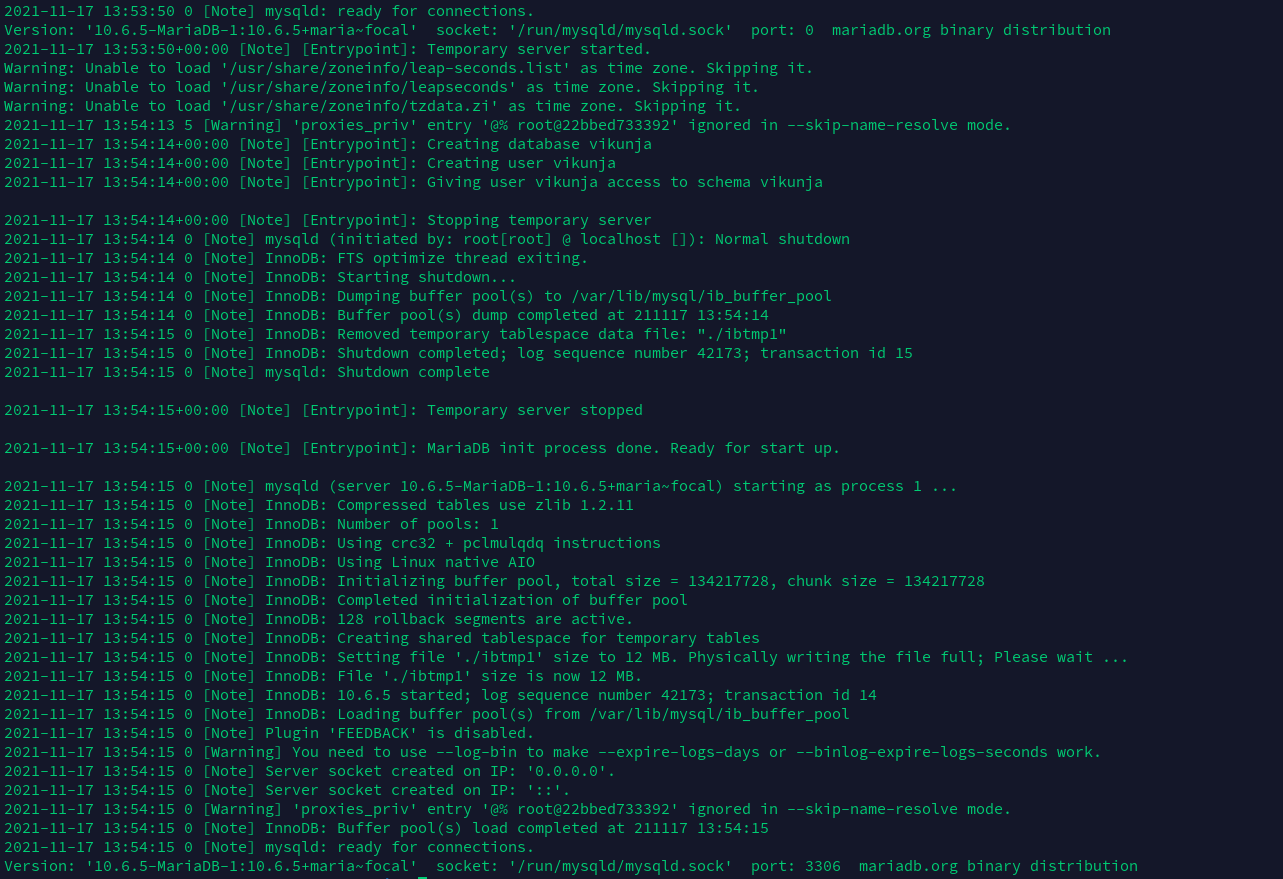
Frontend:

docker ps:

@rheaalleen commented on GitHub (Nov 17, 2021):
Another update: I went ahead and tried it again on the ESXi with the docker walkthrough section. And behold, it worked 🙃
I can't fathom why this is "broken" without a proxy.
@kolaente commented on GitHub (Nov 17, 2021):
Glad it seems to work now.
Since the original issue seems to be caused by a mariadb container, you might want to try it with the postgres example. It does not make any sense why this should work with a proxy and not without one.
@kolaente commented on GitHub (Nov 22, 2021):
Closing as resolved, feel free to ping if you have other issues.
@VincentSC commented on GitHub (Sep 28, 2024):
Because there is another docker-compose where you exposed the database to the proxy. So check with
docker container ls | grep "db"and see none of these are exposed to the proxy