Uploading files to Vaultwarden for Attachments or Send using Bitwarden Android app v2.18.0 (4572) does not work. #4930

Closed
opened 2026-03-07 20:07:02 -06:00 by GiteaMirror · 17 comments
Owner

Originally created by @mrclschstr on GitHub (May 29, 2022).

Originally assigned to: @BlackDex on GitHub.

Subject of the issue

Uploading files to Bitwarden Send using Bitwarden Android app v2.18.0 (4572) does not work.

Deployment environment

Your environment (Generated via diagnostics page)

  • Vaultwarden version: v1.25.0
  • Web-vault version: v2.28.1
  • Running within Docker: true (Base: Debian)
  • Environment settings overridden: true
  • Uses a reverse proxy: true
  • IP Header check: true (X-Real-IP)
  • Internet access: true
  • Internet access via a proxy: false
  • DNS Check: true
  • Time Check: true
  • Domain Configuration Check: true
  • HTTPS Check: true
  • Database type: MySQL
  • Database version: 10.6.8-MariaDB-1:10.6.8+maria~focal
  • Clients used: Bitwarden Android app v2.18.0 (4572)
  • Reverse proxy and version: nginx/1.20.2
  • Other relevant information: n/a

Config (Generated via diagnostics page)

Show Running Config

Environment settings which are overridden: DOMAIN, ADMIN_TOKEN

{
  "_duo_akey": null,
  "_enable_duo": false,
  "_enable_email_2fa": false,
  "_enable_smtp": true,
  "_enable_yubico": true,
  "_ip_header_enabled": true,
  "admin_ratelimit_max_burst": 3,
  "admin_ratelimit_seconds": 300,
  "admin_token": "***",
  "allowed_iframe_ancestors": "",
  "attachments_folder": "data/attachments",
  "authenticator_disable_time_drift": false,
  "data_folder": "data",
  "database_conn_init": "",
  "database_max_conns": 10,
  "database_timeout": 30,
  "database_url": "*****://***********:************@*******/***********",
  "db_connection_retries": 15,
  "disable_2fa_remember": false,
  "disable_admin_token": false,
  "disable_icon_download": false,
  "domain": "*****://*****.*****.**",
  "domain_origin": "*****://*****.*****.**",
  "domain_path": "",
  "domain_set": true,
  "duo_host": null,
  "duo_ikey": null,
  "duo_skey": null,
  "email_attempts_limit": 3,
  "email_expiration_time": 600,
  "email_token_size": 6,
  "emergency_access_allowed": true,
  "emergency_notification_reminder_schedule": "0 5 * * * *",
  "emergency_request_timeout_schedule": "0 5 * * * *",
  "enable_db_wal": true,
  "extended_logging": true,
  "helo_name": null,
  "hibp_api_key": null,
  "icon_blacklist_non_global_ips": true,
  "icon_blacklist_regex": null,
  "icon_cache_folder": "data/icon_cache",
  "icon_cache_negttl": 259200,
  "icon_cache_ttl": 2592000,
  "icon_download_timeout": 10,
  "icon_redirect_code": 302,
  "icon_service": "internal",
  "incomplete_2fa_schedule": "30 * * * * *",
  "incomplete_2fa_time_limit": 3,
  "invitation_org_name": "Vaultwarden",
  "invitations_allowed": false,
  "ip_header": "X-Real-IP",
  "job_poll_interval_ms": 30000,
  "log_file": "/data/logs/vaultwarden.log",
  "log_level": "warn",
  "log_timestamp_format": "%Y-%m-%d %H:%M:%S.%3f",
  "login_ratelimit_max_burst": 10,
  "login_ratelimit_seconds": 60,
  "org_attachment_limit": null,
  "org_creation_users": "",
  "password_iterations": 100000,
  "reload_templates": false,
  "require_device_email": false,
  "rsa_key_filename": "data/rsa_key",
  "send_purge_schedule": "0 5 * * * *",
  "sends_allowed": true,
  "sends_folder": "data/sends",
  "show_password_hint": false,
  "signups_allowed": false,
  "signups_domains_whitelist": "",
  "signups_verify": true,
  "signups_verify_resend_limit": 6,
  "signups_verify_resend_time": 3600,
  "smtp_accept_invalid_certs": false,
  "smtp_accept_invalid_hostnames": false,
  "smtp_auth_mechanism": null,
  "smtp_debug": false,
  "smtp_explicit_tls": null,
  "smtp_from": "*******@*****.**",
  "smtp_from_name": "Vaultwarden",
  "smtp_host": "****.*****.**",
  "smtp_password": "***",
  "smtp_port": 587,
  "smtp_security": "starttls",
  "smtp_ssl": null,
  "smtp_timeout": 15,
  "smtp_username": "*******@*****.**",
  "templates_folder": "data/templates",
  "tmp_folder": "data/tmp",
  "trash_auto_delete_days": null,
  "trash_purge_schedule": "0 5 0 * * *",
  "use_syslog": false,
  "user_attachment_limit": null,
  "web_vault_enabled": true,
  "web_vault_folder": "web-vault/",
  "websocket_address": "0.0.0.0",
  "websocket_enabled": false,
  "websocket_port": 3012,
  "yubico_client_id": "67759",
  "yubico_secret_key": "***",
  "yubico_server": null
}

Steps to reproduce

Open latest BItwarden Android app and create a new file in Send. Clicking Save results in an error message: Es ist ein Fehler aufgetreten (german, translates to "An error occurred").

Expected behaviour

A Send file is created and can be shared with others.

Actual behaviour

File is not uploaded to Send.

Troubleshooting data

You can upload a file via the web interface without any issue. I just discovered this error using the Bitwarden Android app v2.18.0 (4572). The vaultwarden trace logs show the following:

Vaultwarden Trace Log
[2022-05-29 10:35:59.468][start][INFO] Rocket has launched from http://0.0.0.0:80
[2022-05-29 10:36:07.063][mio::poll][TRACE] registering event source with poller: token=Token(2), interests=READABLE | WRITABLE
[2022-05-29 10:36:07.063][tracing::span][TRACE] parse_headers;
[2022-05-29 10:36:07.063][tracing::span::active][TRACE] -> parse_headers;
[2022-05-29 10:36:07.064][tracing::span::active][TRACE] <- parse_headers;
[2022-05-29 10:36:07.064][tracing::span][TRACE] -- parse_headers;
[2022-05-29 10:36:07.064][request][INFO] POST /api/sends/file/v2
[2022-05-29 10:36:07.064][response][INFO] 404 Not Found
[2022-05-29 10:36:07.064][tracing::span][TRACE] encode_headers;
[2022-05-29 10:36:07.064][tracing::span::active][TRACE] -> encode_headers;
[2022-05-29 10:36:07.064][tracing::span::active][TRACE] <- encode_headers;
[2022-05-29 10:36:07.064][tracing::span][TRACE] -- encode_headers;
[2022-05-29 10:36:07.064][mio::poll][TRACE] deregistering event source from poller
[2022-05-29 10:36:07.301][mio::poll][TRACE] registering event source with poller: token=Token(16777218), interests=READABLE | WRITABLE
[2022-05-29 10:36:07.302][tracing::span][TRACE] parse_headers;
[2022-05-29 10:36:07.302][tracing::span::active][TRACE] -> parse_headers;
[2022-05-29 10:36:07.302][tracing::span::active][TRACE] <- parse_headers;
[2022-05-29 10:36:07.302][tracing::span][TRACE] -- parse_headers;
[2022-05-29 10:36:07.302][request][INFO] POST /api/sends/file
[2022-05-29 10:36:07.306][multer::buffer][TRACE] finding next field: None
[2022-05-29 10:36:07.307][multer::buffer][TRACE] new field found at 607
[2022-05-29 10:36:07.307][multer::buffer][TRACE] finding next field: None
[2022-05-29 10:36:07.307][multer::buffer][TRACE] no new field found, not EOF, checking close
[2022-05-29 10:36:07.307][multer::buffer][TRACE] finding next field: None
[2022-05-29 10:36:07.307][multer::buffer][TRACE] finding next field: None
[2022-05-29 10:36:07.307][multer::buffer][TRACE] no new field found, not EOF, checking close
[2022-05-29 10:36:07.307][multer::buffer][TRACE] finding next field: None
[2022-05-29 10:36:07.307][multer::buffer][TRACE] finding next field: None
[2022-05-29 10:36:07.307][multer::buffer][TRACE] no new field found, not EOF, checking close
[2022-05-29 10:36:07.308][multer::buffer][TRACE] finding next field: None
[2022-05-29 10:36:07.308][multer::buffer][TRACE] finding next field: None
[2022-05-29 10:36:07.308][multer::buffer][TRACE] new field found at 69012
[2022-05-29 10:36:07.316][response][INFO] (post_send_file) POST /api/sends/file multipart/form-data => 422 Unprocessable Entity
[2022-05-29 10:36:07.316][tracing::span][TRACE] encode_headers;
[2022-05-29 10:36:07.316][tracing::span::active][TRACE] -> encode_headers;
[2022-05-29 10:36:07.316][tracing::span::active][TRACE] <- encode_headers;
[2022-05-29 10:36:07.316][tracing::span][TRACE] -- encode_headers;
[2022-05-29 10:36:07.317][mio::poll][TRACE] deregistering event source from poller

It seems that the Bitwarden Android app uses the API /api/sends/file/v2 (resulting in 422 Unprocessable Entity) whereas the the web interface uses the API /api/sends/file.

To rule out the possibility that the error is coming from the nginx reverse proxy, I've executed the command curl -sD - -o /dev/null http://localhost/api/sends/file/v2 directly in the vaultwarden container shell. I still get the 404 error:

HTTP/1.1 404 Not Found
content-type: text/html; charset=utf-8
server: Rocket
x-frame-options: SAMEORIGIN
permissions-policy: accelerometer=(), ambient-light-sensor=(), autoplay=(), camera=(), encrypted-media=(), fullscreen=(), geolocation=(), gyroscope=(), magnetometer=(), microphone=(), midi=(), payment=(), picture-in-picture=(), sync-xhr=(self "https://haveibeenpwned.com" "https://2fa.directory"), usb=(), vr=()
x-content-type-options: nosniff
referrer-policy: same-origin
x-xss-protection: 0
content-security-policy: frame-ancestors 'self' chrome-extension://nngceckbapebfimnlniiiahkandclblb chrome-extension://jbkfoedolllekgbhcbcoahefnbanhhlh moz-extension://* ;
cache-control: no-cache, no-store, max-age=0
content-length: 383
date: Sun, 29 May 2022 12:06:22 GMT

Does vaultwarden not yet implement the v2 api endpoint?

Originally created by @mrclschstr on GitHub (May 29, 2022). Originally assigned to: @BlackDex on GitHub. ### Subject of the issue Uploading files to Bitwarden Send using Bitwarden Android app v2.18.0 (4572) does not work. ### Deployment environment ### Your environment (Generated via diagnostics page) * Vaultwarden version: v1.25.0 * Web-vault version: v2.28.1 * Running within Docker: true (Base: Debian) * Environment settings overridden: true * Uses a reverse proxy: true * IP Header check: true (X-Real-IP) * Internet access: true * Internet access via a proxy: false * DNS Check: true * Time Check: true * Domain Configuration Check: true * HTTPS Check: true * Database type: MySQL * Database version: 10.6.8-MariaDB-1:10.6.8+maria~focal * Clients used: Bitwarden Android app v2.18.0 (4572) * Reverse proxy and version: nginx/1.20.2 * Other relevant information: n/a ### Config (Generated via diagnostics page) <details><summary>Show Running Config</summary> **Environment settings which are overridden:** DOMAIN, ADMIN_TOKEN ```json { "_duo_akey": null, "_enable_duo": false, "_enable_email_2fa": false, "_enable_smtp": true, "_enable_yubico": true, "_ip_header_enabled": true, "admin_ratelimit_max_burst": 3, "admin_ratelimit_seconds": 300, "admin_token": "***", "allowed_iframe_ancestors": "", "attachments_folder": "data/attachments", "authenticator_disable_time_drift": false, "data_folder": "data", "database_conn_init": "", "database_max_conns": 10, "database_timeout": 30, "database_url": "*****://***********:************@*******/***********", "db_connection_retries": 15, "disable_2fa_remember": false, "disable_admin_token": false, "disable_icon_download": false, "domain": "*****://*****.*****.**", "domain_origin": "*****://*****.*****.**", "domain_path": "", "domain_set": true, "duo_host": null, "duo_ikey": null, "duo_skey": null, "email_attempts_limit": 3, "email_expiration_time": 600, "email_token_size": 6, "emergency_access_allowed": true, "emergency_notification_reminder_schedule": "0 5 * * * *", "emergency_request_timeout_schedule": "0 5 * * * *", "enable_db_wal": true, "extended_logging": true, "helo_name": null, "hibp_api_key": null, "icon_blacklist_non_global_ips": true, "icon_blacklist_regex": null, "icon_cache_folder": "data/icon_cache", "icon_cache_negttl": 259200, "icon_cache_ttl": 2592000, "icon_download_timeout": 10, "icon_redirect_code": 302, "icon_service": "internal", "incomplete_2fa_schedule": "30 * * * * *", "incomplete_2fa_time_limit": 3, "invitation_org_name": "Vaultwarden", "invitations_allowed": false, "ip_header": "X-Real-IP", "job_poll_interval_ms": 30000, "log_file": "/data/logs/vaultwarden.log", "log_level": "warn", "log_timestamp_format": "%Y-%m-%d %H:%M:%S.%3f", "login_ratelimit_max_burst": 10, "login_ratelimit_seconds": 60, "org_attachment_limit": null, "org_creation_users": "", "password_iterations": 100000, "reload_templates": false, "require_device_email": false, "rsa_key_filename": "data/rsa_key", "send_purge_schedule": "0 5 * * * *", "sends_allowed": true, "sends_folder": "data/sends", "show_password_hint": false, "signups_allowed": false, "signups_domains_whitelist": "", "signups_verify": true, "signups_verify_resend_limit": 6, "signups_verify_resend_time": 3600, "smtp_accept_invalid_certs": false, "smtp_accept_invalid_hostnames": false, "smtp_auth_mechanism": null, "smtp_debug": false, "smtp_explicit_tls": null, "smtp_from": "*******@*****.**", "smtp_from_name": "Vaultwarden", "smtp_host": "****.*****.**", "smtp_password": "***", "smtp_port": 587, "smtp_security": "starttls", "smtp_ssl": null, "smtp_timeout": 15, "smtp_username": "*******@*****.**", "templates_folder": "data/templates", "tmp_folder": "data/tmp", "trash_auto_delete_days": null, "trash_purge_schedule": "0 5 0 * * *", "use_syslog": false, "user_attachment_limit": null, "web_vault_enabled": true, "web_vault_folder": "web-vault/", "websocket_address": "0.0.0.0", "websocket_enabled": false, "websocket_port": 3012, "yubico_client_id": "67759", "yubico_secret_key": "***", "yubico_server": null } ``` </details> ### Steps to reproduce Open latest BItwarden Android app and create a new file in Send. Clicking `Save` results in an error message: `Es ist ein Fehler aufgetreten` (german, translates to "An error occurred"). ### Expected behaviour A Send file is created and can be shared with others. ### Actual behaviour File is not uploaded to Send. ### Troubleshooting data You can upload a file via the web interface without any issue. I just discovered this error using the Bitwarden Android app v2.18.0 (4572). The vaultwarden trace logs show the following: <details><summary>Vaultwarden Trace Log</summary> ``` [2022-05-29 10:35:59.468][start][INFO] Rocket has launched from http://0.0.0.0:80 [2022-05-29 10:36:07.063][mio::poll][TRACE] registering event source with poller: token=Token(2), interests=READABLE | WRITABLE [2022-05-29 10:36:07.063][tracing::span][TRACE] parse_headers; [2022-05-29 10:36:07.063][tracing::span::active][TRACE] -> parse_headers; [2022-05-29 10:36:07.064][tracing::span::active][TRACE] <- parse_headers; [2022-05-29 10:36:07.064][tracing::span][TRACE] -- parse_headers; [2022-05-29 10:36:07.064][request][INFO] POST /api/sends/file/v2 [2022-05-29 10:36:07.064][response][INFO] 404 Not Found [2022-05-29 10:36:07.064][tracing::span][TRACE] encode_headers; [2022-05-29 10:36:07.064][tracing::span::active][TRACE] -> encode_headers; [2022-05-29 10:36:07.064][tracing::span::active][TRACE] <- encode_headers; [2022-05-29 10:36:07.064][tracing::span][TRACE] -- encode_headers; [2022-05-29 10:36:07.064][mio::poll][TRACE] deregistering event source from poller [2022-05-29 10:36:07.301][mio::poll][TRACE] registering event source with poller: token=Token(16777218), interests=READABLE | WRITABLE [2022-05-29 10:36:07.302][tracing::span][TRACE] parse_headers; [2022-05-29 10:36:07.302][tracing::span::active][TRACE] -> parse_headers; [2022-05-29 10:36:07.302][tracing::span::active][TRACE] <- parse_headers; [2022-05-29 10:36:07.302][tracing::span][TRACE] -- parse_headers; [2022-05-29 10:36:07.302][request][INFO] POST /api/sends/file [2022-05-29 10:36:07.306][multer::buffer][TRACE] finding next field: None [2022-05-29 10:36:07.307][multer::buffer][TRACE] new field found at 607 [2022-05-29 10:36:07.307][multer::buffer][TRACE] finding next field: None [2022-05-29 10:36:07.307][multer::buffer][TRACE] no new field found, not EOF, checking close [2022-05-29 10:36:07.307][multer::buffer][TRACE] finding next field: None [2022-05-29 10:36:07.307][multer::buffer][TRACE] finding next field: None [2022-05-29 10:36:07.307][multer::buffer][TRACE] no new field found, not EOF, checking close [2022-05-29 10:36:07.307][multer::buffer][TRACE] finding next field: None [2022-05-29 10:36:07.307][multer::buffer][TRACE] finding next field: None [2022-05-29 10:36:07.307][multer::buffer][TRACE] no new field found, not EOF, checking close [2022-05-29 10:36:07.308][multer::buffer][TRACE] finding next field: None [2022-05-29 10:36:07.308][multer::buffer][TRACE] finding next field: None [2022-05-29 10:36:07.308][multer::buffer][TRACE] new field found at 69012 [2022-05-29 10:36:07.316][response][INFO] (post_send_file) POST /api/sends/file multipart/form-data => 422 Unprocessable Entity [2022-05-29 10:36:07.316][tracing::span][TRACE] encode_headers; [2022-05-29 10:36:07.316][tracing::span::active][TRACE] -> encode_headers; [2022-05-29 10:36:07.316][tracing::span::active][TRACE] <- encode_headers; [2022-05-29 10:36:07.316][tracing::span][TRACE] -- encode_headers; [2022-05-29 10:36:07.317][mio::poll][TRACE] deregistering event source from poller ``` </details> It seems that the Bitwarden Android app uses the API `/api/sends/file/v2` (resulting in `422 Unprocessable Entity`) whereas the the web interface uses the API `/api/sends/file`. To rule out the possibility that the error is coming from the nginx reverse proxy, I've executed the command `curl -sD - -o /dev/null http://localhost/api/sends/file/v2` directly in the vaultwarden container shell. I still get the 404 error: ``` HTTP/1.1 404 Not Found content-type: text/html; charset=utf-8 server: Rocket x-frame-options: SAMEORIGIN permissions-policy: accelerometer=(), ambient-light-sensor=(), autoplay=(), camera=(), encrypted-media=(), fullscreen=(), geolocation=(), gyroscope=(), magnetometer=(), microphone=(), midi=(), payment=(), picture-in-picture=(), sync-xhr=(self "https://haveibeenpwned.com" "https://2fa.directory"), usb=(), vr=() x-content-type-options: nosniff referrer-policy: same-origin x-xss-protection: 0 content-security-policy: frame-ancestors 'self' chrome-extension://nngceckbapebfimnlniiiahkandclblb chrome-extension://jbkfoedolllekgbhcbcoahefnbanhhlh moz-extension://* ; cache-control: no-cache, no-store, max-age=0 content-length: 383 date: Sun, 29 May 2022 12:06:22 GMT ``` Does vaultwarden not yet implement the v2 api endpoint?
GiteaMirror added the Third partybug labels 2026-03-07 20:07:02 -06:00
Author
Owner

@BlackDex commented on GitHub (May 29, 2022):

Looks like the mobile clients send the data in a different way then the web-vault.
The same goes for Attachments as reported in #2512

@BlackDex commented on GitHub (May 29, 2022): Looks like the mobile clients send the data in a different way then the web-vault. The same goes for Attachments as reported in #2512
Author
Owner

@nathanael-h commented on GitHub (May 31, 2022):

Indeed: b8b41fe847/src/Core/Services/ApiService.cs (L253)

@nathanael-h commented on GitHub (May 31, 2022): Indeed: https://github.com/bitwarden/mobile/blob/b8b41fe847e3db5553a07f2a9246f4e8bc344b08/src/Core/Services/ApiService.cs#L253
Author
Owner

@BlackDex commented on GitHub (May 31, 2022):

They still also support v1, but they seem to send different kind of parameters.

@BlackDex commented on GitHub (May 31, 2022): They still also support v1, but they seem to send different kind of parameters.
Author
Owner

@BlackDex commented on GitHub (Jun 1, 2022):

It looks like this is an issue of some interpretation of the RFC's and what is commonly used currently.
During a multipart/data stream it is encouraged to use quotes around field names, and most clients seem to do that, and a lot of servers seem to not allow unquoted items. This is the same for Rocket. For some reason the Android client doesn't quote some field names, and that causes Rocket to not parse the request correctly.

Now they have created a PR after some debugging together with me, but that PR now causes it to be the other way around 😆 .
I got it working on the Android app, but not via the web-vault anymore. So, we just have to wait until that is solved for this to work unfortunately.

For those who are interested: https://github.com/rousan/multer-rs/pull/42

@BlackDex commented on GitHub (Jun 1, 2022): It looks like this is an issue of some interpretation of the RFC's and what is commonly used currently. During a multipart/data stream it is encouraged to use quotes around field names, and most clients seem to do that, and a lot of servers seem to not allow unquoted items. This is the same for Rocket. For some reason the Android client doesn't quote some field names, and that causes Rocket to not parse the request correctly. Now they have created a PR after some debugging together with me, but that PR now causes it to be the other way around 😆 . I got it working on the Android app, but not via the web-vault anymore. So, we just have to wait until that is solved for this to work unfortunately. For those who are interested: https://github.com/rousan/multer-rs/pull/42
Author
Owner

@KnightTim commented on GitHub (Jun 23, 2022):

Using web vault Version 2022.05.0 I can no longer upload attachments, I believe this is likely caused by the same issue.

Your environment (Generated via diagnostics page)

  • Vaultwarden version: v1.25.0
  • Web-vault version: v2022.05.0
  • Running within Docker: false (Base: Debian)
  • Environment settings overridden: false
  • Uses a reverse proxy: true
  • IP Header check: true (X-Real-IP)
  • Internet access: true
  • Internet access via a proxy: false
  • DNS Check: true
  • Time Check: true
  • Domain Configuration Check: true
  • HTTPS Check: true
  • Database type: SQLite
  • Database version: 3.35.4

I can upload any other info needed, please let me know.

@KnightTim commented on GitHub (Jun 23, 2022): Using web vault Version 2022.05.0 I can no longer upload attachments, I believe this is likely caused by the same issue. ### Your environment (Generated via diagnostics page) * Vaultwarden version: v1.25.0 * Web-vault version: v2022.05.0 * Running within Docker: false (Base: Debian) * Environment settings overridden: false * Uses a reverse proxy: true * IP Header check: true (X-Real-IP) * Internet access: true * Internet access via a proxy: false * DNS Check: true * Time Check: true * Domain Configuration Check: true * HTTPS Check: true * Database type: SQLite * Database version: 3.35.4 I can upload any other info needed, please let me know.
Author
Owner

@BlackDex commented on GitHub (Jun 23, 2022):

@KnightTim uploading attachments via the web-vault is broken? Or using the other clients?? Because for me uploading via the web-vault works without issues. Only the mobile and cli clients give issues.

@BlackDex commented on GitHub (Jun 23, 2022): @KnightTim uploading attachments via the web-vault is broken? Or using the other clients?? Because for me uploading via the web-vault works without issues. Only the mobile and cli clients give issues.
Author
Owner

@KnightTim commented on GitHub (Jun 23, 2022):

@KnightTim uploading attachments via the web-vault is broken? Or using the other clients?? Because for me uploading via the web-vault works without issues. Only the mobile and cli clients give issues.

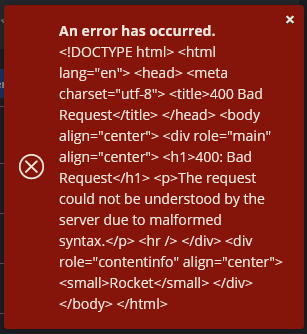
@BlackDex I get this error
image

What version of the web-vault are you running?

Edit: created a discussion https://github.com/dani-garcia/vaultwarden/discussions/2573

@KnightTim commented on GitHub (Jun 23, 2022): > @KnightTim uploading attachments via the web-vault is broken? Or using the other clients?? Because for me uploading via the web-vault works without issues. Only the mobile and cli clients give issues. @BlackDex I get this error ![image](https://user-images.githubusercontent.com/858797/175204926-4ca722d8-e2c1-4ff9-a5e1-6b0785b3a918.png) What version of the web-vault are you running? Edit: created a discussion https://github.com/dani-garcia/vaultwarden/discussions/2573
Author
Owner

@BlackDex commented on GitHub (Jun 23, 2022):

The exact same version. I suggest to start a discussion regarding this (not a new issue) and not clutter this issue, since i think you have some reverse proxy config issues.

@BlackDex commented on GitHub (Jun 23, 2022): The exact same version. I suggest to start a discussion regarding this (not a new issue) and not clutter this issue, since i think you have some reverse proxy config issues.
Author
Owner

@svenstaro commented on GitHub (Jul 15, 2022):

As an update, the upstream PR was merged in 677ce5cd1b and released in multer 2.0.3.

@svenstaro commented on GitHub (Jul 15, 2022): As an update, the upstream PR was merged in https://github.com/rousan/multer-rs/commit/677ce5cd1b2939d5aced78debd06932730efb19b and released in multer 2.0.3.
Author
Owner

@mrclschstr commented on GitHub (Aug 7, 2022):

Unfortunately this issue seems still not fixed for me; same issue, same 404 error. Meanwhile I'm currently using vaultwarden v1.25.1 and the Android app v2022.6.2 (4851).

@mrclschstr commented on GitHub (Aug 7, 2022): Unfortunately this issue seems still not fixed for me; same issue, same 404 error. Meanwhile I'm currently using vaultwarden v1.25.1 and the Android app v2022.6.2 (4851).
Author
Owner

@BlackDex commented on GitHub (Aug 7, 2022):

Have you installed the testing tagged image? Or are you using the latest tagged image?
Because the fix is only in the testing tagged image.

@BlackDex commented on GitHub (Aug 7, 2022): Have you installed the `testing` tagged image? Or are you using the `latest` tagged image? Because the fix is only in the `testing` tagged image.
Author
Owner

@BlackDex commented on GitHub (Aug 7, 2022):

To give a bit more context. We thought it would have been fixed in 1.25.1, though it caused an issue with mobile client uploads to be broken. So if you are still using that version and have uploaded files via the mobile client. They are probably broken.

In 1.25.2 we disabled this, and prevented those file uploads from reporting a false positive successful upload.

Now, in the current testing version there is a patch which allows these files to be uploaded again.
So, either use 1.25.2 which prevents broken uploads, or use the current testing image which has a fix for this.

@BlackDex commented on GitHub (Aug 7, 2022): To give a bit more context. We thought it would have been fixed in 1.25.1, though it caused an issue with mobile client uploads to be broken. So if you are still using that version and have uploaded files via the mobile client. They are probably broken. In 1.25.2 we disabled this, and prevented those file uploads from reporting a false positive successful upload. Now, in the current `testing` version there is a patch which allows these files to be uploaded again. So, either use 1.25.2 which prevents broken uploads, or use the current `testing` image which has a fix for this.
Author
Owner

@mrclschstr commented on GitHub (Aug 7, 2022):

I'm sorry, small typo: I'm currently using the latest vaultwarden v1.25.2.

The issue itself has not changed since my bug report: During a file upload in Sends via the Android app I'm still seeing an API access to /api/sends/file/v2 which gives me a 404 error. To rule out the reverse proxy, I've executed the command curl -sD - -o /dev/null http://localhost/api/sends/file/v2 directly in the vaultwarden container shell which also gives me a 404.

I'll give the testing branch a shot.

@mrclschstr commented on GitHub (Aug 7, 2022): I'm sorry, small typo: I'm currently using the latest vaultwarden v1.25.2. The issue itself has not changed since my bug report: During a file upload in Sends via the Android app I'm still seeing an API access to `/api/sends/file/v2` which gives me a 404 error. To rule out the reverse proxy, I've executed the command `curl -sD - -o /dev/null http://localhost/api/sends/file/v2` directly in the vaultwarden container shell which also gives me a 404. I'll give the `testing` branch a shot.
Author
Owner

@BlackDex commented on GitHub (Aug 7, 2022):

Well, that is correct, and that is no issue. Vaultwarden does not support /api/sends/file/v2 (yet). And that causes the clients to switch to the v1 way which works just fine.

So that 404 is as intended. But still, uploading works fine since it will use a different way.

@BlackDex commented on GitHub (Aug 7, 2022): Well, that is correct, and that is no issue. Vaultwarden does not support /api/sends/file/v2 (yet). And that causes the clients to switch to the v1 way which works just fine. So that 404 is as intended. But still, uploading works fine since it will use a different way.
Author
Owner

@mrclschstr commented on GitHub (Aug 7, 2022):

Well, that's the point: The app is not switching to the v1 API for me; does it work for you? Is that an issue of the Android app or the reverse proxy configuration? Using the web app upload works just fine!

@mrclschstr commented on GitHub (Aug 7, 2022): Well, that's the point: The app is not switching to the v1 API for me; does it work for you? Is that an issue of the Android app or the reverse proxy configuration? Using the web app upload works just fine!
Author
Owner

@BlackDex commented on GitHub (Aug 7, 2022):

If you are using the latest tagged version then currently you can't upload files via the mobile clients.
Use the testing tagged image for that.

And, yes, it works fine for me. Both Send and Cipher Attachments

@BlackDex commented on GitHub (Aug 7, 2022): If you are using the `latest` tagged version then currently you can't upload files via the mobile clients. Use the `testing` tagged image for that. And, yes, it works fine for me. Both `Send` and Cipher `Attachments`
Author
Owner

@mrclschstr commented on GitHub (Oct 17, 2022):

Works perfectly with 1.26.0., thank you!

@mrclschstr commented on GitHub (Oct 17, 2022): Works perfectly with 1.26.0., thank you!
Sign in to join this conversation.
1 Participants
Notifications
Due Date
No due date set.
Dependencies

No dependencies set.

Reference: github-starred/vaultwarden#4930