Originally created by @yumenoshizuku on GitHub (Feb 22, 2021).
Subject of the issue
In web vault, when cloning from one organization to another, the Collections pane shows There are no collections to list. when changing organization selection. But the desktop app can show the collections correctly.
Your environment
Bitwarden_rs version: 1.19.0, also tested with 1.18.0, 1.17.0
Web installed: 2.18.1, also tried substituting with bitwarden/web:2.18.1 docker image but the problem persists
Install method: Docker-compose
Clients used: Chrome, Firefox, Edge, Safari
Reverse proxy and version: Apache/2.4.41 (Ubuntu) on another machine
Edit .env, setup Apache reverse proxy on another machine, run bitwarden_rs with docker-compose up -d
Create two or more organizations, then create a few collections in each organization. Add one or more items to any of the collection. Click the gear icon and choose Clone.
Expected behaviour
When selecting a different organization under Ownership, the Collections pane should show a list of collections in that organization that the user has write access to.
Actual behaviour
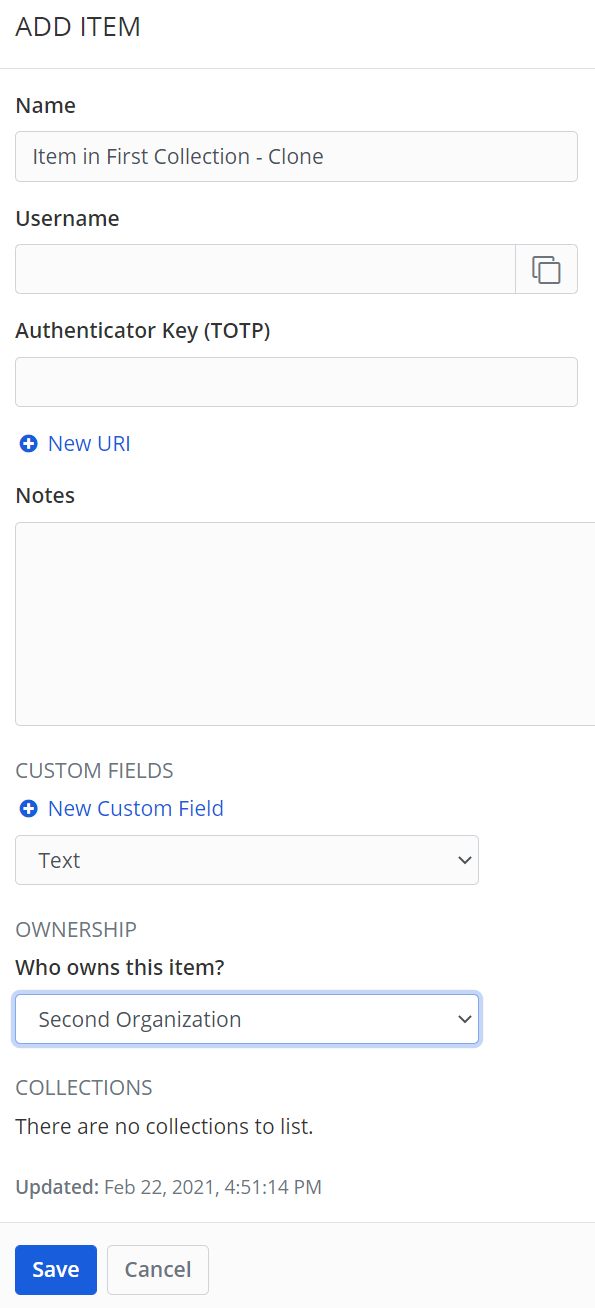
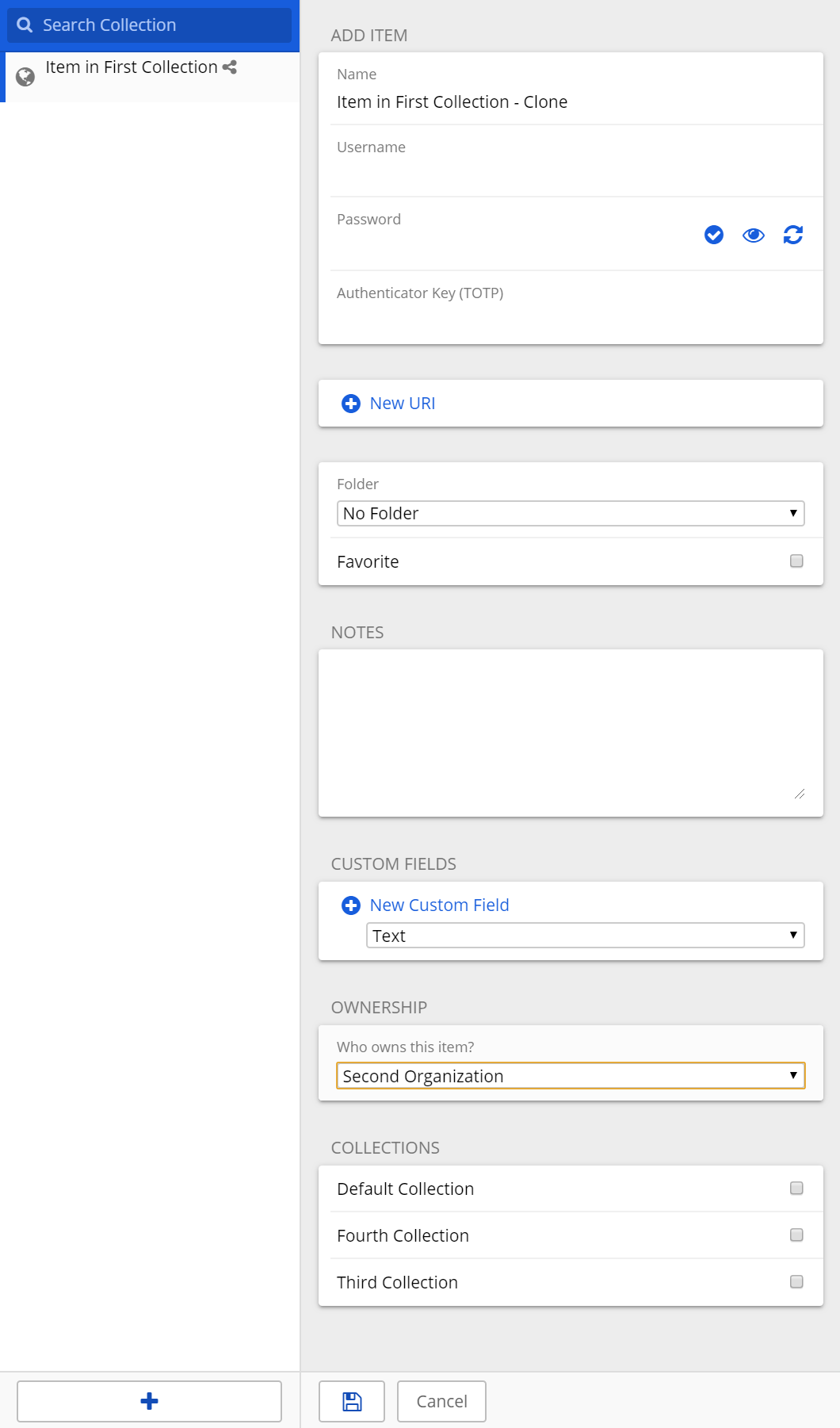
The Collections pane shows There are no collections to list.
Relevant logs
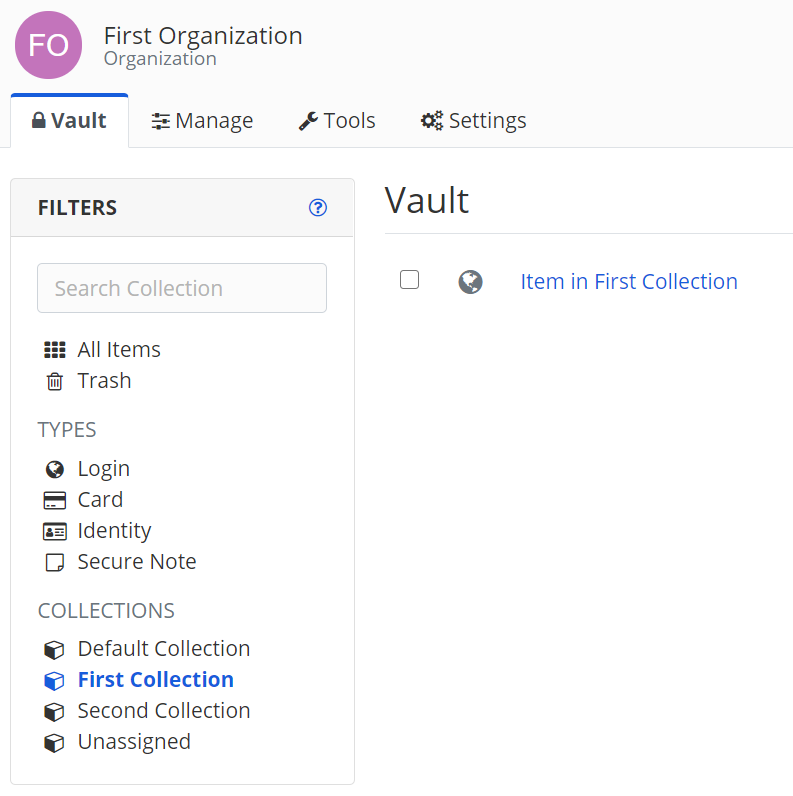
Created an item in First Organization, First Collection
Affter clicking Clone, can choose another collection in the same organization
After choosing another organization, no collections are shown
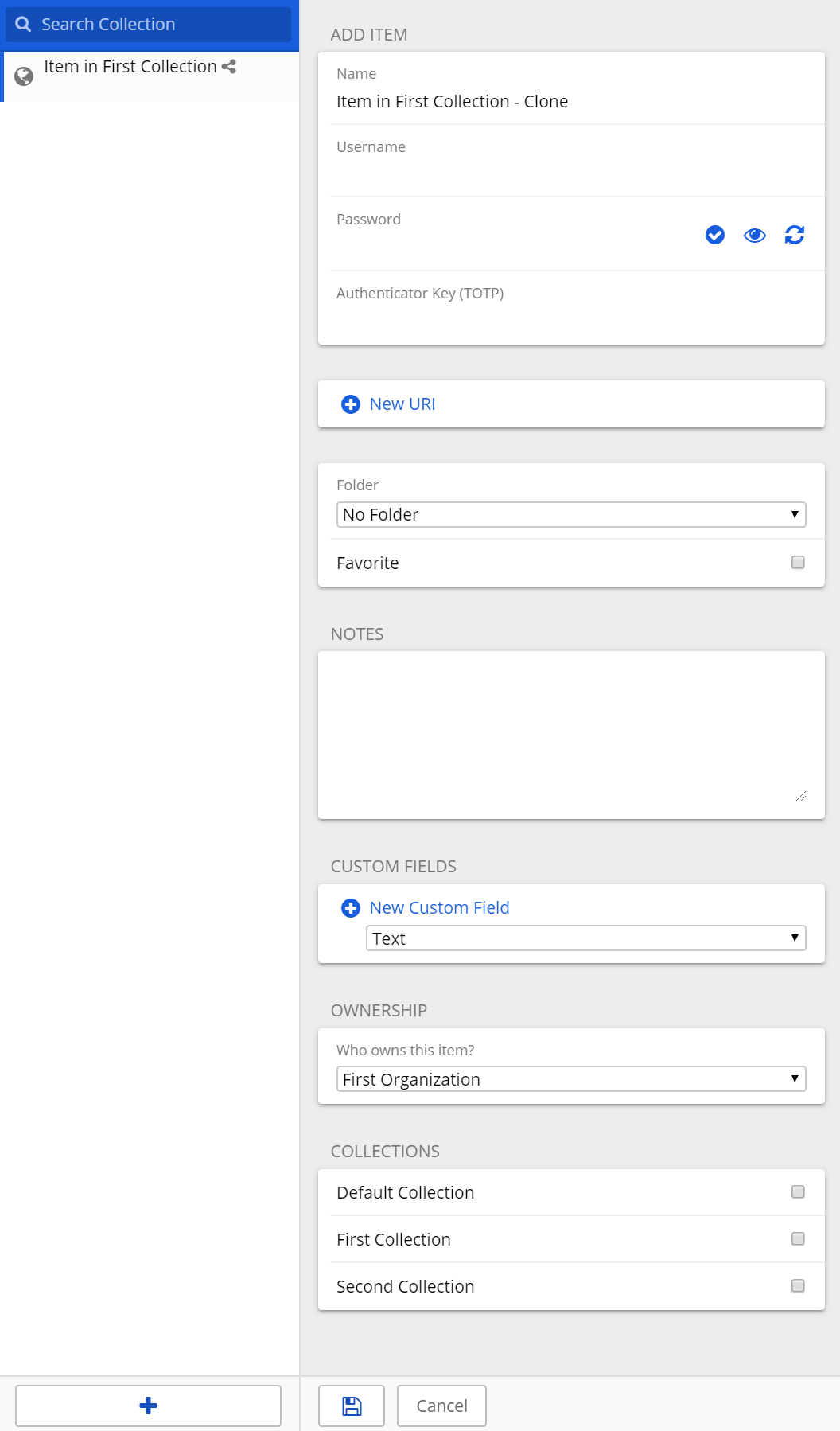
In desktop app, after clicking Clone, can choose another collection in the same organization
In desktop app, after choosing another organization, available collections are shown
Originally created by @yumenoshizuku on GitHub (Feb 22, 2021).
<!--
# ###
NOTE: Please update to the latest version of bitwarden_rs before reporting an issue!
This saves you and us a lot of time and troubleshooting.
See: https://github.com/dani-garcia/bitwarden_rs/issues/1180
# ###
-->
<!--
Please fill out the following template to make solving your problem easier and faster for us.
This is only a guideline. If you think that parts are unnecessary for your issue, feel free to remove them.
Remember to hide/obfuscate personal and confidential information,
such as names, global IP/DNS addresses and especially passwords, if necessary.
-->
### Subject of the issue
<!-- Describe your issue here.-->
In web vault, when cloning from one organization to another, the Collections pane shows `There are no collections to list.` when changing organization selection. But the desktop app can show the collections correctly.
### Your environment
<!-- The version number, obtained from the logs or the admin diagnostics page -->
<!-- Remember to check your issue on the latest version first! -->
* Bitwarden_rs version: 1.19.0, also tested with 1.18.0, 1.17.0
* Web installed: 2.18.1, also tried substituting with bitwarden/web:2.18.1 docker image but the problem persists
<!-- How the server was installed: Docker image / package / built from source -->
* Install method: Docker-compose
* Clients used: <!-- if applicable --> Chrome, Firefox, Edge, Safari
* Reverse proxy and version: <!-- if applicable --> Apache/2.4.41 (Ubuntu) on another machine
* Version of mysql/postgresql: <!-- if applicable --> SQLite 3
* Other relevant information:
```
# Reverse Proxy Configuration
<VirtualHost *:80>
ServerName public.domain.com
ProxyPreserveHost On
DocumentRoot /var/www/html
ProxyPass /.well-known !
ProxyPass / http://private.ip:80/
ProxyPassReverse / http://private.ip:80/
RewriteEngine on
RewriteCond %{SERVER_NAME} =public.domain.com
RewriteRule ^ https://%{SERVER_NAME}%{REQUEST_URI} [END,NE,R=permanent]
</VirtualHost>
<VirtualHost *:443>
ServerName public.domain.com
ProxyPreserveHost On
DocumentRoot /var/www/html
RewriteEngine On
RewriteCond %{HTTP:Upgrade} =websocket [NC]
RewriteRule /(.*) ws://private.ip:3012/$1 [P,L]
RewriteCond %{HTTP:Upgrade} !=websocket [NC]
RewriteRule /(.*) http://private.ip:80/$1 [P,L]
ProxyPass /.well-known !
ProxyPass / http://private.ip:80/
ProxyPassReverse / http://private.ip:80/
SSLCertificateFile /etc/letsencrypt/live/public.domain.com/fullchain.pem
SSLCertificateKeyFile /etc/letsencrypt/live/public.domain.com/privkey.pem
Include /etc/letsencrypt/options-ssl-apache.conf
</VirtualHost>
```
```
# Environment variables in .env file
WEBSOCKET_ENABLED=true
WEBSOCKET_ADDRESS=0.0.0.0
WEBSOCKET_PORT=3012
SIGNUPS_ALLOWED=false
ORG_CREATION_USERS=my_account_email
ADMIN_TOKEN=complex_token
DOMAIN=public.domain.com
```
```
# docker-compose.yml
version: '3'
services:
bitwarden:
image: bitwardenrs/server
restart: always
volumes:
- /bw-data:/data
ports:
- 80:80
- 3012:3012
env_file:
- /etc/bitwarden/.env
```
### Steps to reproduce
<!-- Tell us how to reproduce this issue. What parameters did you set (differently from the defaults)
and how did you start bitwarden_rs? -->
Edit .env, setup Apache reverse proxy on another machine, run bitwarden_rs with `docker-compose up -d`
Create two or more organizations, then create a few collections in each organization. Add one or more items to any of the collection. Click the gear icon and choose Clone.
### Expected behaviour
<!-- Tell us what should happen -->
When selecting a different organization under Ownership, the Collections pane should show a list of collections in that organization that the user has write access to.
### Actual behaviour
<!-- Tell us what happens instead -->
The Collections pane shows `There are no collections to list.`
### Relevant logs
<!-- Share some logfiles, screenshots or output of relevant programs with us. -->
Created an item in First Organization, First Collection
<img width="397" alt="ItemInFirstOrg" src="https://user-images.githubusercontent.com/4616011/108775400-0738ae80-752f-11eb-8cbe-692b3712affb.png">
Affter clicking Clone, can choose another collection in the same organization
<img width="298" alt="CloneInitial" src="https://user-images.githubusercontent.com/4616011/108775422-0e5fbc80-752f-11eb-82e0-b871da8ee757.png">
After choosing another organization, no collections are shown
<img width="298" alt="CloneSecondOrg" src="https://user-images.githubusercontent.com/4616011/108775439-13247080-752f-11eb-9149-d7deafbb83db.png">
In desktop app, after clicking Clone, can choose another collection in the same organization
<img width="528" alt="DesktopCloneInitial" src="https://user-images.githubusercontent.com/4616011/108775451-1586ca80-752f-11eb-9cec-b6810cf452c6.png">
In desktop app, after choosing another organization, available collections are shown
<img width="530" alt="DesktopCloneSecondOrg" src="https://user-images.githubusercontent.com/4616011/108775460-1881bb00-752f-11eb-8414-4a4c4616845a.png">
Thanks for the detailed report. I was able to reproduce this issue in the bitwarden_rs web vault. However, I was also able to reproduce it at https://vault.bitwarden.com/, so the issue originates in the upstream web vault code. I'd suggest opening an issue at https://github.com/bitwarden/web/issues and providing them the steps to reproduce.
When you open an issue there, I'd suggest that you only mention https://vault.bitwarden.com/, and leave out any mention of bitwarden_rs or your hosting environment to avoid any potential confusion about whether this is a bitwarden_rs issue. Or at least be very clear that the issue does affect https://vault.bitwarden.com/.
@jjlin commented on GitHub (Feb 23, 2021):
Thanks for the detailed report. I was able to reproduce this issue in the bitwarden_rs web vault. However, I was also able to reproduce it at https://vault.bitwarden.com/, so the issue originates in the upstream web vault code. I'd suggest opening an issue at https://github.com/bitwarden/web/issues and providing them the steps to reproduce.
When you open an issue there, I'd suggest that you only mention https://vault.bitwarden.com/, and leave out any mention of bitwarden_rs or your hosting environment to avoid any potential confusion about whether this is a bitwarden_rs issue. Or at least be very clear that the issue does affect https://vault.bitwarden.com/.
@vandermark1977 commented on GitHub (Dec 26, 2022):
Hmm, I am not using the browser plugin, I am just working inside the vault in the webbrowser. Plugin is active though... Why cant I see any collections when I try to clone to different organization?
@vandermark1977 commented on GitHub (Dec 26, 2022):
Hmm, I am not using the browser plugin, I am just working inside the vault in the webbrowser. Plugin is active though... Why cant I see any collections when I try to clone to different organization?

It doesn't matter which client you use. It just isn't supported.
Only way would be to clone it to your personal vault and then move it to the other org afterwards.
@BlackDex commented on GitHub (Dec 26, 2022):
It doesn't matter which client you use. It just isn't supported.
Only way would be to clone it to your personal vault and then move it to the other org afterwards.
Blocking a user prevents them from interacting with repositories, such as opening or commenting on pull requests or issues. Learn more about blocking a user.
Originally created by @yumenoshizuku on GitHub (Feb 22, 2021).
Subject of the issue
In web vault, when cloning from one organization to another, the Collections pane shows
There are no collections to list.when changing organization selection. But the desktop app can show the collections correctly.Your environment
Steps to reproduce
Edit .env, setup Apache reverse proxy on another machine, run bitwarden_rs with
docker-compose up -dCreate two or more organizations, then create a few collections in each organization. Add one or more items to any of the collection. Click the gear icon and choose Clone.
Expected behaviour
When selecting a different organization under Ownership, the Collections pane should show a list of collections in that organization that the user has write access to.
Actual behaviour
The Collections pane shows
There are no collections to list.Relevant logs
Created an item in First Organization, First Collection
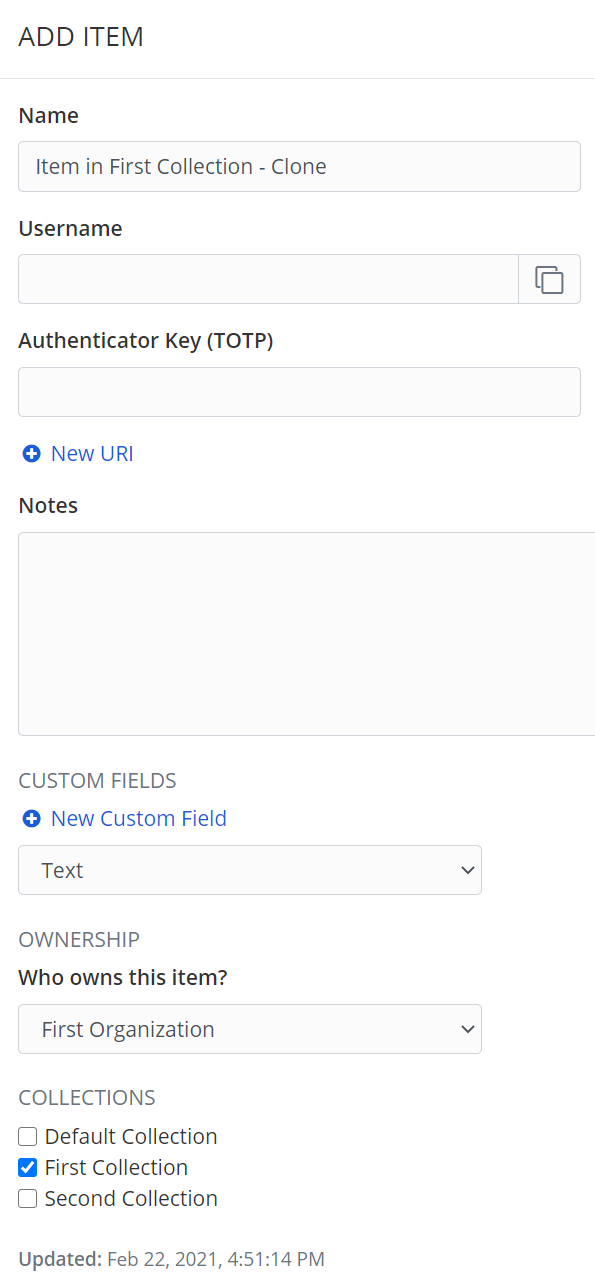
Affter clicking Clone, can choose another collection in the same organization
After choosing another organization, no collections are shown
In desktop app, after clicking Clone, can choose another collection in the same organization
In desktop app, after choosing another organization, available collections are shown
@jjlin commented on GitHub (Feb 23, 2021):
Thanks for the detailed report. I was able to reproduce this issue in the bitwarden_rs web vault. However, I was also able to reproduce it at https://vault.bitwarden.com/, so the issue originates in the upstream web vault code. I'd suggest opening an issue at https://github.com/bitwarden/web/issues and providing them the steps to reproduce.
When you open an issue there, I'd suggest that you only mention https://vault.bitwarden.com/, and leave out any mention of bitwarden_rs or your hosting environment to avoid any potential confusion about whether this is a bitwarden_rs issue. Or at least be very clear that the issue does affect https://vault.bitwarden.com/.
@yumenoshizuku commented on GitHub (Feb 23, 2021):
Thanks for the advice!
@vandermark1977 commented on GitHub (Dec 26, 2022):
I have the same problem? Is this resolved?
@BlackDex commented on GitHub (Dec 26, 2022):
See https://github.com/dani-garcia/vaultwarden/discussions/3016
@vandermark1977 commented on GitHub (Dec 26, 2022):
Hmm, I am not using the browser plugin, I am just working inside the vault in the webbrowser. Plugin is active though... Why cant I see any collections when I try to clone to different organization?
@BlackDex commented on GitHub (Dec 26, 2022):
It doesn't matter which client you use. It just isn't supported.
Only way would be to clone it to your personal vault and then move it to the other org afterwards.
@vandermark1977 commented on GitHub (Dec 26, 2022):
Thank you, that makes the issue clear for me. Your suggestion worked fine, tx!