This seems to happen because an error sending the login email, do you have it enabled and configured correctly?
@dani-garcia commented on GitHub (Aug 18, 2019):
This seems to happen because an error sending the login email, do you have it enabled and configured correctly?
@TuEstUnePommeDeTerre commented on GitHub (Aug 19, 2019):
I have the SMTP settings set according to the wiki, but you're right; they do not seem to work.
The password hint page generates a similar error.
Interestingly though, the error persists with the SMTP configuration disabled.
Here is a redacted version of my docker-compose file:
version:"3"services:bitwarden:image:bitwardenrs/server:latestrestart:alwaysvolumes:- ./bw-data:/data- /etc/localtime:/etc/localtime:ronetworks:- privateenvironment:WEBSOCKET_ENABLED:"true"# Required to use websocketsSIGNUPS_ALLOWED:"false"# set to false to disable signupsDOMAIN:"https://bitwarden.DOMAIN.com"# Enable U2F supportSHOW_PASSWORD_HINT:"false"# Disable password hints on login pageLOG_FILE:"/data/bitwarden.log"# Enable loggingSMTP_HOST:"smtp.host.com"SMTP_FROM:"bitwarden@DOMAIN.com"SMTP_PORT:"587"SMTP_SSL:"true"SMTP_USERNAME:"USERNAME"SMTP_PASSWORD:"PASSWORD"DISABLE_ICON_DOWNLOAD:"true"DUO_IKEY:"IKEY"DUO_SKEY:"SKEY"DUO_HOST:"api-XXXXXXXX.duosecurity.com"RUST_BACKTRACE:"full"caddy:image:abiosoft/caddyrestart:alwaysvolumes:- ./Caddyfile:/etc/Caddyfile:ro- caddycerts:/root/.caddy- /etc/localtime:/etc/localtime:ronetworks:private:docker_vlan:ipv4_address:192.168.1.27environment:ACME_AGREE:"true"# agree to Let's Encrypt Subscriber AgreementDOMAIN:"bitwarden.DOMAIN.com"# Used for Auto Let's Encrypt SSLEMAIL:"email@DOMAIN.com"# Optional, provided to Let's Encryptvolumes:caddycerts:networks:private:internal:truedocker_vlan:external:name:docker_vlan
@TuEstUnePommeDeTerre commented on GitHub (Aug 19, 2019):
I have the SMTP settings set according to the wiki, but you're right; they do not seem to work.
The password hint page generates a similar error.
Interestingly though, the error persists with the SMTP configuration disabled.
Here is a redacted version of my docker-compose file:
```#docker-compose.yml
version: "3"
services:
bitwarden:
image: bitwardenrs/server:latest
restart: always
volumes:
- ./bw-data:/data
- /etc/localtime:/etc/localtime:ro
networks:
- private
environment:
WEBSOCKET_ENABLED: "true" # Required to use websockets
SIGNUPS_ALLOWED: "false" # set to false to disable signups
DOMAIN: "https://bitwarden.DOMAIN.com" # Enable U2F support
SHOW_PASSWORD_HINT: "false" # Disable password hints on login page
LOG_FILE: "/data/bitwarden.log" # Enable logging
SMTP_HOST: "smtp.host.com"
SMTP_FROM: "bitwarden@DOMAIN.com"
SMTP_PORT: "587"
SMTP_SSL: "true"
SMTP_USERNAME: "USERNAME"
SMTP_PASSWORD: "PASSWORD"
DISABLE_ICON_DOWNLOAD: "true"
DUO_IKEY: "IKEY"
DUO_SKEY: "SKEY"
DUO_HOST: "api-XXXXXXXX.duosecurity.com"
RUST_BACKTRACE: "full"
caddy:
image: abiosoft/caddy
restart: always
volumes:
- ./Caddyfile:/etc/Caddyfile:ro
- caddycerts:/root/.caddy
- /etc/localtime:/etc/localtime:ro
networks:
private:
docker_vlan:
ipv4_address: 192.168.1.27
environment:
ACME_AGREE: "true" # agree to Let's Encrypt Subscriber Agreement
DOMAIN: "bitwarden.DOMAIN.com" # Used for Auto Let's Encrypt SSL
EMAIL: "email@DOMAIN.com" # Optional, provided to Let's Encrypt
volumes:
caddycerts:
networks:
private:
internal: true
docker_vlan:
external:
name: docker_vlan
```
@TuEstUnePommeDeTerre commented on GitHub (Aug 21, 2019):
I gave up and just rebuilt the docker instance in a VM. I might have had a port closed somewhere. It's still weird to me that the email error was thrown even when the SMTP settings were not enabled.
@TuEstUnePommeDeTerre commented on GitHub (Aug 21, 2019):
I gave up and just rebuilt the docker instance in a VM. I might have had a port closed somewhere. It's still weird to me that the email error was thrown even when the SMTP settings were not enabled.
Blocking a user prevents them from interacting with repositories, such as opening or commenting on pull requests or issues. Learn more about blocking a user.
Originally created by @TuEstUnePommeDeTerre on GitHub (Aug 17, 2019).
I am unable to log in to the web and desktop clients with Duo enabled.
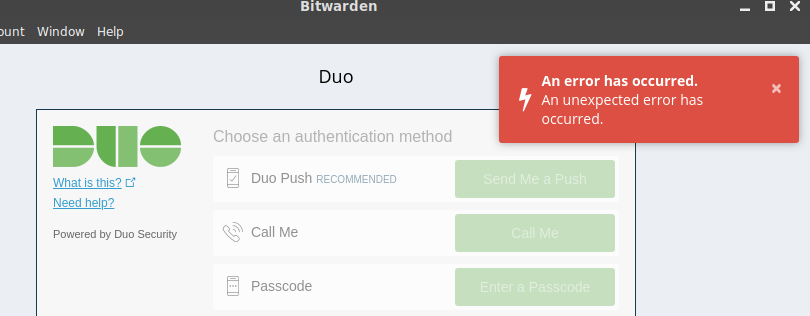
However, it does work on the Android app and the web vault.
I've included my docker log with RUST_BACKTRACE=full
The json error occurs in successful logons.
@dani-garcia commented on GitHub (Aug 18, 2019):
This seems to happen because an error sending the login email, do you have it enabled and configured correctly?
@TuEstUnePommeDeTerre commented on GitHub (Aug 19, 2019):
I have the SMTP settings set according to the wiki, but you're right; they do not seem to work.
The password hint page generates a similar error.
Interestingly though, the error persists with the SMTP configuration disabled.
Here is a redacted version of my docker-compose file:
@TuEstUnePommeDeTerre commented on GitHub (Aug 21, 2019):
I gave up and just rebuilt the docker instance in a VM. I might have had a port closed somewhere. It's still weird to me that the email error was thrown even when the SMTP settings were not enabled.