mirror of
https://github.com/dani-garcia/vaultwarden.git
synced 2026-07-16 17:02:14 -05:00
U2F not working on Chrome 75 #293

No Assignees

Notifications
Due Date
No due date set.
Dependencies
No dependencies set.
Reference: github-starred/vaultwarden#293
Reference in New Issue
Block a user
Delete Branch "%!s()"
Deleting a branch is permanent. Although the deleted branch may continue to exist for a short time before it actually gets removed, it CANNOT be undone in most cases. Continue?
Originally created by @n1am on GitHub (May 7, 2019).
Hi,
I'm running bitwarden_rs on docker behind an nginx proxy, using the same nginx configuration posted in the wiki.
I'm having trouble registering my U2F keys on Chrome (version 74 and 75-dev). During che registration process I get this error:
listening for key... Fetch finished loading: POST "https://mydomain.ltd/api/two-factor/get-u2f-challenge". u2f.js:628 Extension JS API Version: 1.1 two-factor-u2f.component.ts:138 error: 2Using Firefox (with u2f support enabled) the registration and login process works fine. I used Firefox 66.0.4 and Firefox ESR 60.6.2.
Best regards
Andrea
@dani-garcia commented on GitHub (May 7, 2019):
Did you configure the DOMAIN env variable to be equal to the URL used to access the service? Like
https://mydomain.ltd.Error 2 is usually a mismatched URL.
@n1am commented on GitHub (May 7, 2019):
Hi,
thanks for the quick reply.
The DOMAIN env variable is equal to the URL and the app-id.json presents the right URL.
I've encountered the problem only on Chrome. Using Firefox the auth process using U2F does not result in any error. I tried on different PC, with the latest Chrome stable and Dev version, unfortunately the issue persist. So I'm thinking that the problem is Chrome since it works fine on Firefox.
When I'm asked to insert the U2F security key, in the Chrome console I'm getting this error 400 in this request url: https://vault.mydomain.ltd/identity/connect/token
@algernon commented on GitHub (May 9, 2019):
I'm seeing the same issue with Chrome 74 on Linux. My keys work fine under Firefox, but for some odd reason, it fails in Chrome.
FWIW, the Yubikey in question used to work at other places in Chrome, but even those fail now, while Firefox works. I guess this is a Chrome issue...
@allgoewer commented on GitHub (May 13, 2019):
I am having the same problem with chrome 74 (Windows 10).
Console output is the same as @n1am is getting.
Edit: The u2f-key is a Yubikey 4. Contrary to @algernon's observation, the key works with other sites, such as gmail or github.
My app-id.json looks like this:
@kuruptedfiend commented on GitHub (May 13, 2019):
I am also seeing this issue with Chrome 74. Keys work fine in Firefox, previously worked in Chrome.
@dani-garcia commented on GitHub (May 13, 2019):
So I tried registering a key just now and the errorCode 2 seems to be caused by an encoding issue:
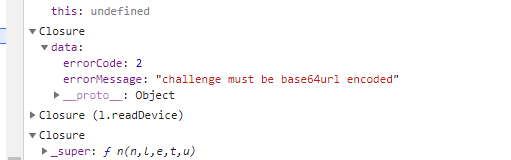
Chrome expects base64url while we send normal base64, I think.
Also not sure if related, as I couldn't look into it, but gitea is also having problems with U2F and Chrome 74, which makes me think there was a recent change in Chrome breaking this:
https://github.com/go-gitea/gitea/issues/6748
@allgoewer commented on GitHub (May 14, 2019):
This is the corresponding chromium-commit which forces challenges to be base64-url encoded (according to spec).
u2f-rs encodes the challenge as base64, see this line
@dani-garcia commented on GitHub (May 15, 2019):
I've updated the u2f crate to use base64url with no padding in all cases, and switched it in a commit right now, and that seems to solve the issue for me.
For anyone wanting to test it, you can compile the master branch of the project yourselves or wait a couple of hours until the docker images are built.
After some more users confirm the fix works I'll send a PR to the official u2f repo, instead of using the fork.
@n1am commented on GitHub (May 16, 2019):
Hi,
just tested the latest build. Problem solved.
Thanks
@allgoewer commented on GitHub (May 16, 2019):
It seems to also be working for me, Chrome and Firefox.