mirror of
https://github.com/dani-garcia/vaultwarden.git
synced 2026-07-17 09:22:30 -05:00
Web vault installing issue #266

No Assignees

Notifications
Due Date
No due date set.
Dependencies
No dependencies set.
Reference: github-starred/vaultwarden#266
Reference in New Issue
Block a user
Delete Branch "%!s()"
Deleting a branch is permanent. Although the deleted branch may continue to exist for a short time before it actually gets removed, it CANNOT be undone in most cases. Continue?
Originally created by @shd128 on GitHub (Mar 26, 2019).
Im trying to install the compiled version of the web vault but I don't know where should I place the bw_web_v2.10.0.tar.gz
I tried unzipping it and copying it to /root/bitwarden_rs-1.8.0/target/release/
and the run
[root@preprod-bitwarden01 bitwarden_rs-1.8.0]# cargo run --release
And I get:
[root@preprod-bitwarden01 bitwarden_rs-1.8.0]# cargo build --release
Compiling bitwarden_rs v1.0.0 (/root/bitwarden_rs-1.8.0)
Finished release [optimized] target(s) in 1m 20s
[root@preprod-bitwarden01 bitwarden_rs-1.8.0]# cargo run --release
Compiling bitwarden_rs v1.0.0 (/root/bitwarden_rs-1.8.0)
Finished release [optimized] target(s) in 1m 20s
Running
target/release/bitwarden_rs/--------------------------------------------------------------------\
[2019-03-26 12:45:12][bitwarden_rs][ERROR] Web vault is not found. To install it, please follow the steps in https://github.com/dani-garcia/bitwarden_rs/wiki/Building-binary#install-the-web-vault
Im doing something wrong
@mqus commented on GitHub (Mar 26, 2019):
you have to put the contents of the archive (e.g.
version.json,app/, etc) into theweb-vaultfolder. This folder has to be created as a subdirectory of thebitwarden_rsfolder where you run thecargo run [...]command, similarly to the description in https://github.com/dani-garcia/bitwarden_rs/wiki/Building-binary#install-the-web-vault .@shd128 commented on GitHub (Mar 26, 2019):
ok, that did the trick.
Now im trying to acces with my IP adress plus port 8000 but it doesn't work.
[root@preprod-bitwarden01 bitwarden_rs-1.8.0]# cargo run --release
Compiling bitwarden_rs v1.0.0 (/root/bitwarden_rs-1.8.0)
Finished release [optimized] target(s) in 1m 20s
Running
target/release/bitwarden_rs/--------------------------------------------------------------------\
[2019-03-26 13:50:50][launch][INFO] 🔧 Configured for production.
[2019-03-26 13:50:50][launch_][INFO] address: 0.0.0.0
[2019-03-26 13:50:50][launch_][INFO] port: 8000
[2019-03-26 13:50:50][launch_][INFO] log: critical
[2019-03-26 13:50:50][launch_][INFO] workers: 4
[2019-03-26 13:50:50][launch_][INFO] secret key: generated
[2019-03-26 13:50:50][launch_][INFO] limits: forms = 32KiB, json* = 10MiB
[2019-03-26 13:50:50][launch_][INFO] keep-alive: 5s
[2019-03-26 13:50:50][launch_][INFO] tls: disabled
[2019-03-26 13:50:50][rocket::rocket][WARN] environment is 'production', but no
secret_keyis configured[2019-03-26 13:50:50][rocket::fairing::fairings][INFO] 📡 Fairings:
[2019-03-26 13:50:50][_][INFO] 1 response: Application Headers
[2019-03-26 13:50:50][launch][INFO] 🚀 Rocket has launched from http://0.0.0.0:8000
@shd128 commented on GitHub (Mar 26, 2019):
Where are the conf files located at? I think I should put my ip somewhere
@mqus commented on GitHub (Mar 26, 2019):
bitwarden_rs is configured via environment variables, a file listing all of them is
.env.template.But changing the ip would not help here because listening to
0.0.0.0usually means that it listens to ALL ip packets (ipv4) send to the machine and not only those sent to a specific interface. You could set the ip-address later to increase security but for just trying it out this should suffice.If you can't access bitwarden_rs at the ip of the vm, check if the vm accepts connections at all and if the firewall of the vm (if it exists)is configured to let incoming connections through.
@shd128 commented on GitHub (Mar 26, 2019):
You were right, the firewall was stopping the conection. Now its working. Thank you so much for everything.
@mqus commented on GitHub (Mar 26, 2019):
You can also rename
.env.templateto.envand directly uncomment and change the variables there to configure bitwarden.@shd128 commented on GitHub (Mar 26, 2019):
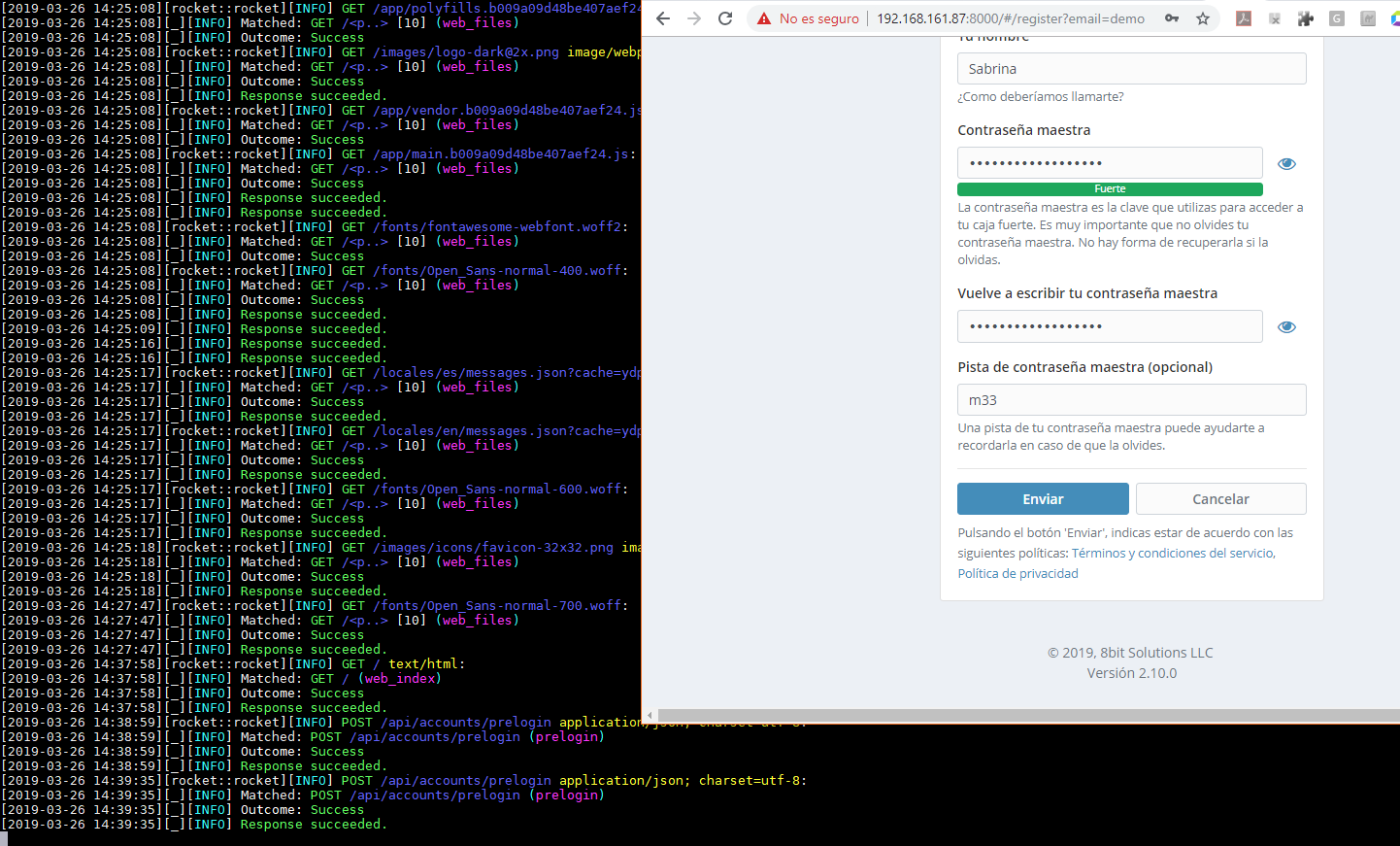
It did load but when creating an user the Send bottom doesn't do anything.
@dani-garcia commented on GitHub (Mar 26, 2019):
Chrome doesn't allow the necessary crypto apis needed to create the account when using http. You can either enable HTTPS or use firefox or another browser to create the account. Everything else should work the same on any browser.
@shd128 commented on GitHub (Mar 26, 2019):
Yes you right, it works on firefox. On chrome I couldn't even log in, even if I created the user in firefox. I will use firefox for this then till I enable https.
Thanks for you help!