Originally created by @calvin-li-developer on GitHub (Apr 3, 2023).
Subject of the issue
Deployment environment
vaultwarden version: 1.28.1
Install method: docker via docker compose up -d
Clients used: web browser extension firefox / edge /chrome
Reverse proxy and version: yes via cloudflare tunnels
MySQL/MariaDB or PostgreSQL version: n/a
Other relevant details:
Steps to reproduce
So I have updated to the latest version of vaultwarden using docker compose pull and docker compose up -d then I checked the version via cli with command docker exec vaultwarden /vaultwarden --version and got version 1.28.1
Expected behaviour
Should show version 1.28.1 for server version on the extension about page.
Actual behaviour
when I checked on firefox extension it still shows 1.28.0 but also when I checked via chrome or edge extension it doesnt display any version after the like server version (thrid party):
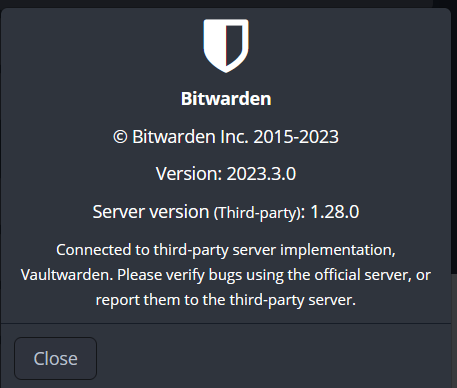
Firefox about page:
Edge/Chrome about page:
Troubleshooting data
Originally created by @calvin-li-developer on GitHub (Apr 3, 2023).
<!--
# ###
NOTE: Please update to the latest version of vaultwarden before reporting an issue!
This saves you and us a lot of time and troubleshooting.
See:
* https://github.com/dani-garcia/vaultwarden/issues/1180
* https://github.com/dani-garcia/vaultwarden/wiki/Updating-the-vaultwarden-image
# ###
-->
<!--
Please fill out the following template to make solving your problem easier and faster for us.
This is only a guideline. If you think that parts are unnecessary for your issue, feel free to remove them.
Remember to hide/redact personal or confidential information,
such as passwords, IP addresses, and DNS names as appropriate.
-->
### Subject of the issue
<!-- Describe your issue here. -->
### Deployment environment
<!--
=========================================================================================
Preferably, use the `Generate Support String` button on the admin page's Diagnostics tab.
That will auto-generate most of the info requested in this section.
=========================================================================================
-->
<!-- The version number, obtained from the logs (at startup) or the admin diagnostics page -->
<!-- This is NOT the version number shown on the web vault, which is versioned separately from vaultwarden -->
<!-- Remember to check if your issue exists on the latest version first! -->
* vaultwarden version: 1.28.1
<!-- How the server was installed: Docker image, OS package, built from source, etc. -->
* Install method: docker via `docker compose up -d`
* Clients used: <!-- web vault, desktop, Android, iOS, etc. (if applicable) --> web browser extension firefox / edge /chrome
* Reverse proxy and version: <!-- if applicable --> yes via cloudflare tunnels
* MySQL/MariaDB or PostgreSQL version: <!-- if applicable --> n/a
* Other relevant details:
### Steps to reproduce
<!-- Tell us how to reproduce this issue. What parameters did you set (differently from the defaults)
and how did you start vaultwarden? -->
So I have updated to the latest version of vaultwarden using `docker compose pull` and `docker compose up -d` then I checked the version via cli with command `docker exec vaultwarden /vaultwarden --version` and got version 1.28.1
### Expected behaviour
<!-- Tell us what you expected to happen -->
Should show version 1.28.1 for server version on the extension about page.
### Actual behaviour
when I checked on firefox extension it still shows 1.28.0 but also when I checked via chrome or edge extension it doesnt display any version after the like server version (thrid party):
Firefox about page:

Edge/Chrome about page:

<!-- Tell us what actually happened -->
### Troubleshooting data
<!-- Share any log files, screenshots, or other relevant troubleshooting data -->
It's probably cached on the client side.
You can check the version we return by going to https://your.domsin.tld/api/config
@BlackDex commented on GitHub (Apr 3, 2023):
It's probably cached on the client side.
You can check the version we return by going to `https://your.domsin.tld/api/config`
@calvin-li-developer commented on GitHub (Apr 3, 2023):
Oddly enough when I reinstall bitwarden extension on firefox it has the same screenshot result has the edge / chrome one.
It's probably cached on the client side. You can check the version we return by going to https://your.domsin.tld/api/config
This does display the correct version of vaultwarden. Thanks for the link.
I guess now i'm not sure if its an issue but it doesn't display version at all for the extension about page.
@calvin-li-developer commented on GitHub (Apr 3, 2023):
Oddly enough when I reinstall bitwarden extension on firefox it has the same screenshot result has the edge / chrome one.
> It's probably cached on the client side. You can check the version we return by going to `https://your.domsin.tld/api/config`
This does display the correct version of vaultwarden. Thanks for the link.
I guess now i'm not sure if its an issue but it doesn't display version at all for the extension about page.
Blocking a user prevents them from interacting with repositories, such as opening or commenting on pull requests or issues. Learn more about blocking a user.
Originally created by @calvin-li-developer on GitHub (Apr 3, 2023).
Subject of the issue
Deployment environment
Install method: docker via
docker compose up -dClients used: web browser extension firefox / edge /chrome
Reverse proxy and version: yes via cloudflare tunnels
MySQL/MariaDB or PostgreSQL version: n/a
Other relevant details:
Steps to reproduce
So I have updated to the latest version of vaultwarden using
docker compose pullanddocker compose up -dthen I checked the version via cli with commanddocker exec vaultwarden /vaultwarden --versionand got version 1.28.1Expected behaviour
Should show version 1.28.1 for server version on the extension about page.
Actual behaviour
when I checked on firefox extension it still shows 1.28.0 but also when I checked via chrome or edge extension it doesnt display any version after the like server version (thrid party):

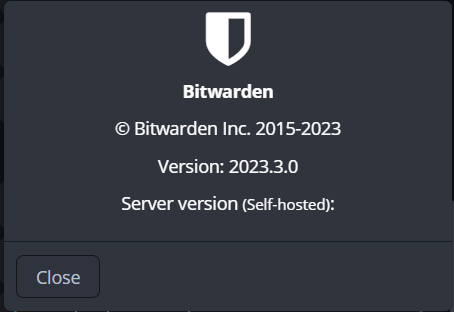
Firefox about page:
Edge/Chrome about page:
Troubleshooting data
@BlackDex commented on GitHub (Apr 3, 2023):
It's probably cached on the client side.
You can check the version we return by going to
https://your.domsin.tld/api/config@calvin-li-developer commented on GitHub (Apr 3, 2023):
Oddly enough when I reinstall bitwarden extension on firefox it has the same screenshot result has the edge / chrome one.
This does display the correct version of vaultwarden. Thanks for the link.
I guess now i'm not sure if its an issue but it doesn't display version at all for the extension about page.