2FA Login Error on 1.23.1 #1171

Closed
opened 2025-11-07 06:59:57 -06:00 by GiteaMirror · 10 comments
Owner

Originally created by @emaraszek on GitHub (Dec 18, 2021).

Subject of the issue

Cannot login as a user with 2FA enabled after updating from 1.23.0 to 1.23.1

Deployment environment

  • vaultwarden version: 2.25.0
  • Install method: Docker

  • Clients used: web vault, desktop, iOS

  • Reverse proxy and version: Traefik 2.5.5

  • MySQL/MariaDB or PostgreSQL version: MariaDB 10.6.5

  • Other relevant details:

    • If I use the admin panel to remove 2FA from the account, I am able to login successfully.
    • I created a new container using 1.23.1 with a fresh MariaDB database. I then created a new user and configured 2FA. With this new container and user, I had no issue logging in/entering the TOTP code.
    • After setting my production container back to 1.23.0, I was able to login again as a user with 2FA enabled.

Steps to reproduce

  1. Update environment from 1.23.0 to 1.23.1 (Docker, MariaDB 10.6.5)
  2. Navigate to web vault login page
  3. Enter email and password of a user with 2FA enabled (TOTP via authenticator app)
  4. Click 'Log In'

Expected behaviour

User is prompted to enter TOTP code and is logged in successfully after doing so.

Actual behaviour

Login page displays an error message ("Error adding twofactor_incomplete record") and the container log displays the following:

"Cannot add or update a child row: a foreign key constraint fails (bitwarden.twofactor_incomplete, CONSTRAINT twofactor_incomplete_ibfk_1 FOREIGN KEY (user_uuid) REFERENCES users (uuid))"

Troubleshooting data

Log file: _Bitwarden_logs.txt

Screenshot 2021-12-18 030633

Originally created by @emaraszek on GitHub (Dec 18, 2021). <!-- # ### NOTE: Please update to the latest version of vaultwarden before reporting an issue! This saves you and us a lot of time and troubleshooting. See: * https://github.com/dani-garcia/vaultwarden/issues/1180 * https://github.com/dani-garcia/vaultwarden/wiki/Updating-the-vaultwarden-image # ### --> <!-- Please fill out the following template to make solving your problem easier and faster for us. This is only a guideline. If you think that parts are unnecessary for your issue, feel free to remove them. Remember to hide/redact personal or confidential information, such as passwords, IP addresses, and DNS names as appropriate. --> ### Subject of the issue <!-- Describe your issue here. --> Cannot login as a user with 2FA enabled after updating from 1.23.0 to 1.23.1 ### Deployment environment <!-- ========================================================================================= Preferably, use the `Generate Support String` button on the admin page's Diagnostics tab. That will auto-generate most of the info requested in this section. ========================================================================================= --> <!-- The version number, obtained from the logs (at startup) or the admin diagnostics page --> <!-- This is NOT the version number shown on the web vault, which is versioned separately from vaultwarden --> <!-- Remember to check if your issue exists on the latest version first! --> * vaultwarden version: 2.25.0 <!-- How the server was installed: Docker image, OS package, built from source, etc. --> * Install method: Docker * Clients used: <!-- web vault, desktop, Android, iOS, etc. (if applicable) --> web vault, desktop, iOS * Reverse proxy and version: Traefik 2.5.5 * MySQL/MariaDB or PostgreSQL version: MariaDB 10.6.5 * Other relevant details: * If I use the admin panel to remove 2FA from the account, I am able to login successfully. * I created a new container using 1.23.1 with a fresh MariaDB database. I then created a new user and configured 2FA. With this new container and user, I had no issue logging in/entering the TOTP code. * After setting my production container back to 1.23.0, I was able to login again as a user with 2FA enabled. ### Steps to reproduce <!-- Tell us how to reproduce this issue. What parameters did you set (differently from the defaults) and how did you start vaultwarden? --> 1. Update environment from 1.23.0 to 1.23.1 (Docker, MariaDB 10.6.5) 2. Navigate to web vault login page 3. Enter email and password of a user with 2FA enabled (TOTP via authenticator app) 4. Click 'Log In' ### Expected behaviour User is prompted to enter TOTP code and is logged in successfully after doing so. ### Actual behaviour Login page displays an error message ("Error adding twofactor_incomplete record") and the container log displays the following: > "Cannot add or update a child row: a foreign key constraint fails (`bitwarden`.`twofactor_incomplete`, CONSTRAINT `twofactor_incomplete_ibfk_1` FOREIGN KEY (`user_uuid`) REFERENCES `users` (`uuid`))" ### Troubleshooting data <!-- Share any log files, screenshots, or other relevant troubleshooting data --> Log file: [_Bitwarden_logs.txt](https://github.com/dani-garcia/vaultwarden/files/7740042/_Bitwarden_logs.txt) ![Screenshot 2021-12-18 030633](https://user-images.githubusercontent.com/7446498/146657247-ca7888d3-bbaa-430c-b767-16a48928ae8a.jpg)
GiteaMirror added the troubleshooting label 2025-11-07 06:59:57 -06:00
Author
Owner

@ndonkersloot commented on GitHub (Dec 20, 2021):

It works for me, i also run vaultwarden in docker.
Are you sure you have the correct time set on the docker host?

You can check this on the admin page in the diagnostics tab. Is "Date & Time (UTC)" marked with "OK"?

@ndonkersloot commented on GitHub (Dec 20, 2021): It works for me, i also run vaultwarden in docker. Are you sure you have the correct time set on the docker host? You can check this on the admin page in the diagnostics tab. Is "Date & Time (UTC)" marked with "OK"?
Author
Owner

@emaraszek commented on GitHub (Dec 21, 2021):

yeah that's marked as "Ok" for me as well
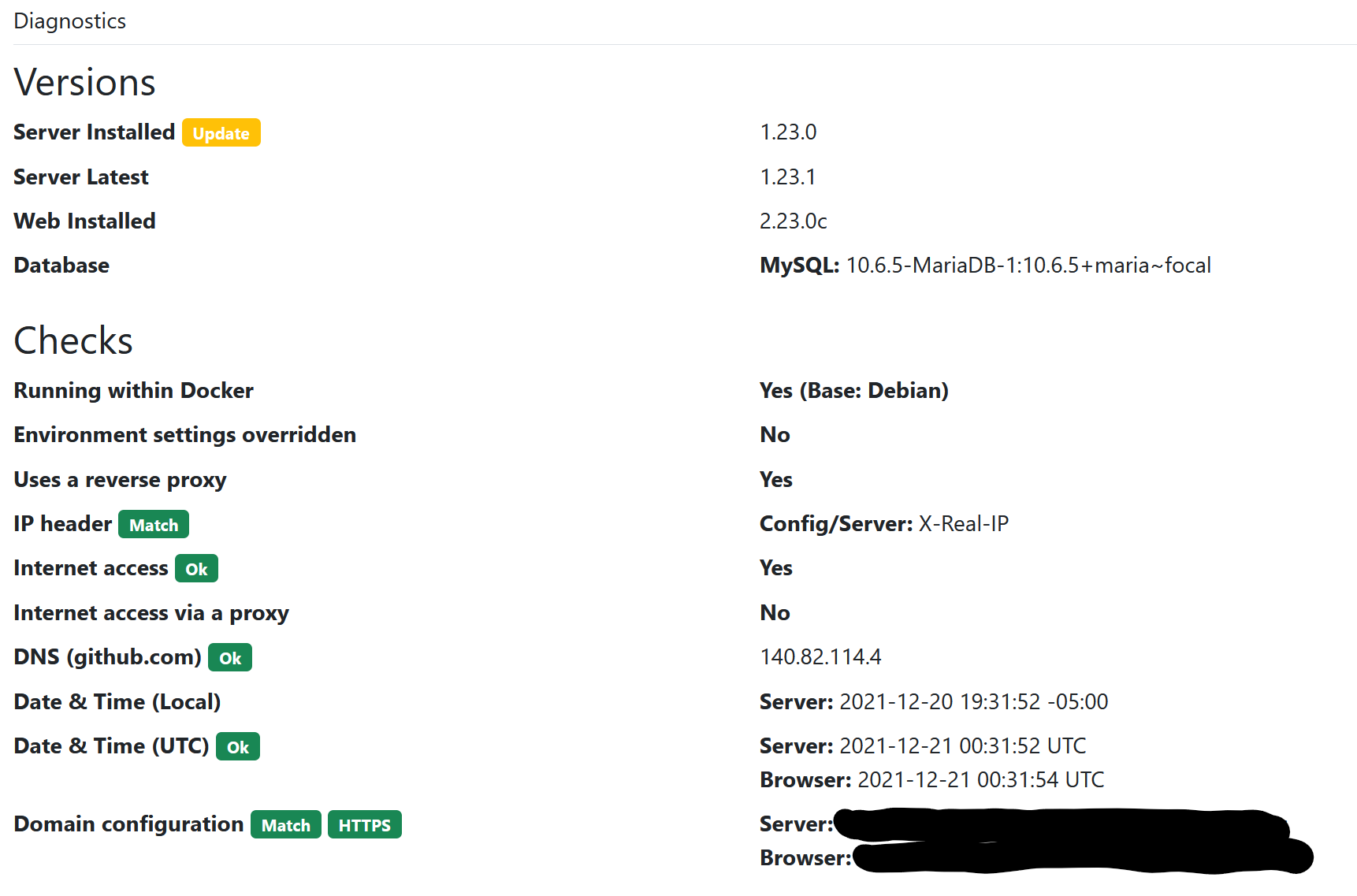
image

@emaraszek commented on GitHub (Dec 21, 2021): yeah that's marked as "Ok" for me as well ![image](https://user-images.githubusercontent.com/7446498/146850996-1c42cfe6-a9c7-43a2-aa10-792aaff82e94.png)
Author
Owner

@BlackDex commented on GitHub (Dec 21, 2021):

I think you need to change your database charset/collation. Please see https://github.com/dani-garcia/vaultwarden/discussions/1492#discussioncomment-544064

@BlackDex commented on GitHub (Dec 21, 2021): I think you need to change your database charset/collation. Please see https://github.com/dani-garcia/vaultwarden/discussions/1492#discussioncomment-544064
Author
Owner

@emaraszek commented on GitHub (Dec 21, 2021):

Ok, I just ran through those steps. All tables were converted correctly, except 'invitations'. That produced an error message:

#1071 - Specified key was too long; max key length is 1000 bytes

I just recreated the container with 1.23.1 and am still having the same issue when attempting to login. Reverting back to 1.23.0 again for now.

@emaraszek commented on GitHub (Dec 21, 2021): Ok, I just ran through those steps. All tables were converted correctly, except 'invitations'. That produced an error message: `#1071 - Specified key was too long; max key length is 1000 bytes` I just recreated the container with 1.23.1 and am still having the same issue when attempting to login. Reverting back to 1.23.0 again for now.
Author
Owner

@jjlin commented on GitHub (Dec 21, 2021):

twofactor_incomplete is a new table, which you presumably also need to convert.

@BlackDex Maybe you can update your comment, or perhaps just add it to the wiki.

@jjlin commented on GitHub (Dec 21, 2021): `twofactor_incomplete` is a new table, which you presumably also need to convert. @BlackDex Maybe you can update your comment, or perhaps just add it to the [wiki](https://github.com/dani-garcia/vaultwarden/wiki/Using-the-MariaDB-%28MySQL%29-Backend).
Author
Owner

@BlackDex commented on GitHub (Dec 21, 2021):

Well, those commands are generated actually by the querie above.
So it should only add the tables which are there, it could be that @emaraszek didn't run the SELECT CONTACT... query and just copied the example?

But it stated that the key was too long. I think this is because some conversion from what it was, i think latin1 or something, to utf8mb, which is longer indeed.

@emaraszek could you run the following query and show us the output?

SHOW CREATE TABLE `invitations`; 

It should output something like this:

CREATE TABLE `invitations` (
  `email` varchar(255) NOT NULL,
  PRIMARY KEY (`email`)
) ENGINE=InnoDB DEFAULT CHARSET=utf8mb4
@BlackDex commented on GitHub (Dec 21, 2021): Well, those commands are generated actually by the querie above. So it should only add the tables which are there, it could be that @emaraszek didn't run the `SELECT CONTACT...` query and just copied the example? But it stated that the key was too long. I think this is because some conversion from what it was, i think latin1 or something, to utf8mb, which is longer indeed. @emaraszek could you run the following query and show us the output? ```sql SHOW CREATE TABLE `invitations`; ``` It should output something like this: ```sql CREATE TABLE `invitations` ( `email` varchar(255) NOT NULL, PRIMARY KEY (`email`) ) ENGINE=InnoDB DEFAULT CHARSET=utf8mb4 ```
Author
Owner
@BlackDex commented on GitHub (Dec 21, 2021): btw @jjlin i updated the wiki: https://github.com/dani-garcia/vaultwarden/wiki/Using-the-MariaDB-(MySQL)-Backend#foreign-key-errors-collation-and-charset
Author
Owner

@emaraszek commented on GitHub (Dec 23, 2021):

@BlackDex I did run the SELECT CONTACT... query as instructed, which did pick up the twofactor_incomplete table. That table appears to have converted correctly:

CREATE TABLE `twofactor_incomplete` (
  `user_uuid` char(36) COLLATE utf8mb4_unicode_ci NOT NULL,
  `device_uuid` char(36) COLLATE utf8mb4_unicode_ci NOT NULL,
  `device_name` text COLLATE utf8mb4_unicode_ci NOT NULL,
  `login_time` datetime NOT NULL,
  `ip_address` text COLLATE utf8mb4_unicode_ci NOT NULL,
  PRIMARY KEY (`user_uuid`,`device_uuid`),
  CONSTRAINT `twofactor_incomplete_ibfk_1` FOREIGN KEY (`user_uuid`) REFERENCES `users` (`uuid`)
) ENGINE=InnoDB DEFAULT CHARSET=utf8mb4 COLLATE=utf8mb4_unicode_ci

However, the invitations table has not been converted and returns the following:

CREATE TABLE `invitations` (
  `email` varchar(255) NOT NULL,
  PRIMARY KEY (`email`)
) ENGINE=MyISAM DEFAULT CHARSET=latin1

I do have 2 unaccepted invitations pending, so perhaps that could be the cause? However, that seems like a separate issue from the MFA login problem on 1.23.1

@emaraszek commented on GitHub (Dec 23, 2021): @BlackDex I did run the `SELECT CONTACT...` query as instructed, which did pick up the twofactor_incomplete table. That table appears to have converted correctly: ``` CREATE TABLE `twofactor_incomplete` ( `user_uuid` char(36) COLLATE utf8mb4_unicode_ci NOT NULL, `device_uuid` char(36) COLLATE utf8mb4_unicode_ci NOT NULL, `device_name` text COLLATE utf8mb4_unicode_ci NOT NULL, `login_time` datetime NOT NULL, `ip_address` text COLLATE utf8mb4_unicode_ci NOT NULL, PRIMARY KEY (`user_uuid`,`device_uuid`), CONSTRAINT `twofactor_incomplete_ibfk_1` FOREIGN KEY (`user_uuid`) REFERENCES `users` (`uuid`) ) ENGINE=InnoDB DEFAULT CHARSET=utf8mb4 COLLATE=utf8mb4_unicode_ci ``` However, the invitations table has not been converted and returns the following: ``` CREATE TABLE `invitations` ( `email` varchar(255) NOT NULL, PRIMARY KEY (`email`) ) ENGINE=MyISAM DEFAULT CHARSET=latin1 ``` I do have 2 unaccepted invitations pending, so perhaps that could be the cause? However, that seems like a separate issue from the MFA login problem on 1.23.1
Author
Owner

@BlackDex commented on GitHub (Dec 23, 2021):

What i find strange is that one table is using innodb and the other myisam. Did you changed database backends or updated the configuration? All should be the same. And they all should be utf8mb.

@BlackDex commented on GitHub (Dec 23, 2021): What i find strange is that one table is using innodb and the other myisam. Did you changed database backends or updated the configuration? All should be the same. And they all should be utf8mb.
Author
Owner

@emaraszek commented on GitHub (Dec 23, 2021):

@BlackDex Thank you, your last comment highlighted an issue with my environment that I had missed.

I did migrate from SQLite to MariaDB a couple years ago, so these tables must have been using MyISAM since then. I could see that newer tables (twofactor_incomplete, sends, emergency_access) were using InnoDB as expected. I did follow the migration guide in the wiki, so I'm not sure if I missed something or my migrated tables defaulted to MyISAM for some reason.

I did a mass-conversion of all tables to InnoDB using a similar approach to your query:

SELECT CONCAT('ALTER TABLE `', TABLE_NAME,'` ENGINE = InnoDB;') AS CharSetConvert
FROM INFORMATION_SCHEMA.TABLES
WHERE TABLE_SCHEMA="bitwarden"
AND TABLE_TYPE="BASE TABLE";

After changing all tables to InnoDB, I was able to set the charset/collation properly using your query. I then recreated the container with 1.23.1 and was able to login successfully.

Perhaps this should be added to the wiki as well?

@emaraszek commented on GitHub (Dec 23, 2021): @BlackDex Thank you, your last comment highlighted an issue with my environment that I had missed. I did migrate from SQLite to MariaDB a couple years ago, so these tables must have been using MyISAM since then. I could see that newer tables (twofactor_incomplete, sends, emergency_access) were using InnoDB as expected. I did follow the migration guide in the wiki, so I'm not sure if I missed something or my migrated tables defaulted to MyISAM for some reason. I did a mass-conversion of all tables to InnoDB using a similar approach to your query: ``` SELECT CONCAT('ALTER TABLE `', TABLE_NAME,'` ENGINE = InnoDB;') AS CharSetConvert FROM INFORMATION_SCHEMA.TABLES WHERE TABLE_SCHEMA="bitwarden" AND TABLE_TYPE="BASE TABLE"; ``` After changing all tables to InnoDB, I was able to set the charset/collation properly using your query. I then recreated the container with 1.23.1 and was able to login successfully. Perhaps this should be added to the wiki as well?
Sign in to join this conversation.
1 Participants
Notifications
Due Date
No due date set.
Dependencies

No dependencies set.

Reference: github-starred/vaultwarden#1171