mirror of
https://github.com/go-gitea/gitea.git
synced 2026-03-09 04:25:18 -05:00
Custom paths not as expected: installation problem? #6587
Closed
opened 2025-11-02 07:00:19 -06:00 by GiteaMirror
·
9 comments
No Branch/Tag Specified
main
release/v1.25
release/v1.24
release/v1.23
release/v1.22
release/v1.21
release/v1.20
release/v1.19
release/v1.18
release/v1.17
release/v1.16
release/v1.15
release/v1.14
release/v1.13
release/v1.12
release/v1.11
release/v1.10
release/v1.9
release/v1.8
v1.25.3
v1.25.2
v1.25.1
v1.25.0
v1.24.7
v1.25.0-rc0
v1.26.0-dev
v1.24.6
v1.24.5
v1.24.4
v1.24.3
v1.24.2
v1.24.1
v1.24.0
v1.23.8
v1.24.0-rc0
v1.25.0-dev
v1.23.7
v1.23.6
v1.23.5
v1.23.4
v1.23.3
v1.23.2
v1.23.1
v1.23.0
v1.23.0-rc0
v1.24.0-dev
v1.22.6
v1.22.5
v1.22.4
v1.22.3
v1.22.2
v1.22.1
v1.22.0
v1.23.0-dev
v1.22.0-rc1
v1.21.11
v1.22.0-rc0
v1.21.10
v1.21.9
v1.21.8
v1.21.7
v1.21.6
v1.21.5
v1.21.4
v1.21.3
v1.21.2
v1.20.6
v1.21.1
v1.21.0
v1.21.0-rc2
v1.21.0-rc1
v1.20.5
v1.22.0-dev
v1.21.0-rc0
v1.20.4
v1.20.3
v1.20.2
v1.20.1
v1.20.0
v1.19.4
v1.21.0-dev
v1.20.0-rc2
v1.20.0-rc1
v1.20.0-rc0
v1.19.3
v1.19.2
v1.19.1
v1.19.0
v1.19.0-rc1
v1.20.0-dev
v1.19.0-rc0
v1.18.5
v1.18.4
v1.18.3
v1.18.2
v1.18.1
v1.18.0
v1.17.4
v1.18.0-rc1
v1.19.0-dev
v1.18.0-rc0
v1.17.3
v1.17.2
v1.17.1
v1.17.0
v1.17.0-rc2
v1.16.9
v1.17.0-rc1
v1.18.0-dev
v1.16.8
v1.16.7
v1.16.6
v1.16.5
v1.16.4
v1.16.3
v1.16.2
v1.16.1
v1.16.0
v1.15.11
v1.17.0-dev
v1.16.0-rc1
v1.15.10
v1.15.9
v1.15.8
v1.15.7
v1.15.6
v1.15.5
v1.15.4
v1.15.3
v1.15.2
v1.15.1
v1.14.7
v1.15.0
v1.15.0-rc3
v1.14.6
v1.15.0-rc2
v1.14.5
v1.16.0-dev
v1.15.0-rc1
v1.14.4
v1.14.3
v1.14.2
v1.14.1
v1.14.0
v1.13.7
v1.14.0-rc2
v1.13.6
v1.13.5
v1.14.0-rc1
v1.15.0-dev
v1.13.4
v1.13.3
v1.13.2
v1.13.1
v1.13.0
v1.12.6
v1.13.0-rc2
v1.14.0-dev
v1.13.0-rc1
v1.12.5
v1.12.4
v1.12.3
v1.12.2
v1.12.1
v1.11.8
v1.12.0
v1.11.7
v1.12.0-rc2
v1.11.6
v1.12.0-rc1
v1.13.0-dev
v1.11.5
v1.11.4
v1.11.3
v1.10.6
v1.12.0-dev
v1.11.2
v1.10.5
v1.11.1
v1.10.4
v1.11.0
v1.11.0-rc2
v1.10.3
v1.11.0-rc1
v1.10.2
v1.10.1
v1.10.0
v1.9.6
v1.9.5
v1.10.0-rc2
v1.11.0-dev
v1.10.0-rc1
v1.9.4
v1.9.3
v1.9.2
v1.9.1
v1.9.0
v1.9.0-rc2
v1.10.0-dev
v1.9.0-rc1
v1.8.3
v1.8.2
v1.8.1
v1.8.0
v1.8.0-rc3
v1.7.6
v1.8.0-rc2
v1.7.5
v1.8.0-rc1
v1.9.0-dev
v1.7.4
v1.7.3
v1.7.2
v1.7.1
v1.7.0
v1.7.0-rc3
v1.6.4
v1.7.0-rc2
v1.6.3
v1.7.0-rc1
v1.7.0-dev
v1.6.2
v1.6.1
v1.6.0
v1.6.0-rc2
v1.5.3
v1.6.0-rc1
v1.6.0-dev
v1.5.2
v1.5.1
v1.5.0
v1.5.0-rc2
v1.5.0-rc1
v1.5.0-dev
v1.4.3
v1.4.2
v1.4.1
v1.4.0
v1.4.0-rc3
v1.4.0-rc2
v1.3.3
v1.4.0-rc1
v1.3.2
v1.3.1
v1.3.0
v1.3.0-rc2
v1.3.0-rc1
v1.2.3
v1.2.2
v1.2.1
v1.2.0
v1.2.0-rc3
v1.2.0-rc2
v1.1.4
v1.2.0-rc1
v1.1.3
v1.1.2
v1.1.1
v1.1.0
v1.0.2
v1.0.1
v1.0.0
v0.9.99
Labels
Clear labels
$20
$250
$50
$500
backport/done
💎 Bounty
docs-update-needed
good first issue
hacktoberfest
issue/bounty
issue/confirmed
issue/critical
issue/duplicate
issue/needs-feedback
issue/not-a-bug
issue/regression
issue/stale
issue/workaround
lgtm/need 2
modifies/api
modifies/translation
outdated/backport/v1.18
outdated/theme/markdown
outdated/theme/timetracker
performance/bigrepo
performance/cpu
performance/memory
performance/speed
pr/breaking
proposal/accepted
proposal/rejected
pr/wip
pull-request
reviewed/wontfix
💰 Rewarded
skip-changelog
status/blocked
topic/accessibility
topic/api
topic/authentication
topic/build
topic/code-linting
topic/commit-signing
topic/content-rendering
topic/deployment
topic/distribution
topic/federation
topic/gitea-actions
topic/issues
topic/lfs
topic/mobile
topic/moderation
topic/packages
topic/pr
topic/projects
topic/repo
topic/repo-migration
topic/security
topic/theme
topic/ui
topic/ui-interaction
topic/ux
topic/webhooks
topic/wiki
type/bug
type/deprecation
type/docs
type/enhancement
type/feature
type/miscellaneous
type/proposal
type/question
type/refactoring
type/summary
type/testing
type/upstream
Mirrored from GitHub Pull Request
No Label
type/question
Milestone
No items
No Milestone
Projects
Clear projects
No project

No Assignees

Notifications
Due Date
No due date set.
Dependencies
No dependencies set.
Reference: github-starred/gitea#6587
Reference in New Issue
Block a user
Blocking a user prevents them from interacting with repositories, such as opening or commenting on pull requests or issues. Learn more about blocking a user.
Delete Branch "%!s()"
Deleting a branch is permanent. Although the deleted branch may continue to exist for a short time before it actually gets removed, it CANNOT be undone in most cases. Continue?
Originally created by @jbhanks on GitHub (Dec 27, 2020).
I am trying to set up customizations according to this:
https://docs.gitea.io/en-us/customizing-gitea/#:~:text=You%20can%20check%20the%20CustomPath,option%20on%20the%20gitea%20binary.
It says that by running
gitea helpI can get the custom path and other paths. However, I only see the defaults listed, and those do not exist on my system. Am I supposed to create them manually?By looking at the admin panel, I found that the location was actually
ls /var/lib/gitea/custom, but that folder was empty. Shouldn't there be a copy ofapp.inithere (mine is at/etc/gitea/app.ini)?As I installed directly from the gitea site and not via a distribution, I am confused about whether this is how it is supposed to be or not. Did something go wrong in my installation or are those docs outdated.
I downloaded gitea from https://dl.gitea.io/gitea/1.13.0/gitea-1.13.0-linux-amd64
@lunny commented on GitHub (Dec 27, 2020):
How did you run
Gitea? Some environment variables may change them.@jbhanks commented on GitHub (Dec 27, 2020):
I run it as a service, I set it up like this (on Ubuntu 20.04)
@lunny commented on GitHub (Dec 27, 2020):
You can find
WorkingDirectory=/var/lib/gitea/, so maybe you can take a look at that directory.@zeripath commented on GitHub (Dec 27, 2020):
The gitea.service file runs Gitea with /var/lib/gitea as the working directory as @lunny states above and it runs the specific config /etc/gitea/app.ini
If you were to run:
may give you a closer approximation of the environment - however the first 4 lines emitted by gitea web on stdout give you some more information about how gitea is configured.
@jbhanks commented on GitHub (Dec 27, 2020):
/var/lib/gitea/custom/exists, but is empty. Shouldn't the "options" folder have been created automatically? I created thecustom/optionsfolder and put file called "gitignore" in there (and restarted the gitea service), but that file is not being used as a default .gitignore.In app.ini, I do not see a variable for custom path.
@zeripath commented on GitHub (Dec 28, 2020):
nope why should it?
It should be a named file in
custom/options/gitignore/e.g.custom/options/gitignore/jbhanks@jbhanks commented on GitHub (Dec 29, 2020):
Ok, that was not at all clear to me from the documentation I linked to above, which says:
Any any case, I still don't get what I am supposed to do to set up a custom .gitignore.
I did:
Then I created a new repo in gitea with "initialize repository" checked, but there was no .gitignore in the new repo. Am I misunderstanding how this is supposed to work?
@Masgalor commented on GitHub (Jan 4, 2021):
You are slightly misunderstanding what these files are supposed to do.
You can not set some default gitignore that appears in every new repo.
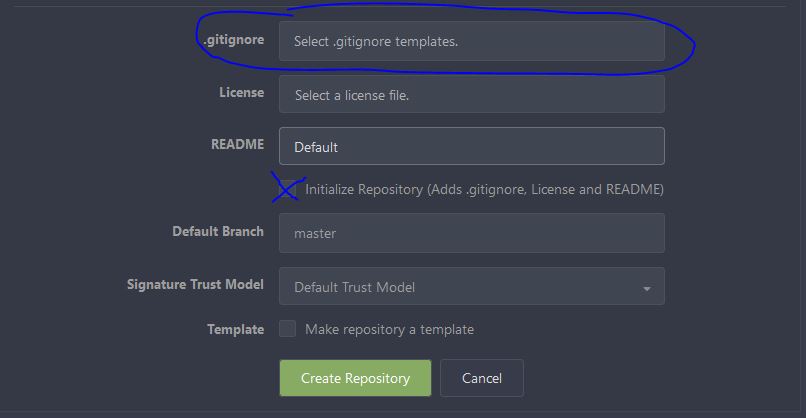
All you can do is extend the list of available templates.
During creation of a new repo you can choose one or more templates that are combined and than included in your repo.
If you want to add a template you need to place a named file in
custom/options/gitignore/. (as zeripath already told you)Here is a corrected version of your steps, assuming you are running the service as user "gitea".
If everything is correct you will see the entry "jbhanks" in the list of available gitignore templates.
@jbhanks commented on GitHub (Jan 4, 2021):
Thank you for clarifying, it was not at all obvious to me how that was supposed to work.