mirror of
https://github.com/go-gitea/gitea.git
synced 2026-07-18 17:36:09 -05:00
API calls returning 401 Unauthorized #6279
Closed
opened 2025-11-02 06:50:47 -06:00 by GiteaMirror
·
31 comments
No Branch/Tag Specified
main
release/v1.25
release/v1.24
release/v1.23
release/v1.22
release/v1.21
release/v1.20
release/v1.19
release/v1.18
release/v1.17
release/v1.16
release/v1.15
release/v1.14
release/v1.13
release/v1.12
release/v1.11
release/v1.10
release/v1.9
release/v1.8
v1.25.3
v1.25.2
v1.25.1
v1.25.0
v1.24.7
v1.25.0-rc0
v1.26.0-dev
v1.24.6
v1.24.5
v1.24.4
v1.24.3
v1.24.2
v1.24.1
v1.24.0
v1.23.8
v1.24.0-rc0
v1.25.0-dev
v1.23.7
v1.23.6
v1.23.5
v1.23.4
v1.23.3
v1.23.2
v1.23.1
v1.23.0
v1.23.0-rc0
v1.24.0-dev
v1.22.6
v1.22.5
v1.22.4
v1.22.3
v1.22.2
v1.22.1
v1.22.0
v1.23.0-dev
v1.22.0-rc1
v1.21.11
v1.22.0-rc0
v1.21.10
v1.21.9
v1.21.8
v1.21.7
v1.21.6
v1.21.5
v1.21.4
v1.21.3
v1.21.2
v1.20.6
v1.21.1
v1.21.0
v1.21.0-rc2
v1.21.0-rc1
v1.20.5
v1.22.0-dev
v1.21.0-rc0
v1.20.4
v1.20.3
v1.20.2
v1.20.1
v1.20.0
v1.19.4
v1.21.0-dev
v1.20.0-rc2
v1.20.0-rc1
v1.20.0-rc0
v1.19.3
v1.19.2
v1.19.1
v1.19.0
v1.19.0-rc1
v1.20.0-dev
v1.19.0-rc0
v1.18.5
v1.18.4
v1.18.3
v1.18.2
v1.18.1
v1.18.0
v1.17.4
v1.18.0-rc1
v1.19.0-dev
v1.18.0-rc0
v1.17.3
v1.17.2
v1.17.1
v1.17.0
v1.17.0-rc2
v1.16.9
v1.17.0-rc1
v1.18.0-dev
v1.16.8
v1.16.7
v1.16.6
v1.16.5
v1.16.4
v1.16.3
v1.16.2
v1.16.1
v1.16.0
v1.15.11
v1.17.0-dev
v1.16.0-rc1
v1.15.10
v1.15.9
v1.15.8
v1.15.7
v1.15.6
v1.15.5
v1.15.4
v1.15.3
v1.15.2
v1.15.1
v1.14.7
v1.15.0
v1.15.0-rc3
v1.14.6
v1.15.0-rc2
v1.14.5
v1.16.0-dev
v1.15.0-rc1
v1.14.4
v1.14.3
v1.14.2
v1.14.1
v1.14.0
v1.13.7
v1.14.0-rc2
v1.13.6
v1.13.5
v1.14.0-rc1
v1.15.0-dev
v1.13.4
v1.13.3
v1.13.2
v1.13.1
v1.13.0
v1.12.6
v1.13.0-rc2
v1.14.0-dev
v1.13.0-rc1
v1.12.5
v1.12.4
v1.12.3
v1.12.2
v1.12.1
v1.11.8
v1.12.0
v1.11.7
v1.12.0-rc2
v1.11.6
v1.12.0-rc1
v1.13.0-dev
v1.11.5
v1.11.4
v1.11.3
v1.10.6
v1.12.0-dev
v1.11.2
v1.10.5
v1.11.1
v1.10.4
v1.11.0
v1.11.0-rc2
v1.10.3
v1.11.0-rc1
v1.10.2
v1.10.1
v1.10.0
v1.9.6
v1.9.5
v1.10.0-rc2
v1.11.0-dev
v1.10.0-rc1
v1.9.4
v1.9.3
v1.9.2
v1.9.1
v1.9.0
v1.9.0-rc2
v1.10.0-dev
v1.9.0-rc1
v1.8.3
v1.8.2
v1.8.1
v1.8.0
v1.8.0-rc3
v1.7.6
v1.8.0-rc2
v1.7.5
v1.8.0-rc1
v1.9.0-dev
v1.7.4
v1.7.3
v1.7.2
v1.7.1
v1.7.0
v1.7.0-rc3
v1.6.4
v1.7.0-rc2
v1.6.3
v1.7.0-rc1
v1.7.0-dev
v1.6.2
v1.6.1
v1.6.0
v1.6.0-rc2
v1.5.3
v1.6.0-rc1
v1.6.0-dev
v1.5.2
v1.5.1
v1.5.0
v1.5.0-rc2
v1.5.0-rc1
v1.5.0-dev
v1.4.3
v1.4.2
v1.4.1
v1.4.0
v1.4.0-rc3
v1.4.0-rc2
v1.3.3
v1.4.0-rc1
v1.3.2
v1.3.1
v1.3.0
v1.3.0-rc2
v1.3.0-rc1
v1.2.3
v1.2.2
v1.2.1
v1.2.0
v1.2.0-rc3
v1.2.0-rc2
v1.1.4
v1.2.0-rc1
v1.1.3
v1.1.2
v1.1.1
v1.1.0
v1.0.2
v1.0.1
v1.0.0
v0.9.99
Labels
Clear labels
$20
$250
$50
$500
backport/done
💎 Bounty
docs-update-needed
good first issue
hacktoberfest
issue/bounty
issue/confirmed
issue/critical
issue/duplicate
issue/needs-feedback
issue/not-a-bug
issue/regression
issue/stale
issue/workaround
lgtm/need 2
modifies/api
modifies/translation
outdated/backport/v1.18
outdated/theme/markdown
outdated/theme/timetracker
performance/bigrepo
performance/cpu
performance/memory
performance/speed
pr/breaking
proposal/accepted
proposal/rejected
pr/wip
pull-request
reviewed/wontfix
💰 Rewarded
skip-changelog
status/blocked
topic/accessibility
topic/api
topic/authentication
topic/build
topic/code-linting
topic/commit-signing
topic/content-rendering
topic/deployment
topic/distribution
topic/federation
topic/gitea-actions
topic/issues
topic/lfs
topic/mobile
topic/moderation
topic/packages
topic/pr
topic/projects
topic/repo
topic/repo-migration
topic/security
topic/theme
topic/ui
topic/ui-interaction
topic/ux
topic/webhooks
topic/wiki
type/bug
type/deprecation
type/docs
type/enhancement
type/feature
type/miscellaneous
type/proposal
type/question
type/refactoring
type/summary
type/testing
type/upstream
Mirrored from GitHub Pull Request
Milestone
No items
No Milestone
Projects
Clear projects
No project

No Assignees

Notifications
Due Date
No due date set.
Dependencies
No dependencies set.
Reference: github-starred/gitea#6279
Reference in New Issue
Block a user
Blocking a user prevents them from interacting with repositories, such as opening or commenting on pull requests or issues. Learn more about blocking a user.
Delete Branch "%!s()"
Deleting a branch is permanent. Although the deleted branch may continue to exist for a short time before it actually gets removed, it CANNOT be undone in most cases. Continue?
Originally created by @AllTaken on GitHub (Nov 9, 2020).
Gitea is as downloaded from the Releases page.
[x]):https://gist.github.com/AllTaken/e15cf3c7333d011340dfbc81e18b10c4
Description
Many different API calls result in 401 unauthorized, for no reason I can discern.
Setting up a blank repo in try.gitea.io with a single commit and trying to POST the following results in 401 unauthorized:
curl -X POST "https://try.gitea.io/api/v1/repos/test6661/Test/statuses/0b97b9b4de6c75125f635ee1f045f148ebd9b7b9" -H "accept: application/json" -H "Authorization: ba0969a9d789630ffa5321164315a27954221832" -H "Content-Type: application/json" -d "{ \"context\": \"Build\", \"description\": \"asdasdad\", \"state\": \"success\", \"target_url\": \"\"}"Note that this happens when trying to use basic auth as well.
This used to work, probably as recently as 1.11.6
@dubiouscript commented on GitHub (Nov 11, 2020):
afaik
now-H "Authorization: token ba0969a9d789630ffa5321164315a27954221832"
should work !
@AllTaken commented on GitHub (Nov 11, 2020):
Yes, it really should, but it just returns 401:
@AllTaken commented on GitHub (Nov 11, 2020):
Same thing happens with various API calls, here is another:
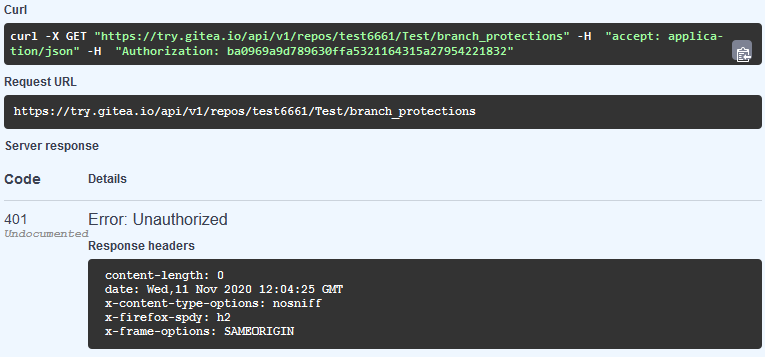
@AllTaken commented on GitHub (Nov 11, 2020):
Other API calls do work like
/repos/searchf.ex.@6543 commented on GitHub (Nov 11, 2020):
this should not be the case ...
@6543 commented on GitHub (Nov 11, 2020):
this works just fine:
curl -X GET "https://try.gitea.io/api/v1/repos/test6661/Test/statuses/0b97b9b4de6c75125f635ee1f045f148ebd9b7b9" -H "accept: application/json" -H "Authorization: token ba0969a9d789630ffa5321164315a27954221832"or
curl -X GET "https://try.gitea.io/api/v1/repos/test6661/Test/statuses/0b97b9b4de6c75125f635ee1f045f148ebd9b7b9?token=ba0969a9d789630ffa5321164315a27954221832" -H "accept: application/json"@AllTaken commented on GitHub (Nov 11, 2020):
I'm fairly convinced this is a bug...
@6543 commented on GitHub (Nov 11, 2020):
@AllTaken I would label it as souch as soon as I can reproduce it ... my problem is, I cant :/
@6543 commented on GitHub (Nov 11, 2020):
can you execute the curl statement on a bash shell?
it should return
[]@zeripath commented on GitHub (Nov 11, 2020):
@AllTaken your authorization header is missing the "token "
@AllTaken commented on GitHub (Nov 11, 2020):
I see, maybe the issue is only with basic authentication then.
@6543 commented on GitHub (Nov 11, 2020):
Let me se ...
@AllTaken commented on GitHub (Nov 11, 2020):
@6543 commented on GitHub (Nov 11, 2020):
basic auth do not work on some endpoints !!!
@zeripath commented on GitHub (Nov 11, 2020):
I think the authorization header has to beAuthorization: basicworks for me.no looking again I get the 401 still! sorry.
@zeripath commented on GitHub (Nov 11, 2020):
Ok so looking at api.go, this endpoint is controlled by:
3fd060eb37/routers/api/v1/api.go (L837-L840)with reqToken() defined by:
3fd060eb37/routers/api/v1/api.go (L180-L196)So let's assume that IsBasicAuth is being set correctly... Does this account have 2FA set?
@AllTaken commented on GitHub (Nov 11, 2020):
No.
@kevinzg commented on GitHub (Nov 23, 2020):
If you are trying to use the API logged in from the browser you need to send the CSRF token as a header.
The header name is
X-Csrf-Tokenand the value should be in a meta tag in the HTML and in the cookies, default name is_csrf.@AllTaken commented on GitHub (Nov 23, 2020):
@kevinzg I'm not sure I understand?
I'm trying to call the REST API using basic auth, there is no HTML and no browser?
@kevinzg commented on GitHub (Nov 23, 2020):
@AllTaken What I meant was that when you login and visit
yourgitea.com/api/swaggerand try to use execute the requests some of them will give you a 401 because they need the CSRF token.From the code, it looks like basic auth still needs a CSRF token (if you don't have the OTP thingy).No, it doesn't.Since you are not using the browser, you can just add any token in your request, for example in curl add thisNo need.-H 'Cookie: _csrf=whatever' -H 'X-Csrf-Token: whatever', that should let you pass the validation.@zeripath commented on GitHub (Nov 27, 2020):
OK I just tried:
and this worked.
Also:
this works.
I think the suggested header is incorrect.
@kevinzg commented on GitHub (Nov 27, 2020):
@zeripath Yes, you are right, the CSRF token is not needed for basic auth, my bad.
I think the problem is that if you are logged-in (in the browser), Gitea authenticates the user with the session cookie and ignores the basic auth header, so
ctx.Context.IsBasicAuthis false and the code goes by thectx.RequireCSRF()path.That's why the Swagger interface gets a 401, but the curl command works fine.
@zeripath commented on GitHub (Nov 27, 2020):
ah so if went to the swagger page directly using a private tab without logging I guess it would then work
@zeripath commented on GitHub (Nov 27, 2020):
But interestingly the curl command in https://github.com/go-gitea/gitea/issues/13484#issuecomment-725448274 doesn't work - presumably because the basic authentication header here is incorrect - (I'll admit I haven't tried / bothered to decode it to check so it's potentially invalid)
@AllTaken commented on GitHub (Nov 28, 2020):
Yeah there is a transcription error in #13484 (comment).
The auth value should be:
Basic dGVzdDY2NjE6eUAxOXdqVXd6dGthb15Einstead ofbasic dGVzdDY2NjE6eUAx0XdqBXd6dGthb15EUsing these values it works now.
I'm not sure if you're saying that it is "by design" that 401 is returned, even though the client is presenting valid credentials, merely because a CSRF cookie is present? I can't really see any chance of CSRF being an issue when valid credentials are present? And why only for basic credentials?
In addition this sort of renders the auto generated swagger page useless for trying/testing the API with basic credentials. This should at least be documented in the interface, if it is by design.
@zeripath commented on GitHub (Nov 30, 2020):
CSRF is only needed for POST with cookie session. Basic authentication without a cookie, or token authentication don't require CSRF.
@kevinzg commented on GitHub (Dec 1, 2020):
A get to
https://try.gitea.io/api/v1/userasks for the token.@lunny commented on GitHub (Jan 27, 2021):
OK. So
Authorization: Basicwork butAuthorization: basicnot. Is this still considered as a bug?@6543 commented on GitHub (Jan 27, 2021):
Fixed in master
@AllTaken commented on GitHub (Jan 27, 2021):
Well.. you get 401 if you have a CSRF cookie and use Basic auth but not if you use other auth options...
Is this not considered a bug?
@6543 commented on GitHub (Jan 27, 2021):
inconsistency ... @AllTaken I open a new issue since this here now described different issues (solved) etc ...