mirror of
https://github.com/go-gitea/gitea.git
synced 2026-07-16 04:42:51 -05:00
LDAP Clarification/Debugging #6077
Closed
opened 2025-11-02 06:44:26 -06:00 by GiteaMirror
·
11 comments
No Branch/Tag Specified
main
release/v1.25
release/v1.24
release/v1.23
release/v1.22
release/v1.21
release/v1.20
release/v1.19
release/v1.18
release/v1.17
release/v1.16
release/v1.15
release/v1.14
release/v1.13
release/v1.12
release/v1.11
release/v1.10
release/v1.9
release/v1.8
v1.25.3
v1.25.2
v1.25.1
v1.25.0
v1.24.7
v1.25.0-rc0
v1.26.0-dev
v1.24.6
v1.24.5
v1.24.4
v1.24.3
v1.24.2
v1.24.1
v1.24.0
v1.23.8
v1.24.0-rc0
v1.25.0-dev
v1.23.7
v1.23.6
v1.23.5
v1.23.4
v1.23.3
v1.23.2
v1.23.1
v1.23.0
v1.23.0-rc0
v1.24.0-dev
v1.22.6
v1.22.5
v1.22.4
v1.22.3
v1.22.2
v1.22.1
v1.22.0
v1.23.0-dev
v1.22.0-rc1
v1.21.11
v1.22.0-rc0
v1.21.10
v1.21.9
v1.21.8
v1.21.7
v1.21.6
v1.21.5
v1.21.4
v1.21.3
v1.21.2
v1.20.6
v1.21.1
v1.21.0
v1.21.0-rc2
v1.21.0-rc1
v1.20.5
v1.22.0-dev
v1.21.0-rc0
v1.20.4
v1.20.3
v1.20.2
v1.20.1
v1.20.0
v1.19.4
v1.21.0-dev
v1.20.0-rc2
v1.20.0-rc1
v1.20.0-rc0
v1.19.3
v1.19.2
v1.19.1
v1.19.0
v1.19.0-rc1
v1.20.0-dev
v1.19.0-rc0
v1.18.5
v1.18.4
v1.18.3
v1.18.2
v1.18.1
v1.18.0
v1.17.4
v1.18.0-rc1
v1.19.0-dev
v1.18.0-rc0
v1.17.3
v1.17.2
v1.17.1
v1.17.0
v1.17.0-rc2
v1.16.9
v1.17.0-rc1
v1.18.0-dev
v1.16.8
v1.16.7
v1.16.6
v1.16.5
v1.16.4
v1.16.3
v1.16.2
v1.16.1
v1.16.0
v1.15.11
v1.17.0-dev
v1.16.0-rc1
v1.15.10
v1.15.9
v1.15.8
v1.15.7
v1.15.6
v1.15.5
v1.15.4
v1.15.3
v1.15.2
v1.15.1
v1.14.7
v1.15.0
v1.15.0-rc3
v1.14.6
v1.15.0-rc2
v1.14.5
v1.16.0-dev
v1.15.0-rc1
v1.14.4
v1.14.3
v1.14.2
v1.14.1
v1.14.0
v1.13.7
v1.14.0-rc2
v1.13.6
v1.13.5
v1.14.0-rc1
v1.15.0-dev
v1.13.4
v1.13.3
v1.13.2
v1.13.1
v1.13.0
v1.12.6
v1.13.0-rc2
v1.14.0-dev
v1.13.0-rc1
v1.12.5
v1.12.4
v1.12.3
v1.12.2
v1.12.1
v1.11.8
v1.12.0
v1.11.7
v1.12.0-rc2
v1.11.6
v1.12.0-rc1
v1.13.0-dev
v1.11.5
v1.11.4
v1.11.3
v1.10.6
v1.12.0-dev
v1.11.2
v1.10.5
v1.11.1
v1.10.4
v1.11.0
v1.11.0-rc2
v1.10.3
v1.11.0-rc1
v1.10.2
v1.10.1
v1.10.0
v1.9.6
v1.9.5
v1.10.0-rc2
v1.11.0-dev
v1.10.0-rc1
v1.9.4
v1.9.3
v1.9.2
v1.9.1
v1.9.0
v1.9.0-rc2
v1.10.0-dev
v1.9.0-rc1
v1.8.3
v1.8.2
v1.8.1
v1.8.0
v1.8.0-rc3
v1.7.6
v1.8.0-rc2
v1.7.5
v1.8.0-rc1
v1.9.0-dev
v1.7.4
v1.7.3
v1.7.2
v1.7.1
v1.7.0
v1.7.0-rc3
v1.6.4
v1.7.0-rc2
v1.6.3
v1.7.0-rc1
v1.7.0-dev
v1.6.2
v1.6.1
v1.6.0
v1.6.0-rc2
v1.5.3
v1.6.0-rc1
v1.6.0-dev
v1.5.2
v1.5.1
v1.5.0
v1.5.0-rc2
v1.5.0-rc1
v1.5.0-dev
v1.4.3
v1.4.2
v1.4.1
v1.4.0
v1.4.0-rc3
v1.4.0-rc2
v1.3.3
v1.4.0-rc1
v1.3.2
v1.3.1
v1.3.0
v1.3.0-rc2
v1.3.0-rc1
v1.2.3
v1.2.2
v1.2.1
v1.2.0
v1.2.0-rc3
v1.2.0-rc2
v1.1.4
v1.2.0-rc1
v1.1.3
v1.1.2
v1.1.1
v1.1.0
v1.0.2
v1.0.1
v1.0.0
v0.9.99
Labels
Clear labels
$20
$250
$50
$500
backport/done
💎 Bounty
docs-update-needed
good first issue
hacktoberfest
issue/bounty
issue/confirmed
issue/critical
issue/duplicate
issue/needs-feedback
issue/not-a-bug
issue/regression
issue/stale
issue/workaround
lgtm/need 2
modifies/api
modifies/translation
outdated/backport/v1.18
outdated/theme/markdown
outdated/theme/timetracker
performance/bigrepo
performance/cpu
performance/memory
performance/speed
pr/breaking
proposal/accepted
proposal/rejected
pr/wip
pull-request
reviewed/wontfix
💰 Rewarded
skip-changelog
status/blocked
topic/accessibility
topic/api
topic/authentication
topic/build
topic/code-linting
topic/commit-signing
topic/content-rendering
topic/deployment
topic/distribution
topic/federation
topic/gitea-actions
topic/issues
topic/lfs
topic/mobile
topic/moderation
topic/packages
topic/pr
topic/projects
topic/repo
topic/repo-migration
topic/security
topic/theme
topic/ui
topic/ui-interaction
topic/ux
topic/webhooks
topic/wiki
type/bug
type/deprecation
type/docs
type/enhancement
type/feature
type/miscellaneous
type/proposal
type/question
type/refactoring
type/summary
type/testing
type/upstream
Mirrored from GitHub Pull Request
No Label
type/question
Milestone
No items
No Milestone
Projects
Clear projects
No project

No Assignees

Notifications
Due Date
No due date set.
Dependencies
No dependencies set.
Reference: github-starred/gitea#6077
Reference in New Issue
Block a user
Blocking a user prevents them from interacting with repositories, such as opening or commenting on pull requests or issues. Learn more about blocking a user.
Delete Branch "%!s()"
Deleting a branch is permanent. Although the deleted branch may continue to exist for a short time before it actually gets removed, it CANNOT be undone in most cases. Continue?
Originally created by @WattsC-90 on GitHub (Oct 1, 2020).
[x]):Description
I wish to seek clarification over how Gitea+LDAP work as my expectation is that Gitea will query the LDAP server, in order to validate the user exists. Some tickets/bits of info I have read indicate that Gitea synchronises its users, replicating(?) the users locally, before a user can then login?
I have tried to setup the LDAP bits, but it isn't working (not sure why), are there particular log messages I should be looking out for to indicate whether the settings are right or not etc?
Screenshots
The settings in use: (LDAP simple)
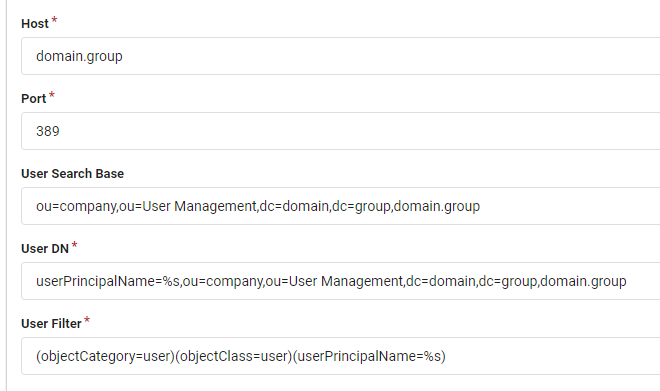
(I am not sure if these are correct to be honest!) I used ADExplorer and ADInsight to attempt to figure out the LDAP configurations, any tips welcome!
@zeripath commented on GitHub (Oct 1, 2020):
The logs will generally log errors with ldap somewhere in them.
Have you read https://docs.gitea.io/en-us/authentication/
I think there's also a closed issue somewhere with the suggested configuration for an AD.
@WattsC-90 commented on GitHub (Oct 2, 2020):
nothing about ldap in the logs at all, searched ldap, and searched my email that i was trying to log in with and it just seems to search SQL.
I have read the auth page, but honestly I have no idea about LDAP. I hoped there was a way for it to do it "automagically" as TeamCity does as it is on a domain connected machine, so it should be able to challenge the DC from it's own settings.
Also, slight side note, Verify group membership in LDAP section in the gitea auth settings doesnt exist? I could probably make use of it.
Let me try find the AD ticket, I did look but couldn't find anything at the time
@zeripath commented on GitHub (Oct 9, 2020):
In the case of the logs, most of the interesting logs around LDAP are at Trace level. I wouldn't recommend setting your logging at trace in general because it's very noisy - the best thing to do is to add a logger that will trace ldap:
@WattsC-90 commented on GitHub (Oct 9, 2020):
@zeripath interesting information, wasnt aware you could do that with the logger!
after spending some time on the auth documentation, i realised at the bottom is a more appropriate type for me - SPNEGO with SSPI. This way the server doesnt synchronise over 5000 users from AD!
I still cannot get it to work, but I think its the more appropriate route! In the logs, all I get is this (see below). Any ideas?
@zeripath commented on GitHub (Oct 11, 2020):
I unfortunately know nothing about sspi .
Google the error code - it's a Windows specific error code and that should tell you what is going on
@WattsC-90 commented on GitHub (Oct 12, 2020):
The interesting/annoying thing is that all articles on google point to basically incorrect arguments. But I don't supply anything to the SSPI configuration, it seems to do it all itself! With SSPI there is 0 configuration in Gitea UI, so for an error code essentially saying that the call failed or in the latest logs (where I set
LAN Manager authentication leveltoSend NTLM Response Onlyas per: https://bugzilla.mozilla.org/show_bug.cgi?id=468334)Unfortunately, to me, it should be transparent, certainly from the configurations (which are as default as it gets).
@zeripath commented on GitHub (Oct 12, 2020):
@quasoft are you able to shed any light?
@quasoft commented on GitHub (Oct 13, 2020):
It's true there are few configuration options for SSPI in gitea, but some configuration is required in the AD environment (eg. creating a dedicated user account, setting spn on it, running gitea with this account, etc.) and the browser.
You probably already did that, but just in case, go again over the steps outlined in https://docs.gitea.io/en-us/authentication/
When setting things for the first time, I usually try with Internet Explorer or Chrome first, because they require less configuration, which helps to confirm if it works.
@WattsC-90 commented on GitHub (Nov 9, 2020):
@quasoft so i refollowed the steps.. i think the one i probably glazed over was the AD http command line step.. after rerunning i realised it was failing.. eventually (27 days later) the IT group have actioned the ticket.. and it works! so that makes me feel stupid.. sorry!
I have a follow up question though. Looking at the login/account created, there is no way to specify the fields that can be used for names/emails etc. a default user is created with a wierd guid email address (see below). Is there a way to customise this? to specify what fields should be pulled out from the domain controller when it creates the account locally? Is the guid email actually valid in Gitea land? I am unsure whether this would hinder usability of the platform or not at this point so I am reluctant to change it. (obviously there would be no password reset, but you may trigger a notification from an issue being raised I guess(?), so would that still work with the guid emails?)
@quasoft commented on GitHub (Nov 9, 2020):
@WattsC-90 Unfortunately the SSPI method currently does not support reading attributes from active directory. This is why it generates a random fake email address in the corresponding field.
It is possible to use LDAP to query the active directory for those fields, after automatically creating the account, but it would require a code change. I cannot engage with making such a change right now.
But you could also use the LDAP authentication method instead. It does not support single sign-on, but it does fill those fields automatically.
@WattsC-90 commented on GitHub (Nov 9, 2020):
The reason I investigated this method in the first place was that the LDAP method indicated user synchronisation, i.e. the gitea system will create a user entry for every use found on the domain, approx 5000 users rather than the people who actually need access.. Approximately 150 to 200. It would definitely be worth trying to get the info via LDAP for a complete solution (in the future)