mirror of
https://github.com/go-gitea/gitea.git
synced 2026-07-16 21:53:50 -05:00
How to close the gitea process. #5208
Closed
opened 2025-11-02 06:17:55 -06:00 by GiteaMirror
·
7 comments
No Branch/Tag Specified
main
release/v1.25
release/v1.24
release/v1.23
release/v1.22
release/v1.21
release/v1.20
release/v1.19
release/v1.18
release/v1.17
release/v1.16
release/v1.15
release/v1.14
release/v1.13
release/v1.12
release/v1.11
release/v1.10
release/v1.9
release/v1.8
v1.25.3
v1.25.2
v1.25.1
v1.25.0
v1.24.7
v1.25.0-rc0
v1.26.0-dev
v1.24.6
v1.24.5
v1.24.4
v1.24.3
v1.24.2
v1.24.1
v1.24.0
v1.23.8
v1.24.0-rc0
v1.25.0-dev
v1.23.7
v1.23.6
v1.23.5
v1.23.4
v1.23.3
v1.23.2
v1.23.1
v1.23.0
v1.23.0-rc0
v1.24.0-dev
v1.22.6
v1.22.5
v1.22.4
v1.22.3
v1.22.2
v1.22.1
v1.22.0
v1.23.0-dev
v1.22.0-rc1
v1.21.11
v1.22.0-rc0
v1.21.10
v1.21.9
v1.21.8
v1.21.7
v1.21.6
v1.21.5
v1.21.4
v1.21.3
v1.21.2
v1.20.6
v1.21.1
v1.21.0
v1.21.0-rc2
v1.21.0-rc1
v1.20.5
v1.22.0-dev
v1.21.0-rc0
v1.20.4
v1.20.3
v1.20.2
v1.20.1
v1.20.0
v1.19.4
v1.21.0-dev
v1.20.0-rc2
v1.20.0-rc1
v1.20.0-rc0
v1.19.3
v1.19.2
v1.19.1
v1.19.0
v1.19.0-rc1
v1.20.0-dev
v1.19.0-rc0
v1.18.5
v1.18.4
v1.18.3
v1.18.2
v1.18.1
v1.18.0
v1.17.4
v1.18.0-rc1
v1.19.0-dev
v1.18.0-rc0
v1.17.3
v1.17.2
v1.17.1
v1.17.0
v1.17.0-rc2
v1.16.9
v1.17.0-rc1
v1.18.0-dev
v1.16.8
v1.16.7
v1.16.6
v1.16.5
v1.16.4
v1.16.3
v1.16.2
v1.16.1
v1.16.0
v1.15.11
v1.17.0-dev
v1.16.0-rc1
v1.15.10
v1.15.9
v1.15.8
v1.15.7
v1.15.6
v1.15.5
v1.15.4
v1.15.3
v1.15.2
v1.15.1
v1.14.7
v1.15.0
v1.15.0-rc3
v1.14.6
v1.15.0-rc2
v1.14.5
v1.16.0-dev
v1.15.0-rc1
v1.14.4
v1.14.3
v1.14.2
v1.14.1
v1.14.0
v1.13.7
v1.14.0-rc2
v1.13.6
v1.13.5
v1.14.0-rc1
v1.15.0-dev
v1.13.4
v1.13.3
v1.13.2
v1.13.1
v1.13.0
v1.12.6
v1.13.0-rc2
v1.14.0-dev
v1.13.0-rc1
v1.12.5
v1.12.4
v1.12.3
v1.12.2
v1.12.1
v1.11.8
v1.12.0
v1.11.7
v1.12.0-rc2
v1.11.6
v1.12.0-rc1
v1.13.0-dev
v1.11.5
v1.11.4
v1.11.3
v1.10.6
v1.12.0-dev
v1.11.2
v1.10.5
v1.11.1
v1.10.4
v1.11.0
v1.11.0-rc2
v1.10.3
v1.11.0-rc1
v1.10.2
v1.10.1
v1.10.0
v1.9.6
v1.9.5
v1.10.0-rc2
v1.11.0-dev
v1.10.0-rc1
v1.9.4
v1.9.3
v1.9.2
v1.9.1
v1.9.0
v1.9.0-rc2
v1.10.0-dev
v1.9.0-rc1
v1.8.3
v1.8.2
v1.8.1
v1.8.0
v1.8.0-rc3
v1.7.6
v1.8.0-rc2
v1.7.5
v1.8.0-rc1
v1.9.0-dev
v1.7.4
v1.7.3
v1.7.2
v1.7.1
v1.7.0
v1.7.0-rc3
v1.6.4
v1.7.0-rc2
v1.6.3
v1.7.0-rc1
v1.7.0-dev
v1.6.2
v1.6.1
v1.6.0
v1.6.0-rc2
v1.5.3
v1.6.0-rc1
v1.6.0-dev
v1.5.2
v1.5.1
v1.5.0
v1.5.0-rc2
v1.5.0-rc1
v1.5.0-dev
v1.4.3
v1.4.2
v1.4.1
v1.4.0
v1.4.0-rc3
v1.4.0-rc2
v1.3.3
v1.4.0-rc1
v1.3.2
v1.3.1
v1.3.0
v1.3.0-rc2
v1.3.0-rc1
v1.2.3
v1.2.2
v1.2.1
v1.2.0
v1.2.0-rc3
v1.2.0-rc2
v1.1.4
v1.2.0-rc1
v1.1.3
v1.1.2
v1.1.1
v1.1.0
v1.0.2
v1.0.1
v1.0.0
v0.9.99
Labels
Clear labels
$20
$250
$50
$500
backport/done
💎 Bounty
docs-update-needed
good first issue
hacktoberfest
issue/bounty
issue/confirmed
issue/critical
issue/duplicate
issue/needs-feedback
issue/not-a-bug
issue/regression
issue/stale
issue/workaround
lgtm/need 2
modifies/api
modifies/translation
outdated/backport/v1.18
outdated/theme/markdown
outdated/theme/timetracker
performance/bigrepo
performance/cpu
performance/memory
performance/speed
pr/breaking
proposal/accepted
proposal/rejected
pr/wip
pull-request
reviewed/wontfix
💰 Rewarded
skip-changelog
status/blocked
topic/accessibility
topic/api
topic/authentication
topic/build
topic/code-linting
topic/commit-signing
topic/content-rendering
topic/deployment
topic/distribution
topic/federation
topic/gitea-actions
topic/issues
topic/lfs
topic/mobile
topic/moderation
topic/packages
topic/pr
topic/projects
topic/repo
topic/repo-migration
topic/security
topic/theme
topic/ui
topic/ui-interaction
topic/ux
topic/webhooks
topic/wiki
type/bug
type/deprecation
type/docs
type/enhancement
type/feature
type/miscellaneous
type/proposal
type/question
type/refactoring
type/summary
type/testing
type/upstream
Mirrored from GitHub Pull Request
No Label
issue/not-a-bug
Milestone
No items
No Milestone
Projects
Clear projects
No project

No Assignees

Notifications
Due Date
No due date set.
Dependencies
No dependencies set.
Reference: github-starred/gitea#5208
Reference in New Issue
Block a user
Blocking a user prevents them from interacting with repositories, such as opening or commenting on pull requests or issues. Learn more about blocking a user.
Delete Branch "%!s()"
Deleting a branch is permanent. Although the deleted branch may continue to exist for a short time before it actually gets removed, it CANNOT be undone in most cases. Continue?
Originally created by @lygoing on GitHub (Apr 8, 2020).
[x]):Description
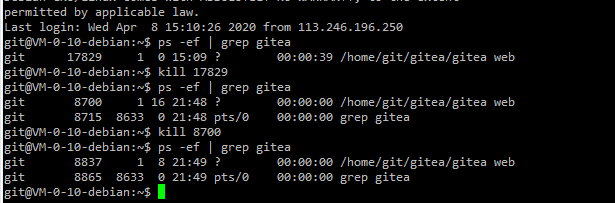
Execute the kill command, the gitea process is not closed.
...
Screenshots
@zeripath commented on GitHub (Apr 8, 2020):
Your screenshot clearly shows that the gitea process running on 13685 has been shutdown.
The results of your second
psare simply demonstrating thegrepprocess.@lygoing commented on GitHub (Apr 8, 2020):
@zeripath thank you, but the problem remains.
@zeripath commented on GitHub (Apr 8, 2020):
All of those processes have different PIDs. Clearly something is restarting the Gitea process.
Have you installed a system d unit file?
@lygoing commented on GitHub (Apr 9, 2020):
@zeripath I didn‘t install the systemd unit.

I thought gitea had a special shutdown command, but I didn't find the shutdown instructions in the official documentation. I think it may be a problem with my operating system environment, but I really don't know how to solve it. Thanks again!
@zeripath commented on GitHub (Apr 9, 2020):
Something is restarting your gitea process after it dies. That's either a systemd unit, openRC or docker process. How did you start gitea?
Gitea will restart itself by design if you send it a
kill -1but will respond to a normal sigkill by shutting down.@lygoing commented on GitHub (Apr 10, 2020):
I just download through the release page of the github repository, and then
chmod a+xto run. Root account execution ofkill -9can't completely terminate the process. Since it's a production environment, I cannot restart the machine. I want to close gitea just to upgrade to the latest version.@guillep2k commented on GitHub (Apr 10, 2020):
How did you start Gitea on the first place? By hand? Did you put it under /etc/init.d? Something weird is going on in your system.
Alternatively what you can do is this, just for the sake of upgrading: rename the file (
mv gitea gitea.old), place the new version in the exact same location (mv /downloads/new.gitea gitea) and kill the process. It should use the new executable when restarting.