Heatmap: Actions are shown on the previous day #2920

Closed
opened 2025-11-02 04:54:05 -06:00 by GiteaMirror · 20 comments
Owner

Originally created by @siddweiker on GitHub (Feb 15, 2019).

  • Gitea version (or commit ref): dfad569 1.7.1 (docker image)
  • Git version: 2.18.1
  • Operating system: Alpine Linux 3.8 (docker image)
  • Database:
    • PostgreSQL
    • MySQL
    • MSSQL
    • SQLite
  • Can you reproduce the bug at https://try.gitea.io:
    • Yes (screenshots below)
    • No
    • Not relevant
  • Log gist: none

Description

Heatmap actions are shown on the previous day for actions in an EST (and beyond?) timezone.

Steps to reproduce:

  • Have your system time be in EST
  • Register and login to https://try.gitea.io
  • Create a repository and make a commit
  • View the heatmap and compare the date of the 2 actions that should be there

Screenshots

Here is a screenshot from my own gitea instance, the heatmap should show actions from Monday to Friday, instead they are shifted back one day.
image

From try.gitea.io, here is a combined screenshot to show the commit time and the heatmap action time:
image

Originally created by @siddweiker on GitHub (Feb 15, 2019). - Gitea version (or commit ref): dfad569 1.7.1 (docker image) - Git version: 2.18.1 - Operating system: Alpine Linux 3.8 (docker image) - Database: - [ ] PostgreSQL - [ ] MySQL - [ ] MSSQL - [x] SQLite - Can you reproduce the bug at https://try.gitea.io: - [x] Yes (screenshots below) - [ ] No - [ ] Not relevant - Log gist: none ## Description Heatmap actions are shown on the previous day for actions in an EST (and beyond?) timezone. #### Steps to reproduce: - Have your system time be in EST - Register and login to https://try.gitea.io - Create a repository and make a commit - View the heatmap and compare the date of the 2 actions that should be there ## Screenshots Here is a screenshot from my own gitea instance, the heatmap should show actions from Monday to Friday, instead they are shifted back one day. ![image](https://user-images.githubusercontent.com/42593659/52868979-a2157b80-3112-11e9-9248-3084e4259293.png) From try.gitea.io, here is a combined screenshot to show the commit time and the heatmap action time: ![image](https://user-images.githubusercontent.com/42593659/52866812-78a62100-310d-11e9-84b8-feabe7cfbe1b.png)
GiteaMirror added the issue/confirmedtype/bug labels 2025-11-02 04:54:05 -06:00
Author
Owner

@troygeiger commented on GitHub (Mar 5, 2019):

I noticed this today as well.

@troygeiger commented on GitHub (Mar 5, 2019): I noticed this today as well.
Author
Owner

@Jamozed commented on GitHub (Mar 30, 2019):

NZST timezone (UTC +12:00/13:00) also does this, except only before midday.

@Jamozed commented on GitHub (Mar 30, 2019): NZST timezone (UTC +12:00/13:00) also does this, except only before midday.
Author
Owner

@kolaente commented on GitHub (Apr 9, 2019):

This probably has to do with the fact the server runs in a different timezone (most likely utc) than your browser.

@kolaente commented on GitHub (Apr 9, 2019): This probably has to do with the fact the server runs in a different timezone (most likely utc) than your browser.
Author
Owner

@Jamozed commented on GitHub (Apr 10, 2019):

This probably has to do with the fact the server runs in a different timezone (most likely utc) than your browser.

This was the first thing I checked in my case, my server and browser are absolutely running in the same timezone.

@Jamozed commented on GitHub (Apr 10, 2019): > This probably has to do with the fact the server runs in a different timezone (most likely utc) than your browser. This was the first thing I checked in my case, my server and browser are absolutely running in the same timezone.
Author
Owner

@siddweiker commented on GitHub (Apr 10, 2019):

I think its because the time is striped from the timestamp.
c42bde719e/models/user_heatmap.go (L25)

@siddweiker commented on GitHub (Apr 10, 2019): I think its because the time is striped from the timestamp. https://github.com/go-gitea/gitea/blob/c42bde719ecf2dd8757453bed18e082d14c1d3fa/models/user_heatmap.go#L25
Author
Owner

@stale[bot] commented on GitHub (Jun 9, 2019):

This issue has been automatically marked as stale because it has not had recent activity. It will be closed if no further activity occurs during the next 2 weeks. Thank you for your contributions.

@stale[bot] commented on GitHub (Jun 9, 2019): This issue has been automatically marked as stale because it has not had recent activity. It will be closed if no further activity occurs during the next 2 weeks. Thank you for your contributions.
Author
Owner

@Brayyy commented on GitHub (Dec 29, 2020):

This issue is still present on 1.14.0+dev-394-g069acf6a2.

It is caused by a disparity in the timezone of the DB (MySQL in my case), and the local browser. My company mainly works out of the EDT timezone, but I am in PST (three hours behind). When I push code, I always see it appear on the prior day, however, if I adjust my local system time to be EDT, the blocks align correctly.

As noted, the issue is rooted in the DB query roundingcreated_unix down to the local day, then in the browser, JS applies the TZ offset, and then rounds this value down a second time, which is now the prior day.

The best solution would likely be to read the timezone from the user browser and use that when globbing the created_unix hours into a single day.

@Brayyy commented on GitHub (Dec 29, 2020): This issue is still present on 1.14.0+dev-394-g069acf6a2. It is caused by a disparity in the timezone of the DB (MySQL in my case), and the local browser. My company mainly works out of the EDT timezone, but I am in PST (three hours behind). When I push code, I always see it appear on the prior day, however, if I adjust my local system time to be EDT, the blocks align correctly. As noted, the issue is rooted in the DB query rounding`created_unix` down to the local day, then in the browser, JS applies the TZ offset, and then rounds this value down a second time, which is now the prior day. The best solution would likely be to read the timezone from the user browser and use that when globbing the `created_unix` hours into a single day.
Author
Owner

@Colin5887 commented on GitHub (Jan 9, 2021):

@Brayyy

I think there are two problems: incorrect heatmap and incorrect commission time.

The commission time (the text popup when hovering on the "19 hours ago") can be changed by putting a time section in the setting. Everyone who accesses that gitea server will use the same time zone.

However, the heatmap uses UTC+0 time zone and there is currently no way to change that. I live in AEDT (UTC+10) and every commission before 10:00 will be marked as yesterday's work.

@Colin5887 commented on GitHub (Jan 9, 2021): @Brayyy I think there are two problems: incorrect heatmap and incorrect commission time. The commission time (the text popup when hovering on the "19 hours ago") can be changed by putting a `time` section in the setting. Everyone who accesses that gitea server will use the same time zone. However, the heatmap uses UTC+0 time zone and there is currently no way to change that. I live in AEDT (UTC+10) and every commission before 10:00 will be marked as yesterday's work.
Author
Owner

@Colin5887 commented on GitHub (Jan 9, 2021):

@siddweiker

The heatmap uses UTC+0 time zone and cannot be changed by any settings (so far). The only way you can make a commission today is to push your work after 19:00 (since you live in UTC-5).

@Colin5887 commented on GitHub (Jan 9, 2021): @siddweiker The heatmap uses UTC+0 time zone and cannot be changed by any settings (so far). The only way you can make a commission today is to push your work after 19:00 (since you live in UTC-5).
Author
Owner

@kins-dev commented on GitHub (Feb 25, 2021):

@siddweiker

The heatmap uses UTC+0 time zone and cannot be changed by any settings (so far). The only way you can make a commission today is to push your work after 19:00 (since you live in UTC-5).

I think you have that backwards.
I'm using PST (UTC -8). If I push at 1:00 AM, that is 9 AM UTC+0 of the same day.
https://www.google.com/search?q=1%3A00+AM+PST+to+UTC

If I push at 5 PM (17:00) then that should be shown as 1:00 AM on the next day if the heat map is UTC based.
https://www.google.com/search?q=17%3A00+PST+to+UTC

It should never show up on the previous day if the user has a negative offset to UTC. The heat map is just wrong.

Edit:
It appears this is a result of the timestamp in heatmap.json, being converted from UTC to the local time zone. For example If I have:

[{"timestamp":1614211200,"contributions":2}]

1614211200 represents Thursday, February 25, 2021 12:00:00 AM UTC
https://www.epochconverter.com/
If my browser then takes that as UTC and converts it to local time, that's Wednesday, February 24, 2021 4:00:00 PM UTC-08:00

So the timestamp being generated for grouping is causing the issue.
One possible way to fix this would be to go to:
https://github.com/go-gitea/gitea/blob/4172b1955fabe79e5918145f4ad1b00911390de0/web_src/js/features/heatmap.js#L11
use this instead:

      return {date: new Date((timestamp + ((new Date()).getTimezoneOffset() * 60)) * 1000), count: contributions};

I haven't actually tested out this change, but based on the JSON data and using my javascript console this should work.

@kins-dev commented on GitHub (Feb 25, 2021): > @siddweiker > > The heatmap uses UTC+0 time zone and cannot be changed by any settings (so far). The only way you can make a commission today is to push your work after 19:00 (since you live in UTC-5). I think you have that backwards. I'm using PST (UTC -8). If I push at 1:00 AM, that is 9 AM UTC+0 of the same day. <https://www.google.com/search?q=1%3A00+AM+PST+to+UTC> If I push at 5 PM (17:00) then that should be shown as 1:00 AM on the next day if the heat map is UTC based. <https://www.google.com/search?q=17%3A00+PST+to+UTC> It should never show up on the previous day if the user has a negative offset to UTC. The heat map is just wrong. Edit: It appears this is a result of the timestamp in heatmap.json, being converted from UTC to the local time zone. For example If I have: ```json [{"timestamp":1614211200,"contributions":2}] ``` 1614211200 represents Thursday, February 25, 2021 12:00:00 AM UTC <https://www.epochconverter.com/> If my browser then takes that as UTC and converts it to local time, that's Wednesday, February 24, 2021 4:00:00 PM UTC-08:00 So the timestamp being generated for grouping is causing the issue. One possible way to fix this would be to go to: <https://github.com/go-gitea/gitea/blob/4172b1955fabe79e5918145f4ad1b00911390de0/web_src/js/features/heatmap.js#L11> use this instead: ```js return {date: new Date((timestamp + ((new Date()).getTimezoneOffset() * 60)) * 1000), count: contributions}; ``` I haven't actually tested out this change, but based on the JSON data and using my javascript console this should work.
Author
Owner

@siddweiker commented on GitHub (Feb 25, 2021):

@kins-dev That will not work;
Given a user who is in the EST timezone:

  • Database Value
    • Timestamp: 1612141200
    • GMT: 2021-02-01 01:00:00+00:00
    • EST: 2021-01-31 20:00:00-05:00
  • Selected Value
    • Timestamp: 1612137600
    • GMT: 2021-02-01 00:00:00+00:00
    • Javascript EST: 2021-01-31 19:00:00-05:00
    • Your JS EST: 2021-02-01 00:00:00-05:00
  • Expected Value
    • EST: 2021-01-31 00:00:00-05:00

The opposite happens for 1612306800 (2021-02-02 18:00:00-05:00), the JS will be the previous day but your JS will be correct.

The server is not aware of the client's timezone, so when it strips out the time, you will get shifted results on the client side.
The SQL should not group at all, and it should be done in heatmap.js.

A better solution would be to group to the hour in SQL, then have the JS convert it to local date (strip the time) and summarize it once more. This will send one timestamp per hour instead of every commit's timestamp.

@siddweiker commented on GitHub (Feb 25, 2021): @kins-dev That will not work; Given a user who is in the EST timezone: - Database Value - Timestamp: `1612141200` - GMT: `2021-02-01 01:00:00+00:00` - EST: `2021-01-31 20:00:00-05:00` - Selected Value - Timestamp: `1612137600` - GMT: `2021-02-01 00:00:00+00:00` - Javascript EST: `2021-01-31 19:00:00-05:00` - Your JS EST: `2021-02-01 00:00:00-05:00` - Expected Value - EST: `2021-01-31 00:00:00-05:00` The opposite happens for `1612306800` (`2021-02-02 18:00:00-05:00`), the JS will be the previous day but your JS will be correct. The server is not aware of the client's timezone, so when it strips out the **time**, you will get shifted results on the client side. The SQL should not group at all, and it should be done in heatmap.js. A better solution would be to group to the hour in SQL, then have the JS convert it to local date (strip the time) and summarize it once more. This will send one timestamp per hour instead of every commit's timestamp.
Author
Owner

@kins-dev commented on GitHub (Feb 26, 2021):

@kins-dev That will not work;
Given a user who is in the EST timezone:

* Database Value
  
  * Timestamp: `1612141200`
  * GMT: `2021-02-01 01:00:00+00:00`
  * EST: `2021-01-31 20:00:00-05:00`

* Selected Value
  
  * Timestamp: `1612137600`
  * GMT: `2021-02-01 00:00:00+00:00`
  * Javascript EST: `2021-01-31 19:00:00-05:00`
  * Your JS EST: `2021-02-01 00:00:00-05:00`

* Expected Value
  
  * EST: `2021-01-31 00:00:00-05:00`

The opposite happens for 1612306800 (2021-02-02 18:00:00-05:00), the JS will be the previous day but your JS will be correct.

The server is not aware of the client's timezone, so when it strips out the time, you will get shifted results on the client side.
The SQL should not group at all, and it should be done in heatmap.js.

A better solution would be to group to the hour in SQL, then have the JS convert it to local date (strip the time) and summarize it once more. This will send one timestamp per hour instead of every commit's timestamp.

Really? Did you try it? Did you understand the issue? (The calendar.vue is running in the context of local time, for showing days but the server is providing the date via epoch which evaluates to the previous day when your timezone is behind UTC. You can think of it as taking the time specified and doing dropping the time information but keeping the date information. Using epoch time implies that time is in the UTC zone, so that information is not being stripped when it goes to your browser.)

So, I'm PST, but this will work for EST or any other timezone.
I made a brand new server and commits today, the result was as I stated before:

[{"timestamp":1614211200,"contributions":2}]

That's not February 25th where my browser or server is running. It is February 25th UTC time, in fact the very first moment of it. February 25th started at 1614240000 for the PST time zone.

So, doing the math 1614240000 - 1614211200 = 28800 seconds.
28800 seconds is 480 minutes which is 8 hours. Given that PST is GMT -8, that makes sense. (We're 8 hours behind GMT.)
Well what is:

(new Date()).getTimezoneOffset() * 60 + 1614211200

https://jsfiddle.net/3v578s1r/1/

Does that match 1614240000?

I think it does, and in fact after putting my code in place, I get this now:
Screenshot from 2021-02-25 15-56-21

This is not perfect, far from it, but it is at least defensible. I'm using math to make the calendar.vue work based on UTC time so it matches the server in terms of what constitutes a single day. Why do you believe that won't work?

Edit:
That picture is a little hard to read, but you can see it says my account joined today. Here's the heatmap without the popup.
Screenshot from 2021-02-25 16-10-32

Before my change, those contributions all showed up the previous day in the heatmap

Edit 2: some wording.

Edit 3: Just realized it is just after midnight UTC, so I made a few more commits:
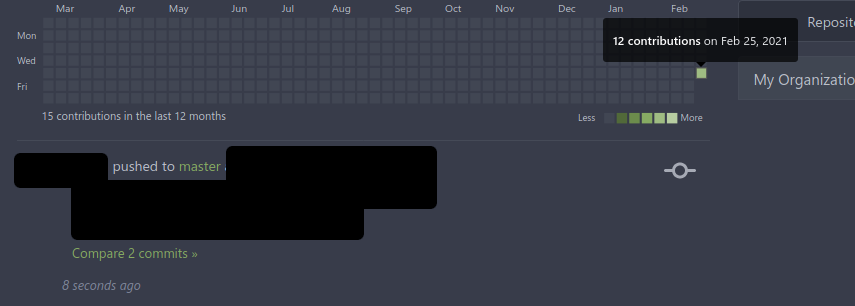
Screenshot from 2021-02-25 16-28-10
You can see the commits that should be attributed to 2/26/2021 are not shown here.

The heatmap data is now:

[{"timestamp":1614211200,"contributions":12},{"timestamp":1614297600,"contributions":3}]

12 + 3 = 15 contributions and it is obvious the 3 are connected to the next day.

heatmap.vue and calendar.vue will not show the next day until it hits the 26th local time, so for now that data is not visible. Like I said not perfect, but better than putting items on the wrong day.

@kins-dev commented on GitHub (Feb 26, 2021): > @kins-dev That will not work; > Given a user who is in the EST timezone: > > * Database Value > > * Timestamp: `1612141200` > * GMT: `2021-02-01 01:00:00+00:00` > * EST: `2021-01-31 20:00:00-05:00` > > * Selected Value > > * Timestamp: `1612137600` > * GMT: `2021-02-01 00:00:00+00:00` > * Javascript EST: `2021-01-31 19:00:00-05:00` > * Your JS EST: `2021-02-01 00:00:00-05:00` > > * Expected Value > > * EST: `2021-01-31 00:00:00-05:00` > > > The opposite happens for `1612306800` (`2021-02-02 18:00:00-05:00`), the JS will be the previous day but your JS will be correct. > > The server is not aware of the client's timezone, so when it strips out the **time**, you will get shifted results on the client side. > The SQL should not group at all, and it should be done in heatmap.js. > > A better solution would be to group to the hour in SQL, then have the JS convert it to local date (strip the time) and summarize it once more. This will send one timestamp per hour instead of every commit's timestamp. Really? Did you try it? Did you understand the issue? (The calendar.vue is running in the context of local time, for showing days but the server is providing the date via epoch which evaluates to the previous day when your timezone is behind UTC. You can think of it as taking the time specified and doing dropping the time information but keeping the date information. Using epoch time implies that time is in the UTC zone, so that information is not being stripped when it goes to your browser.) So, I'm PST, but this will work for EST or any other timezone. I made a brand new server and commits today, the result was as I stated before: ```json [{"timestamp":1614211200,"contributions":2}] ``` That's not February 25th where my browser or server is running. It is February 25th UTC time, in fact the very first moment of it. February 25th started at 1614240000 for the PST time zone. So, doing the math 1614240000 - 1614211200 = 28800 seconds. 28800 seconds is 480 minutes which is 8 hours. Given that PST is GMT -8, that makes sense. (We're 8 hours behind GMT.) Well what is: ```js (new Date()).getTimezoneOffset() * 60 + 1614211200 ``` <https://jsfiddle.net/3v578s1r/1/> Does that match 1614240000? I think it does, and in fact after putting my code in place, I get this now: ![Screenshot from 2021-02-25 15-56-21](https://user-images.githubusercontent.com/48720687/109235639-ec5e7800-7782-11eb-8921-a9c840a18e68.png) This is not perfect, far from it, but it is at least defensible. I'm using math to make the calendar.vue work based on UTC time so it matches the server in terms of what constitutes a single day. Why do you believe that won't work? Edit: That picture is a little hard to read, but you can see it says my account joined today. Here's the heatmap without the popup. ![Screenshot from 2021-02-25 16-10-32](https://user-images.githubusercontent.com/48720687/109236327-41e75480-7784-11eb-88f7-fb05cd968433.png) Before my change, those contributions all showed up the previous day in the heatmap Edit 2: some wording. Edit 3: Just realized it is just after midnight UTC, so I made a few more commits: ![Screenshot from 2021-02-25 16-28-10](https://user-images.githubusercontent.com/48720687/109237739-05692800-7787-11eb-92a5-827b41a156f9.png) You can see the commits that should be attributed to 2/26/2021 are not shown here. The heatmap data is now: ```json [{"timestamp":1614211200,"contributions":12},{"timestamp":1614297600,"contributions":3}] ``` 12 + 3 = 15 contributions and it is obvious the 3 are connected to the next day. heatmap.vue and calendar.vue will not show the next day until it hits the 26th local time, so for now that data is not visible. Like I said not perfect, but better than putting items on the wrong day.
Author
Owner

@kins-dev commented on GitHub (Feb 27, 2021):

So I believe the heat map end date can be fixed by:
50208e903a/web_src/js/components/ActivityHeatmap.vue (L38)
to

    endDate: new Date(Date.now() + (new Date()).getTimezoneOffset() * 60000),

And this should keep the heatmap in UTC.

I won't be able to test it for another day.

Of course this all could have been avoided if
c42bde719e/models/user_heatmap.go (L19)
had kept the date string as a string instead of converting it seconds then milliseconds. (As per the documentation here: https://github.com/julienr114/vue-calendar-heatmap) We'd still need to play games with the end date.

That all said there's a better solution.
I want to make sure that someone like @lafriks, @kolaente, or @jolheiser see's this part: since my suggestion probably needs to be evaluated as part of the whole design.

if the function in user_heatmap.go was simplified to: (Remember to remove the unused reference)

func getUserHeatmapData(user *User, team *Team, doer *User) ([]*UserHeatmapData, error) {
        hdata := make([]*UserHeatmapData, 0)

        if !activityReadable(user, doer) {
                return hdata, nil
        }

        cond, err := activityQueryCondition(GetFeedsOptions{
                RequestedUser:  user,
                RequestedTeam:  team,
                Actor:          doer,
                IncludePrivate: true, // don't filter by private, as we already filter by repo access
                IncludeDeleted: true,
                // * Heatmaps for individual users only include actions that the user themself did.
                // * For organizations actions by all users that were made in owned
                //   repositories are counted.
                OnlyPerformedBy: !user.IsOrganization(),
        })
        if err != nil {
                return nil, err
        }

        // Only worry about actions in the last 53 weeks to give a little margin for error
        return hdata, x.
                Select("created_unix AS timestamp, count(user_id) as contributions").
                Table("action").
                Where(cond).
                And("created_unix > ?", (timeutil.TimeStampNow() - (53*7*60*60))).
                GroupBy("created_unix").
                OrderBy("timestamp").
                Find(&hdata)
}

So that everything is just grouped by their unix timestamp.

Then in heatmap.js if you did something like:

export default async function initHeatmap() {
  const el = document.getElementById('user-heatmap');
  if (!el) return;

  try {
    const json_data = JSON.parse(el.dataset.heatmapData).map(({contributions, timestamp}) => {
      return {date: new Date(timestamp * 1000).toDateString(), count: contributions};
    });
    let tmp={};
    json_data.forEach(e => {
        let val = tmp[e.date]||0;
        val += e.count;
        tmp[e.date]=val;
    });
    let heatmap_data = [];
    for(let dateVal in tmp) {
        let countVal = tmp[dateVal];
        heatmap_data.push({date: new Date(dateVal), count: countVal});
    }
    const values = heatmap_data.map(a => ({...a}));

    const View = Vue.extend({
      render: (createElement) => createElement(ActivityHeatmap, {props: {values}}),
    });

    new View().$mount(el);
  } catch (err) {
    console.error(err);
    el.textContent = 'Heatmap failed to load';
  }
}

Then the heatmap would just work in the web browser's time zone and this entire issue would just go away.

Also it reduces the computational load on the server, by making clients sum the number of actions per day, The draw back is, it does increase the amount of data being sent between the client and the server. This may be a problem with a lot of commits, so the person fixing this might want to group by minute, or by a 10 minute interval, but I'll leave that up to them. (The original reason for grouping was not in a comment in the code, so I don't know if there's something I'm missing.)

@kins-dev commented on GitHub (Feb 27, 2021): So I believe the heat map end date can be fixed by: https://github.com/go-gitea/gitea/blob/50208e903ae9aa931db3d93bde7032e766687cae/web_src/js/components/ActivityHeatmap.vue#L38 to ```js endDate: new Date(Date.now() + (new Date()).getTimezoneOffset() * 60000), ``` And this should keep the heatmap in UTC. I won't be able to test it for another day. Of course this all could have been avoided if https://github.com/go-gitea/gitea/blob/c42bde719ecf2dd8757453bed18e082d14c1d3fa/models/user_heatmap.go#L19 had kept the date string as a string instead of converting it seconds then milliseconds. (As per the documentation here: https://github.com/julienr114/vue-calendar-heatmap) We'd still need to play games with the end date. That all said there's a better solution. I want to make sure that someone like @lafriks, @kolaente, or @jolheiser see's this part: since my suggestion probably needs to be evaluated as part of the whole design. if the function in user_heatmap.go was simplified to: (Remember to remove the unused reference) ```go func getUserHeatmapData(user *User, team *Team, doer *User) ([]*UserHeatmapData, error) { hdata := make([]*UserHeatmapData, 0) if !activityReadable(user, doer) { return hdata, nil } cond, err := activityQueryCondition(GetFeedsOptions{ RequestedUser: user, RequestedTeam: team, Actor: doer, IncludePrivate: true, // don't filter by private, as we already filter by repo access IncludeDeleted: true, // * Heatmaps for individual users only include actions that the user themself did. // * For organizations actions by all users that were made in owned // repositories are counted. OnlyPerformedBy: !user.IsOrganization(), }) if err != nil { return nil, err } // Only worry about actions in the last 53 weeks to give a little margin for error return hdata, x. Select("created_unix AS timestamp, count(user_id) as contributions"). Table("action"). Where(cond). And("created_unix > ?", (timeutil.TimeStampNow() - (53*7*60*60))). GroupBy("created_unix"). OrderBy("timestamp"). Find(&hdata) } ``` So that everything is just grouped by their unix timestamp. Then in heatmap.js if you did something like: ```js export default async function initHeatmap() { const el = document.getElementById('user-heatmap'); if (!el) return; try { const json_data = JSON.parse(el.dataset.heatmapData).map(({contributions, timestamp}) => { return {date: new Date(timestamp * 1000).toDateString(), count: contributions}; }); let tmp={}; json_data.forEach(e => { let val = tmp[e.date]||0; val += e.count; tmp[e.date]=val; }); let heatmap_data = []; for(let dateVal in tmp) { let countVal = tmp[dateVal]; heatmap_data.push({date: new Date(dateVal), count: countVal}); } const values = heatmap_data.map(a => ({...a})); const View = Vue.extend({ render: (createElement) => createElement(ActivityHeatmap, {props: {values}}), }); new View().$mount(el); } catch (err) { console.error(err); el.textContent = 'Heatmap failed to load'; } } ``` Then the heatmap would just work in the web browser's time zone and this entire issue would just go away. Also it reduces the computational load on the server, by making clients sum the number of actions per day, The draw back is, it does increase the amount of data being sent between the client and the server. This may be a problem with a lot of commits, so the person fixing this might want to group by minute, or by a 10 minute interval, but I'll leave that up to them. (The original reason for grouping was not in a comment in the code, so I don't know if there's something I'm missing.)
Author
Owner

@siddweiker commented on GitHub (Feb 27, 2021):

I'm in agreement. (This is what I proposed in my previous comment...)

There are 30min and 45min timezones (India is UTC +5:30). So grouping by date and 15 min intervals will give you the most accurate times with the least amount of data sent.

@siddweiker commented on GitHub (Feb 27, 2021): I'm in agreement. (This is what I proposed in my previous comment...) There are 30min and 45min timezones (India is UTC +5:30). So grouping by date and 15 min intervals will give you the most accurate times with the least amount of data sent.
Author
Owner

@Colin5887 commented on GitHub (Feb 27, 2021):

I'm tired of making no contributions every Friday and work overtime every Sunday. Hope this issue can be fixed soon.

BTW, Australian Central Daylight Time (ADST) is a +10.5 time. 15 minutes' interval is a great suggestion.

@Colin5887 commented on GitHub (Feb 27, 2021): I'm tired of making no contributions every Friday and work overtime every Sunday. Hope this issue can be fixed soon. BTW, Australian Central Daylight Time (ADST) is a +10.5 time. 15 minutes' interval is a great suggestion.
Author
Owner

@siddweiker commented on GitHub (Feb 27, 2021):

I started working on a fix for the SQL and used the javascript fix from @kins-dev. SQLite seems to be working so far.
I also created a python script for testing while I work on it since I wanted to test every 15 minute time for an entire day.

@siddweiker commented on GitHub (Feb 27, 2021): I started working on a fix for the SQL and used the javascript fix from @kins-dev. SQLite seems to be working so far. I also created a [python script](https://github.com/siddweiker/gitea-generate-heatmap) for testing while I work on it since I wanted to test every 15 minute time for an entire day.
Author
Owner

@kins-dev commented on GitHub (Feb 27, 2021):

@siddweiker if you want to go that route you should be able to do some simple math in the SQL

Something like:

group by created_unix / 900

Probably need that in the select as well.

Since leap seconds are ignored by epoch time, this should just work for everyone.

Edit:
Oh and don't forget to multiply by 900 in the javascript

@kins-dev commented on GitHub (Feb 27, 2021): @siddweiker if you want to go that route you should be able to do some simple math in the SQL Something like: ```sql group by created_unix / 900 ``` Probably need that in the select as well. Since leap seconds are ignored by epoch time, this should just work for everyone. Edit: Oh and don't forget to multiply by 900 in the javascript
Author
Owner

@kins-dev commented on GitHub (Feb 28, 2021):

@siddweiker
Okay so with 15 minute intervals the code is:
83cf1a894e/models/user_heatmap.go (L28-L72)

func getUserHeatmapData(user *User, team *Team, doer *User) ([]*UserHeatmapData, error) {
	// 53 weeks in seconds, because the heatmap may show up to 53 columns
	const WeeksInSec = 53 * 7 * 24 * 60 * 60

	heatMapData := make([]*UserHeatmapData, 0)

	if !activityReadable(user, doer) {
		return heatMapData, nil
	}

	cond, err := activityQueryCondition(GetFeedsOptions{
		RequestedUser:  user,
		RequestedTeam:  team,
		Actor:          doer,
		IncludePrivate: true, // don't filter by private, as we already filter by repo access
		IncludeDeleted: true,
		// * Heatmaps for individual users only include actions that the user themself did.
		// * For organizations actions by all users that were made in owned
		//   repositories are counted.
		OnlyPerformedBy: !user.IsOrganization(),
	})
	if err != nil {
		return nil, err
	}

	// 900 in the following statements comes from 15 minutes in seconds
	// 15 minute groupings was decided because that's the smallest offset
	// from an hour that is possible (eg. Nepal)
	// https://www.worldtimeserver.com/learn/unusual-time-zones/
	return heatMapData, x.
		Select("created_unix / 900 AS timestamp, count(user_id) as contributions").
		Table("action").
		Where(cond).
		And("created_unix > ?", (timeutil.TimeStampNow() - (WeeksInSec))).
		GroupBy("created_unix / 900").
		OrderBy("timestamp").
		Find(&heatMapData)
}

83cf1a894e/web_src/js/features/heatmap.js (L5-L23)

export default async function initHeatmap() {
  const el = document.getElementById('user-heatmap');
  if (!el) return;

  try {
    const json_data = JSON.parse(el.dataset.heatmapData).map(({ contributions, timestamp }) => {
      // groups by 15 minute intervals, (15*60) and we need that in milliseconds, so 900000
      // must be kept in sync with user_heatmap.go
      return { date: new Date(timestamp * 900000).toDateString(), count: contributions };
    });
    let tmp = {};
    json_data.forEach(e => {
      let val = tmp[e.date] || 0;
      val += e.count;
      tmp[e.date] = val;
    });
    let heatmap_data = [];
    for (let dateVal in tmp) {
      let countVal = tmp[dateVal];
      heatmap_data.push({ date: new Date(dateVal), count: countVal });
    }
    const values = heatmap_data.map(a => ({ ...a }));

    const View = Vue.extend({
      render: (createElement) => createElement(ActivityHeatmap, { props: { values } }),
    });

    new View().$mount(el);
  } catch (err) {
    console.error(err);
    el.textContent = 'Heatmap failed to load';
  }
}

Note: In my previous code, I missed the 24 in the calculation of 53 weeks for the user_heatmap.go file. Oh and do remove the unneeded reference.

I verified the results by looking at the contents of div id="user-heatmap" data-heatmap-data of the root html file:
One second grouping:

[ {"timestamp":1614267824,"contributions":1},
  {"timestamp":1614269550,"contributions":1},
  {"timestamp":1614290624,"contributions":1},
  {"timestamp":1614290662,"contributions":1},
  {"timestamp":1614290794,"contributions":1},
  {"timestamp":1614290980,"contributions":1},
  {"timestamp":1614291138,"contributions":1},
  {"timestamp":1614291523,"contributions":1},
  {"timestamp":1614299151,"contributions":1},
  {"timestamp":1614299237,"contributions":2},
  {"timestamp":1614348696,"contributions":1},
  {"timestamp":1614351446,"contributions":1},
  {"timestamp":1614355082,"contributions":1},
  {"timestamp":1614355346,"contributions":2},
  {"timestamp":1614355882,"contributions":1},
  {"timestamp":1614356603,"contributions":1},
  {"timestamp":1614407454,"contributions":1},
  {"timestamp":1614407984,"contributions":1},
  {"timestamp":1614408176,"contributions":2},
  {"timestamp":1614408536,"contributions":1},
  {"timestamp":1614408867,"contributions":1},
  {"timestamp":1614448314,"contributions":1},
  {"timestamp":1614448315,"contributions":2},
  {"timestamp":1614448715,"contributions":1},
  {"timestamp":1614453629,"contributions":1},
  {"timestamp":1614456736,"contributions":1},
  {"timestamp":1614463043,"contributions":1},
  {"timestamp":1614464473,"contributions":1},
  {"timestamp":1614530671,"contributions":1},
  {"timestamp":1614530672,"contributions":1},
  {"timestamp":1614532187,"contributions":1},
  {"timestamp":1614540754,"contributions":1},
  {"timestamp":1614541439,"contributions":1},
  {"timestamp":1614541988,"contributions":1},
  {"timestamp":1614542189,"contributions":1}]

15 Minute Grouping:

[ {"timestamp":1793630,"contributions":1},
  {"timestamp":1793632,"contributions":1},
  {"timestamp":1793656,"contributions":5},
  {"timestamp":1793657,"contributions":1},
  {"timestamp":1793665,"contributions":3},
  {"timestamp":1793720,"contributions":1},
  {"timestamp":1793723,"contributions":1},
  {"timestamp":1793727,"contributions":1},
  {"timestamp":1793728,"contributions":3},
  {"timestamp":1793729,"contributions":1},
  {"timestamp":1793786,"contributions":4},
  {"timestamp":1793787,"contributions":2},
  {"timestamp":1793831,"contributions":4},
  {"timestamp":1793837,"contributions":1},
  {"timestamp":1793840,"contributions":1},
  {"timestamp":1793847,"contributions":1},
  {"timestamp":1793849,"contributions":1},
  {"timestamp":1793922,"contributions":2},
  {"timestamp":1793924,"contributions":1},
  {"timestamp":1793934,"contributions":2},
  {"timestamp":1793935,"contributions":2}]

You can put that data into a spreadsheet if you want to confirm, there are multiple commits in the same 15 minute window, and commits that fall into sequential 15 minute windows.

I haven't tested anything but SQLite3

@kins-dev commented on GitHub (Feb 28, 2021): @siddweiker Okay so with 15 minute intervals the code is: https://github.com/go-gitea/gitea/blob/83cf1a894e5a3a60ea72fa6b92744cb0705dd145/models/user_heatmap.go#L28-L72 ```go func getUserHeatmapData(user *User, team *Team, doer *User) ([]*UserHeatmapData, error) { // 53 weeks in seconds, because the heatmap may show up to 53 columns const WeeksInSec = 53 * 7 * 24 * 60 * 60 heatMapData := make([]*UserHeatmapData, 0) if !activityReadable(user, doer) { return heatMapData, nil } cond, err := activityQueryCondition(GetFeedsOptions{ RequestedUser: user, RequestedTeam: team, Actor: doer, IncludePrivate: true, // don't filter by private, as we already filter by repo access IncludeDeleted: true, // * Heatmaps for individual users only include actions that the user themself did. // * For organizations actions by all users that were made in owned // repositories are counted. OnlyPerformedBy: !user.IsOrganization(), }) if err != nil { return nil, err } // 900 in the following statements comes from 15 minutes in seconds // 15 minute groupings was decided because that's the smallest offset // from an hour that is possible (eg. Nepal) // https://www.worldtimeserver.com/learn/unusual-time-zones/ return heatMapData, x. Select("created_unix / 900 AS timestamp, count(user_id) as contributions"). Table("action"). Where(cond). And("created_unix > ?", (timeutil.TimeStampNow() - (WeeksInSec))). GroupBy("created_unix / 900"). OrderBy("timestamp"). Find(&heatMapData) } ``` https://github.com/go-gitea/gitea/blob/83cf1a894e5a3a60ea72fa6b92744cb0705dd145/web_src/js/features/heatmap.js#L5-L23 ```js export default async function initHeatmap() { const el = document.getElementById('user-heatmap'); if (!el) return; try { const json_data = JSON.parse(el.dataset.heatmapData).map(({ contributions, timestamp }) => { // groups by 15 minute intervals, (15*60) and we need that in milliseconds, so 900000 // must be kept in sync with user_heatmap.go return { date: new Date(timestamp * 900000).toDateString(), count: contributions }; }); let tmp = {}; json_data.forEach(e => { let val = tmp[e.date] || 0; val += e.count; tmp[e.date] = val; }); let heatmap_data = []; for (let dateVal in tmp) { let countVal = tmp[dateVal]; heatmap_data.push({ date: new Date(dateVal), count: countVal }); } const values = heatmap_data.map(a => ({ ...a })); const View = Vue.extend({ render: (createElement) => createElement(ActivityHeatmap, { props: { values } }), }); new View().$mount(el); } catch (err) { console.error(err); el.textContent = 'Heatmap failed to load'; } } ``` Note: In my previous code, I missed the 24 in the calculation of 53 weeks for the `user_heatmap.go` file. Oh and do remove the unneeded reference. I verified the results by looking at the contents of `div id="user-heatmap" data-heatmap-data` of the root html file: One second grouping: ```json [ {"timestamp":1614267824,"contributions":1}, {"timestamp":1614269550,"contributions":1}, {"timestamp":1614290624,"contributions":1}, {"timestamp":1614290662,"contributions":1}, {"timestamp":1614290794,"contributions":1}, {"timestamp":1614290980,"contributions":1}, {"timestamp":1614291138,"contributions":1}, {"timestamp":1614291523,"contributions":1}, {"timestamp":1614299151,"contributions":1}, {"timestamp":1614299237,"contributions":2}, {"timestamp":1614348696,"contributions":1}, {"timestamp":1614351446,"contributions":1}, {"timestamp":1614355082,"contributions":1}, {"timestamp":1614355346,"contributions":2}, {"timestamp":1614355882,"contributions":1}, {"timestamp":1614356603,"contributions":1}, {"timestamp":1614407454,"contributions":1}, {"timestamp":1614407984,"contributions":1}, {"timestamp":1614408176,"contributions":2}, {"timestamp":1614408536,"contributions":1}, {"timestamp":1614408867,"contributions":1}, {"timestamp":1614448314,"contributions":1}, {"timestamp":1614448315,"contributions":2}, {"timestamp":1614448715,"contributions":1}, {"timestamp":1614453629,"contributions":1}, {"timestamp":1614456736,"contributions":1}, {"timestamp":1614463043,"contributions":1}, {"timestamp":1614464473,"contributions":1}, {"timestamp":1614530671,"contributions":1}, {"timestamp":1614530672,"contributions":1}, {"timestamp":1614532187,"contributions":1}, {"timestamp":1614540754,"contributions":1}, {"timestamp":1614541439,"contributions":1}, {"timestamp":1614541988,"contributions":1}, {"timestamp":1614542189,"contributions":1}] ``` 15 Minute Grouping: ```json [ {"timestamp":1793630,"contributions":1}, {"timestamp":1793632,"contributions":1}, {"timestamp":1793656,"contributions":5}, {"timestamp":1793657,"contributions":1}, {"timestamp":1793665,"contributions":3}, {"timestamp":1793720,"contributions":1}, {"timestamp":1793723,"contributions":1}, {"timestamp":1793727,"contributions":1}, {"timestamp":1793728,"contributions":3}, {"timestamp":1793729,"contributions":1}, {"timestamp":1793786,"contributions":4}, {"timestamp":1793787,"contributions":2}, {"timestamp":1793831,"contributions":4}, {"timestamp":1793837,"contributions":1}, {"timestamp":1793840,"contributions":1}, {"timestamp":1793847,"contributions":1}, {"timestamp":1793849,"contributions":1}, {"timestamp":1793922,"contributions":2}, {"timestamp":1793924,"contributions":1}, {"timestamp":1793934,"contributions":2}, {"timestamp":1793935,"contributions":2}] ``` You can put that data into a spreadsheet if you want to confirm, there are multiple commits in the same 15 minute window, and commits that fall into sequential 15 minute windows. I haven't tested anything but SQLite3
Author
Owner

@kins-dev commented on GitHub (Mar 2, 2021):

Due to segfaults on the master branch when using issue management on the Arm64 platform, I'm going back to 1.13.2.

Back porting these changes:
014313134f/web_src/js/components/ActivityHeatmap.vue (L50-L60)
becomes:

        loadHeatmap(userName) {
            const self = this;
            $.get(`${this.suburl}/api/v1/users/${userName}/heatmap`, (chartRawData) => {
                const chartDataMap = {};
                const chartData = [];

                for (let i = 0; i < chartRawData.length; i++) {
                    let dateStr = (new Date(chartRawData[i].timestamp * 1000)).toDateString();
                    let dayContrib = chartDataMap[dateStr] || 0;
                    dayContrib += chartRawData[i].contributions;
                    self.totalContributions += chartRawData[i].contributions;
                    chartDataMap[dateStr] = dayContrib;
                }
                for (let dateStr in chartDataMap)
                {
                    chartData.push({date: new Date(dateStr), count: chartDataMap[dateStr]})
                }
                self.values = chartData;
                self.isLoading = false;
            });

014313134f/models/user_heatmap.go (L18-L58)
becomes:

// GetUserHeatmapDataByUser returns an array of UserHeatmapData
func GetUserHeatmapDataByUser(user *User) ([]*UserHeatmapData, error) {
	// 53 weeks in seconds, because the heatmap may show up to 53 columns
	const WeeksInSec = 53 * 7 * 24 * 60 * 60

	hdata := make([]*UserHeatmapData, 0)

	if user.KeepActivityPrivate {
		return hdata, nil
	}

	sess := x.Select("(created_unix / 900) * 900 AS timestamp, count(user_id) as contributions").
		Table("action").
		Where("user_id = ?", user.ID).
		And("created_unix > ?", (timeutil.TimeStampNow() - (WeeksInSec)))

	// * Heatmaps for individual users only include actions that the user themself
	//   did.
	// * For organizations actions by all users that were made in owned
	//   repositories are counted.
	if user.Type == UserTypeIndividual {
		sess = sess.And("act_user_id = ?", user.ID)
	}

	err := sess.GroupBy("created_unix / 900").
		OrderBy("timestamp").
		Find(&hdata)

	return hdata, err
}

There's a couple of bonuses here, one is the API should work the same again (no change in semantics) and the javascript code was cleaned up some.

@kins-dev commented on GitHub (Mar 2, 2021): Due to segfaults on the master branch when using issue management on the Arm64 platform, I'm going back to 1.13.2. Back porting these changes: https://github.com/go-gitea/gitea/blob/014313134f72ebb2ca57eb2e5cd42726231f8fff/web_src/js/components/ActivityHeatmap.vue#L50-L60 becomes: ```js loadHeatmap(userName) { const self = this; $.get(`${this.suburl}/api/v1/users/${userName}/heatmap`, (chartRawData) => { const chartDataMap = {}; const chartData = []; for (let i = 0; i < chartRawData.length; i++) { let dateStr = (new Date(chartRawData[i].timestamp * 1000)).toDateString(); let dayContrib = chartDataMap[dateStr] || 0; dayContrib += chartRawData[i].contributions; self.totalContributions += chartRawData[i].contributions; chartDataMap[dateStr] = dayContrib; } for (let dateStr in chartDataMap) { chartData.push({date: new Date(dateStr), count: chartDataMap[dateStr]}) } self.values = chartData; self.isLoading = false; }); ``` https://github.com/go-gitea/gitea/blob/014313134f72ebb2ca57eb2e5cd42726231f8fff/models/user_heatmap.go#L18-L58 becomes: ```go // GetUserHeatmapDataByUser returns an array of UserHeatmapData func GetUserHeatmapDataByUser(user *User) ([]*UserHeatmapData, error) { // 53 weeks in seconds, because the heatmap may show up to 53 columns const WeeksInSec = 53 * 7 * 24 * 60 * 60 hdata := make([]*UserHeatmapData, 0) if user.KeepActivityPrivate { return hdata, nil } sess := x.Select("(created_unix / 900) * 900 AS timestamp, count(user_id) as contributions"). Table("action"). Where("user_id = ?", user.ID). And("created_unix > ?", (timeutil.TimeStampNow() - (WeeksInSec))) // * Heatmaps for individual users only include actions that the user themself // did. // * For organizations actions by all users that were made in owned // repositories are counted. if user.Type == UserTypeIndividual { sess = sess.And("act_user_id = ?", user.ID) } err := sess.GroupBy("created_unix / 900"). OrderBy("timestamp"). Find(&hdata) return hdata, err } ``` There's a couple of bonuses here, one is the API should work the same again (no change in semantics) and the javascript code was cleaned up some.
Author
Owner

@siddweiker commented on GitHub (Apr 6, 2021):

@kins-dev @Colin5887
I have a PR open if you want to test my changes.

@siddweiker commented on GitHub (Apr 6, 2021): @kins-dev @Colin5887 I have a PR open if you want to test my changes.
Sign in to join this conversation.
1 Participants
Notifications
Due Date
No due date set.
Dependencies

No dependencies set.

Reference: github-starred/gitea#2920