mirror of
https://github.com/go-gitea/gitea.git
synced 2026-07-22 03:37:48 -05:00
Problems accessing various pages in Chrome #2840
Closed
opened 2025-11-02 04:50:37 -06:00 by GiteaMirror
·
9 comments
No Branch/Tag Specified
main
release/v1.25
release/v1.24
release/v1.23
release/v1.22
release/v1.21
release/v1.20
release/v1.19
release/v1.18
release/v1.17
release/v1.16
release/v1.15
release/v1.14
release/v1.13
release/v1.12
release/v1.11
release/v1.10
release/v1.9
release/v1.8
v1.25.3
v1.25.2
v1.25.1
v1.25.0
v1.24.7
v1.25.0-rc0
v1.26.0-dev
v1.24.6
v1.24.5
v1.24.4
v1.24.3
v1.24.2
v1.24.1
v1.24.0
v1.23.8
v1.24.0-rc0
v1.25.0-dev
v1.23.7
v1.23.6
v1.23.5
v1.23.4
v1.23.3
v1.23.2
v1.23.1
v1.23.0
v1.23.0-rc0
v1.24.0-dev
v1.22.6
v1.22.5
v1.22.4
v1.22.3
v1.22.2
v1.22.1
v1.22.0
v1.23.0-dev
v1.22.0-rc1
v1.21.11
v1.22.0-rc0
v1.21.10
v1.21.9
v1.21.8
v1.21.7
v1.21.6
v1.21.5
v1.21.4
v1.21.3
v1.21.2
v1.20.6
v1.21.1
v1.21.0
v1.21.0-rc2
v1.21.0-rc1
v1.20.5
v1.22.0-dev
v1.21.0-rc0
v1.20.4
v1.20.3
v1.20.2
v1.20.1
v1.20.0
v1.19.4
v1.21.0-dev
v1.20.0-rc2
v1.20.0-rc1
v1.20.0-rc0
v1.19.3
v1.19.2
v1.19.1
v1.19.0
v1.19.0-rc1
v1.20.0-dev
v1.19.0-rc0
v1.18.5
v1.18.4
v1.18.3
v1.18.2
v1.18.1
v1.18.0
v1.17.4
v1.18.0-rc1
v1.19.0-dev
v1.18.0-rc0
v1.17.3
v1.17.2
v1.17.1
v1.17.0
v1.17.0-rc2
v1.16.9
v1.17.0-rc1
v1.18.0-dev
v1.16.8
v1.16.7
v1.16.6
v1.16.5
v1.16.4
v1.16.3
v1.16.2
v1.16.1
v1.16.0
v1.15.11
v1.17.0-dev
v1.16.0-rc1
v1.15.10
v1.15.9
v1.15.8
v1.15.7
v1.15.6
v1.15.5
v1.15.4
v1.15.3
v1.15.2
v1.15.1
v1.14.7
v1.15.0
v1.15.0-rc3
v1.14.6
v1.15.0-rc2
v1.14.5
v1.16.0-dev
v1.15.0-rc1
v1.14.4
v1.14.3
v1.14.2
v1.14.1
v1.14.0
v1.13.7
v1.14.0-rc2
v1.13.6
v1.13.5
v1.14.0-rc1
v1.15.0-dev
v1.13.4
v1.13.3
v1.13.2
v1.13.1
v1.13.0
v1.12.6
v1.13.0-rc2
v1.14.0-dev
v1.13.0-rc1
v1.12.5
v1.12.4
v1.12.3
v1.12.2
v1.12.1
v1.11.8
v1.12.0
v1.11.7
v1.12.0-rc2
v1.11.6
v1.12.0-rc1
v1.13.0-dev
v1.11.5
v1.11.4
v1.11.3
v1.10.6
v1.12.0-dev
v1.11.2
v1.10.5
v1.11.1
v1.10.4
v1.11.0
v1.11.0-rc2
v1.10.3
v1.11.0-rc1
v1.10.2
v1.10.1
v1.10.0
v1.9.6
v1.9.5
v1.10.0-rc2
v1.11.0-dev
v1.10.0-rc1
v1.9.4
v1.9.3
v1.9.2
v1.9.1
v1.9.0
v1.9.0-rc2
v1.10.0-dev
v1.9.0-rc1
v1.8.3
v1.8.2
v1.8.1
v1.8.0
v1.8.0-rc3
v1.7.6
v1.8.0-rc2
v1.7.5
v1.8.0-rc1
v1.9.0-dev
v1.7.4
v1.7.3
v1.7.2
v1.7.1
v1.7.0
v1.7.0-rc3
v1.6.4
v1.7.0-rc2
v1.6.3
v1.7.0-rc1
v1.7.0-dev
v1.6.2
v1.6.1
v1.6.0
v1.6.0-rc2
v1.5.3
v1.6.0-rc1
v1.6.0-dev
v1.5.2
v1.5.1
v1.5.0
v1.5.0-rc2
v1.5.0-rc1
v1.5.0-dev
v1.4.3
v1.4.2
v1.4.1
v1.4.0
v1.4.0-rc3
v1.4.0-rc2
v1.3.3
v1.4.0-rc1
v1.3.2
v1.3.1
v1.3.0
v1.3.0-rc2
v1.3.0-rc1
v1.2.3
v1.2.2
v1.2.1
v1.2.0
v1.2.0-rc3
v1.2.0-rc2
v1.1.4
v1.2.0-rc1
v1.1.3
v1.1.2
v1.1.1
v1.1.0
v1.0.2
v1.0.1
v1.0.0
v0.9.99
Labels
Clear labels
$20
$250
$50
$500
backport/done
💎 Bounty
docs-update-needed
good first issue
hacktoberfest
issue/bounty
issue/confirmed
issue/critical
issue/duplicate
issue/needs-feedback
issue/not-a-bug
issue/regression
issue/stale
issue/workaround
lgtm/need 2
modifies/api
modifies/translation
outdated/backport/v1.18
outdated/theme/markdown
outdated/theme/timetracker
performance/bigrepo
performance/cpu
performance/memory
performance/speed
pr/breaking
proposal/accepted
proposal/rejected
pr/wip
pull-request
reviewed/wontfix
💰 Rewarded
skip-changelog
status/blocked
topic/accessibility
topic/api
topic/authentication
topic/build
topic/code-linting
topic/commit-signing
topic/content-rendering
topic/deployment
topic/distribution
topic/federation
topic/gitea-actions
topic/issues
topic/lfs
topic/mobile
topic/moderation
topic/packages
topic/pr
topic/projects
topic/repo
topic/repo-migration
topic/security
topic/theme
topic/ui
topic/ui-interaction
topic/ux
topic/webhooks
topic/wiki
type/bug
type/deprecation
type/docs
type/enhancement
type/feature
type/miscellaneous
type/proposal
type/question
type/refactoring
type/summary
type/testing
type/upstream
Mirrored from GitHub Pull Request
No labels
Milestone
No items
No Milestone
Projects
Clear projects
No projects

No Assignees

Notifications
Due Date
No due date set.
Dependencies
No dependencies set.
Reference: github-starred/gitea#2840
Reference in New Issue
Block a user
Blocking a user prevents them from interacting with repositories, such as opening or commenting on pull requests or issues. Learn more about blocking a user.
Originally created by @Roemer on GitHub (Jan 31, 2019).
0823791(latest docker image)[x]):Description
When I try to access various pages like commit-details, issues, wiki, pull-requests, releases etc I get the error from the screenshot below. Accessing a projects main page works. Also using another browser like FireFox works.
In my setup, I have gitea running as http service in docker and a reverse-proxy to allow outside-access via https.
...
Screenshots
@Roemer commented on GitHub (Jan 31, 2019):
While posting this issue and trying some more things, I found out that doing a forced-refresh (ctrl-refresh) in chrome on all those pages fixed the issue temporarily. But as soon as I refresh the page, the problem is back until I do another ctrl-refresh.
@Roemer commented on GitHub (Jan 31, 2019):
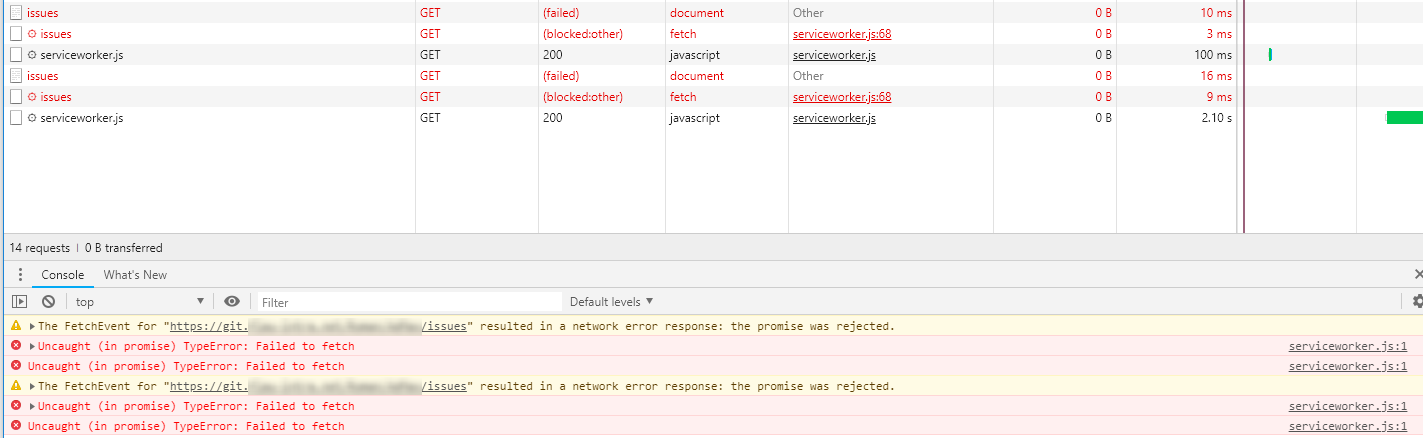
Chrome Developer Console shows the following errors:
@techknowlogick commented on GitHub (Jan 31, 2019):
@Roemer which reverse-proxy are you using?
@Roemer commented on GitHub (Feb 1, 2019):
@techknowlogick I'm using the one integrated in a Synology NAS which uses nginx under the hood.
@Roemer commented on GitHub (Feb 1, 2019):
I just tested and if I skip the reverse proxy, it works also in Chrome. Are there some special settings needed in the reverse proxy? Also I'm fairly unsure what I need to set in
Serversection of theapp.inifrom gitea.What should be put int:
SSH_DOMAIN,ROOT_URLandDOMAIN?Currently I have:
Should this be the information from the reverse proxy like the following?:
@zeripath commented on GitHub (Feb 2, 2019):
You should put the external information into the Gitea app.ini, so the second option is correct.
@Roemer commented on GitHub (Feb 2, 2019):
I added all those information, didnt't change anything.
@zeripath commented on GitHub (Feb 2, 2019):
Let's just check your configuration. Take an url with the rejected promise above, replace the external server url bit with
localhost:$PORTwhere port is the port that gitea is listening on, presumably 3000.Then from the server box:
Check the response. If this is an API request like
/api/v1/repos/username/reponame/issuesit should respond with the full external url of your gitea as the urls.Gitea must have its ROOT_URL and SSH_DOMAIN set as if they are the external facing urls.
As an example my nginx configuration is simply:
My app.ini (suitably replaced):
There is only one
[server]section in my app.ini and these keys are only placed once in the file. (If you change app.ini you must restart gitea.)So for example, for me this would be to replace
www.domain.com/git/->localhost:3000/and then on my servercurl -v localhost:3000/api/v1/repos/testuser/testrepo/issues -u testusernoting that the response contains urls that link back towww.domain.com/git/...@Roemer commented on GitHub (Feb 2, 2019):
NO WAY!!!
I just found out the issue (thanks to https://stackoverflow.com/questions/47160929/progressive-web-app-uncaught-in-promise-typeerror-failed-to-fetch).
The problem was that I have a repository starting with
Ad. TheAdBlock Plusextension from chrome then blocked all those sub-sites! Disabling adblock on my gitea page solved the issue completely.So it is absolutely no issue with gitea, just with AdBlock and a repository name starting with
ad.