mirror of
https://github.com/go-gitea/gitea.git
synced 2026-07-10 16:44:50 -05:00
Dashboard does not show repositories for user #1670
Closed
opened 2025-11-02 04:09:02 -06:00 by GiteaMirror
·
7 comments
No Branch/Tag Specified
main
release/v1.25
release/v1.24
release/v1.23
release/v1.22
release/v1.21
release/v1.20
release/v1.19
release/v1.18
release/v1.17
release/v1.16
release/v1.15
release/v1.14
release/v1.13
release/v1.12
release/v1.11
release/v1.10
release/v1.9
release/v1.8
v1.25.3
v1.25.2
v1.25.1
v1.25.0
v1.24.7
v1.25.0-rc0
v1.26.0-dev
v1.24.6
v1.24.5
v1.24.4
v1.24.3
v1.24.2
v1.24.1
v1.24.0
v1.23.8
v1.24.0-rc0
v1.25.0-dev
v1.23.7
v1.23.6
v1.23.5
v1.23.4
v1.23.3
v1.23.2
v1.23.1
v1.23.0
v1.23.0-rc0
v1.24.0-dev
v1.22.6
v1.22.5
v1.22.4
v1.22.3
v1.22.2
v1.22.1
v1.22.0
v1.23.0-dev
v1.22.0-rc1
v1.21.11
v1.22.0-rc0
v1.21.10
v1.21.9
v1.21.8
v1.21.7
v1.21.6
v1.21.5
v1.21.4
v1.21.3
v1.21.2
v1.20.6
v1.21.1
v1.21.0
v1.21.0-rc2
v1.21.0-rc1
v1.20.5
v1.22.0-dev
v1.21.0-rc0
v1.20.4
v1.20.3
v1.20.2
v1.20.1
v1.20.0
v1.19.4
v1.21.0-dev
v1.20.0-rc2
v1.20.0-rc1
v1.20.0-rc0
v1.19.3
v1.19.2
v1.19.1
v1.19.0
v1.19.0-rc1
v1.20.0-dev
v1.19.0-rc0
v1.18.5
v1.18.4
v1.18.3
v1.18.2
v1.18.1
v1.18.0
v1.17.4
v1.18.0-rc1
v1.19.0-dev
v1.18.0-rc0
v1.17.3
v1.17.2
v1.17.1
v1.17.0
v1.17.0-rc2
v1.16.9
v1.17.0-rc1
v1.18.0-dev
v1.16.8
v1.16.7
v1.16.6
v1.16.5
v1.16.4
v1.16.3
v1.16.2
v1.16.1
v1.16.0
v1.15.11
v1.17.0-dev
v1.16.0-rc1
v1.15.10
v1.15.9
v1.15.8
v1.15.7
v1.15.6
v1.15.5
v1.15.4
v1.15.3
v1.15.2
v1.15.1
v1.14.7
v1.15.0
v1.15.0-rc3
v1.14.6
v1.15.0-rc2
v1.14.5
v1.16.0-dev
v1.15.0-rc1
v1.14.4
v1.14.3
v1.14.2
v1.14.1
v1.14.0
v1.13.7
v1.14.0-rc2
v1.13.6
v1.13.5
v1.14.0-rc1
v1.15.0-dev
v1.13.4
v1.13.3
v1.13.2
v1.13.1
v1.13.0
v1.12.6
v1.13.0-rc2
v1.14.0-dev
v1.13.0-rc1
v1.12.5
v1.12.4
v1.12.3
v1.12.2
v1.12.1
v1.11.8
v1.12.0
v1.11.7
v1.12.0-rc2
v1.11.6
v1.12.0-rc1
v1.13.0-dev
v1.11.5
v1.11.4
v1.11.3
v1.10.6
v1.12.0-dev
v1.11.2
v1.10.5
v1.11.1
v1.10.4
v1.11.0
v1.11.0-rc2
v1.10.3
v1.11.0-rc1
v1.10.2
v1.10.1
v1.10.0
v1.9.6
v1.9.5
v1.10.0-rc2
v1.11.0-dev
v1.10.0-rc1
v1.9.4
v1.9.3
v1.9.2
v1.9.1
v1.9.0
v1.9.0-rc2
v1.10.0-dev
v1.9.0-rc1
v1.8.3
v1.8.2
v1.8.1
v1.8.0
v1.8.0-rc3
v1.7.6
v1.8.0-rc2
v1.7.5
v1.8.0-rc1
v1.9.0-dev
v1.7.4
v1.7.3
v1.7.2
v1.7.1
v1.7.0
v1.7.0-rc3
v1.6.4
v1.7.0-rc2
v1.6.3
v1.7.0-rc1
v1.7.0-dev
v1.6.2
v1.6.1
v1.6.0
v1.6.0-rc2
v1.5.3
v1.6.0-rc1
v1.6.0-dev
v1.5.2
v1.5.1
v1.5.0
v1.5.0-rc2
v1.5.0-rc1
v1.5.0-dev
v1.4.3
v1.4.2
v1.4.1
v1.4.0
v1.4.0-rc3
v1.4.0-rc2
v1.3.3
v1.4.0-rc1
v1.3.2
v1.3.1
v1.3.0
v1.3.0-rc2
v1.3.0-rc1
v1.2.3
v1.2.2
v1.2.1
v1.2.0
v1.2.0-rc3
v1.2.0-rc2
v1.1.4
v1.2.0-rc1
v1.1.3
v1.1.2
v1.1.1
v1.1.0
v1.0.2
v1.0.1
v1.0.0
v0.9.99
Labels
Clear labels
$20
$250
$50
$500
backport/done
💎 Bounty
docs-update-needed
good first issue
hacktoberfest
issue/bounty
issue/confirmed
issue/critical
issue/duplicate
issue/needs-feedback
issue/not-a-bug
issue/regression
issue/stale
issue/workaround
lgtm/need 2
modifies/api
modifies/translation
outdated/backport/v1.18
outdated/theme/markdown
outdated/theme/timetracker
performance/bigrepo
performance/cpu
performance/memory
performance/speed
pr/breaking
proposal/accepted
proposal/rejected
pr/wip
pull-request
reviewed/wontfix
💰 Rewarded
skip-changelog
status/blocked
topic/accessibility
topic/api
topic/authentication
topic/build
topic/code-linting
topic/commit-signing
topic/content-rendering
topic/deployment
topic/distribution
topic/federation
topic/gitea-actions
topic/issues
topic/lfs
topic/mobile
topic/moderation
topic/packages
topic/pr
topic/projects
topic/repo
topic/repo-migration
topic/security
topic/theme
topic/ui
topic/ui-interaction
topic/ux
topic/webhooks
topic/wiki
type/bug
type/deprecation
type/docs
type/enhancement
type/feature
type/miscellaneous
type/proposal
type/question
type/refactoring
type/summary
type/testing
type/upstream
Mirrored from GitHub Pull Request
No Label
Milestone
No items
No Milestone
Projects
Clear projects
No project

No Assignees

Notifications
Due Date
No due date set.
Dependencies
No dependencies set.
Reference: github-starred/gitea#1670
Reference in New Issue
Block a user
Blocking a user prevents them from interacting with repositories, such as opening or commenting on pull requests or issues. Learn more about blocking a user.
Delete Branch "%!s()"
Deleting a branch is permanent. Although the deleted branch may continue to exist for a short time before it actually gets removed, it CANNOT be undone in most cases. Continue?
Originally created by @adilinden on GitHub (Apr 3, 2018).
[x]):Description
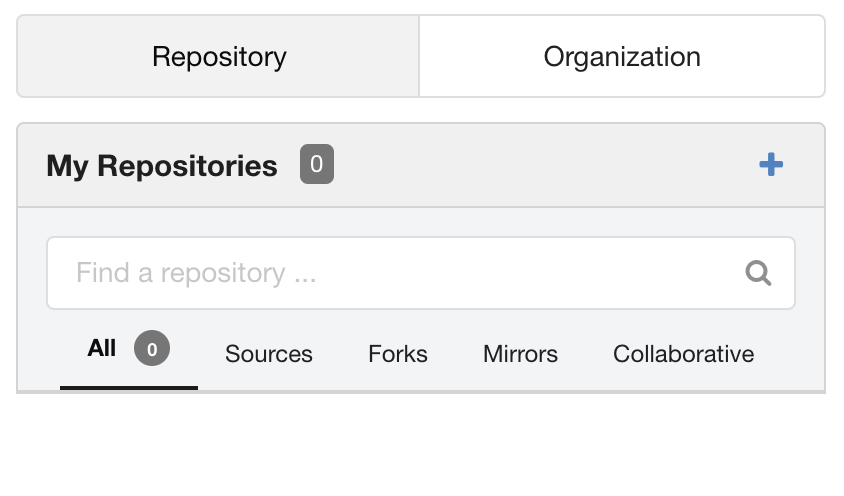
I have several organizations with repos and a user with repos. On Dashboard page the organization repos show up properly, but the personal repo count is '0', although there are several repos present.
I created private repo on try.gitea.io. When I go to dashboard it properly shows one repo in Dashboard.
Is this a bug in 1.4.0 or some issue with my settings or install?
...
Screenshots
@adilinden commented on GitHub (Apr 3, 2018):
I built gitea commit
d877bf7e, now reports as Gitea Version: 1.1.0+1126-gd877bf7e, and issue remains the same. That's the same commit as try.gitea.io reports.@adilinden commented on GitHub (Apr 5, 2018):
I wiped the install and started all over. All is working now. No idea why or what was going on. I didn't do anything that deviated from instructions. My setting with (app.ini) with the new install are identical. So I really don't know.
This can be files as "cannot be reproduced" and this issue can be closed.
@adilinden commented on GitHub (Apr 5, 2018):
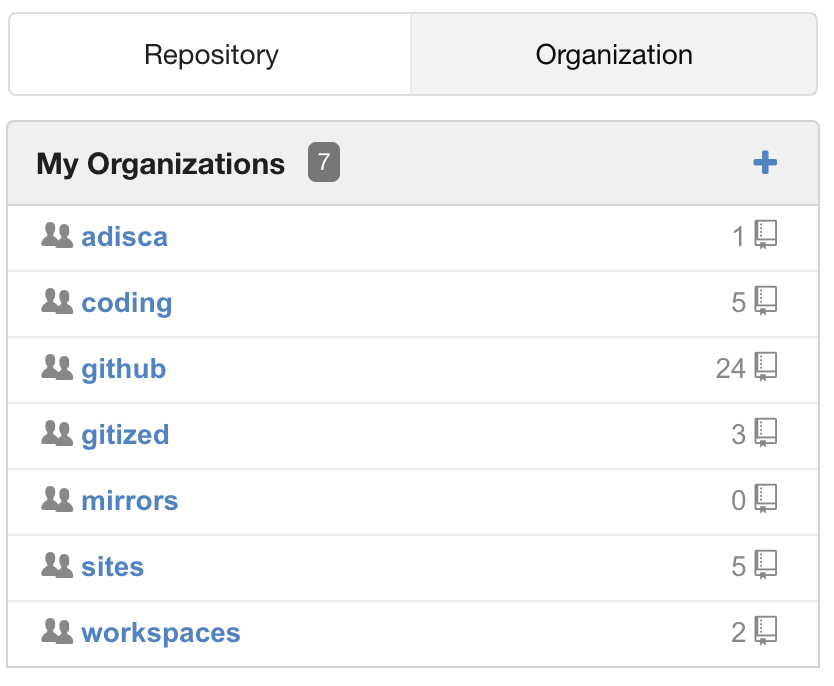
Sorry, there's a bug! Tuesday night installed Gitea. Wednesday created 1 user and 7 organizations. Migrated 49 repositories to Gitea. There are 24 mirrors (GitHub) and 25 standard repositories.
This morning my list of repos is 0. Because I organized repos into groups utilizing organizations (this is personal hosting) the "Dashboard" in invaluable in seeing and finding repos that I am looking for. I didn't take screenshot last night. But as I added each repo the Dashboard repo count increased appropriately and the list was populated. This morning the list is gone.
Screenshots attached.
@Morlinest commented on GitHub (Apr 5, 2018):
@adilinden Hi.
@adilinden commented on GitHub (Apr 5, 2018):
Hi @Morlinest,
Yes, everything is there. I run Gitea directly. But on my firewall I run haproxy as the port is used for multiple different backend servers. On the Gitea server itself I run nginx as a reverse proxy to provide SSL with Gitea bound to localhost:3000 only.
Having me look at api call lead me to identify the source of the issue. On the haproxy I have /api directed to the wrong backend, resulting in /api not being available from the outside. When accessed from my local network, directly accessing nginx without haproxy, all is fine.
That solves this mystery - my confusion resulted from me accessing the server from different location. Plus as I am a frequent user of VPN for remote access, whether VPN was engaged also changed the behaviour....
Perhaps this allows me to dig into the next quest I am on, extending the repositories list to more then 15 repos. I'd like to see all repos that a user has access to in a single list, across all orgs and users. I see that the widget call to the api included a limit of 15.
That resolves this!
Thanks,
Adi
@Morlinest commented on GitHub (Apr 6, 2018):
@adilinden Great you found the problem and solved it :).
Right now, to increase number of searched repos you can
setting.UI.User.RepoPagingNumin app.ini (probably best way, but can affect another pages too)<meta name="_search_limit" content="{{.SearchLimit}}" />(e.g.<meta name="_search_limit" content="100" />).:search-limit="searchLimit"(e.g.:search-limit=100).Edit: Or you can rewrite
<meta name="_search_limit" content="100" />on your proxy :D@Morlinest commented on GitHub (Apr 7, 2018):
I think this issue can be closed as problem was solved and it was not gitea related problem anyway.