mirror of
https://github.com/go-gitea/gitea.git
synced 2026-07-15 20:09:18 -05:00
Error 500 when trying to access repo in UI #10144
Closed
opened 2025-11-02 08:59:19 -06:00 by GiteaMirror
·
5 comments
No Branch/Tag Specified
main
release/v1.25
release/v1.24
release/v1.23
release/v1.22
release/v1.21
release/v1.20
release/v1.19
release/v1.18
release/v1.17
release/v1.16
release/v1.15
release/v1.14
release/v1.13
release/v1.12
release/v1.11
release/v1.10
release/v1.9
release/v1.8
v1.25.3
v1.25.2
v1.25.1
v1.25.0
v1.24.7
v1.25.0-rc0
v1.26.0-dev
v1.24.6
v1.24.5
v1.24.4
v1.24.3
v1.24.2
v1.24.1
v1.24.0
v1.23.8
v1.24.0-rc0
v1.25.0-dev
v1.23.7
v1.23.6
v1.23.5
v1.23.4
v1.23.3
v1.23.2
v1.23.1
v1.23.0
v1.23.0-rc0
v1.24.0-dev
v1.22.6
v1.22.5
v1.22.4
v1.22.3
v1.22.2
v1.22.1
v1.22.0
v1.23.0-dev
v1.22.0-rc1
v1.21.11
v1.22.0-rc0
v1.21.10
v1.21.9
v1.21.8
v1.21.7
v1.21.6
v1.21.5
v1.21.4
v1.21.3
v1.21.2
v1.20.6
v1.21.1
v1.21.0
v1.21.0-rc2
v1.21.0-rc1
v1.20.5
v1.22.0-dev
v1.21.0-rc0
v1.20.4
v1.20.3
v1.20.2
v1.20.1
v1.20.0
v1.19.4
v1.21.0-dev
v1.20.0-rc2
v1.20.0-rc1
v1.20.0-rc0
v1.19.3
v1.19.2
v1.19.1
v1.19.0
v1.19.0-rc1
v1.20.0-dev
v1.19.0-rc0
v1.18.5
v1.18.4
v1.18.3
v1.18.2
v1.18.1
v1.18.0
v1.17.4
v1.18.0-rc1
v1.19.0-dev
v1.18.0-rc0
v1.17.3
v1.17.2
v1.17.1
v1.17.0
v1.17.0-rc2
v1.16.9
v1.17.0-rc1
v1.18.0-dev
v1.16.8
v1.16.7
v1.16.6
v1.16.5
v1.16.4
v1.16.3
v1.16.2
v1.16.1
v1.16.0
v1.15.11
v1.17.0-dev
v1.16.0-rc1
v1.15.10
v1.15.9
v1.15.8
v1.15.7
v1.15.6
v1.15.5
v1.15.4
v1.15.3
v1.15.2
v1.15.1
v1.14.7
v1.15.0
v1.15.0-rc3
v1.14.6
v1.15.0-rc2
v1.14.5
v1.16.0-dev
v1.15.0-rc1
v1.14.4
v1.14.3
v1.14.2
v1.14.1
v1.14.0
v1.13.7
v1.14.0-rc2
v1.13.6
v1.13.5
v1.14.0-rc1
v1.15.0-dev
v1.13.4
v1.13.3
v1.13.2
v1.13.1
v1.13.0
v1.12.6
v1.13.0-rc2
v1.14.0-dev
v1.13.0-rc1
v1.12.5
v1.12.4
v1.12.3
v1.12.2
v1.12.1
v1.11.8
v1.12.0
v1.11.7
v1.12.0-rc2
v1.11.6
v1.12.0-rc1
v1.13.0-dev
v1.11.5
v1.11.4
v1.11.3
v1.10.6
v1.12.0-dev
v1.11.2
v1.10.5
v1.11.1
v1.10.4
v1.11.0
v1.11.0-rc2
v1.10.3
v1.11.0-rc1
v1.10.2
v1.10.1
v1.10.0
v1.9.6
v1.9.5
v1.10.0-rc2
v1.11.0-dev
v1.10.0-rc1
v1.9.4
v1.9.3
v1.9.2
v1.9.1
v1.9.0
v1.9.0-rc2
v1.10.0-dev
v1.9.0-rc1
v1.8.3
v1.8.2
v1.8.1
v1.8.0
v1.8.0-rc3
v1.7.6
v1.8.0-rc2
v1.7.5
v1.8.0-rc1
v1.9.0-dev
v1.7.4
v1.7.3
v1.7.2
v1.7.1
v1.7.0
v1.7.0-rc3
v1.6.4
v1.7.0-rc2
v1.6.3
v1.7.0-rc1
v1.7.0-dev
v1.6.2
v1.6.1
v1.6.0
v1.6.0-rc2
v1.5.3
v1.6.0-rc1
v1.6.0-dev
v1.5.2
v1.5.1
v1.5.0
v1.5.0-rc2
v1.5.0-rc1
v1.5.0-dev
v1.4.3
v1.4.2
v1.4.1
v1.4.0
v1.4.0-rc3
v1.4.0-rc2
v1.3.3
v1.4.0-rc1
v1.3.2
v1.3.1
v1.3.0
v1.3.0-rc2
v1.3.0-rc1
v1.2.3
v1.2.2
v1.2.1
v1.2.0
v1.2.0-rc3
v1.2.0-rc2
v1.1.4
v1.2.0-rc1
v1.1.3
v1.1.2
v1.1.1
v1.1.0
v1.0.2
v1.0.1
v1.0.0
v0.9.99
Labels
Clear labels
$20
$250
$50
$500
backport/done
💎 Bounty
docs-update-needed
good first issue
hacktoberfest
issue/bounty
issue/confirmed
issue/critical
issue/duplicate
issue/needs-feedback
issue/not-a-bug
issue/regression
issue/stale
issue/workaround
lgtm/need 2
modifies/api
modifies/translation
outdated/backport/v1.18
outdated/theme/markdown
outdated/theme/timetracker
performance/bigrepo
performance/cpu
performance/memory
performance/speed
pr/breaking
proposal/accepted
proposal/rejected
pr/wip
pull-request
reviewed/wontfix
💰 Rewarded
skip-changelog
status/blocked
topic/accessibility
topic/api
topic/authentication
topic/build
topic/code-linting
topic/commit-signing
topic/content-rendering
topic/deployment
topic/distribution
topic/federation
topic/gitea-actions
topic/issues
topic/lfs
topic/mobile
topic/moderation
topic/packages
topic/pr
topic/projects
topic/repo
topic/repo-migration
topic/security
topic/theme
topic/ui
topic/ui-interaction
topic/ux
topic/webhooks
topic/wiki
type/bug
type/deprecation
type/docs
type/enhancement
type/feature
type/miscellaneous
type/proposal
type/question
type/refactoring
type/summary
type/testing
type/upstream
Mirrored from GitHub Pull Request
No Label
type/bug
Milestone
No items
No Milestone
Projects
Clear projects
No project

No Assignees

Notifications
Due Date
No due date set.
Dependencies
No dependencies set.
Reference: github-starred/gitea#10144
Reference in New Issue
Block a user
Blocking a user prevents them from interacting with repositories, such as opening or commenting on pull requests or issues. Learn more about blocking a user.
Delete Branch "%!s()"
Deleting a branch is permanent. Although the deleted branch may continue to exist for a short time before it actually gets removed, it CANNOT be undone in most cases. Continue?
Originally created by @christerjohansson on GitHub (Jan 22, 2023).
Description
I had to reinstall Gitea from a volume crash on my Synology. I had backup in the cloud, and restored all my files from it through Hyper Backup. But when Gitea is installed, and set up, I can not access the repositories at all. I can create a new repository and access it, but I can not use my old repos.
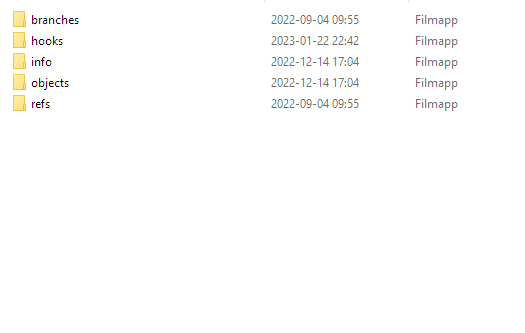
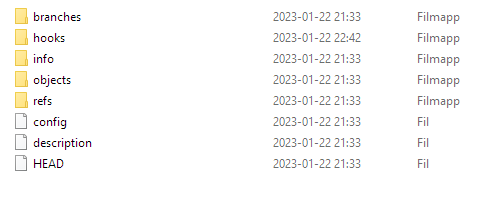
I have tried "Resynchronize pre-receive, update and post-receive hooks of all repositories." to no end. The admin features seem to do nothing. I have noticed that these bare repos are missing some files, compared to the new one I created from the web ui. Also, I can not clone these repos outside as server say they aren't a repo or I do not have access. I have tried setting both myself and root as owner (chown), but still get same message.
I really need help restoring my repo's, they are in bare version now. And git does not seem to recognize them anymore, not sure what to do? It worked fine a week ago, before I reinstalled Gitea.
Error message:
"exit status 128 - fatal: not a git repository (or any parent up to mount point /volume1)
Stopping at filesystem boundary (GIT_DISCOVERY_ACROSS_FILESYSTEM not set)."
Log:
"2023/01/23 00:18:41 ...ules/context/repo.go:630:RepoAssignment() [E] [63cdc451] RepoAssignment Invalid repo /volume1/gitea/christer.johansson/eken-dashboard.git: exit status 128 - fatal: not a git repository (or any parent up to mount point /volume1)
Stopping at filesystem boundary (GIT_DISCOVERY_ACROSS_FILESYSTEM not set).
2023/01/23 00:18:41 ...s/context/context.go:219:HTML() [D] [63cdc451] Template: status/500
2023/01/23 00:18:41 [63cdc451] router: completed GET /christer.johansson/eken-dashboard for 192.168.0.xxx:60863, 500 Internal Server Error in 219.5ms @ context/repo.go:429(context.RepoAssignment)"
Gitea Version
1.17.3-10
Can you reproduce the bug on the Gitea demo site?
No
Log Gist
No response
Screenshots
Screenshot:

Screenshot of repo files:
Bare repo (old)
Screenshot of Hello World repo created in UI after installation
Git Version
2.39.1-26
Operating System
Linux
How are you running Gitea?
I am running Gitea as a SynoCommunity package installed on my Synology DS720+ with DSM 7.1.1.x
Database
MySQL
@zeripath commented on GitHub (Jan 23, 2023):
Git can't find a git repository in that directory. It's likely it's just empty directories but whatever is there is not a valid repo.
Are you sure that /volume1/gitea is where the Gitea repositories have been restored to?
@christerjohansson commented on GitHub (Jan 23, 2023):
Yes, the sub folders in that directory exist, and they have objects...
For example,
/volume1/gitea/christer.johansson/eken-dashboard.githave following content underobjects/packBut I can't get Git or Gitea to see these bare repositories, and need help figuring out how to do it. I can see the repo in my list of repos in Gitea, but generates the error 500 when clicking on it.
@silverwind commented on GitHub (Jan 24, 2023):
Check file system permissions for the user that runs gitea and maybe try starting gitea with
GIT_DISCOVERY_ACROSS_FILESYSTEM=1to see if it makes any difference. I'm not totally sure if such env vars are inherited to git processes thought.@christerjohansson commented on GitHub (Jan 24, 2023):
I am closing this issue. The repo's were all broken and were missing config files. I went scouring across clients and got hold of most repos from client side and copied most recent files from .git folder into appropiate repsoitories in Gitea. I also switched from running Gitea as package to Docker container version in Synology instead. All repositories are mounted on host system, and will not be affected if container is reinstalled etc.
Not sure what actually went wrong in this process, or if Gitea had anything to do with it. But all the repo's lacked all config files, and only had pack-files. I have about 95% of them restored, it's close enough. :)
@zeripath commented on GitHub (Jan 24, 2023):
If it was only config files that were missing, then simply setting the below as the config file should have worked: