mirror of
https://github.com/go-gitea/gitea.git
synced 2026-08-31 03:38:48 -05:00
NPM Packages published to gitea npm registry which use a scope, can't be opened in the web interface 404 #10004
Closed
opened 2025-11-02 08:55:27 -06:00 by GiteaMirror
·
6 comments
No Branch/Tag Specified
main
release/v1.25
release/v1.24
release/v1.23
release/v1.22
release/v1.21
release/v1.20
release/v1.19
release/v1.18
release/v1.17
release/v1.16
release/v1.15
release/v1.14
release/v1.13
release/v1.12
release/v1.11
release/v1.10
release/v1.9
release/v1.8
v1.25.3
v1.25.2
v1.25.1
v1.25.0
v1.24.7
v1.25.0-rc0
v1.26.0-dev
v1.24.6
v1.24.5
v1.24.4
v1.24.3
v1.24.2
v1.24.1
v1.24.0
v1.23.8
v1.24.0-rc0
v1.25.0-dev
v1.23.7
v1.23.6
v1.23.5
v1.23.4
v1.23.3
v1.23.2
v1.23.1
v1.23.0
v1.23.0-rc0
v1.24.0-dev
v1.22.6
v1.22.5
v1.22.4
v1.22.3
v1.22.2
v1.22.1
v1.22.0
v1.23.0-dev
v1.22.0-rc1
v1.21.11
v1.22.0-rc0
v1.21.10
v1.21.9
v1.21.8
v1.21.7
v1.21.6
v1.21.5
v1.21.4
v1.21.3
v1.21.2
v1.20.6
v1.21.1
v1.21.0
v1.21.0-rc2
v1.21.0-rc1
v1.20.5
v1.22.0-dev
v1.21.0-rc0
v1.20.4
v1.20.3
v1.20.2
v1.20.1
v1.20.0
v1.19.4
v1.21.0-dev
v1.20.0-rc2
v1.20.0-rc1
v1.20.0-rc0
v1.19.3
v1.19.2
v1.19.1
v1.19.0
v1.19.0-rc1
v1.20.0-dev
v1.19.0-rc0
v1.18.5
v1.18.4
v1.18.3
v1.18.2
v1.18.1
v1.18.0
v1.17.4
v1.18.0-rc1
v1.19.0-dev
v1.18.0-rc0
v1.17.3
v1.17.2
v1.17.1
v1.17.0
v1.17.0-rc2
v1.16.9
v1.17.0-rc1
v1.18.0-dev
v1.16.8
v1.16.7
v1.16.6
v1.16.5
v1.16.4
v1.16.3
v1.16.2
v1.16.1
v1.16.0
v1.15.11
v1.17.0-dev
v1.16.0-rc1
v1.15.10
v1.15.9
v1.15.8
v1.15.7
v1.15.6
v1.15.5
v1.15.4
v1.15.3
v1.15.2
v1.15.1
v1.14.7
v1.15.0
v1.15.0-rc3
v1.14.6
v1.15.0-rc2
v1.14.5
v1.16.0-dev
v1.15.0-rc1
v1.14.4
v1.14.3
v1.14.2
v1.14.1
v1.14.0
v1.13.7
v1.14.0-rc2
v1.13.6
v1.13.5
v1.14.0-rc1
v1.15.0-dev
v1.13.4
v1.13.3
v1.13.2
v1.13.1
v1.13.0
v1.12.6
v1.13.0-rc2
v1.14.0-dev
v1.13.0-rc1
v1.12.5
v1.12.4
v1.12.3
v1.12.2
v1.12.1
v1.11.8
v1.12.0
v1.11.7
v1.12.0-rc2
v1.11.6
v1.12.0-rc1
v1.13.0-dev
v1.11.5
v1.11.4
v1.11.3
v1.10.6
v1.12.0-dev
v1.11.2
v1.10.5
v1.11.1
v1.10.4
v1.11.0
v1.11.0-rc2
v1.10.3
v1.11.0-rc1
v1.10.2
v1.10.1
v1.10.0
v1.9.6
v1.9.5
v1.10.0-rc2
v1.11.0-dev
v1.10.0-rc1
v1.9.4
v1.9.3
v1.9.2
v1.9.1
v1.9.0
v1.9.0-rc2
v1.10.0-dev
v1.9.0-rc1
v1.8.3
v1.8.2
v1.8.1
v1.8.0
v1.8.0-rc3
v1.7.6
v1.8.0-rc2
v1.7.5
v1.8.0-rc1
v1.9.0-dev
v1.7.4
v1.7.3
v1.7.2
v1.7.1
v1.7.0
v1.7.0-rc3
v1.6.4
v1.7.0-rc2
v1.6.3
v1.7.0-rc1
v1.7.0-dev
v1.6.2
v1.6.1
v1.6.0
v1.6.0-rc2
v1.5.3
v1.6.0-rc1
v1.6.0-dev
v1.5.2
v1.5.1
v1.5.0
v1.5.0-rc2
v1.5.0-rc1
v1.5.0-dev
v1.4.3
v1.4.2
v1.4.1
v1.4.0
v1.4.0-rc3
v1.4.0-rc2
v1.3.3
v1.4.0-rc1
v1.3.2
v1.3.1
v1.3.0
v1.3.0-rc2
v1.3.0-rc1
v1.2.3
v1.2.2
v1.2.1
v1.2.0
v1.2.0-rc3
v1.2.0-rc2
v1.1.4
v1.2.0-rc1
v1.1.3
v1.1.2
v1.1.1
v1.1.0
v1.0.2
v1.0.1
v1.0.0
v0.9.99
Labels
Clear labels
$20
$250
$50
$500
backport/done
💎 Bounty
docs-update-needed
good first issue
hacktoberfest
issue/bounty
issue/confirmed
issue/critical
issue/duplicate
issue/needs-feedback
issue/not-a-bug
issue/regression
issue/stale
issue/workaround
lgtm/need 2
modifies/api
modifies/translation
outdated/backport/v1.18
outdated/theme/markdown
outdated/theme/timetracker
performance/bigrepo
performance/cpu
performance/memory
performance/speed
pr/breaking
proposal/accepted
proposal/rejected
pr/wip
pull-request
reviewed/wontfix
💰 Rewarded
skip-changelog
status/blocked
topic/accessibility
topic/api
topic/authentication
topic/build
topic/code-linting
topic/commit-signing
topic/content-rendering
topic/deployment
topic/distribution
topic/federation
topic/gitea-actions
topic/issues
topic/lfs
topic/mobile
topic/moderation
topic/packages
topic/pr
topic/projects
topic/repo
topic/repo-migration
topic/security
topic/theme
topic/ui
topic/ui-interaction
topic/ux
topic/webhooks
topic/wiki
type/bug
type/deprecation
type/docs
type/enhancement
type/feature
type/miscellaneous
type/proposal
type/question
type/refactoring
type/summary
type/testing
type/upstream
Mirrored from GitHub Pull Request
Milestone
No items
No Milestone
Projects
Clear projects
No projects

No Assignees

Notifications
Due Date
No due date set.
Dependencies
No dependencies set.
Reference: github-starred/gitea#10004
Reference in New Issue
Block a user
Blocking a user prevents them from interacting with repositories, such as opening or commenting on pull requests or issues. Learn more about blocking a user.
Originally created by @suricoon on GitHub (Dec 21, 2022).
Description
Summary
NPM Packages published to gitea npm registry which use a scope, can't be opened in the web interface anymore.
The UI shows 404
Steps to reproduce
.npmrc
package.json
The problem
The @ of the package name does not seem to be URL encoded in the URL.
Gitea Version
1.17.2
Can you reproduce the bug on the Gitea demo site?
No
Log Gist
No response
Screenshots
see description above
Git Version
No response
Operating System
No response
How are you running Gitea?
self hosted gite in a docker container behing reverse proxy nginx
Database
None
@KN4CK3R commented on GitHub (Dec 22, 2022):
Still works for me:
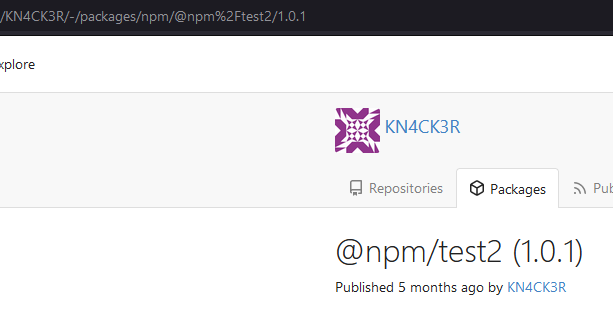
@KN4CK3R commented on GitHub (Dec 23, 2022):
Maybe same error as #20890 or #21407?
@cedx commented on GitHub (Jan 1, 2023):
Same issue here. Using Gitea 1.18.0 with SQL Server 2019 on Windows Server 2019.
@KN4CK3R commented on GitHub (Jan 1, 2023):
Which reverse proxy do you use?
@cedx commented on GitHub (Jan 1, 2023):
You've found the root cause: thank you @KN4CK3R ! I've tried a direct access (i.e. without using the proxy), and it works!
I'm using Microsoft IIS with the Application Request Routing & Rewrite modules. Now I just have to figure out how to properly configure IIS...
My current
web.config:@cedx commented on GitHub (Jan 1, 2023):
With IIS, you can avoid this issue by disabling the
useOriginalURLEncodingflag and using theUNENCODED_URLserver variable:So definitely a proxy issue on my side.