What's the difference between this Python project and similar ones?
This project has the following features:
a cool live spinner, which makes it clear the process did not hang and your terminal/connection is healthy;
a visual feedback of the current speed/throughput, as the spinner runs faster or slower according to the actual processing speed;
an efficient multi-threaded bar, which updates itself at a fraction of the actual speed (1,000,000 iterations per second equates to roughly 60fps refresh rate) to keep CPU usage low and avoid terminal spamming; (📌 new: you can now calibrate this!)
an expected time of arrival (ETA), that shows the remaining processing time in a friendly way, not anything like eta: 1584s, it will nicely show eta: 0:26:24 as you would expect (but anything less than a minute is indeed eta: 42s);
a print() hook, which allows print statements in the midst of an alive-bar context without any hassle, automatically cleaning the screen, and even enriching with the current position when it occurred;
after your processing has finished, a nice receipt is printed with the statistics of that run, including the elapsed time and observed throughput;
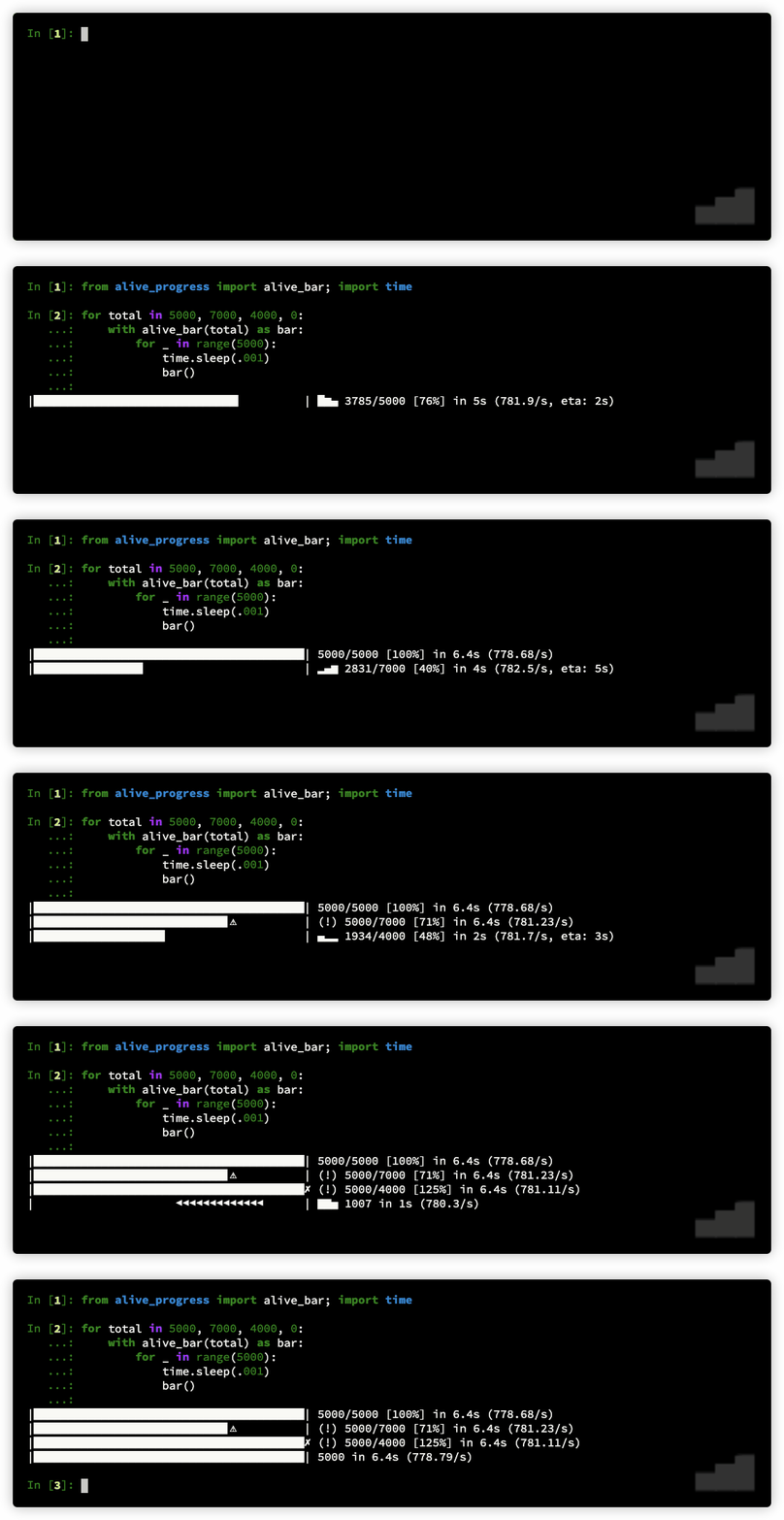
it tracks the actual count to detect under and overflows, so it will look different if you send in less or more than expected;
it automatically detects if there's an allocated tty, and if there isn't, only the final receipt is printed, so you can safely include the alive-bar in any code, and rest assure your log file won't get 60fps progress lines;
you can pause the alive-bar! I think that's an unprecedented feature for a progress bar! It's incredible to be able to manually operate on some items while inside a running progress bar context, and get the bar back like it had never stopped whenever you want;
it is customizable, with a growing smorgasbord of different bar and spinner styles, as well as several factories to easily generate yours!
--
Anyone who agrees with this pull request could vote for it by adding a 👍 to it, and usually, the maintainer will merge it when votes reach 20.
🔄 This issue represents a GitHub Pull Request. It cannot be merged through Gitea due to API limitations.
## 📋 Pull Request Information
**Original PR:** https://github.com/vinta/awesome-python/pull/1552
**Author:** [@rsalmei](https://github.com/rsalmei)
**Created:** 6/6/2020
**Status:** ✅ Merged
**Merged:** 6/6/2020
**Merged by:** [@vinta](https://github.com/vinta)
**Base:** `master` ← **Head:** `rsa-add-alive-progress`
---
### 📝 Commits (2)
- [`0976031`](https://github.com/vinta/awesome-python/commit/097603169fe5a7149b44628be278a97b1838da10) add cool alive-progress bar
- [`b1e4d96`](https://github.com/vinta/awesome-python/commit/b1e4d962d7f43400a79307c3917fbfa9017c304f) new project description
### 📊 Changes
**1 file changed** (+1 additions, -0 deletions)
<details>
<summary>View changed files</summary>
📝 `README.md` (+1 -0)
</details>
### 📄 Description
## What is this Python project?
It's a new kind of progress bar, with real-time throughput, eta and very cool animations!
It has now more than 600⭐️, take a look: https://github.com/rsalmei/alive-progress
## What's the difference between this Python project and similar ones?
This project has the following features:
- a cool live spinner, which makes it clear the process did not hang and your terminal/connection is healthy;
- a visual feedback of the current speed/throughput, as the spinner runs faster or slower according to the actual processing speed;
- an efficient multi-threaded bar, which updates itself at a fraction of the actual speed (1,000,000 iterations per second equates to roughly 60fps refresh rate) to keep CPU usage low and avoid terminal spamming; (📌 new: you can now calibrate this!)
- an expected time of arrival (ETA), that shows the remaining processing time in a friendly way, not anything like eta: 1584s, it will nicely show eta: 0:26:24 as you would expect (but anything less than a minute is indeed eta: 42s);
- a print() hook, which allows print statements in the midst of an alive-bar context without any hassle, automatically cleaning the screen, and even enriching with the current position when it occurred;
- after your processing has finished, a nice receipt is printed with the statistics of that run, including the elapsed time and observed throughput;
- it tracks the actual count to detect under and overflows, so it will look different if you send in less or more than expected;
- it automatically detects if there's an allocated tty, and if there isn't, only the final receipt is printed, so you can safely include the alive-bar in any code, and rest assure your log file won't get 60fps progress lines;
- you can pause the alive-bar! I think that's an unprecedented feature for a progress bar! It's incredible to be able to manually operate on some items while inside a running progress bar context, and get the bar back like it had never stopped whenever you want;
- it is customizable, with a growing smorgasbord of different bar and spinner styles, as well as several factories to easily generate yours!
--
Anyone who agrees with this pull request could vote for it by adding a :+1: to it, and usually, the maintainer will merge it when votes reach **20**.
---
<sub>🔄 This issue represents a GitHub Pull Request. It cannot be merged through Gitea due to API limitations.</sub>
Blocking a user prevents them from interacting with repositories, such as opening or commenting on pull requests or issues. Learn more about blocking a user.


📋 Pull Request Information
Original PR: https://github.com/vinta/awesome-python/pull/1552
Author: @rsalmei
Created: 6/6/2020
Status: ✅ Merged
Merged: 6/6/2020
Merged by: @vinta
Base:
master← Head:rsa-add-alive-progress📝 Commits (2)
0976031add cool alive-progress barb1e4d96new project description📊 Changes
1 file changed (+1 additions, -0 deletions)
View changed files
📝
README.md(+1 -0)📄 Description
What is this Python project?
It's a new kind of progress bar, with real-time throughput, eta and very cool animations!
It has now more than 600⭐️, take a look: https://github.com/rsalmei/alive-progress
What's the difference between this Python project and similar ones?
This project has the following features:
--
Anyone who agrees with this pull request could vote for it by adding a 👍 to it, and usually, the maintainer will merge it when votes reach 20.
🔄 This issue represents a GitHub Pull Request. It cannot be merged through Gitea due to API limitations.