mirror of
https://github.com/bitwarden/android.git
synced 2026-08-17 22:12:12 -05:00
There is a problem connecting to the server #241
Closed
opened 2025-11-07 08:32:15 -06:00 by GiteaMirror
·
46 comments
No Branch/Tag Specified
main
PM-41853-migration-update
vfo-1-hardcoded-on
PM-38570/firebase-testharness-dist
PM-42110-make-a-copy-of-a-policy-restricted-send
sdlc/sdk-update
agp-update
PM-42108-add-policy-restriction-banner-to-view-send
PM-42107-wire-send-controls-policy-into-view-send
PM-40533-validate-recipient-email-domains
PM-40531-lock-who-can-view-when-enforced
PM-41295/identity-autofill-multiple-address
PM-41296/identity-autofill-vault-selection-type
PM-41297/identity-autofill-fill-assit
PM-41293/identity-autofill-fill-assist-field-mapping
PM-41294/identity-autofill-multi-partition-pipeline
PM-41292/identity-autofill-heuristic-field-detection
PM-41291/identity-autofill-model-and-data-layer
llm/plan-implement-review-command
auth/pm-41503-and-pm-41533/registration-add-open-org-invite-support
cxf/editable-fields
release/2026.8-rc60
PM-40295-mp-policy-on-unlock
test-stack-2
test-stack-1
release/2026.7-rc59
worktree-QA-2177-blockeduri-testtag
release/2026.7-rc58
PM-37256/merge-fill-assist-with-traverse
update-billing-api
agalles/create-deploy-workflow-trigger
allow-user-certs
vvolkgang/fdroid-update
release/2026.6-rc57
agalles/create-github-workflow-trigger
release/2026.6-rc56
release/2026.5-rc55
release/2026.5-rc53
release/2026.5-rc54
PM-37255/consume-fill-assist-rules-data
PM-26896-autofill-fix
release/hotfix-v2026.4.1-bwpm
target-sdk-37
agalles/fdroid-only
BWA-99/show-next-totp
BWA-99/add-preview-next-totp-code-setting
sync-min-sdk
release/2026.4-rc51
related-origin-passkey-creation
release/2026.4-rc50
platform/android-breaking-change-detection
innovation-sprint-2026-send-folder
release/2026.3-rc49
PM-34193-vault-lockout
android-collections
QA-1523/sanity-test-saucelabs
release/2026.3-rc48
release/2026.2-rc47
pr-6572
release/2026.2-rc46
release/2026.1-rc45
PM-30644/added-logs-for-debug
PM-30644/quicktile-nav-not-showing-migration
minor-gradle-updates
release/2026.1-rc42
release/2026.1-rc44
release/2026.1-rc43
PM-28834/set-landscape-on-horizonos-devices
PM-28468/validate-and-navigate-to-vault-migration
PM-20026/force-ltr-passwords-and-codes
release/2025.12-rc41
cmcg/testCoverage
PM-29014/talkback-support-for-passwords
release/2025.12-rc40
BRE-1305/publish_test
accept-user-certs
autofill-permissions
release/2025.11-rc39
PM-22479/check-all-certificates-validate-asset-links
release/2025.10-rc38
agalles/android-latest
retro-agent
PM-27001/skip-account-selection-only-one-exists-cxp
release/2025.10-rc37
agalles/test-1118
release/2025.10-rc36
PM-20593-token-refresh
QA-1126b/adding-native-sanity-test
release/2025.9-rc35
pm-25933/sdk-update-password
release/2025.9-rc34
release/2025.8-rc33
agalles/20250821-release
debug-release-issues
pm-24249-allow-automated-prs-for-sdk-updates
release/2025.8-rc32
release/WORKFLOW-TEST-2025.8-rc28
agalles/20250807release
release/2025.07-rc25
release/hotfix-v2025.7.0-bwa
pm-23311/export-vault-policy-bypass
release/2025.07-rc24
authenticator-pm-sync-flags-issue
release/hotfix-v2025.6.0-bwpm
release/2025.06-rc21
agalles/automate-android-fastlane-patch
release/2025.05-rc20
release/2025.04-rc19
languages/basque
release/2025.03-rc19
update-readme
qrcode/feature
innovation/archive/pm-19153-archive-items
qrcode/2-ui-fields
qrcode/1-page
hold-on-biometric-prompt-alternative
release-notes-process
release/2025.02-rc16
bwa-monorepo
PM-8223/new-device-verification-ux-improvements
pm-18451/exempt-from-policies
test-bwa
release/2025.01-rc15
release/2025.01-rc14
release/2024.12-rc13
pm-16670/sync-leave-notice
821
PM-16695/backport-lean-more-new-device-verification
release/hotfix-v2024.11.7
release/2024.11-rc1
pm-11304/collection-add-item-button
PM-14241/disabling-logs-app-crash
poc/offline-editing
new-version-calc
pm-11649/expired-link-services
pm-6702/add-feature-flag
pm-6702/email-verification-feature
pm-9933/marketing-copy-update
pm-6702/registration-flows
update-templates
pm-6701/email-verification-selfhost-registration
v2026.7.1-bwpm
v2026.7.1-bwa
v2026.7.0-bwpm
v2026.7.0-bwa
v2026.6.1-bwa
v2026.6.1-bwpm
v2026.6.0-bwpm
v2026.6.0-bwa
v2026.5.1-bwpm
v2026.5.1-bwa
v2026.5.0-bwpm
v2026.5.0-bwa
v2026.4.2-bwpm
v2026.4.1-bwa
v2026.4.1-bwpm
v2026.4.0-bwa
v2026.4.0-bwpm
v2026.3.1-bwa
v2026.3.1-bwpm
v2026.3.0-bwpm
v2026.3.0-bwa
v2026.2.1-bwpm
v2026.2.1-bwa
v2026.2.0-bwpm
v2026.2.0-bwa
v2026.1.1-bwa
v2026.1.1-bwpm
temp-test
v2026.1.0-bwpm
v2026.1.0-bwa
v2025.12.1-bwa
v2025.12.1-bwpm
v2025.12.0-bwa
v2025.12.0-bwpm
v2025.11.1-bwpm
v2025.11.1-bwa
v2025.11.0-bwpm
v2025.11.0-bwa
v2025.10.1-bwa
v2025.10.1-bwpm
v2025.10.0-bwa
v2025.10.0-bwpm
v2025.9.1-bwa
v2025.9.1-bwpm
v2025.9.0-bwa
v2025.9.0-bwpm
v2025.8.1-bwa
v2025.8.1-bwpm
v2025.8.0-bwa
v2025.8.0-bwpm
v2025.7.2-bwa
v2025.7.2-bwpm
v2025.7.1-bwa
v2025.7.1-bwpm
v2025.7.0-bwa
v2025.7.0-bwpm
v2025.6.1-bwpm
v2025.6.0-bwa
v2025.6.0-bwpm
v2025.1.0-bwa
v2025.5.0-bwa
v2025.5.0-bwpm
v2025.5.999
2025.4.0
v2025.4.0
untagged-4731eaadac73f3dfbbb8
v2025.3.0
v2025.2.0
untagged-815a165c5d70ffe75bc7
v2025.1.2
v2025.1.1
v2025.1.0
v2024.12.0
untagged-5a76b6392a4c8998c63a
v2024.11.7
v2024.11.6
v2024.11.5
v2024.11.4
v2024.11.3
v2024.11.2
v2024.11.1
v2024.11.0
v2024.10.2
v2024.10.1
v2024.10.0
v2024.9.0
v2024.8.1
v2024.8.0
v2024.7.3
v2024.7.2
v2024.7.1
v2024.7.0
v2024.6.1
v2024.6.0
v2024.5.1
v2024.4.1
v2024.4.2
v2024.4.0
v2024.3.3
v2024.3.1
v2024.3.0
v2024.2.1
v2024.2.0
v2024.1.1
v2024.1.0
v2023.12.0
v2023.10.0
v2023.9.2
maui-single-project-android
v2023.9.1
v2023.9.0
v2023.8.0
v2023.7.0
v2023.5.0
v2023.4.0
v2023.3.2
v2023.3.1
v2023.3.0
v2023.2.0
v2023.1.0
v2022.11.0
v2022.10.0
v2022.9.1
v2022.9.0
v2022.8.0
v2022.6.2
v2022.6.1
v2022.6.0
v2022.05.0
v2.18.0
v2.17.0
v2.16.4
v2.16.3
v2.16.2
v2.16.1
v2.15.0
v2.14.2
v2.14.1
v2.14.0
v2.13.0
v2.12.0
v2.11.3
v2.11.2
v2.11.1
v2.11.0
v2.10.0
v2.9.1
v2.9.0
v2.8.2
v2.8.1
v2.8.0
v2.7.2
v2.7.0
v2.6.1
v2.6.0
v2.5.6
v.2.5.5
v2.5.5
v2.5.4
v2.5.3
v2.5.2
v2.5.1
v2.5.0
v2.4.3
v2.4.2
v2.4.1
v2.4.0
v2.3.1
v2.3.0
v2.2.8
v2.2.7
v2.2.6
v2.2.2
v2.2.1
v2.2.0
v2.1.2
v2.1.0
v2.0.6
v2.0.5
v2.0.4
v2.0.3
v2.0.2
v2.0.1
v2.0.0
v1.22.1
v1.22.0
v1.21.0
v1.20.0
v1.19.0
v1.18.1
v1.18.0
v1.17.0
v1.16.0
v1.15.2
v1.15.1
v1.15.0
v1.14.4
v1.14.1
v1.14.0
v1.13.0
v1.12.2
v1.12.1
v1.12.0
v1.11.1
v1.11.0
v1.10.0
v1.9.0
v1.8.1
v1.8.0
v1.7.0
v1.6.5
v1.6.1
v1.6.0
v1.5.1
v1.5.0
v1.4.4
v1.4.3
v1.4.0
v1.3.0
v1.2.1
v1.2.0
v1.1.0
v1.0.0
v0.0.6
v0.0.5
v0.0.4
v0.0.3
v0.0.2
v0.0.1
No labels
Milestone
No items
No Milestone
Projects
Clear projects
No projects

No Assignees

Notifications
Due Date
No due date set.
Dependencies
No dependencies set.
Reference: github-starred/android#241
Reference in New Issue
Block a user
Blocking a user prevents them from interacting with repositories, such as opening or commenting on pull requests or issues. Learn more about blocking a user.
Originally created by @JoaoMXN on GitHub (Jun 28, 2018).
I can't log into my Bitwarden account through the Android app. It keeps loading for several minutes and gives the error. I can login via web vault in Chrome for Android and I can log in to other apps, only Bitwarden gives errors. I already deleted and redownloaded the app and restarted my phone (Galaxy S5) as well.
@kspearrin commented on GitHub (Jun 28, 2018):
Are the permissions issues with the app? Check under Android settings.
@JoaoMXN commented on GitHub (Jun 28, 2018):
I looked at the settings and gave two more permissions (camera and memory), but still keeps loading in "logging in" and after a few minutes gives the error.
@kspearrin commented on GitHub (Jun 28, 2018):
Does it have internet permissions?
@JoaoMXN commented on GitHub (Jun 28, 2018):
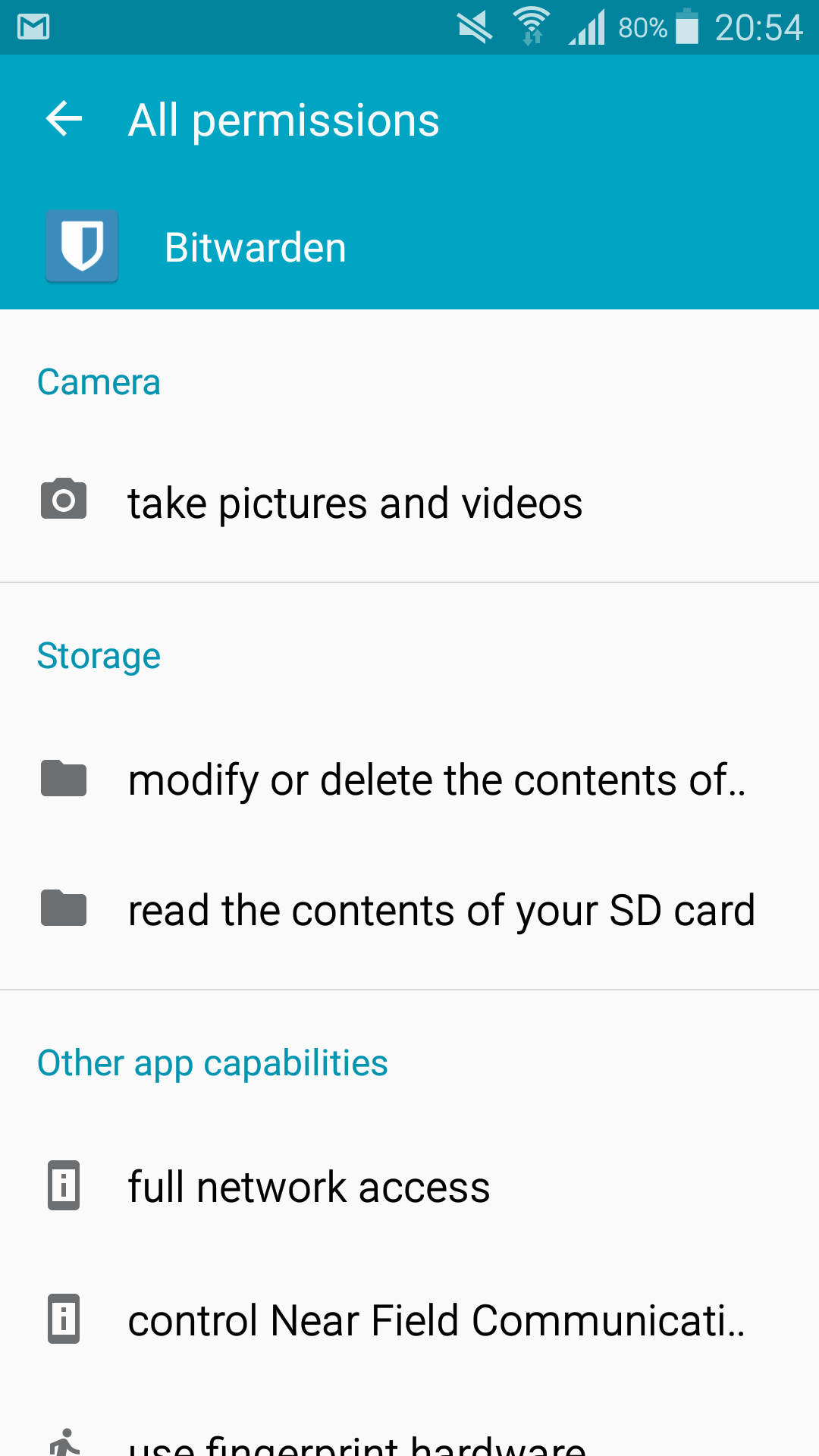
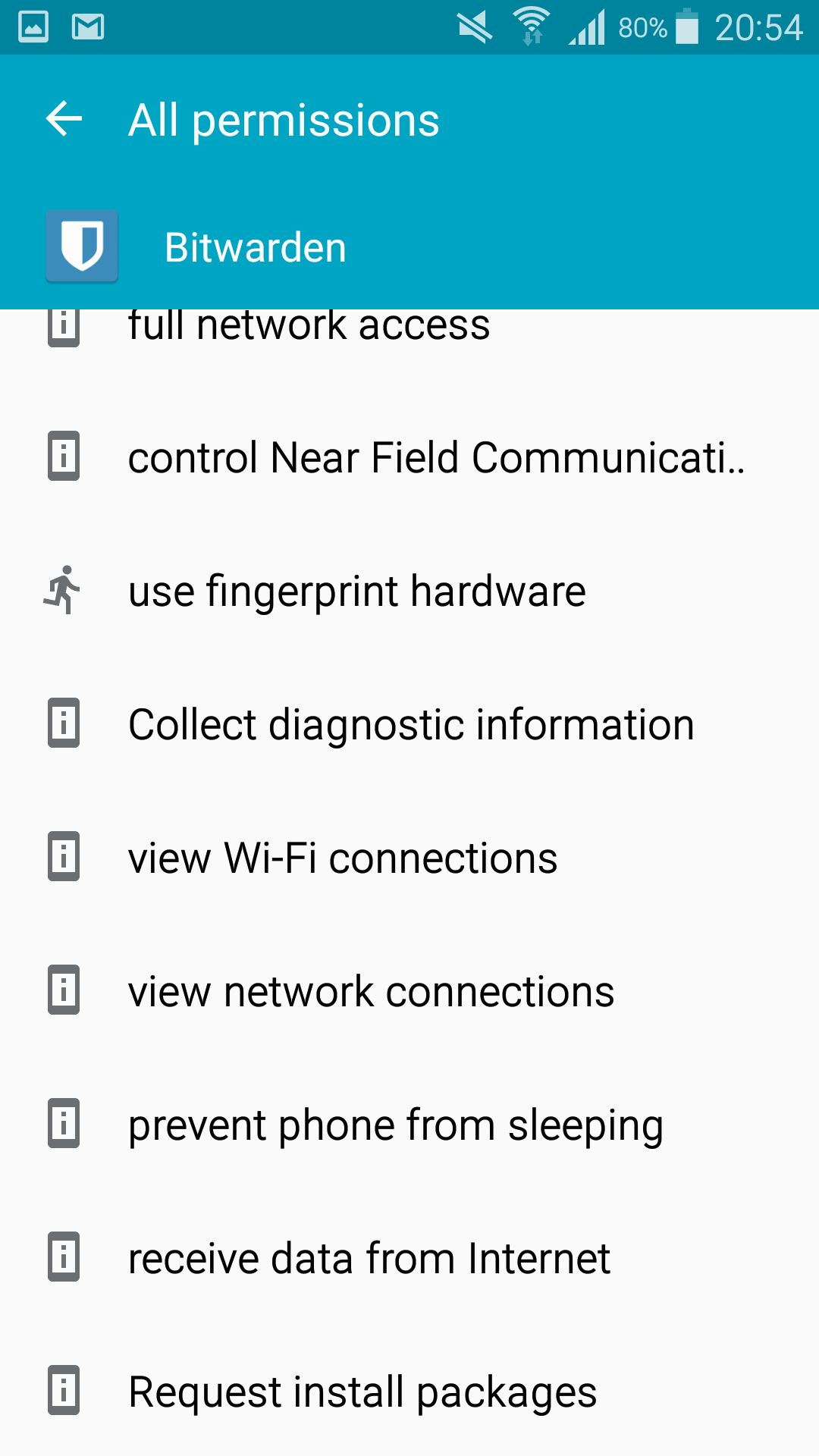
Yes. I took a screenshot of all the permissions.
@kspearrin commented on GitHub (Jun 29, 2018):
Can you try this? Open a notes app or something where you can see what you are typing. Type your master password there so you can see that it is exactly correct. Then copy and paste it into Bitwarden login form rather than typing it. Does that change anything?
@JoaoMXN commented on GitHub (Jun 29, 2018):
It didn't work, unfortunately. I also changed my DNS and nothing. Funny that the first day when I downloaded the app it worked normally and today it doesn't want to log in anymore.
@kspearrin commented on GitHub (Jun 29, 2018):
Unfortunately I don't have any other ideas at this time. Please let me know if you figure anything out.
@kspearrin commented on GitHub (Jun 29, 2018):
Also, is this on the regular Bitwarden cloud servers or are you using your own server?
@JoaoMXN commented on GitHub (Jun 29, 2018):
It is on the regular Bitwarden servers. By the way, my phone is rooted, could that be it?
@kspearrin commented on GitHub (Jun 29, 2018):
It could be anything. Does logcat report any kind of errors when logging in?
@JoaoMXN commented on GitHub (Jun 29, 2018):
I don't know how to read it properly, but I don't see any errors.
bitwarden log.txt
@x11x commented on GitHub (Jul 20, 2018):
I am also having problems logging in on a rooted phone.
There is no delay, just a dialog "An error has occurred. Not connected to the internet." It appears instantly when I try to log in.
I have verified that I am connected to the internet, other apps have connectivity, tried all different connections, I'm sure its not a connectivity problem.
I am running Afwall+ (firewall), and I have checked that it is configured correctly for Bitwarden (allowed full access). I have also tried disabling Afwall+.
It is an unusual setup, Chinese firmware (ZUI, based on Android 7.0) and does not have Google Play services. However, most apps work. I realise this app uses Firebase, Google push messaging etc.
bitwarden-logcat.txt
I read #6 that it should still work without push messaging. I tried the Fdroid apk,.
My theory is that the connectivity check has some requirement (Google play services?) and is causing it to fail even though there is connectivity. Is there any way to disable that connectivity check? It would be good if the connectivity check could be skipped if Google play services is not detected.
I have not had a chance to try building myself and probably will not for some time. My first thought was to try removing the check https://github.com/bitwarden/mobile/blob/master/src/App/Repositories/ApiRepository.cs#L26 but I am not familiar with the code at all so have no idea if this is the right track or not.
A bit of logcat is attached (
adb logcat | grep -i bitwarden), I can't see any exceptions in there. I can post another complete logcat if you need.@kspearrin commented on GitHub (Jul 20, 2018):
@x11x This is the library we use for connectivity testing on Android:
https://github.com/jamesmontemagno/ConnectivityPlugin/blob/master/src/Connectivity.Plugin.Android/ConnectivityImplementation.cs
We updated it recently and pushed it to the beta track on Google Play. Could you re-test it with these updates and see if the problem was fixed perhaps?
https://play.google.com/apps/testing/com.x8bit.bitwarden
Or download the raw APK here:
https://ci.appveyor.com/project/bitwarden/mobile/build/artifacts
@x11x commented on GitHub (Jul 20, 2018):
@kspearrin I tried with the updates and it works!
Thanks very much for your quick response, I'm impressed.
Really love this app and service, very happy with it.
That solves my issue but I think my issue was different to the OP.
Hoping the Fdroid release will work out soon and I can install from there, although I know they can make it difficult to get apps in that have nonfree components.
@kspearrin commented on GitHub (Jul 20, 2018):
@JoaoMXN Can you try latest beta please?
@JoaoMXN commented on GitHub (Jul 20, 2018):
@kspearrin Still has the problem. It doesn't show the error right away like with x11x, but stays at the login loading for several minutes before the server error.
@road42 commented on GitHub (Jul 22, 2018):
Same problem here. Also installed beta.
Self hosted server with LE certificate and nondefault port.
@kspearrin commented on GitHub (Jul 22, 2018):
@road42 Sounds like a separate issue. Your LE cert probably doesn't have a full trust chain, which is required on Android.
@andre1808 commented on GitHub (Jul 24, 2018):
Got the same problem as road42 too. Installed Bitwarden to my qnap NAS and created a LE cert using the QNAP ddns service. Also used a nondefault port.
It's working from everywhere except the android app. Also working from any android browser (tested Chrome and Firefox).
Also tried the beta app, still the same issue. However the "There is a problem connecting to the server" error message comes quite instantly.
@kspearrin commented on GitHub (Jul 24, 2018):
@andre1808 Sounds like a separate issue. Your LE cert probably doesn't have a full trust chain, which is required on Android. Check on https://www.digicert.com/help/
@road42 commented on GitHub (Jul 24, 2018):
@kspearrin
If I call my Bitwarden Local Site via Android Chrome everything is valid including the certificate. Chrome seems to bring its own CertificateChain.
I checked the Settings -> DeviceSecurity -> Certificates if anything sounds like "LE" and did not find anything.
Now I can successfully connect to my own bitwarden server.
@andre1808 commented on GitHub (Jul 24, 2018):
@road42
Christoph, you are the man!
Did the exact same thing as you did and now it's working just fine!
Honestly, I was fiddling around with this shit for like 10 hours (since yesterday) and now it's finally the way I was wishing it would be!
Thank you so much :)
An easier way to get around this (without importing the certificates) would be great though :D
@Joshndroid commented on GitHub (Jul 27, 2018):
@road42
Are you self hosting?
I see with your method that there is no private.key listed as you have just downloaded .pem files are you converting them to .crt to place in your bwdata for self hosting?
@andre1808 commented on GitHub (Jul 27, 2018):
@Joshndroid
You first have to create certificates (with lets encrypt) for your server. You need to integrate those to your bitwarden installation.
When you did that you can download the intermediate certificates from letsencrypt and import them on your mobile.
@Joshndroid commented on GitHub (Jul 27, 2018):
@andre1808
Im running local instance and not allowing outside access (use VPN for that) so I'm lead to nieve let's encrypt won't work in that fashion
@phantomjinx commented on GitHub (Jul 28, 2018):
Same problem as original bug report.
Created new account for my wife.
Installed bitwarden on the desktop and logs in fine.
Installed firefox extension on android and logs in fine.
Installed android app and fails to login, eventually timing out after a minute or so.
Specs
Conclusions:
@Celsiusss commented on GitHub (Aug 17, 2018):
Same issue for me, running non-rooted Android 8.0.
Tried the beta app, same thing.
EDIT: Found out that the app has troubles connecting over wifi, using cellular data fixed the problem. Same thing happens when logged in when doing any server requests.
@FoxBJK commented on GitHub (Aug 27, 2018):
I'm having this same issue, and it sounds like the core issue is that the certificate chain isn't available. My question - is there a way to add the chain.pem file from LE into NGINX's config, or do I need to create a new cert file with the cert and full chain together?
NVM, I'm a moron. I changed the certificate that NGINX is using from the "cert.pem" file to the "fullchain.pem" file and I was able to log in.
@phantomjinx commented on GitHub (Aug 29, 2018):
Just to clarify, the issue I am facing has nothing to do with a standalone/local installation of bitwarden. My devices are failing to connect to the main Bitwarden server (and failing).
@kspearrin commented on GitHub (Aug 29, 2018):
@phantomjinx Maybe you have internet permissions blocked for the app?
@phantomjinx commented on GitHub (Aug 29, 2018):
@kspearrin
No. See my comment above.
@FoxBJK commented on GitHub (Aug 29, 2018):
Just to rule this out, does your connection use any kind of proxy or network filtering that might interfere with certificate delivery? Is your Android device modified to not include the root CA and intermediate certs that Bitwarden uses? Android's really picky about certificates in general.
@phantomjinx commented on GitHub (Aug 29, 2018):
@FoxBJK
No proxy. Straight to home network router and on to internet. If anyone could let me know the ports that Bitwarden talks to I could log the packets coming in and out of the router. At least then I can confirm connectivity. My LG6 phone has no issues connecting (instantaneous). Yet still the case that my wife's tablet, phone and my own tablet (LineageOS 14.1 / Android 7.1.2) all fail to connect.
@FoxBJK commented on GitHub (Aug 29, 2018):
I only needed to open up the standard HTTPS port (443) for my self-hosted instance, so I'd assume all communication is done through there.
@phantomjinx commented on GitHub (Aug 30, 2018):
Good news!
Yesterday Bitwarden app just wouldn't connect. Today, I have borh my tablet and the wifs's phone up n running. Made no changes to either in last 24 hours so presumably something has been fixed on the server? Anyway, thanks!
@kspearrin commented on GitHub (Aug 30, 2018):
@phantomjinx No changes were made recently.
@phantomjinx commented on GitHub (Aug 30, 2018):
@kspearrin
Well that's juat plain weird. I made my original comment on the 28th July. Intermittently, I have tried logging in ever since both on my tablet and my wifes phone. Both failed as I have reported. Yet this evening both connect without a hitch. Clearly something has changed.
@kspearrin commented on GitHub (Aug 30, 2018):
Who knows. We haven't made any server changes since last week.
@JoaoMXN commented on GitHub (Aug 30, 2018):
Still the same problem here. Timeout error at login.
@phantomjinx commented on GitHub (Aug 30, 2018):
@JoaoMXN
What version are you running. Only possibility I can think of is BW app upgraded to 1.18.1 yesterday and I have rebooted.
@JoaoMXN commented on GitHub (Aug 30, 2018):
@phantomjinx I downloaded the latest one from google play. I already give up trying a solution, just waiting some patch to solve it. Impossible to be a device issue since ALL apps work normally and the Bitwarden site in the browser works as well. It's 100% a Bitwarden server issue with the app.
@FoxBJK commented on GitHub (Sep 28, 2018):
Not sure this will help anybody, but this issue popped up for me again and I had to ensure a couple of things before it went away:
Running Android 9.0 on an Pixel 2
@andre1808 commented on GitHub (Oct 19, 2018):
I have no idea why, but it stopped working again :(
Even adding the certificates manually to Android doesn't resolve the issue for me any longer.
Any idea how I can sort this?
@andre1808 commented on GitHub (Oct 25, 2018):
Hi.
Can you maybe help me please?
Because my QNAP is stressing me out since I've updated to QTS4.3.5 I was fiddling with my DNS and stuff and for some reason also renewed my SSL certificate. I've got my bitwarden back running, but I still can't use the Android app to connect to the server.
When creating the certficate from the QTS admin panel I was able to extract the following files:
cert
chain
combine
csr
intermediate.pem
key
local_post_content
Since you were mentioning a ssl chain issue, can you help me in resolving this using above files?
Thanks
André
@andre1808 commented on GitHub (Nov 5, 2018):
I finally got it working... (also without adding any certs to Android)
In the config.yml I've removed the CA certificate since it's optional anyway.
I've figuired out that from all files above (cert; chain; combine; csr; intermediate.pem; key; local_post_content) the
cert = server certificate
chain = ca certificate
key = private.key
I've combined them: cat cert chain >> certificate.crt
copy certificate.crt + private.key into bwdata/ssl/domain/
./bitwarden.sh rebuild
./bitwarden.sh start
Done. Android App working, ssl check (https://www.digicert.com/help/) is completely green, browser is working - everything is working like charm - at least at the moment :D
@JoaoMXN commented on GitHub (Jan 9, 2019):
Update of my problem: After changing the router, apparently my problem was solved. Without any relation to the problem, my provider changed my router after a speed upgrade and with the new router (Tp-Link Archer C5 V4) the problem doesn't happen anymore. Now the question is what the problem was with the other router since most of the apps and the browser worked normally.