mirror of
https://github.com/bitwarden/android.git
synced 2026-08-28 22:45:25 -05:00
Android: App keeps asking to enable accessibility service even though the service is already on #1256
Closed
opened 2025-11-26 22:43:01 -06:00 by GiteaMirror
·
12 comments
No Branch/Tag Specified
main
test/stale-issues-action
sdlc/sdk-update
PM-32154-update-registration-model
PM-41929/manage-devices-push-update-screen
PM-41295/identity-autofill-multiple-address
PM-41296/identity-autofill-vault-selection-type
PM-41297/identity-autofill-fill-assit
PM-41294/identity-autofill-multi-partition-pipeline
PM-41293/identity-autofill-fill-assist-field-mapping
PM-42388-decouple-cipher-flows
release/2026.8-rc61
llm/plan-implement-review-command
auth/pm-41503-and-pm-41533/registration-add-open-org-invite-support
cxf/editable-fields
release/2026.8-rc60
test-stack-2
test-stack-1
release/2026.7-rc59
worktree-QA-2177-blockeduri-testtag
release/2026.7-rc58
PM-37256/merge-fill-assist-with-traverse
update-billing-api
agalles/create-deploy-workflow-trigger
allow-user-certs
vvolkgang/fdroid-update
release/2026.6-rc57
agalles/create-github-workflow-trigger
release/2026.6-rc56
release/2026.5-rc55
release/2026.5-rc53
release/2026.5-rc54
PM-37255/consume-fill-assist-rules-data
PM-26896-autofill-fix
release/hotfix-v2026.4.1-bwpm
target-sdk-37
agalles/fdroid-only
BWA-99/show-next-totp
BWA-99/add-preview-next-totp-code-setting
sync-min-sdk
release/2026.4-rc51
related-origin-passkey-creation
release/2026.4-rc50
platform/android-breaking-change-detection
innovation-sprint-2026-send-folder
release/2026.3-rc49
PM-34193-vault-lockout
android-collections
QA-1523/sanity-test-saucelabs
release/2026.3-rc48
release/2026.2-rc47
pr-6572
release/2026.2-rc46
release/2026.1-rc45
PM-30644/added-logs-for-debug
PM-30644/quicktile-nav-not-showing-migration
minor-gradle-updates
release/2026.1-rc42
release/2026.1-rc44
release/2026.1-rc43
PM-28834/set-landscape-on-horizonos-devices
PM-28468/validate-and-navigate-to-vault-migration
PM-20026/force-ltr-passwords-and-codes
release/2025.12-rc41
cmcg/testCoverage
PM-29014/talkback-support-for-passwords
release/2025.12-rc40
BRE-1305/publish_test
accept-user-certs
autofill-permissions
release/2025.11-rc39
PM-22479/check-all-certificates-validate-asset-links
release/2025.10-rc38
agalles/android-latest
retro-agent
PM-27001/skip-account-selection-only-one-exists-cxp
release/2025.10-rc37
agalles/test-1118
release/2025.10-rc36
PM-20593-token-refresh
QA-1126b/adding-native-sanity-test
release/2025.9-rc35
pm-25933/sdk-update-password
release/2025.9-rc34
release/2025.8-rc33
agalles/20250821-release
debug-release-issues
pm-24249-allow-automated-prs-for-sdk-updates
release/2025.8-rc32
release/WORKFLOW-TEST-2025.8-rc28
agalles/20250807release
release/2025.07-rc25
release/hotfix-v2025.7.0-bwa
pm-23311/export-vault-policy-bypass
release/2025.07-rc24
authenticator-pm-sync-flags-issue
release/hotfix-v2025.6.0-bwpm
release/2025.06-rc21
agalles/automate-android-fastlane-patch
release/2025.05-rc20
release/2025.04-rc19
languages/basque
release/2025.03-rc19
update-readme
qrcode/feature
innovation/archive/pm-19153-archive-items
qrcode/2-ui-fields
qrcode/1-page
hold-on-biometric-prompt-alternative
release-notes-process
release/2025.02-rc16
bwa-monorepo
PM-8223/new-device-verification-ux-improvements
pm-18451/exempt-from-policies
test-bwa
release/2025.01-rc15
release/2025.01-rc14
release/2024.12-rc13
pm-16670/sync-leave-notice
821
PM-16695/backport-lean-more-new-device-verification
release/hotfix-v2024.11.7
release/2024.11-rc1
pm-11304/collection-add-item-button
PM-14241/disabling-logs-app-crash
poc/offline-editing
new-version-calc
pm-11649/expired-link-services
pm-6702/add-feature-flag
pm-6702/email-verification-feature
pm-9933/marketing-copy-update
pm-6702/registration-flows
update-templates
pm-6701/email-verification-selfhost-registration
v2026.8.0-bwpm
v2026.8.0-bwa
v2026.7.1-bwpm
v2026.7.1-bwa
v2026.7.0-bwpm
v2026.7.0-bwa
v2026.6.1-bwa
v2026.6.1-bwpm
v2026.6.0-bwpm
v2026.6.0-bwa
v2026.5.1-bwpm
v2026.5.1-bwa
v2026.5.0-bwpm
v2026.5.0-bwa
v2026.4.2-bwpm
v2026.4.1-bwa
v2026.4.1-bwpm
v2026.4.0-bwa
v2026.4.0-bwpm
v2026.3.1-bwa
v2026.3.1-bwpm
v2026.3.0-bwpm
v2026.3.0-bwa
v2026.2.1-bwpm
v2026.2.1-bwa
v2026.2.0-bwpm
v2026.2.0-bwa
v2026.1.1-bwa
v2026.1.1-bwpm
temp-test
v2026.1.0-bwpm
v2026.1.0-bwa
v2025.12.1-bwa
v2025.12.1-bwpm
v2025.12.0-bwa
v2025.12.0-bwpm
v2025.11.1-bwpm
v2025.11.1-bwa
v2025.11.0-bwpm
v2025.11.0-bwa
v2025.10.1-bwa
v2025.10.1-bwpm
v2025.10.0-bwa
v2025.10.0-bwpm
v2025.9.1-bwa
v2025.9.1-bwpm
v2025.9.0-bwa
v2025.9.0-bwpm
v2025.8.1-bwa
v2025.8.1-bwpm
v2025.8.0-bwa
v2025.8.0-bwpm
v2025.7.2-bwa
v2025.7.2-bwpm
v2025.7.1-bwa
v2025.7.1-bwpm
v2025.7.0-bwa
v2025.7.0-bwpm
v2025.6.1-bwpm
v2025.6.0-bwa
v2025.6.0-bwpm
v2025.1.0-bwa
v2025.5.0-bwa
v2025.5.0-bwpm
v2025.5.999
2025.4.0
v2025.4.0
untagged-4731eaadac73f3dfbbb8
v2025.3.0
v2025.2.0
untagged-815a165c5d70ffe75bc7
v2025.1.2
v2025.1.1
v2025.1.0
v2024.12.0
untagged-5a76b6392a4c8998c63a
v2024.11.7
v2024.11.6
v2024.11.5
v2024.11.4
v2024.11.3
v2024.11.2
v2024.11.1
v2024.11.0
v2024.10.2
v2024.10.1
v2024.10.0
v2024.9.0
v2024.8.1
v2024.8.0
v2024.7.3
v2024.7.2
v2024.7.1
v2024.7.0
v2024.6.1
v2024.6.0
v2024.5.1
v2024.4.1
v2024.4.2
v2024.4.0
v2024.3.3
v2024.3.1
v2024.3.0
v2024.2.1
v2024.2.0
v2024.1.1
v2024.1.0
v2023.12.0
v2023.10.0
v2023.9.2
maui-single-project-android
v2023.9.1
v2023.9.0
v2023.8.0
v2023.7.0
v2023.5.0
v2023.4.0
v2023.3.2
v2023.3.1
v2023.3.0
v2023.2.0
v2023.1.0
v2022.11.0
v2022.10.0
v2022.9.1
v2022.9.0
v2022.8.0
v2022.6.2
v2022.6.1
v2022.6.0
v2022.05.0
v2.18.0
v2.17.0
v2.16.4
v2.16.3
v2.16.2
v2.16.1
v2.15.0
v2.14.2
v2.14.1
v2.14.0
v2.13.0
v2.12.0
v2.11.3
v2.11.2
v2.11.1
v2.11.0
v2.10.0
v2.9.1
v2.9.0
v2.8.2
v2.8.1
v2.8.0
v2.7.2
v2.7.0
v2.6.1
v2.6.0
v2.5.6
v.2.5.5
v2.5.5
v2.5.4
v2.5.3
v2.5.2
v2.5.1
v2.5.0
v2.4.3
v2.4.2
v2.4.1
v2.4.0
v2.3.1
v2.3.0
v2.2.8
v2.2.7
v2.2.6
v2.2.2
v2.2.1
v2.2.0
v2.1.2
v2.1.0
v2.0.6
v2.0.5
v2.0.4
v2.0.3
v2.0.2
v2.0.1
v2.0.0
v1.22.1
v1.22.0
v1.21.0
v1.20.0
v1.19.0
v1.18.1
v1.18.0
v1.17.0
v1.16.0
v1.15.2
v1.15.1
v1.15.0
v1.14.4
v1.14.1
v1.14.0
v1.13.0
v1.12.2
v1.12.1
v1.12.0
v1.11.1
v1.11.0
v1.10.0
v1.9.0
v1.8.1
v1.8.0
v1.7.0
v1.6.5
v1.6.1
v1.6.0
v1.5.1
v1.5.0
v1.4.4
v1.4.3
v1.4.0
v1.3.0
v1.2.1
v1.2.0
v1.1.0
v1.0.0
v0.0.6
v0.0.5
v0.0.4
v0.0.3
v0.0.2
v0.0.1
No labels
Milestone
No items
No Milestone
Projects
Clear projects
No projects

No Assignees

Notifications
Due Date
No due date set.
Dependencies
No dependencies set.
Reference: github-starred/android#1256
Reference in New Issue
Block a user
Blocking a user prevents them from interacting with repositories, such as opening or commenting on pull requests or issues. Learn more about blocking a user.
Originally created by @ziffusion on GitHub (Mar 28, 2021).
Describe the Bug
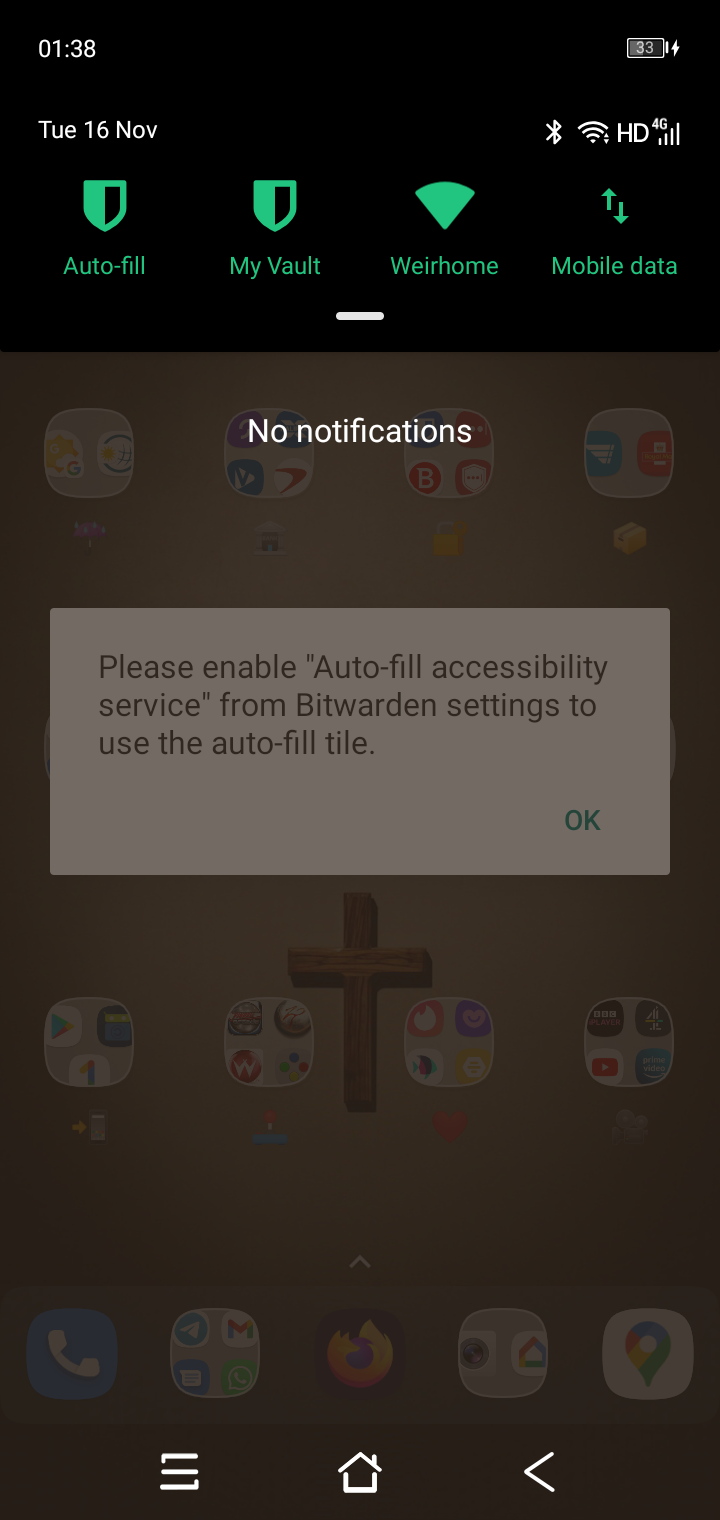
When trying to use autofill from the Bitwarden tile in the Android Quick Settings menu, the application keeps asking to enable accessibility service even though the service is already on.
Steps To Reproduce
Expected Result
Actual Result
Screenshots or Videos
Environment
Additional Context
@HulkSmashBurgers commented on GitHub (Apr 9, 2021):
Moto G Power (2020). Android 10.
Same problem here. Bitwarden setting 'Use Accessibility' stays disabled even though it's enabled in OS settings.
@Greenderella commented on GitHub (Apr 30, 2021):
Hi @ziffusion,
If you keep experiencing the Auto-fill Accessibility Service becoming disabled, check these settings in this order.
The service can also halt if you "Force stop" the Bitwarden app. Here is an interesting site regarding devices and their battery optimization default configurations: https://dontkillmyapp.com/
@aliekiddo commented on GitHub (May 28, 2021):
@Greenderella I also have this problem, battery optimisation is off for Bitwarden.
The 'Use Accessibility' toggle in the app will not turn on despite turning the accessibility settings off and on again in Android settings.
@rsngfrce commented on GitHub (Jul 12, 2021):
I have experienced this issue as well, but I have also experienced for apps other than Bitwarden, so I don't believe it is a Bitwarden specific issue.
(Samsung Galaxy S10e, Android 11. I believe I have battery optimization under control, but believe I have apps getting killed due to memory issues since upgrading to Android 11)
@indrastorms commented on GitHub (Aug 5, 2021):
Same issue, battery optimization is already disabled.
device- Poco M2
android version - 10
miui 12.0.4
edit: surprisingly After forced stop and clearing cache it's turned on.
@mod-john commented on GitHub (Aug 17, 2021):
All Battery Saving and Battery Optimisation is turned off for Bitwarden and accessibility is turn on but same issue. The switch won't go to enabled and the auto fill title claims it's not enabled.
Phone is a Blackview BV5900 running Android 9
@anuraag488 commented on GitHub (Sep 3, 2021):
On miui 12.0 enabling autostart solved issue for me.
@mod-john commented on GitHub (Sep 6, 2021):
How do you do this?
@anuraag488 commented on GitHub (Sep 6, 2021):
@sso-bitwarden commented on GitHub (Sep 10, 2021):
+1
Samsung A32 5G, Android 11.
@mod-john commented on GitHub (Nov 16, 2021):
This is still an issue for me.
@kniahlz commented on GitHub (Oct 21, 2022):
I had this happen to me on Android 13 (pixel 7) after migrating from the pixel 6. The only way to fix it was to uninstall/reinstall bitwarden. Now it is working. My guess is that something doesn't transfer over correctly 🤷♂️