mirror of
https://github.com/actualbudget/actual.git
synced 2026-07-15 22:54:03 -05:00
[GH-ISSUE #245] [Bug]: Changing account name does not work in 'Accounts' overview. #7072

No Assignees

Notifications
Due Date
No due date set.
Dependencies
No dependencies set.
Reference: github-starred/actual#7072
Reference in New Issue
Block a user
Delete Branch "%!s()"
Deleting a branch is permanent. Although the deleted branch may continue to exist for a short time before it actually gets removed, it CANNOT be undone in most cases. Continue?
Originally created by @Flightkick on GitHub (Sep 6, 2022).
Original GitHub issue: https://github.com/actualbudget/actual/issues/245
Verified issue does not already exist?
I have searched and found no existing issue
What happened?
In the overview where all accounts are listed, I was not able to change the name of the account.
Steps to reproduce:
/accountsEnterAs a workaround, I was able to change the account name by going to the specific account view
/account/<uuid>and clicking the account name header.Using Docker
jlongster/actual-server:1.0.3-alpinelinux/amd64What error did you receive?
No error messages were shown
The value does not get committed, no sync request is made.
The field in the user interface silently resets to its previous value.
Where are you hosting Actual?
Docker
What browsers are you seeing the problem on?
Firefox, Chrome
Operating System
Windows 10
@TomAFrench commented on GitHub (Sep 6, 2022):
Could you provide some screenshots to show where you're clicking on step 2?
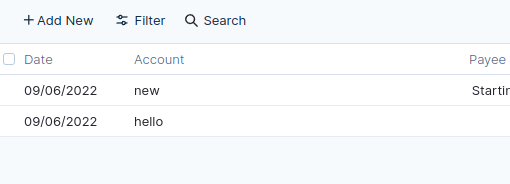
I can't see anything similar except this field in the transaction table. This is for attaching the transaction to a different account rather than renaming an account however.
@Flightkick commented on GitHub (Sep 6, 2022):
Ah I see, you're right. I misunderstood what that field was for.
Now that I don't start typing immediately I see the 'For budget' label as well.