[GH-ISSUE #19] Import does not work when semicolon is used as delimiter in .csv file #7005

Closed
opened 2026-04-10 16:41:04 -05:00 by GiteaMirror · 6 comments
Owner

Originally created by @juriroemer on GitHub (Apr 30, 2022).
Original GitHub issue: https://github.com/actualbudget/actual/issues/19

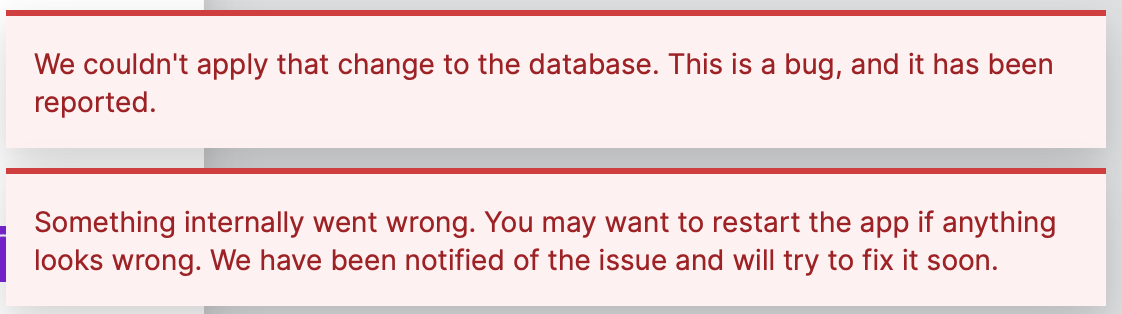
I get the following error when i try to import a .csv that uses semicolons as a delimiter:

image

Replacing the semicolons with commas fixes it. But at the same time the Import transactions (CSV) dialog (which I only get to after replacing semicolons with commas) gives me the option to use semicolons as delimiter:

Bildschirmfoto 2022-04-30 um 13 50 22

Originally created by @juriroemer on GitHub (Apr 30, 2022). Original GitHub issue: https://github.com/actualbudget/actual/issues/19 I get the following error when i try to import a .csv that uses semicolons as a delimiter: ![image](https://user-images.githubusercontent.com/31971585/166104229-e6179bf3-edba-4b14-940d-306ca843a308.png) Replacing the semicolons with commas fixes it. But at the same time the `Import transactions (CSV)` dialog (which I only get to after replacing semicolons with commas) gives me the option to use semicolons as delimiter: ![Bildschirmfoto 2022-04-30 um 13 50 22](https://user-images.githubusercontent.com/31971585/166104535-b8542722-67b0-4c4c-974c-9ff0a2feb21a.png)
GiteaMirror added the bugimporters labels 2026-04-10 16:41:04 -05:00
Author
Owner

@johan-lejdung commented on GitHub (May 1, 2022):

I had the same issue, I think it has to do with certain characters. Weirdly it passes if I open and save it again from Numbers even with semicolon

<!-- gh-comment-id:1114296841 --> @johan-lejdung commented on GitHub (May 1, 2022): I had the same issue, I think it has to do with certain characters. Weirdly it passes if I open and save it again from Numbers even with semicolon
Author
Owner

@DesignsWithDavid commented on GitHub (May 3, 2022):

As a temporary work-around, open a text editor and do a "find-all and replace" to make it comma delimited

<!-- gh-comment-id:1116132476 --> @DesignsWithDavid commented on GitHub (May 3, 2022): As a temporary work-around, open a text editor and do a "find-all and replace" to make it comma delimited
Author
Owner

@arhu32 commented on GitHub (May 6, 2022):

This seems to happen with CSV files that contain semicolon delimiters and strings that are wrapped with double quotation marks. When trying to import such files for the first time to an account, the error pops up.

As a temporary work-around, open a text editor and do a "find-all and replace" to make it comma delimited

A more permanent work-around:

  1. remove all quote characters in the CSV file (search and replace-all)
  2. on the import window in Actual set everything to your liking, including a semicolon as delimiter
  3. import

These settings persist, so from then on you can import without having to edit the import settings or the file again.

<!-- gh-comment-id:1119400310 --> @arhu32 commented on GitHub (May 6, 2022): This seems to happen with CSV files that contain semicolon delimiters and strings that are wrapped with double quotation marks. When trying to import such files for the first time to an account, the error pops up. > As a temporary work-around, open a text editor and do a "find-all and replace" to make it comma delimited A more permanent work-around: 1. remove all quote characters in the CSV file (search and replace-all) 2. on the import window in Actual set everything to your liking, including a semicolon as delimiter 3. import These settings persist, so from then on you can import without having to edit the import settings or the file again.
Author
Owner

@MatissJanis commented on GitHub (Jan 25, 2023):

👋 Are you still able to reproduce the issue on the latest version (demo app)? For me this seems to have been fixed.

If you're still able to reproduce - would you mind attaching an example CSV file that breaks?

<!-- gh-comment-id:1404191573 --> @MatissJanis commented on GitHub (Jan 25, 2023): 👋 Are you still able to reproduce the issue on the latest version ([demo app](https://actualbudget.netlify.app/))? For me this seems to have been fixed. If you're still able to reproduce - would you mind attaching an example CSV file that breaks?
Author
Owner

@johan-lejdung commented on GitHub (Mar 10, 2023):

Still getting an error on my end using Safari at least. But it works when I reduce the number of rows, this is probably just the bug I experienced before on Safari where the frontend isn't able to handle rows because of some poorly written code that overloads the browser cache reported here https://github.com/actualbudget/actual/issues/21
Screenshot 2023-03-10 at 10 39 52

Here is a sample CSV that causes the error
error-actual-budget-file.csv

<!-- gh-comment-id:1463537106 --> @johan-lejdung commented on GitHub (Mar 10, 2023): Still getting an error on my end using Safari at least. But it works when I reduce the number of rows, this is probably just the bug I experienced before on Safari where the frontend isn't able to handle rows because of some poorly written code that overloads the browser cache reported here https://github.com/actualbudget/actual/issues/21 <img width="561" alt="Screenshot 2023-03-10 at 10 39 52" src="https://user-images.githubusercontent.com/9266884/224280946-1a97dcb0-f55b-4720-aef3-9db26873c791.png"> Here is a sample CSV that causes the error [error-actual-budget-file.csv](https://github.com/actualbudget/actual/files/10940664/error-actual-budget-file.csv)
Author
Owner

@j-f1 commented on GitHub (Mar 10, 2023):

Thanks for the info! I think that issue will be fixed with the new version, but this issue should be fixed by https://github.com/actualbudget/actual/pull/738.

<!-- gh-comment-id:1463750224 --> @j-f1 commented on GitHub (Mar 10, 2023): Thanks for the info! I think that issue will be fixed with the new version, but this issue should be fixed by https://github.com/actualbudget/actual/pull/738.
Sign in to join this conversation.
1 Participants
Notifications
Due Date
No due date set.
Dependencies

No dependencies set.

Reference: github-starred/actual#7005