[Feature] Add colors to budget values #1168

Closed
opened 2026-02-28 19:34:32 -06:00 by GiteaMirror · 3 comments
Owner

Originally created by @Thiago-Morais on GitHub (Jun 24, 2024).

Verified feature request does not already exist?

  • I have searched and found no existing issue

💻

  • Would you like to implement this feature?

Pitch: what problem are you trying to solve?

Currently, in the budget tab, if the balance is less than zero it turns red
image

Negative balance values are red. Positive values are white. Zero is gray.

This is good as it makes it easy to see, at a glance, where we are overspending.

However, every other non-zero amount has the same color.
image

Same color shared between positive Balance value, Spent non-zero values, and Budgeted non-zero value.

Also, the group's title doesn't change colors even on Balance

This makes it harder to quickly gather information at a glance when you have many categories going all over the place.

Describe your ideal solution to this problem

My solution would be to:

First, apply the same color change to the Budgeted and Spent columns as well as the Group's title.

Second, Use different colors for Positive values.

The Goal Indicator part of the Budget Goal Templates is a great example of color usage.
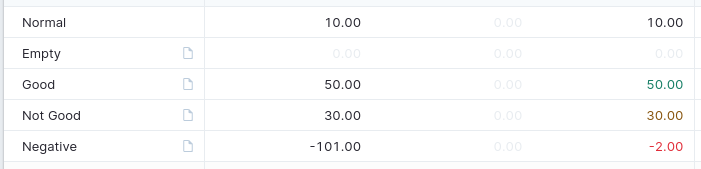
Green for "goal met", yellow for "goal not met", and red for "negative balance".

Teaching and learning

An addition in the documentation with a legend for each color

Originally created by @Thiago-Morais on GitHub (Jun 24, 2024). ### Verified feature request does not already exist? - [X] I have searched and found no existing issue ### 💻 - [ ] Would you like to implement this feature? ### Pitch: what problem are you trying to solve? Currently, in the budget tab, if the balance is less than zero it turns _red_ ![image](https://github.com/actualbudget/actual/assets/21369746/53bbf662-b758-4f88-9f16-5382c9915358) > _Negative balance values are red. Positive values are white. Zero is gray._ This is good as it makes it easy to see, at a glance, where we are overspending. However, every other non-zero amount has the same color. ![image](https://github.com/actualbudget/actual/assets/21369746/3a87018a-1119-466e-a513-330328ec0499) > _Same color shared between positive `Balance` value, `Spent` non-zero values, and `Budgeted` non-zero value._ Also, the group's title doesn't change colors even on Balance This makes it harder to quickly gather information at a glance when you have many categories going all over the place. ### Describe your ideal solution to this problem My solution would be to: First, apply the same color change to the `Budgeted` and `Spent` columns as well as the Group's title. Second, Use different colors for Positive values. [The Goal Indicator part of the Budget Goal Templates](https://actualbudget.org/docs/experimental/goal-templates#goal-indicators) is a great example of color usage. ![](https://actualbudget.org/assets/ideal-img/templates-colors.407fb4e.701.png) > _Green for "goal met", yellow for "goal not met", and red for "negative balance"._ ### Teaching and learning An addition in the documentation with a legend for each color
GiteaMirror added the needs votesfeature labels 2026-02-28 19:34:32 -06:00
Author
Owner

@github-actions[bot] commented on GitHub (Jun 24, 2024):

Thanks for sharing your idea!

This repository uses lodash style issue management for enhancements. That means enhancement issues are automatically closed. This doesn’t mean we don’t accept feature requests, though! We will consider implementing ones that receive many upvotes, and we welcome contributions for any feature requests marked as needing votes (just post a comment first so we can help you make a successful contribution).

The enhancement backlog can be found here: https://github.com/actualbudget/actual/issues?q=label%3A%22needs+votes%22+sort%3Areactions-%2B1-desc+

Don’t forget to upvote the top comment with 👍!

@github-actions[bot] commented on GitHub (Jun 24, 2024): :sparkles: Thanks for sharing your idea! :sparkles: This repository uses lodash style issue management for enhancements. That means enhancement issues are automatically closed. This doesn’t mean we don’t accept feature requests, though! We will consider implementing ones that receive many upvotes, and we welcome contributions for any feature requests marked as needing votes (just post a comment first so we can help you make a successful contribution). The enhancement backlog can be found here: https://github.com/actualbudget/actual/issues?q=label%3A%22needs+votes%22+sort%3Areactions-%2B1-desc+ Don’t forget to upvote the top comment with 👍! <!-- feature-auto-close-comment -->
Author
Owner

@edmonday commented on GitHub (Jul 13, 2024):

I would also find this helpful. Keen to help implement this.

@edmonday commented on GitHub (Jul 13, 2024): I would also find this helpful. Keen to help implement this.
Author
Owner

@edmonday commented on GitHub (Jul 13, 2024):

@Thiago-Morais you can check out my implementation here: https://github.com/actualbudget/actual/pull/3047

@edmonday commented on GitHub (Jul 13, 2024): @Thiago-Morais you can check out my implementation here: https://github.com/actualbudget/actual/pull/3047
Sign in to join this conversation.
1 Participants
Notifications
Due Date
No due date set.
Dependencies

No dependencies set.

Reference: github-starred/actual#1168